Input and Output in C: printf, scanf, fgets and Worked Examples
Learn how C moves text through standard streams, how format strings control conversion, and why checked line input is safer. The worked programs trace every input, return value and output.
KnowledgeGate Team
Exam prep & CS education
Updated 7 Aug 20266 min read
Format mismatches can make a compiling C program print wrong values, skip characters or leave a variable holding its old value. Text moves into and out of a C program through stdin and stdout, and printf, scanf, getchar, putchar and fgets each work on those streams differently. A wrong conversion or an unchecked return value still compiles cleanly, which is why these failures stay quiet until the output looks strange. See Coding & DSA Courses for Placements for the wider route.
1. Input and output in C: streams, headers and the data path
#include <stdio.h> declares these functions. Programs start with three redirectable streams: stdin, stdout and stderr.
Formatted I/O converts text and typed values: printf writes to stdout, scanf converts stdin text, getchar and putchar handle characters, and fgets reads bounded lines.
For example, int items = 3; printf("Items=%d\n", items); writes exactly Items=3, followed by a newline. Before using input, check the call and ensure its conversion, argument type and destination address agree.
2. printf in C: format specifiers, width and precision
This program prints three values and a literal percent sign:
#include <stdio.h>

int main(void) {
    int id = 27;
    double score = 86.375;
    char grade = 'A';

    printf("ID=%04d | Score=%6.2f | Grade=%c\n", id, score, grade);
    printf("Progress=%d%%\n", 75);
    return 0;
}
Exact output:
ID=0027 | Score= 86.38 | Grade=A
Progress=75%
%04d is width four with zero padding. %6.2f is width six with two decimals, so 86.375 rounds to 86.38 with one leading space. %c prints a character, %% prints %, and precision affects only display.
C value type |
|
|---|---|
|
|
|
|
|
|
|
|
|
|
character value |
|
null-terminated character array |
|
printf promotes float to double. With unsigned value = 42U; printf("%u %x %o\n", value, value, value);, the exact output is 42 2a 52. See Number Systems and Base Conversions: GATE Worked Examples for the bases. Floating Point Representation: Encode and Add in IEEE 754 explains the encoding most compilers use for double, which the C standard permits but does not require.
3. scanf in C: addresses, conversions and a fully worked record
scanf returns its completed-conversion count. Check it first:
#include <stdio.h>
int main(void) {
int roll;
double marks;
char section;
if (scanf("%d %lf %c", &roll, &marks, §ion) != 3) {
printf("Invalid input\n");
return 1;
}
printf("Roll=%d, Marks=%.2f, Section=%c\n", roll, marks, section);
return 0;
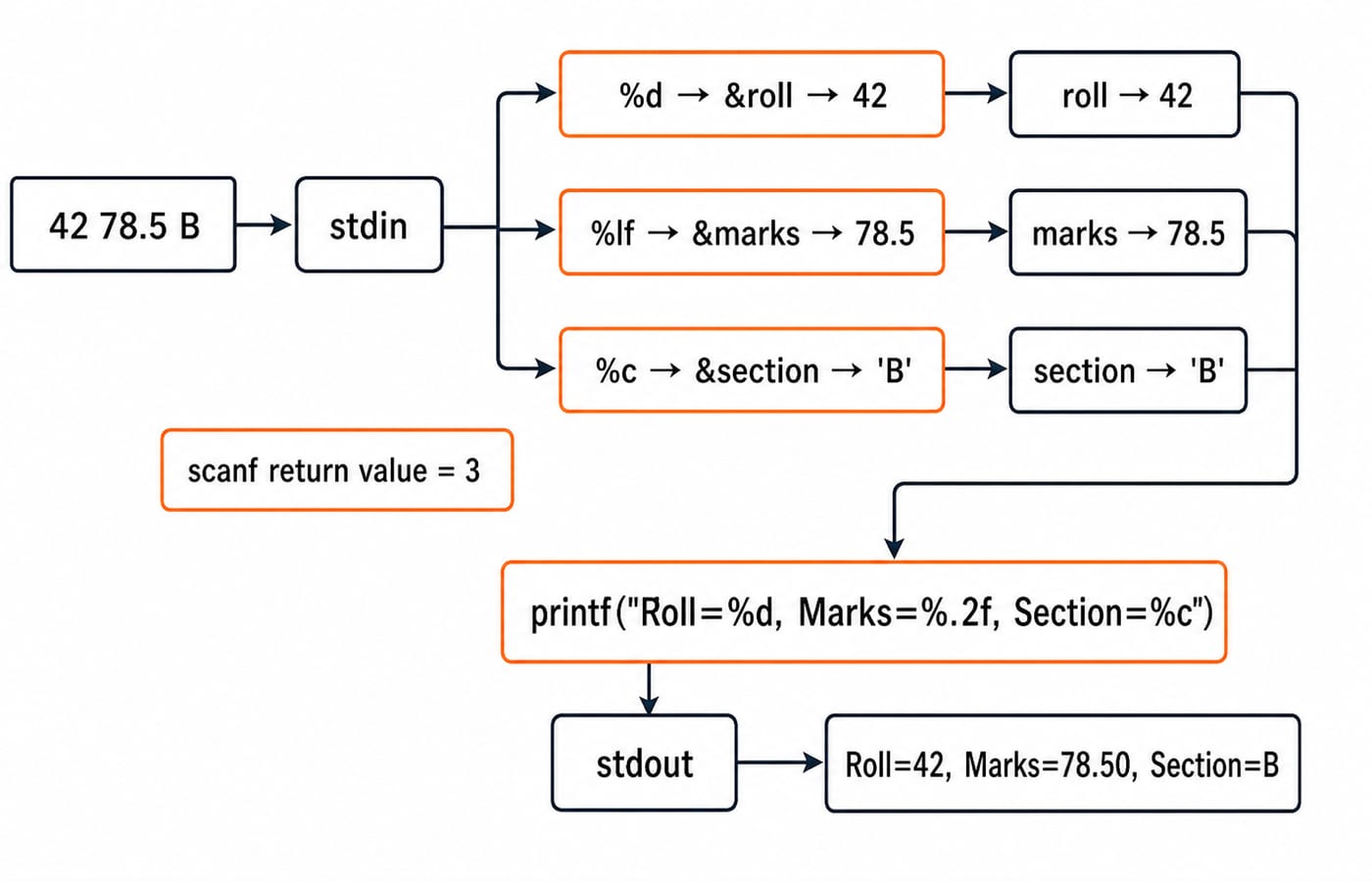
}Input 42 78.5 B maps %d to roll=42, %lf to marks=78.5, and %c to section=B; the space before %c in the format string is what skips the blank ahead of it. The return value is 3, so the program prints Roll=42, Marks=78.50, Section=B.
&roll, &marks and §ion identify destinations. Match int * with %d, unsigned int * with %u, float * with %f, double * with %lf, char * with %c, and writable arrays with bounded %s.
With 42 absent B, only the first conversion succeeds. scanf returns 1 and prints Invalid input without using unassigned marks or section.
4. Character input and output with getchar and putchar
This loop echoes a line and counts characters and lowercase vowels:
int ch;
int characters = 0;
int vowels = 0;

while ((ch = getchar()) != '\n' && ch != EOF) {
    putchar(ch);
    characters++;
    if (ch == 'a' || ch == 'e' || ch == 'i' ||
        ch == 'o' || ch == 'u') {
        vowels++;
    }
}

printf("\nCharacters=%d, Vowels=%d\n", characters, vowels);
For Gate C plus Enter, the six characters are G, a, t, e, a space and C; only lowercase a and e match. Output is the echoed Gate C, followed by Characters=6, Vowels=2.
ch must be int because getchar represents all unsigned character values plus EOF. The loop stops at newline or end of file. Add uppercase cases or safe normalisation to count uppercase vowels.
5. Safer line input with fgets, then parsing with sscanf
fgets reads spaces within bounds. Given char topic[40];, this stores at most sizeof topic - 1 characters plus the null terminator:
if (fgets(topic, sizeof topic, stdin) != NULL) {
    topic[strcspn(topic, "\n")] = '\0';
    printf("Topic=%s\n", topic);
}
Include <string.h> for strcspn. For C input output plus Enter, removing the stored newline produces Topic=C input output.
For structured input, capture then parse a line:
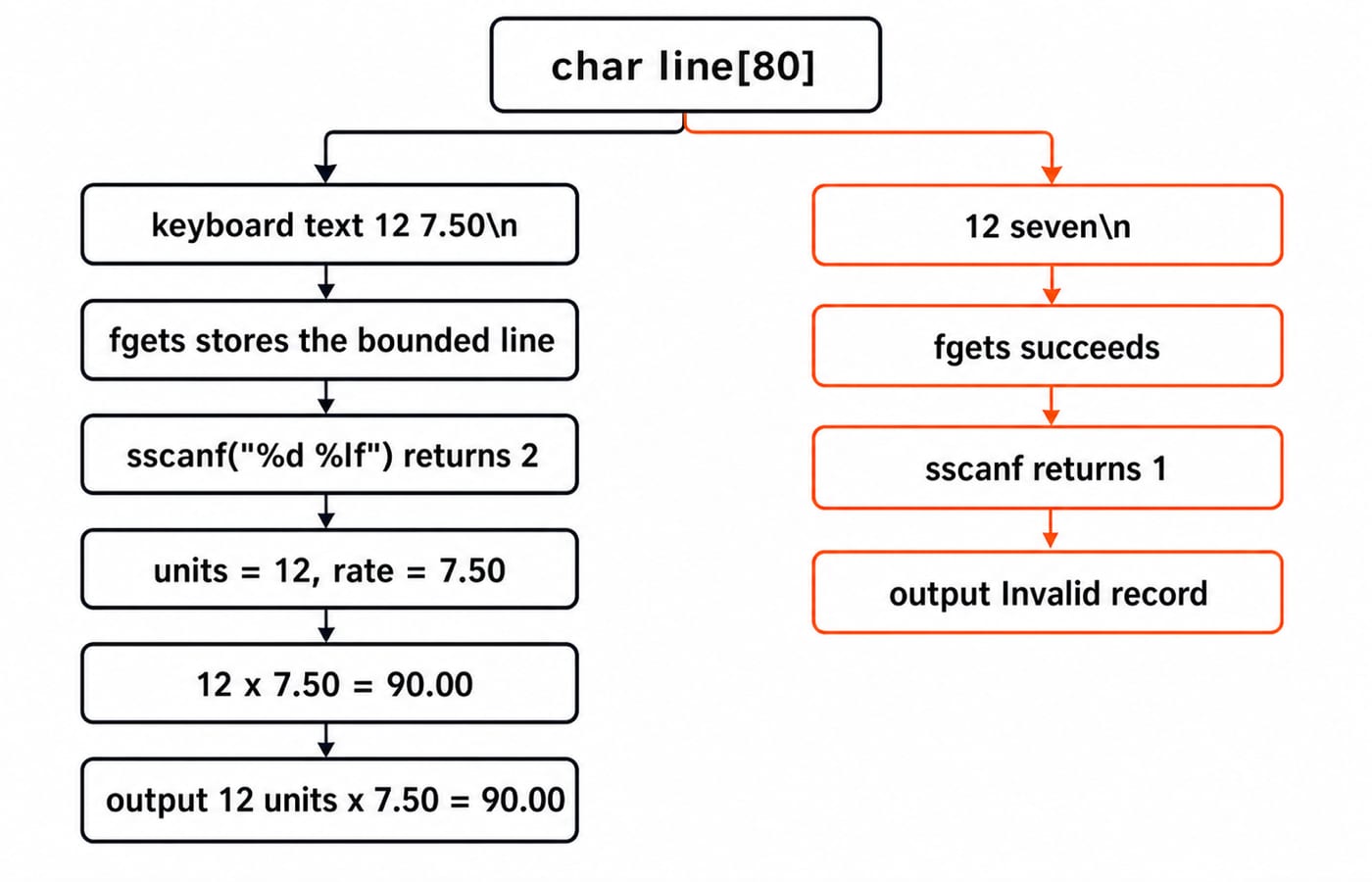
char line[80];
int units;
double rate;

if (fgets(line, sizeof line, stdin) != NULL &&
    sscanf(line, "%d %lf", &units, &rate) == 2) {
    printf("%d units x %.2f = %.2f\n", units, rate, units * rate);
} else {
    printf("Invalid record\n");
}
With 12 7.50, sscanf returns 2. The calculation is 12 * 7.50 = 90.00, so the output is 12 units x 7.50 = 90.00. With 12 seven, fgets succeeds but sscanf returns 1, printing Invalid record without multiplication. Separate capture and conversion. Avoid size-unaware gets and unbounded %s.
6. Mixing C input functions: whitespace, buffers and return values
If scanf("%d", &age) receives 19 plus Enter, it stores 19 but leaves the newline for fgets(name, sizeof name, stdin). That call returns 1, so a return check on it passes, and the fgets that follows reads only the leftover newline, leaving name empty.
For tokens, use checked scanf calls and " %c" only when skipping whitespace. For mixed input, use fgets, then parse. Drain through newline or EOF; one getchar() may leave text.
Most scanf conversions skip leading whitespace; %c, %[ and %n do not. Format whitespace consumes zero or more whitespace characters. For char city[8];, %7s reserves the null byte, but New Delhi stores only New. fflush(stdin) does not portably clear input.
7. Common C input/output mistakes and predict-the-result checks
Mistake | Consequence | Correction |
|---|---|---|
| Invalid destination address and undefined behaviour | Pass |
| Variadic type mismatch and undefined behaviour | Use |
| Variadic type mismatch and undefined behaviour | Use |
Unbounded | Input can overflow the array | Limit the width or use |
| It may consume the pending newline | Use |
Ignored input return value | Unassigned or stale data may be used | Test the completed conversion count |
| Unsafe input or non-portable behaviour | Use bounded |
Now predict four results:
printf("%d %.1f %c\n", 7, 2.5, 'K');prints7 2.5 K.Given input
15 4,scanf("%d %d", &a, &b)returns2. Thena + b = 19anda * b = 60.With
int n = 99;, inputabcmakesscanf("%d", &n)return0. No assignment occurs, sonremains99.unsigned value = 42U; printf("%x %o\n", value, value);prints2a 52.
Exam questions on this topic usually ask you to match a conversion to an argument type, predict an output line, trace a scanf call or repair unsafe input. KnowledgeGate's C Fundamentals question bank holds around 250 questions across C basics, so practice there reaches well past input and output.
8. Input and output in C: the short version and next step
Use this checklist:
Include
<stdio.h>.Match every conversion with the actual argument type.
Pass writable addresses to input functions.
Check how many conversions succeeded.
Choose token, character or line input deliberately.
Bound every string read.
For a transfer exercise, read 8 12.25 as one line, parse quantity and price, then print Quantity=8, Price=12.25, Total=98.00. Check it as 8 * 12.25 = 98.00. Invalid text must print Invalid record without using unassigned values.
Continue with C Language Course: Concepts, MCQs and Coding for practice on these calls. If your next step is files rather than the keyboard, File Handling in C: fopen Modes, fscanf vs fgets carries the same checks over to fopen, fscanf and fgets.
Keep learning
ctype.h Functions in C: Classify Characters and Convert Case Safely
Learn which character test to choose, trace a complete C classifier, and avoid signed-char and EOF mistakes. Worked examples separate classification from case conversion.
Updated 5 Oct 20266 min readC
Key Features of the C Programming Language: Code Examples
What do C's features actually do in a program? Follow an even-number sum and a pointer update, then test your understanding with small code changes.
Updated 30 Sep 20266 min readC
Preprocessor and Macros in C: Expansion Rules and Worked Examples
Learn what happens before C compilation, expand object-like and function-like macros by hand, and avoid precedence and repeated-evaluation bugs.
Updated 18 Sep 20266 min readC
Variables and Data Types in C: Declarations, Conversions and Runnable Examples
Learn how C types control stored values, expressions and I/O. Compile a complete marks program, trace its conversions and repair common type mistakes.
Updated 17 Sep 20266 min readC