File Handling in C: Modes, Streams, a Worked File-Position Trace and Exam Traps
Learn how C streams, fopen modes, EOF checks and file positions work, then follow a five-byte trace that makes common output questions predictable.
KnowledgeGate Team
Exam prep & CS education
Updated 24 Oct 20266 min read
A file trace becomes predictable when the mode, stream state, stored bytes, and file-position indicator are tracked separately. The runnable-program path lives in File Handling in C: fopen, Read, Write, Append and Seek with Runnable Examples. Exam tracing instead isolates mode effects, EOF state, and byte-by-byte position changes. Standard C library behaviour supplies the rules.
File handling in C begins with a stream and a lifecycle
A file stores persistent data outside the program. A C stream connects the program to that data. The FILE *fp handle from <stdio.h> represents the stream.
Follow one lifecycle: choose a mode, open, check, perform I/O while calls succeed, inspect results, then close once.
FILE *fp = fopen("marks.txt", "r");
if (fp == NULL) {
    /* handle open failure */
} else {
    /* read only while calls succeed */
    if (fclose(fp) == EOF) {
        /* handle close failure */
    }
}
If fopen returns NULL, no stream exists, so passing its pointer to I/O is invalid. Do not guess the cause without error information.
Keep stored bytes, mode permissions, and the file-position indicator separate. For surrounding foundations, use the Coding & DSA courses route.
fopen modes: read, write, append and update without guesswork
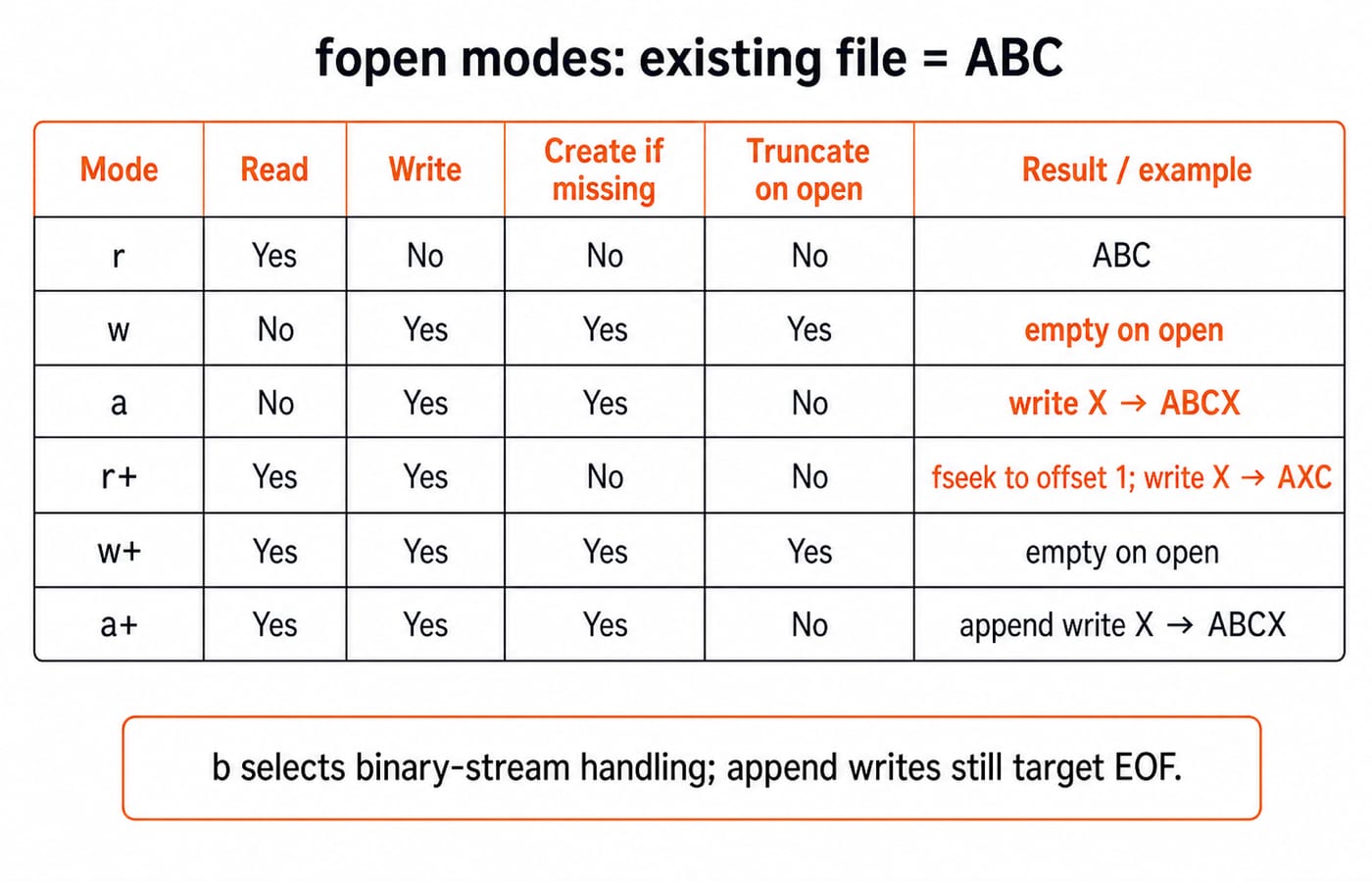
C defines six mode families. Add b for binary handling (rb, wb, rb+); it does not change the buffer's type.
Mode | File must exist? | Create if missing? | Truncate existing data? | Permitted operations | Where writes go |
|---|---|---|---|---|---|
| Yes | No | No | Read | Not permitted |
| No | Yes | Yes | Write | From the beginning |
| No | Yes | No | Write | End of file for every write |
| Yes | No | No | Read and write | Current position |
| No | Yes | Yes | Read and write | Current position |
| No | Yes | No | Read and write | End of file for every write |
For existing ABC, "w" empties the file on open, while "a" plus X produces ABCX. With a fresh ABC, "r+", a seek to offset 1, and X produce AXC. On an append stream, a seek never turns a write into an overwrite; it still goes to EOF.
On update streams, call fflush or a positioning function after output and before input. After input, position before output unless input reached EOF. Make transitions explicit with a flush after writes and fseek or rewind before the next phase. Never use fflush to discard input.
Choose the I/O function by record shape, not by habit
Choose by data shape:
fgetcandfputchandle characters or bytes.fgetsandfputshandle lines or strings.fprintfandfscanfhandle formatted text.freadandfwritehandle object blocks.
On success, fgets(line, sizeof line, fp) reads at most sizeof line - 1 characters and terminates the string. fread(buf, 1, 5, fp) returns the items read.
For Riya 42\nAman 37\n, fscanf(fp, "%15s %d", name, &score) reads tokens and skips whitespace; fgets retains a fitting newline. Width 15 suits char name[16] because \0 needs one element. Unbounded %s can overflow it.
Raw structure dumps are not portable by default. fwrite(&record, sizeof record, 1, fp) may include padding and machine-specific representations.
Worked example: write five bytes, seek, read and track every position
The trace begins after each open, seek, transfer, and close call returns success. fgetc results stay in int to distinguish bytes from EOF; the block buffer uses unsigned char.
unsigned char marks[5] = {12, 25, 38, 41, 54};
FILE *fp = fopen("marks.bin", "wb");
/* require fp != NULL and fwrite(...) == 5 */
fwrite(marks, 1, 5, fp);
fclose(fp);

fp = fopen("marks.bin", "rb");
fseek(fp, 2L, SEEK_SET);
int first = fgetc(fp);
long p1 = ftell(fp);

fseek(fp, -2L, SEEK_CUR);
long p2 = ftell(fp);
unsigned char pair[2];
size_t got = fread(pair, 1, 2, fp);
long p3 = ftell(fp);

fseek(fp, -1L, SEEK_END);
int last = fgetc(fp);
long p4 = ftell(fp);
fclose(fp);
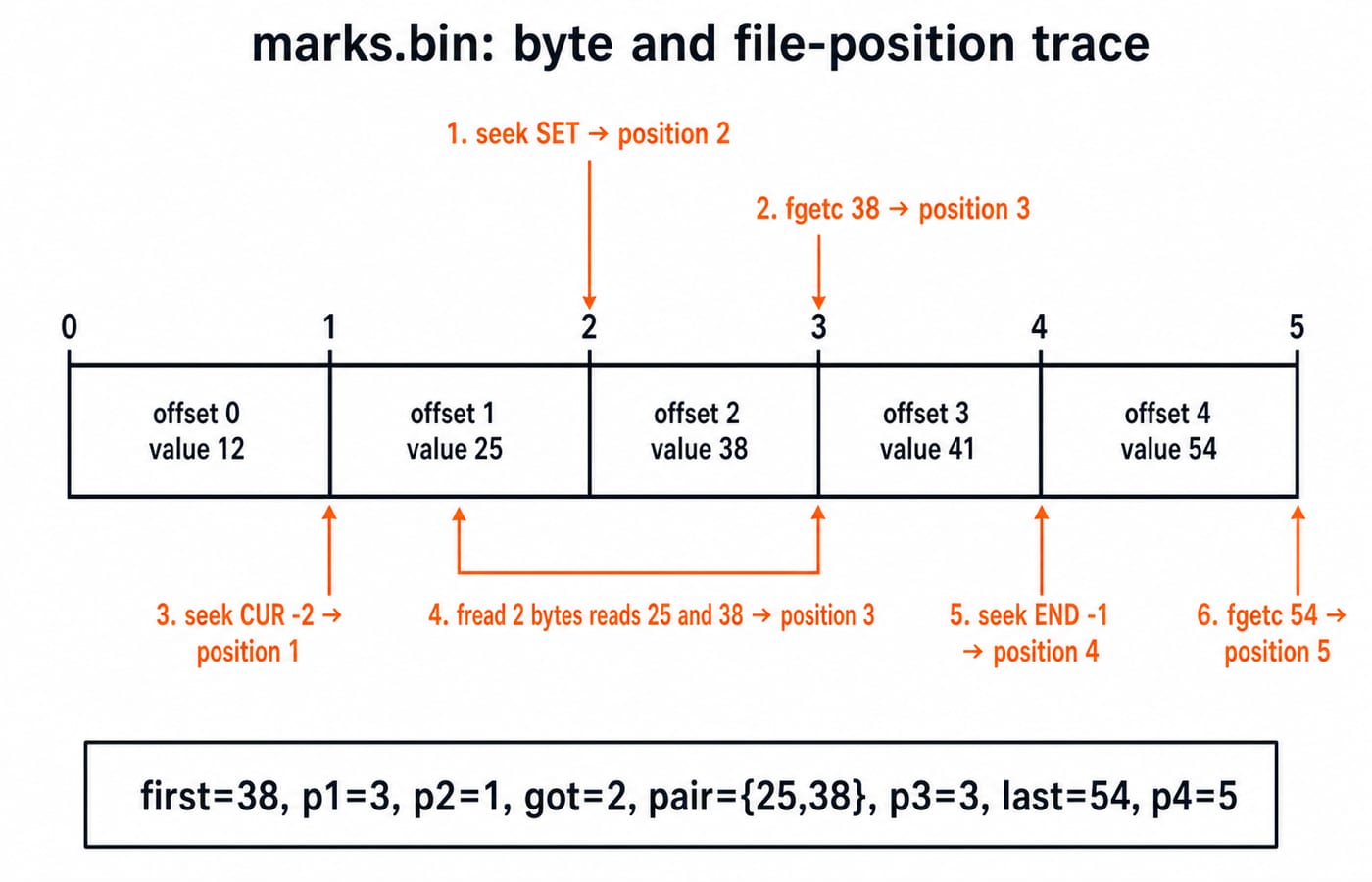
Writing creates bytes 12, 25, 38, 41, 54 at offsets 0 through 4. Reopening starts at 0. fseek(fp, 2L, SEEK_SET) selects offset 2; fgetc returns 38 and advances to 3, so p1 = 3.
Next, fseek(fp, -2L, SEEK_CUR) moves from 3 to 1, so p2 = 1. fread(pair, 1, 2, fp) returns got = 2, stores 25 and 38, and advances to 3, so p3 = 3.
Finally, fseek(fp, -1L, SEEK_END) selects offset 4 because EOF is boundary 5. fgetc returns 54 and advances to 5, so p4 = 5.
Result: first=38, p1=3, p2=1, got=2, pair={25,38}, p3=3, last=54, p4=5.
The position identifies where the next operation begins, not the byte most recently consumed.
EOF is a state learned after a read fails
The loop while (!feof(fp)) { ch = fgetc(fp); ... } is wrong because feof cannot predict failure. For CAT, reads return C, A, and T; the next returns EOF and sets the indicator. An unchecked result may reuse stale data.
Test the read itself:
while ((ch = fgetc(fp)) != EOF) { /* process ch */ }
while (fgets(line, sizeof line, fp) != NULL) { /* process line */ }
while ((got = fread(buf, 1, sizeof buf, fp)) > 0) { /* process got bytes */ }
Afterward, feof(fp) identifies normal EOF and ferror(fp) an I/O error. Process exactly got bytes, including a short final block. Store fgetc in int, which represents every unsigned char value plus EOF.
File-position tools: SEEK_SET, SEEK_CUR, SEEK_END, ftell and rewind
SEEK_SET measures from the beginning, SEEK_CUR from the current position, and SEEK_END from the end. Here, fseek(fp, 1, SEEK_SET) selects 1, from position 3 a -2 SEEK_CUR selects 1, and -1 SEEK_END selects 4. ftell reports the position; rewind returns to the beginning and clears the indicators.
The trace is exact because it uses one-byte objects in a binary stream. For a text stream, restore a position returned by ftell by passing it to fseek with SEEK_SET; arbitrary byte offsets need not map portably to visible characters.
Production code checks fseek for 0, ftell for -1L, transfer item counts, and fclose. Each operation should be checked, with failures handled as needed.
File-handling exam patterns and traps
Output questions usually combine mode effects, file-position arithmetic, EOF-state checks, and API return values. For wider C revision, use C Programming & Data Structures.
Open ABCDE with "r+". After fseek(fp, 2L, SEEK_SET); fputc('X', fp);, the file is ABXDE and the next position is 3. With fresh ABCDE in "a", the same actions produce ABCDEX because append writes at EOF.
Correct these traps directly:
A null
FILE *makes I/O invalid. Checkfopenfirst.werases content on open. Use a preserving mode when needed.aignores a seeked overwrite position. Use an update mode to overwrite.An unchecked short transfer loses data or processes stale bytes. Test the item count.
Comparing a stored
charwithEOFcan lose the sentinel. Storefgetcinint.An incorrect direction change on an update stream is undefined. Flush or reposition as required.
Unbounded
%scan overflow its destination. Leave width for\0.A stream is invalid after
fclose. Reuse it only after a successfulfopen.
File handling in C: the short version and next step
Keep four rules in your head:
The mode decides permission and whether old data survives the open.
Each successful read or write advances the position by the amount transferred.
Append writes go to EOF, even after a seek elsewhere.
EOF is discovered by a failed read, not predicted before one.
In the trace, 38 moves the position to 3, reading {25, 38} again moves it to 3, and 54 moves it to 5.
For structured concepts, MCQs, and coding practice, continue with the C Language course. If you are starting from scratch, the C Programming course is a free route through the basics.
Keep learning
C Operators and Expressions Explained: Precedence, Types and Worked Traces
Learn a repeatable way to parse and evaluate C expressions. Follow typed calculations, bitwise and short-circuit traces, and common exam traps.
Updated 22 Oct 20266 min readC Programming & Data Structures
Introduction to Flowcharts: Symbols, a Worked Example and Exam Traps
Learn how flowchart symbols express sequence, decisions and loops. Then trace a complete even-sum example, translate it into C and repair common logic defects.
Updated 18 Oct 20266 min readC Programming & Data Structures
Undefined Behavior in C: Common Causes, Examples, and Fixes
Learn to find the first undefined operation in common C programs, repair the missing invariant, and verify the corrected result with worked examples.
Updated 14 Oct 20266 min readC Programming & Data Structures
Structures in C: Syntax, Member Access and Worked Examples
Learn how C structures group related values, then trace object and pointer access through complete, implementation-safe examples.
Updated 10 Oct 20266 min readC Programming & Data Structures