

Common Editing (Ctrl+ Keys) MCQs: 12 Solved Questions with Explanations
Solve 12 Common Editing Ctrl key questions, then check each answer against a fresh explanation, a worked shortcut sequence and an application-context cue.
KnowledgeGate Team
Exam prep & CS education
Updated 13 Nov 20267 min read
Familiar keyboard shortcuts become easy marks only when you separate the action, application context and near-identical distractor. Ctrl+C, Ctrl+X and Ctrl+V are not interchangeable, while Ctrl+R or Ctrl+PageDown can change meaning with the application. Use Common Editing Ctrl Keys Explained for the full clipboard-history model and longer traces; use the 12 questions below to test selection, navigation, Word formatting, Excel selection and deletion. Questions 1, 5 and 6 return to the Common Editing (Ctrl+ Keys) PYQ Questions hub inside MP Co-operative Bank Exam Preparation; Questions 2-4 and 7-12 open their exact question pages.
1. Build a shortcut map before attempting the MCQs
Do not learn one flat list. Use three buckets. Selection and clipboard covers Ctrl+A, Ctrl+C, Ctrl+X and Ctrl+V. Navigation and deletion includes Ctrl+Left, Ctrl+PageDown, Delete and Backspace. Application-specific formatting includes Ctrl+R, Ctrl+=, Ctrl+[ and Ctrl+Shift+<.
Label the application and affected object before choosing. Then classify the requested change as selection, clipboard, movement, formatting or deletion. Ctrl+R means right alignment in Word but refresh in a browser, while Ctrl+Space selects the active column in Excel. For clipboard questions, copy preserves the source, cut removes it, paste inserts the clipboard item, undo reverses the last editable action, and redo reapplies it.
The MP Cooperative Bank 2026 Course places keyboard shortcuts inside its Computer Knowledge practice path.
2. Common editing MCQs 1-3: select, copy and cut
Question 1 (Accenture 2023)
Which key is used to select all the text in the document?
A. Ctrl + T
B. Ctrl + A
C. Ctrl + F
D. Ctrl + N
Answer: B. Ctrl + A.
A is the cue for “all.” In a document, Ctrl+A selects all current content for the next copy, cut or formatting command. Ctrl+F opens Find, while Ctrl+N creates a new document. The action for Ctrl+T varies by application.
Question 2 (Accenture 2023)
Ctrl + C is used to
A. Copy the selected text
B. Cut the selected text
C. Print the selected text
D. Paste the selected text
Answer: A. Copy the selected text.
Copy duplicates the selection on the clipboard without removing the original. Copying blue leaves red blue green unchanged while the clipboard becomes blue. Cut is Ctrl+X, paste is Ctrl+V, and print is Ctrl+P. See the step-by-step solution.
Question 3 (EMRS 2023, Computer Science)
While using any documentation tool, the key combination CTRL+X on a keyboard is used for ________.
A. pasting the copied text/object
B. moving the selected text/object
C. cutting the selected text/object
D. copying the selected text/object
Answer: C. cutting the selected text/object.
Ctrl+X removes the selection and places it on the clipboard. Cut followed by paste can move an item, but Ctrl+X alone only cuts it. Here, [red ]blue green blue becomes blue green blue, with clipboard=red . See the step-by-step solution.
3. Common editing MCQs 4-6: paste, repeat or undo, and word movement
Question 4 (EMRS 2023, Computer Science)
While using any documentation tool, the key combination CTRL+V on a keyboard is used for?
A. Moving the selected text/object
B. Cutting the selected text/object
C. Copying the selected text/object
D. Pasting the copied text/object
Answer: D. Pasting the copied text/object.
Paste inserts clipboard content at the cursor. With clipboard=blue, move after red blue green, type one space, then press Ctrl+V; the result is red blue green blue. Paste does not create a new copy or cut. See the step-by-step solution.
Question 5
The shortcut keys to repeat and undo the last action are:
A. Ctrl+Y and Ctrl+Z
B. Ctrl+Z and Ctrl+Y
C. Ctrl+R and Ctrl+U
D. Ctrl+U and Ctrl+R
Answer: A. Ctrl+Y and Ctrl+Z.
Read the order: repeat first, undo second. Here, Ctrl+Y repeats or redoes, while Ctrl+Z undoes. After the cut, Ctrl+Z restores red blue green blue; Ctrl+Y reapplies it and returns blue green blue. For “undo and repeat,” reverse the order.
Question 6 (Bihar STET 2019, Computer Science)
“Ctrl + Left Arrow” is used to:
A. Move the cursor at the beginning of the line
B. Move the cursor one word left
C. Move the cursor one paragraph up
D. Move the cursor one paragraph down
E. None of these
Answer: B. Move the cursor one word left.
Ctrl+Left Arrow moves by one word boundary, not by a character, line or paragraph. From alpha beta| gamma, it produces alpha |beta gamma. Home is the usual line-start clue; paragraph movement commonly uses Ctrl with Up or Down.
4. Common editing MCQs 7-9: page movement and MS Word formatting
Question 7 (Accenture 2024)
"Ctrl + PageDown" is used to
A. Moves the cursor one Paragraph Down
B. Moves the cursor one Page Down
C. Moves the cursor one Line Down
D. Moves the cursor one Screen Down
Answer: B. Moves the cursor one Page Down.
In the document-navigation convention used here, Ctrl+PageDown advances one page. The same keys may switch tabs or sheets elsewhere, so read this as a document shortcut, not a universal Windows rule. See the step-by-step solution.
Question 8 (Accenture 2024)
The keyboard shortcut Ctrl + R is used to:
A. Re-Open the last closed document
B. Re-Print the last printed page
C. Re-Apply the last paragraph formatting
D. Right align the selected Paragraph
Answer: D. Right align the selected Paragraph.
In word-processing context, Ctrl+R applies right alignment. The selected line Quarterly Result moves from the left to the right margin, without changing its characters. Browsers use Ctrl+R for refresh, so the options establish the MS Word-style context. See the step-by-step solution.
Question 9 (REET 2022, Computer Science)
In MS Word, Ctrl + = key is used for
A. Font Size
B. Superscript
C. All Caps
D. Subscript
Answer: D. Subscript.
In MS Word, Ctrl+= toggles subscript. Apply it to the 2 in H2O, and the 2 moves below the baseline. The similar Ctrl+Shift+= toggles superscript; the plain combination is not a font-size command. See the step-by-step solution.
5. Common editing MCQs 10-12: font size, Excel selection and deletion
Question 10 (RSSB 2021)
Which of the following is used to reduce the font size?
A. Ctrl + ]
B. Ctrl + [
C. Ctrl + Shift + <
D. Both (B) and (C)
Answer: D. Both (B) and (C).
In MS Word, both commands reduce font size differently. Ctrl+[ subtracts one point, so 14-point text becomes 13-point text. Ctrl+Shift+< moves to the next smaller preset size. Both B and C are valid. See the step-by-step solution.
Question 11 (Accenture 2024)
To select an entire column in MS-EXCEL, press?
A. CTRL + C
B. CTRL + Arrow key
C. CTRL + S
D. None of the above
Answer: D. None of the above.
Excel uses Ctrl+Space to select the active column, and it is absent. Ctrl+C copies, Ctrl+S saves, and Ctrl+Arrow jumps to a data-region boundary. This missing-command trap makes D correct. See the step-by-step solution.
Question 12 (RSSB 2025, VDO)
Which keyboard key is used to delete the character to the right of the cursor while typing on a computer screen using Windows or Linux?
A. Backspace
B. Delete
C. Tab
D. Shift
Answer: B. Delete.
In CA|T, Delete removes the character on the right and leaves CA|. Backspace removes the character on the left and leaves C|T. Tab changes focus or indentation; Shift modifies another key. Right versus left is the test. See the step-by-step solution.
6. Audit the three traps that cause shortcut errors
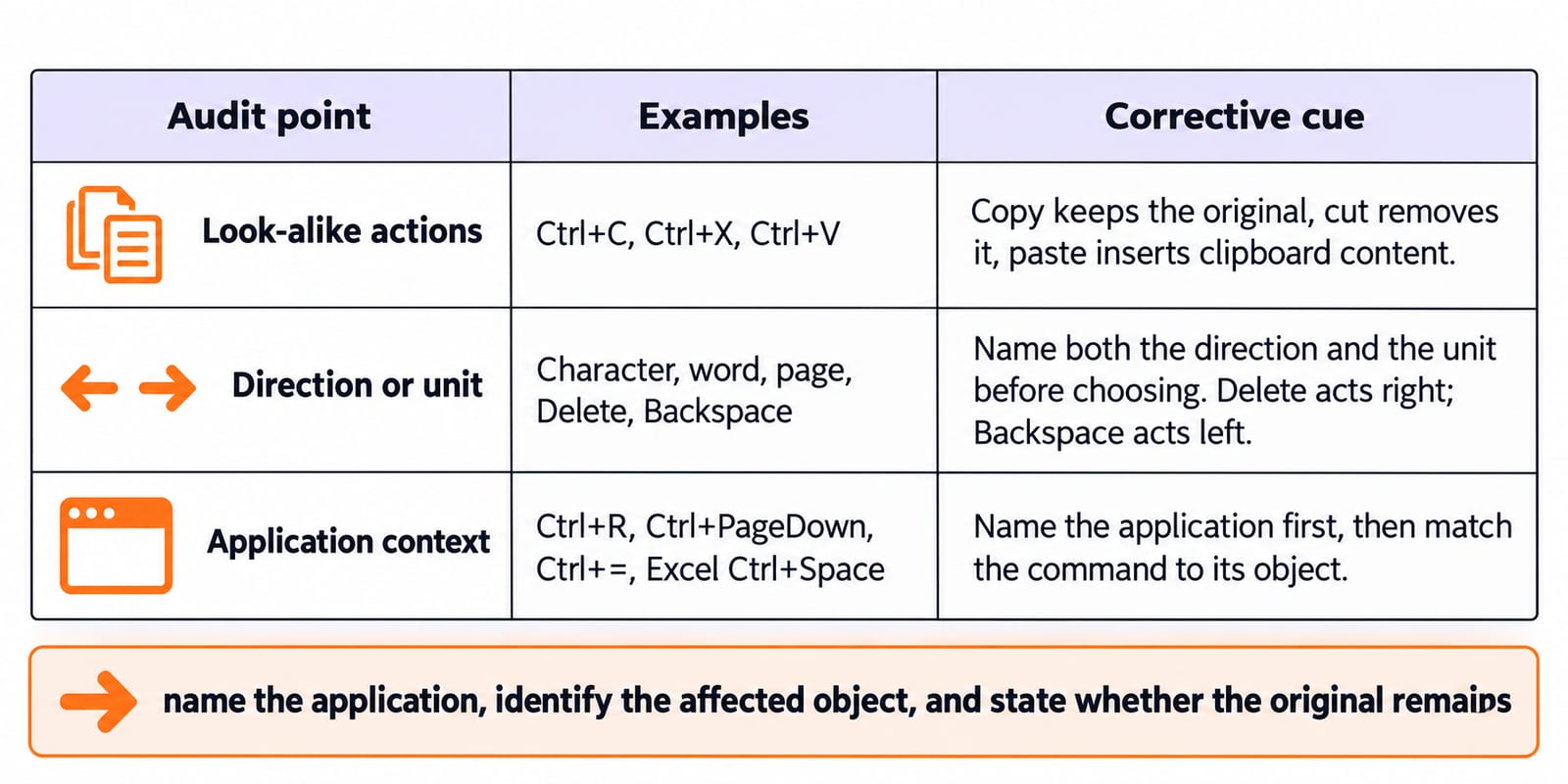
Trap | Examples | Corrective cue |
|---|---|---|
Look-alike actions |
| Copy keeps the original, cut removes it, paste inserts clipboard content. |
Direction or unit | Character, word, page, Delete, Backspace | Name both the direction and the unit before choosing. Delete acts right; Backspace acts left. |
Application context |
| Name the application first, then match the command to its object. |
Turn every miss into a three-part note: name the application, identify the affected object, and state whether the original remains. Only then select the option. This prevents a familiar shortcut from overriding the stem's actual context.
7. Short version and the next practice step
Recall: A = all, C = copy, X = cut, V = paste, Z = undo, Y = repeat/redo. Add the application anchors: in Word, R = right align and Ctrl+= = subscript; in Excel, whole column means Ctrl+Space.
Retry missed questions without looking at the options, then use the Common Editing PYQ hub for more practice. For a Word-only set on page layout, Format Painter, hyperlinks and mail merge, continue with MS Word Basics MCQs.
Keep learning
Common Editing Ctrl Keys Explained: Copy, Cut, Paste, Undo and Redo with Worked Examples
Learn what each common Ctrl key does, then trace the document, clipboard, cursor and edit history through precise examples without confusing Copy, Cut or Undo.
Updated 11 Oct 20266 min read52 viewsTeaching Recruitment (Computer Science)
MS Word Basics: Editing, Formatting, a Worked Document and Exam Traps
Learn how Word applies commands to characters, paragraphs, pages and files. Build an ICT revision plan, audit every state change and avoid common exam traps.
Updated 23 Oct 20266 min readTeaching Recruitment (Computer Science)

Common Software & Tools MCQs: 12 Solved ICT Questions Explained
Attempt 12 previous-year ICT MCQs before reading concise explanations that separate applications, hardware, web tools, abbreviations, malware and operating systems.
Updated 29 Oct 20268 min read53 viewsUGC NET Computer Science

Python Dictionaries Explained: Keys, Methods, Worked Examples and Exam Traps
Learn how Python dictionaries store, retrieve and mutate values. Trace a complete frequency counter, then practise the membership, aliasing and duplicate-key traps that make output questions tricky.
Updated 18 Nov 20265 min readPython