BTSC Lab Assistant Job Profile: Records, Equipment Care and Daily Lab Workflow
Build a realistic CS/IT Laboratory Assistant role model around readiness checks, auditable registers, safe fault handling and evidence-based handover.
KnowledgeGate Team
Exam prep & CS education
Updated 12 Aug 20265 min read
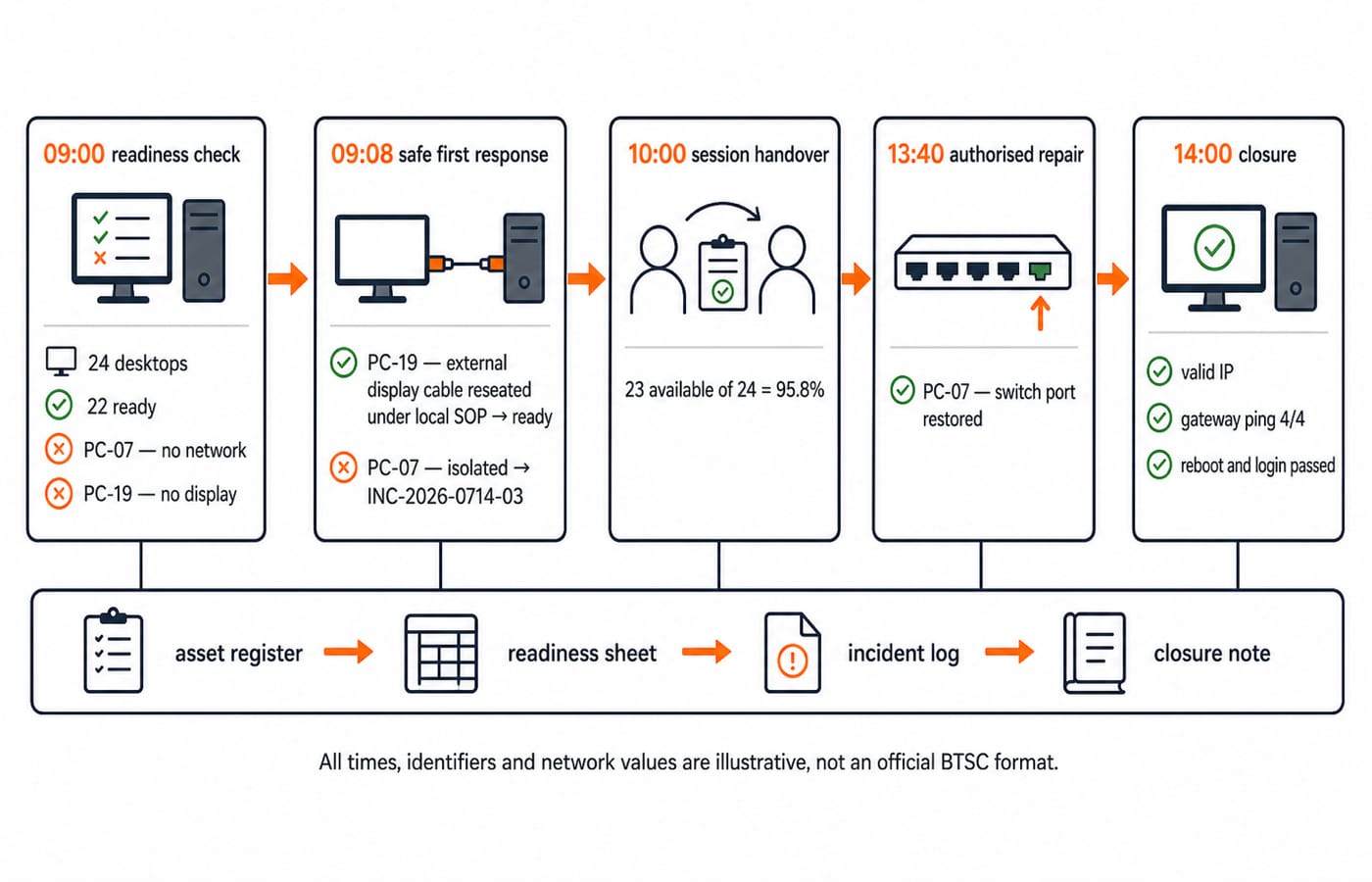
Most job-profile pages say “maintain records” and “look after equipment”, but they rarely show what a traceable entry or a safe response actually looks like. A CS/IT Laboratory Assistant works through four loops that repeat every working day: prepare the room, support an authorised session, record what moved, and make a fault safe before routing it to staff who are allowed to repair it. Four separate registers carry that work, and one awkward morning, a workstation with no network at 09:10, fills every one of them.
BTSC Advertisement 09/2026 and the CS/IT syllabus areas
The current Advertisement 09/2026 page on the official BTSC website identifies the Laboratory Assistant (Computer Science and Engineering or Information Technology) recruitment. The CS/IT syllabus published through BTSC's syllabus page on 21-05-2026 includes computer hardware and storage, MS Office, computer maintenance, hardware and software troubleshooting, operating systems, drivers, software installation, basic network setup, and printer, scanner and laboratory-equipment management.
That list is a preparation scope, not a duty chart. Your timetable, reporting line, inventory format and repair authority are set by the institution that posts you, and they differ between a polytechnic, an ITI and a government college. The BTSC Lab Assistant exam hub collects the exam-side preparation; recruitment-specific rules stay with the latest official notice.
Decode the job as four connected work loops
Laboratory operations resolve into four loops that repeat every working day:
Prepare: check that the room, systems and approved peripherals are ready.
Support: assist an authorised practical or computer session within local instructions.
Record: track assets, issues, returns, stock movements and incidents.
Care and escalate: make a fault safe, route it to authorised staff, verify recovery and close the record.
Each loop closes with a written trace, and that trace is what lets the next loop start from fact instead of memory.
Turn “maintain records” into four auditable registers
These four records cannot be collapsed because each answers a different control question.
Register | Purpose | Example row |
|---|---|---|
Asset register | Existence, location and status |
|
Issue-return log | Custody and timing |
|
Incident log | Failure, observation, notification and closure |
|
Stock register | Expected consumable or accessory balance |
|
Expected closing is 12 + 4 - 5 = 11. If the physical count is 10, variance is 10 - 11 = -1. Flag and reconcile it rather than rewriting the register. MS Office for CS Teaching Exams covers the Word and Excel mechanics these registers are usually kept in.
Care for equipment through pre-use, in-use and post-use checks
Pre-use means power, display, link light, connected peripherals and approved software, all checked before the first student sits down. In-use means watching for heat, a burning smell, unexpected reboots and dropped links, and stopping a machine the moment one appears. Post-use means logging off, counting returned peripherals, noting damage and leaving the bench in the state the next session expects.
At 09:00, 22 of 24 desktops are ready. Immediate availability is (22 ÷ 24) × 100 = 91.666...%, which rounds to 91.7%. PC-19 has no display and PC-07 has no network. If the institution's standard operating procedure (SOP) permits an external cable check, reseating PC-19's display cable restores it. Availability becomes (23 ÷ 24) × 100 = 95.833...%, or 95.8%. PC-07 remains isolated for authorised network support.
Label and isolate a faulty unit, preserve the symptom, protect users and data, then escalate beyond your authority. Never open a power supply, defeat an interlock, work on live mains, use unknown cleaning fluid, change network security settings or install unapproved software. Local SOP and authorised staff control those actions. ICT for Teaching Exams covers the same hardware, software, input-device and output-device vocabulary these checks use.
Work one incident from observation to verified closure
In incident INC-2026-0714-03, PC-07 cannot reach the network at 09:10. Record one affected workstation and an unlit link indicator. If local SOP permits, test a known-good external patch cable. The symptom remains, so mark the workstation unavailable and notify the authorised network administrator at 09:20. Do not reset switches or alter security settings without authority.
At 13:40, the authorised technician reports that the switch port is restored. Close only after three checks: PC-07 picks up 10.20.7.117/24 on the lab subnet with gateway 10.20.7.1; four gateway pings return 4/4 with no loss; after one reboot, login and the approved internal learning page both work. At 14:00, record the technician reference and change the asset from Out of service to Available. The order of those checks matters: an address without a successful ping proves only that a cable is seated, and a ping that has not survived a reboot proves nothing about tomorrow morning.
Make handover and preventive care visible
Daily: readiness and issue-return checks. Weekly: labelled cables reviewed, approved software updates applied, one sample backup restored. Monthly: asset reconciliation, plus UPS and electrical inspection by authorised personnel. The exact frequencies are set by the institution's SOP, so confirm yours on joining. Preventive care means scheduled observation with evidence, not unauthorised repair.
The worked-day handover reads: 24 desktops: 24 available after closure; 2 projectors: 2 returned; USB adapters: register 11, physical 10, variance -1 still open; incidents opened 1, closed 1. Incoming and outgoing staff should read the exceptions before signing.
BTSC Lab Assistant scenarios: five decisions worth rehearsing
Practise five decisions: choose the register for a returned projector; calculate stock from 12 + 4 - 5; calculate 23/24 availability; choose the safe response to a burnt smell from a power supply; list the evidence needed to close INC-2026-0714-03. Give a one-line reason for every answer.
The syllabus names maintenance, troubleshooting, network settings and peripherals, so scenarios of this shape are fair ground to practise; marks, question count and timing for the paper stay with the current BTSC notice. The BTSC Lab Assistant CS test series is where you find out which of those five you get wrong under time.
Short version and next step
Prepare, observe, record, isolate, escalate, verify, close and hand over. Rebuild the four registers and the PC-07 incident from a blank sheet, checking every number and status change. The complete BTSC Lab Assistant course builds the same ground across the whole syllabus, and the test series shows where you stand. Return to BTSC for the current recruitment and syllabus documents.
Keep learning
BTSC Lab Assistant Physics Lab: Instruments, Readings and Error Calculations
Learn a fixed method for selecting lab instruments, reading their scales, correcting zero error and reporting calculated results with sensible uncertainty.
Updated 16 Aug 20266 min readBTSC Lab Assistant

BTSC Lab Assistant Biology Lab: Microscopy and Specimen Handling Guide
Build an exam-ready microscopy workflow through a labelled onion wet mount, a checked cell-size estimate, safe specimen handling, and six common errors.
Updated 14 Aug 20265 min readBTSC Lab Assistant
BTSC Lab Assistant PYQ Analysis: Sort Common and Trade Topics
Turn a mixed PYQ score into a useful repair plan. This method separates common and trade topics, codes each miss and assigns revision time from your own errors.
Updated 10 Aug 20266 min readBTSC Lab Assistant
BTSC Lab Assistant Chemistry: Solutions, Titration and Lab Safety
Connect solution preparation to acid-base titration through a checked HCl and NaOH example. Learn the apparatus, calculations, error directions and safe lab sequence.
Updated 7 Aug 20266 min readBTSC Lab Assistant