ARP, DHCP and ICMP are the quiet helpers that make IP usable, but their similar-looking abbreviations cause avoidable mistakes. A question gives you a host, a missing address or a failed packet, and asks which protocol acts next. The fix is to learn one job for each protocol, then connect that job to its layer and packet flow.
1. Three helpers, one job each
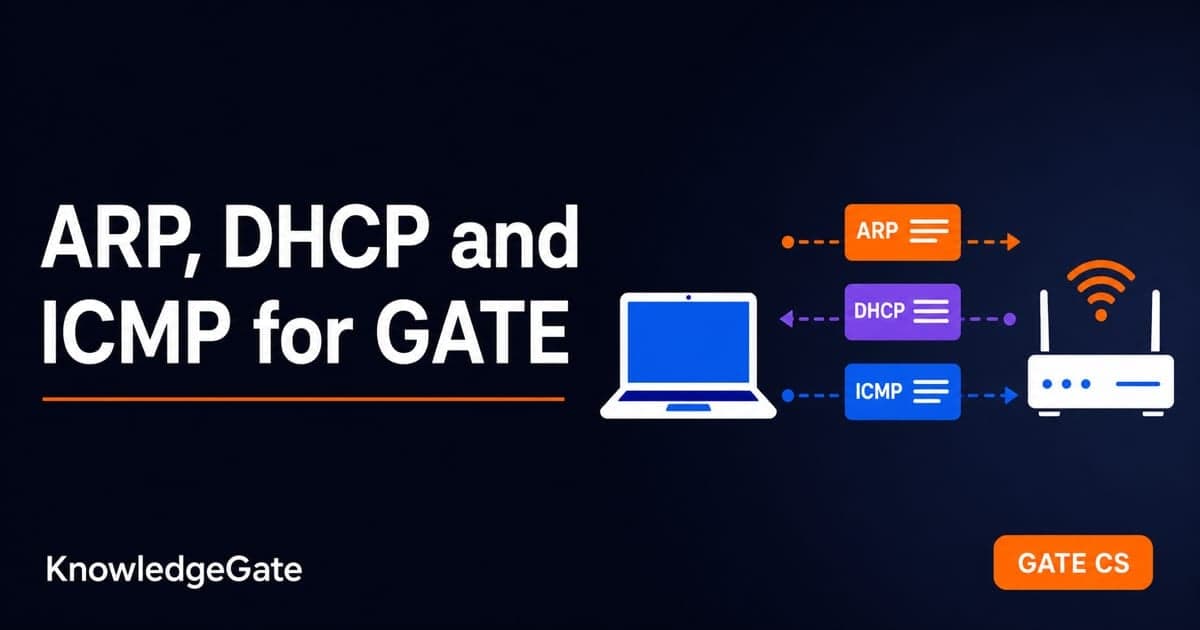
ARP resolves a known IPv4 address to a MAC address, DHCP provides a host's IP configuration, and ICMP reports IP errors and supports diagnostics.
Protocol | Its one main job | Typical clue in a question |
|---|---|---|
ARP | Resolve a known IPv4 address to a MAC address on the local LAN | The host knows an IP but cannot build the Ethernet frame |
DHCP | Give a host its IP configuration automatically | A newly connected host has no usable IP configuration |
ICMP | Report IP errors and support diagnostics | A packet expires, a destination is unreachable, or |
ARP does not assign an IP address. DHCP does not discover a destination MAC for ordinary delivery. ICMP does not repair a packet or make IP reliable. Keeping those boundaries firm answers most direct questions before port numbers or message types even appear.
2. ARP: from IP to MAC on the LAN
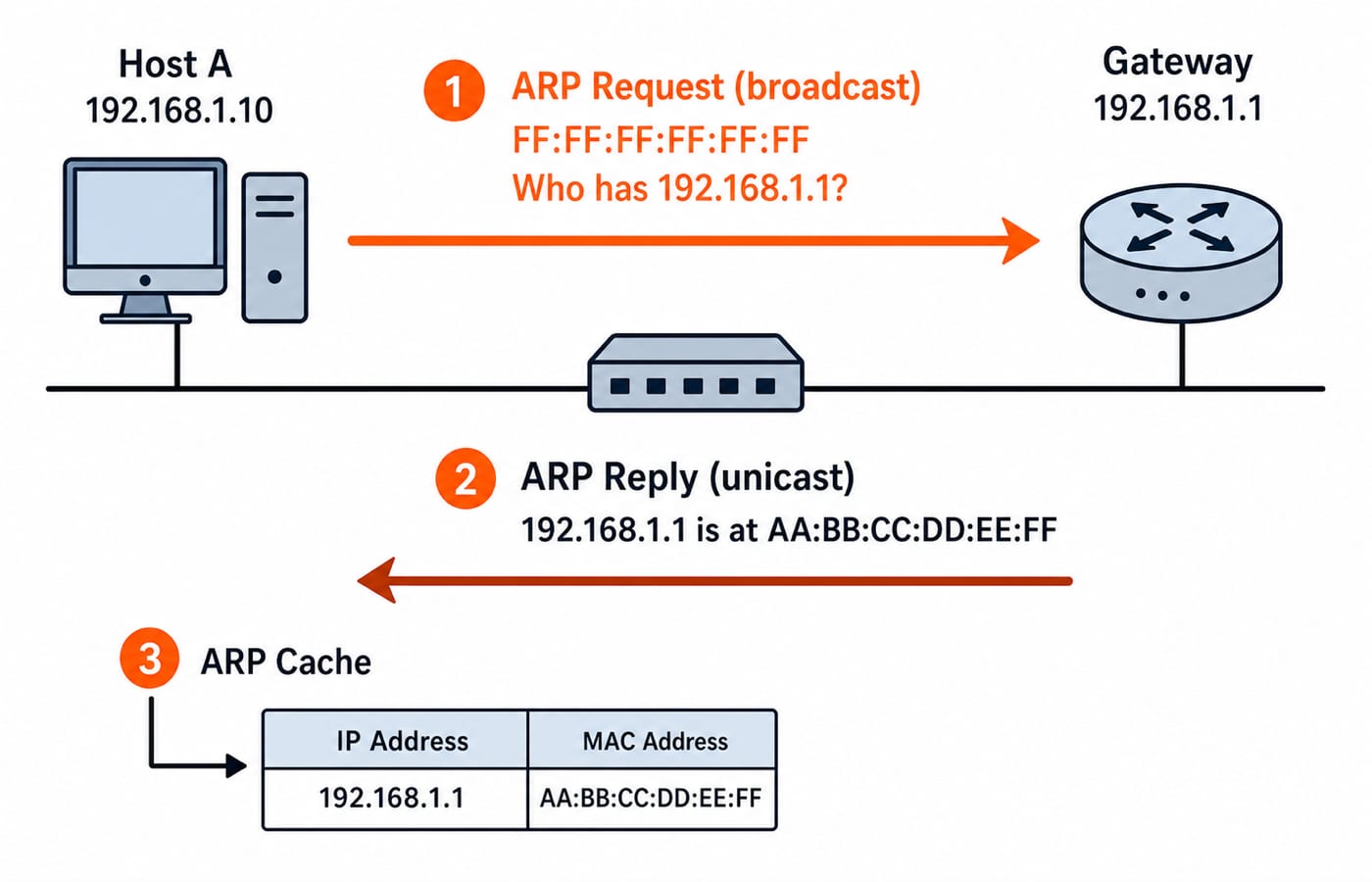
An IPv4 packet may name its next hop by IP address, but Ethernet delivery on a LAN needs a destination MAC address. Suppose a host wants to send outside its subnet. It already knows the default gateway's IP address, so it uses ARP to learn the gateway's MAC address. The wider addressing decision is explained in IP addressing and subnetting explained.
The sender broadcasts an ARP request to FF:FF:FF:FF:FF:FF. Every device in that broadcast domain receives it, but only the device that owns the requested IP replies. That ARP reply is normally unicast back to the requester. The sender stores the IP-to-MAC mapping in its ARP cache, so it need not broadcast before every frame.
ARP is local. A router does not forward an ARP request into another subnet. If the final destination is remote, the sender resolves the MAC address of its local gateway, not the MAC address of the remote host.
In layer questions, ARP sits at the network and data-link boundary, often informally called layer 2.5. It is carried directly inside an Ethernet frame using EtherType 0x0806, not inside an IP packet. RARP tried to obtain an IP from a known MAC address, but DHCP replaced that old approach.
3. DHCP: automatic configuration via DORA
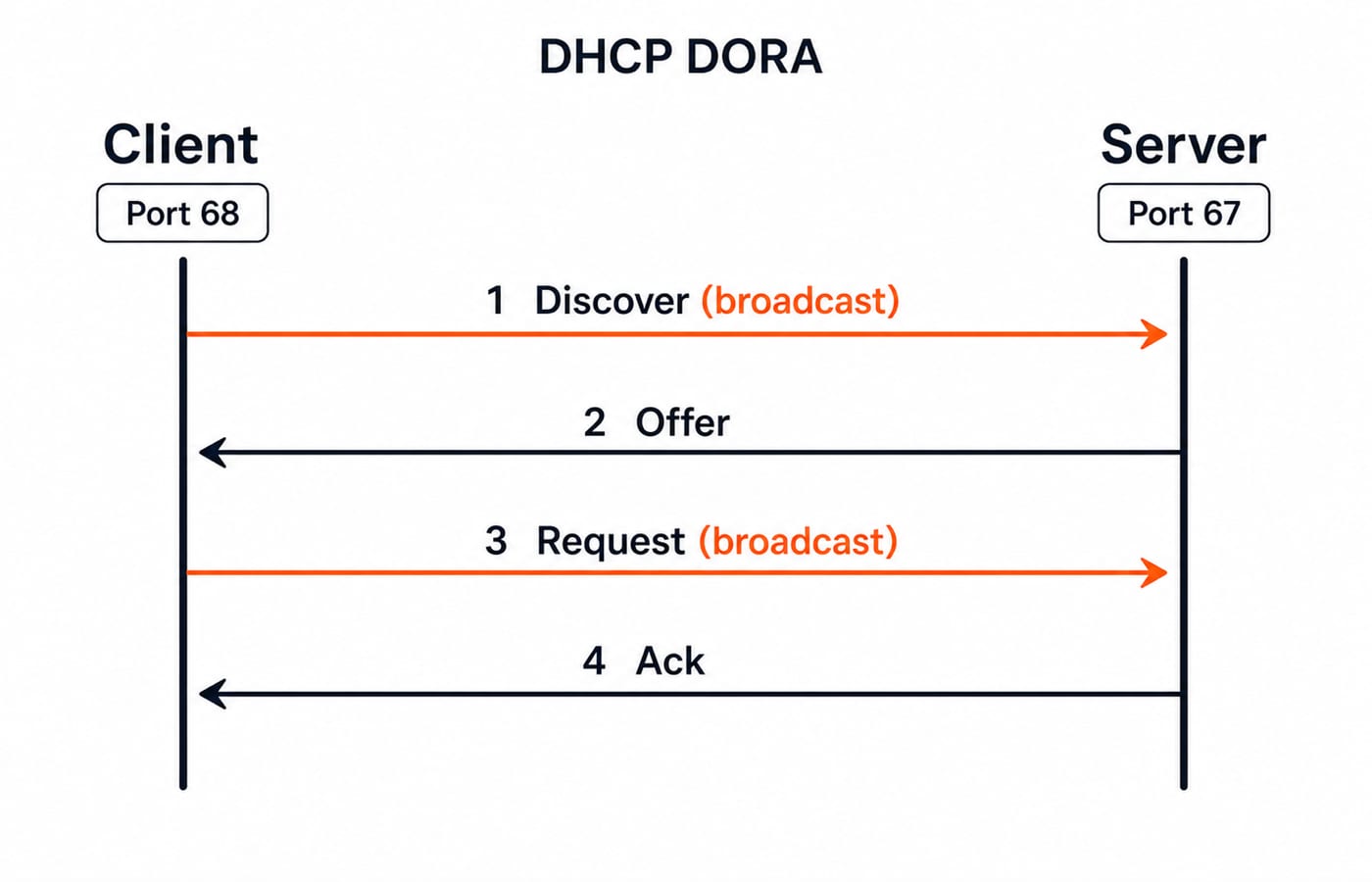
A freshly booted client may not know its own IP address, subnet mask, default gateway or DNS server. DHCP supplies that configuration. It is an application-layer protocol carried over UDP, with the server on port 67 and the client on port 68. You can place it beside DNS and other services in application layer protocols: DNS and HTTP.
The standard exchange is DORA:
Discover: the client broadcasts to find available DHCP servers.
Offer: a server offers an address and related configuration.
Request: the client broadcasts the offer it wants to accept.
Acknowledge: the chosen server confirms the lease and configuration.
Why broadcast Discover and Request? At the start, the client has no usable IP identity and does not know which server can answer. The broadcast also lets other DHCP servers see which offer was selected. Questions often test the sequence, the UDP port direction, or the reason those messages cannot begin as ordinary client-to-server unicasts.
4. ICMP: error reporting and diagnostics
ICMP belongs to the network layer and is encapsulated inside IP. IPv4 identifies it with protocol number 1. Its role is reporting, not correction. If a router discards a packet after its TTL reaches zero, ICMP can tell the sender what happened, but it does not retransmit or recover the original data.
The message types worth fixing in memory are:
Echo Request, type 8, and Echo Reply, type 0, used by
ping.Destination Unreachable, type 3, which includes cases such as a closed UDP port.
Time Exceeded, type 11, generated when TTL becomes zero in transit.
Redirect, which tells a host about a more suitable next hop in the relevant setting.
Traceroute uses controlled TTL values. A probe with TTL 1 expires at the first router, which returns Time Exceeded. A probe with TTL 2 reaches the second router before expiring. Increasing TTL one step at a time reveals successive hops until the destination responds. The arithmetic is simple but important: starting from TTL 3, three router decrements produce 2, then 1, then 0, so the third router discards the packet and reports it.
5. Six scenario drills: choose ARP, DHCP or ICMP
Work from the missing information or event, not from the device names.
A host knows gateway IP
192.168.1.1but needs a destination MAC for its frame. It uses ARP. The request is broadcast and the gateway's reply is unicast.A new laptop has no IP, mask or gateway. It uses DHCP, following Discover, Offer, Request and Acknowledge.
ping 8.8.8.8receives replies. The packets are ICMP Echo Request type 8 and ICMP Echo Reply type 0.A router reduces a packet's TTL from 1 to 0 and drops it. It sends ICMP Time Exceeded type 11, the response used to expose a hop in traceroute.
A datagram reaches a closed UDP port and the destination reports the failure. That is ICMP Destination Unreachable type 3, specifically the port-unreachable case.
A host broadcasts, "Who has 192.168.1.50?" and receives a direct answer. Those are an ARP request and ARP reply.
Notice that only the DHCP case begins with missing IP configuration. ARP begins with a known IP. ICMP begins with an IP event that needs to be reported or diagnosed.
6. Layer placement and encapsulation, the trap
Protocol | Placement | Encapsulation or identifier |
|---|---|---|
ARP | Network/data-link boundary | Directly in Ethernet, EtherType |
ICMP | Network layer | Inside IP, IPv4 protocol number 1 |
DHCP | Application layer | Over UDP, server port 67 and client port 68 |
Do not assign a layer merely from what a protocol helps accomplish. DHCP supplies network configuration, but its own messages are application data over UDP. ICMP travels inside IP, while ARP bypasses IP and rides directly in an Ethernet frame.
7. How GATE tests this and the traps
GATE commonly asks you to match a scenario to a protocol, identify an ICMP type, place a protocol at the right layer, or explain why an early DHCP message is broadcast. Practise each pattern by naming the missing address or packet event first, then the layer, message type and encapsulation clue.
Three traps recur: ARP does not cross a router, ICMP reports an IP problem but does not make IP reliable, and DHCP remains an application-layer protocol even though it supplies IP settings. Confirm the current Computer Networks syllabus and any weightage statement on the official GATE portal. The GATE CS catalogue helps you place this topic in the broader preparation map.
8. A 30-second protocol decision rule
Ask three questions in order. Is IP configuration missing? Choose DHCP. Is the IPv4 address known but its local MAC address missing? Choose ARP. Has an IP packet failed or been probed for diagnostics? Choose ICMP.
Now practise the scenario first and the protocol second. Use GATE Guidance by Sanchit Sir for sequenced Computer Networks coverage, then use the GATE Test Series to check whether you can make these distinctions under time pressure.