Visual Basic Programming Language: Core Concepts with a Worked VB.NET Example
Connect VB.NET syntax to a real Windows Forms event. Build and trace an invoice calculator that validates text input, applies a discount, and displays the exact result.
KnowledgeGate Team
Exam prep & CS education
Updated 12 Aug 20267 min read
A Visual Basic program can look like a collection of buttons and text boxes, but the interface does nothing until typed data, procedures, decisions, and events are connected correctly. The code here is Visual Basic on .NET, commonly written VB.NET. Older classic Visual Basic material may use similar form and control vocabulary, but its syntax is not automatically compatible. One invoice calculator carries the whole path: quantity 3 and unit price 249.50 become a subtotal of 748.50, a discount of 74.85, and a total of 673.65.
Visual Basic basics: language, .NET, form and event
Beginners often merge four ideas. Visual Basic is the programming language. .NET supplies the runtime and libraries. A Windows Form is a class representing a window. Controls such as TextBox, Button, and Label are objects placed on that form. Windows Forms is what makes this particular flow event-driven; Visual Basic also runs in console and class-library projects that have no graphical interface at all.
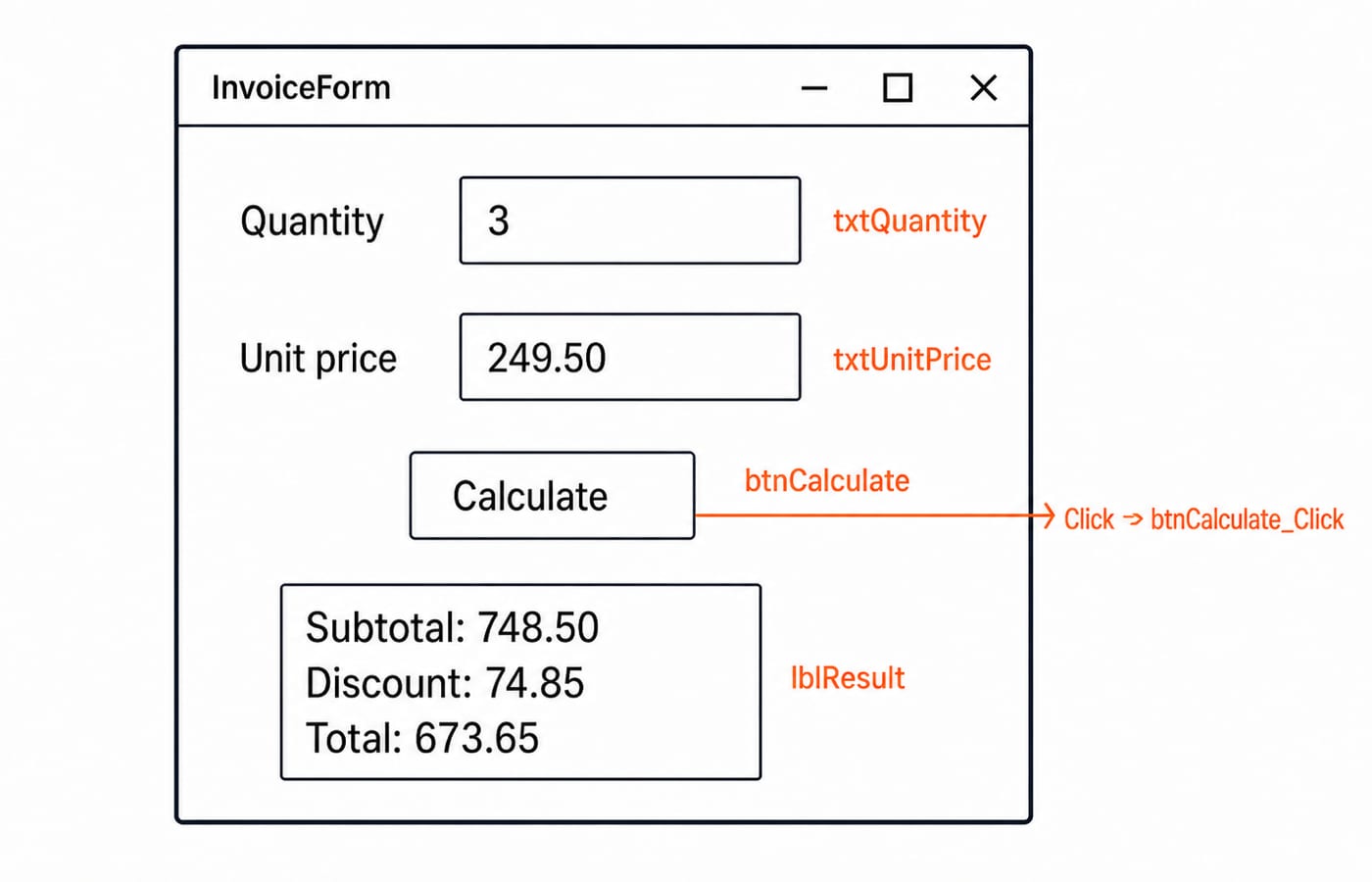
In the example, the user enters 3 in txtQuantity and 249.50 in txtUnitPrice. Clicking btnCalculate raises its Click event. The btnCalculate_Click procedure handles that event, validates the inputs, performs the calculation, and assigns output text to lblResult. The click starts the procedure, while the controls retain their state between events. A visual designer can arrange those controls, but it does not replace the programming that connects them. The Coding & DSA category is a wider route through programming foundations.
Variables, data types, operators and safe conversion
Start with Option Strict On. It helps keep conversions explicit. Each declaration below gives a value a name and a type: Dim quantity As Integer = 3, Dim unitPrice As Decimal = 249.50D, Dim caption As String = "Invoice total", and Dim hasDiscount As Boolean = True. Decimal suits this money example, and the D suffix marks a decimal literal. Other numeric tasks may need other types.
The arithmetic is direct:
3 * 249.50D = 748.50D748.50D * 0.10D = 74.85D748.50D - 74.85D = 673.65D
Arithmetic operators produce numeric results. A comparison such as subtotal >= 500D instead produces a Boolean result, which is True for 748.50D.
A text box contains text even when it displays digits. Use Integer.TryParse and Decimal.TryParse, and calculate only after validation succeeds. Also remember that 5 \ 2 is integer division and yields 2, while 5 / 2 yields 2.5.
Decisions, loops, procedures and collections
A Sub performs work without returning a value. The click handler is a Sub because it updates the form. A Function returns a value. GetDiscountRate(subtotal As Decimal) As Decimal returns 0.10D when subtotal >= 500D, otherwise 0D. With 748.50D, it returns 0.10D.
If...Then...Else chooses between paths, while Select Case handles several discrete alternatives. For, For Each, While, and Do repeat work. For example, For index As Integer = 2 To 4 visits 2, 3, and 4; the upper bound is included.
An array declaration such as Dim quantities() As Integer = {3, 2, 5} creates values 3, 2, and 5 at indices 0, 1, and 2. A List(Of Integer) is resizable. A local variable is available only inside its scope. ByVal gives a procedure its own parameter variable, while ByRef should be reserved for cases where the procedure genuinely needs to change the caller's variable.
Forms, controls, properties, methods and events
The worked form has labels Quantity and Unit price, text boxes named txtQuantity and txtUnitPrice, a button named btnCalculate with Text = "Calculate", and an output label named lblResult whose text starts empty. Name is the identifier used by code; Text is the content visible to the user.
The expression txtQuantity.Text reads a property. Calling txtQuantity.Clear() invokes a method. btnCalculate.Click is an event, and Handles btnCalculate.Click wires the handler to it. Changing a property changes object state, calling a method asks an object to perform behaviour, and an event announces that something occurred.
Public Class InvoiceForm declares the form class. The window displayed at runtime is an object created from that class, so two windows opened from the same class each hold their own control values. Inheritance, interfaces, and designer-generated code start to carry weight once an application grows past a single form.
Fully worked VB.NET invoice calculator
Place the named controls on InvoiceForm, then use this exact code behind the form:
Option Strict On

Public Class InvoiceForm
    Private Sub btnCalculate_Click(sender As Object, e As EventArgs) Handles btnCalculate.Click
        Dim quantity As Integer
        Dim unitPrice As Decimal

        If Not Integer.TryParse(txtQuantity.Text, quantity) OrElse quantity <= 0 Then
            lblResult.Text = "Enter a whole-number quantity above 0."
            Return
        End If

        If Not Decimal.TryParse(txtUnitPrice.Text, unitPrice) OrElse unitPrice < 0D Then
            lblResult.Text = "Enter a non-negative unit price."
            Return
        End If

        Dim subtotal As Decimal = quantity * unitPrice
        Dim discountRate As Decimal = GetDiscountRate(subtotal)
        Dim discount As Decimal = Decimal.Round(
            subtotal * discountRate, 2, MidpointRounding.AwayFromZero)
        Dim netAmount As Decimal = subtotal - discount

        lblResult.Text = $"Subtotal: {subtotal:F2}; Discount: {discount:F2}; Total: {netAmount:F2}"
    End Sub

    Private Function GetDiscountRate(subtotal As Decimal) As Decimal
        If subtotal >= 500D Then
            Return 0.10D
        End If
        Return 0D
    End Function
End Class
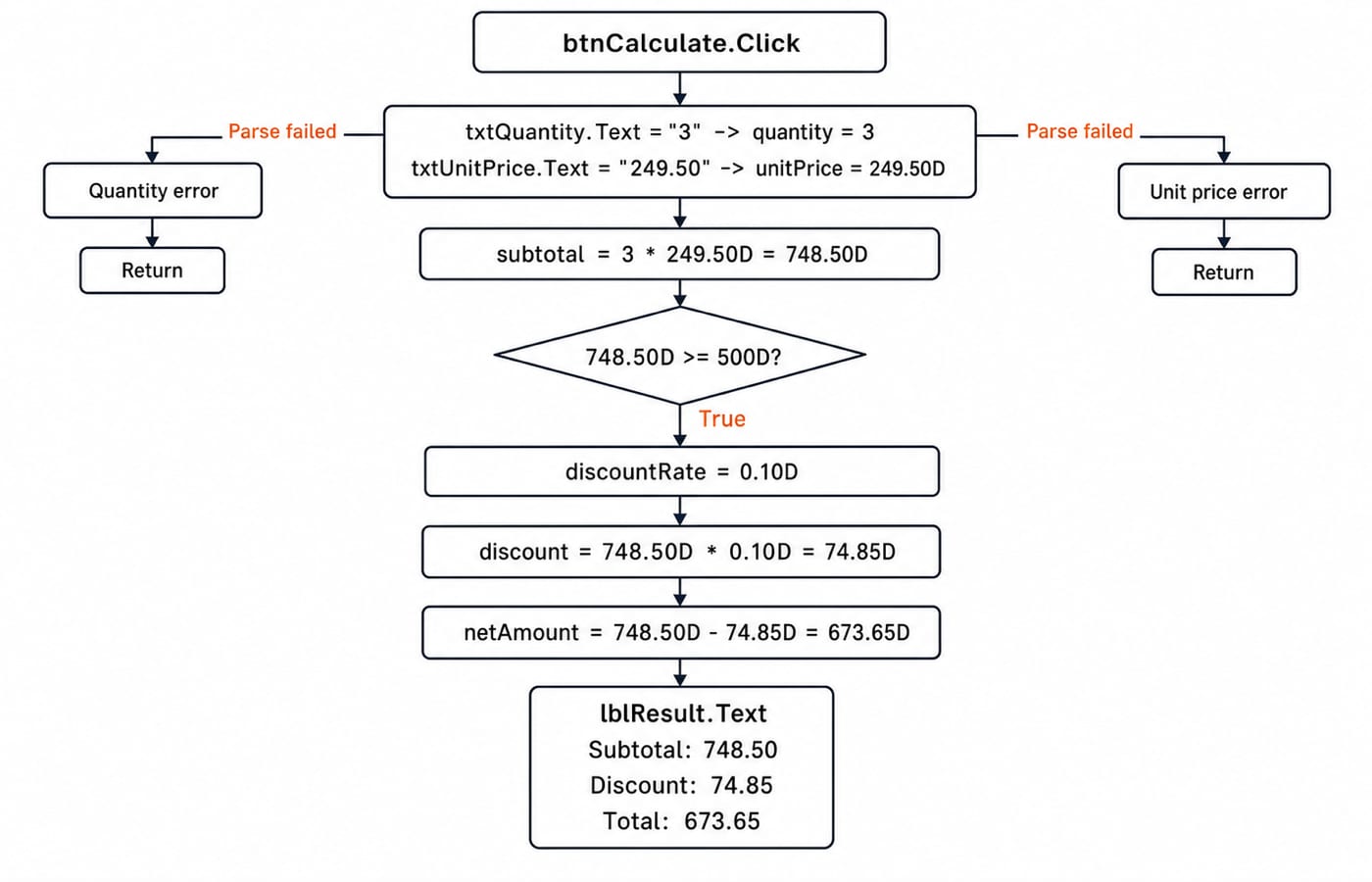
On a successful click, both parses succeed. quantity = 3 and unitPrice = 249.50D, so subtotal = 3 * 249.50D = 748.50D. The comparison 748.50D >= 500D is True, so discountRate = 0.10D. The rounded discount is 748.50D * 0.10D = 74.85D, and netAmount = 748.50D - 74.85D = 673.65D. The label becomes Subtotal: 748.50; Discount: 74.85; Total: 673.65.
For an invalid branch, set txtQuantity.Text = "three". Integer.TryParse returns False. Short-circuit OrElse makes the condition true without relying on a valid quantity, the label shows Enter a whole-number quantity above 0., and Return prevents every calculation below it.
Common Visual Basic mistakes and how to repair them
These errors are small enough to miss and large enough to break the result:
Mistake | What goes wrong | Correction |
|---|---|---|
Leave | Failures surface late | Turn it on and parse explicitly |
Use | Integer division returns | Use |
Name a control | The handler no longer addresses the intended control | Keep descriptive names consistent |
Omit | Clicking the button does not run this handler | Wire the event once |
Use | Both operands are evaluated | Use |
Declare a variable inside an | The variable is out of scope | Declare it in the smallest enclosing scope that needs it |
Debug systematically. Reproduce one input, inspect the parsed values, trace one statement at a time, and compare the displayed output with hand arithmetic. Message boxes may expose a value, but they are not substitutes for validation or tests.
How concept questions and interviews test these ideas
Visual Basic-specific questions suit semester study, teaching-recruitment preparation, or interview practice. The transferable parts reach further than the language itself: type conversion, control-flow tracing, scope, parameter passing, and program logic that does not depend on events. All five appear in the invoice calculator above.
Test whether you can predict 5 \ 2 versus 5 / 2, explain why TryParse must precede multiplication, trace the 748.50D >= 500D branch, distinguish the Click event from its handler, and explain why input "three" reaches Return. KnowledgeGate's Visual Basic practice set runs to more than 40 questions on this introductory ground, which is enough to drill each of those points more than once.
For the language-processing bridge, study how lexical analysis turns source characters into tokens, then how top-down and bottom-up parsing organises those tokens by syntax. That is the machinery that turns a line like Dim quantity As Integer = 3 into something the runtime can execute.
Short version, practice task and next step
Declare values with explicit types. Parse text before arithmetic. Choose with If or Select Case. Repeat with the loop that fits the job. Return values from a Function. Connect user actions to handlers through events. The invoice trace is 3 x 249.50 -> 748.50 -> 74.85 discount -> 673.65 total.
Now change txtQuantity to 2 and keep txtUnitPrice = 249.50. The subtotal is 2 * 249.50 = 499.00, so the discount condition is False, the discount is 0.00, and the total remains 499.00.
Choose the next step by goal: use C Language for transferable programming and tracing practice, or GATE Guidance by Sanchit Sir for a broader GATE preparation route.
Keep learning
TypeScript vs C# Typing: Structural Compatibility, Nominal Identity, Generics and Runtime Checks
Follow one User/Admin example through TypeScript and C# to predict assignments, generic conversions, branded IDs, and JSON behaviour at runtime.
Updated 3 Oct 20266 min readProgramming Languages Survey
TypeScript Learning Roadmap: 20 Weeks from Everyday Types to a Full-Stack App
Follow a dependency-led TypeScript plan through BudgetLens, IssueBoard and TaskBoard, with exact weekly gates, strict checks and tested API boundaries.
Updated 28 Sep 20265 min readProgramming Languages Survey
Static vs Dynamic Typing: Errors, Feedback Loops and Refactoring Flexibility
Follow one OrderLine model from an integer price to an INR Money value. See what Java catches during checking, what Python reveals during execution, and what both still need tests to prove.
Updated 25 Sep 20265 min readProgramming Languages Survey
Kotlin vs C#: Compare Null Safety, Async Models, Ecosystems and Platform Fit
Compare Kotlin and C# by building the same packing model in both. See how their managed runtimes, null checks, async behaviour and ecosystems differ.
Updated 24 Sep 20266 min readProgramming Languages Survey