

SQL Views Tutorial: CREATE VIEW, Updates and Worked Examples
Build SQL views on one small employee dataset, trace their exact results, test safe updates, and compare live views with stored materialized snapshots.
KnowledgeGate Team
Exam prep & CS education
Updated 11 Nov 20266 min read

A view is queried like a table, but an ordinary view normally stores its query, not a second copy of rows. Base-data changes can appear immediately, updates may be allowed, and creating the view alone does not improve performance. The PostgreSQL dataset below traces filtering, joins, aggregates, updates, CHECK OPTION, dependencies, and materialized-view freshness. For wider syllabus coverage, use CS Fundamentals for Exams & Placements.
What a view in SQL is, and what it is not
An ordinary view is a named query with a table-shaped result. The PostgreSQL CREATE VIEW documentation says it is not physically materialized: its query runs when referenced. The database saves the definition, not a momentary result.
Views can hide columns, centralise repeated joins or filters, and keep base tables behind a stable interface. A view is not a security boundary: permissions, ownership, row-level security, and engine rules still matter. SQL Queries and Joins in DBMS: Worked Join and GROUP BY teaches SELECT, joins, and GROUP BY directly; view definitions reuse those operations behind a named interface.
Object | What it stores | Writes and freshness |
|---|---|---|
Base table | Rows | Accepts writes under its constraints |
Ordinary view | Query definition | May be updatable; reads current results |
Materialized view | Result snapshot | Needs refresh logic |
Creating a view does not automatically accelerate its query.
Create the base tables and your first SQL view
Run this setup in PostgreSQL and keep every value unchanged for the examples:
CREATE TABLE departments (
  dept_id INTEGER PRIMARY KEY,
  dept_name VARCHAR(30) NOT NULL,
  city VARCHAR(30) NOT NULL
);

CREATE TABLE employees (
  employee_id INTEGER PRIMARY KEY,
  employee_name VARCHAR(30) NOT NULL,
  dept_id INTEGER NOT NULL REFERENCES departments(dept_id),
  salary INTEGER NOT NULL,
  status VARCHAR(10) NOT NULL
    CHECK (status IN ('ACTIVE', 'INACTIVE'))
);

INSERT INTO departments VALUES
  (10, 'Engineering', 'Pune'),
  (20, 'Sales', 'Delhi'),
  (30, 'Support', 'Bengaluru');

INSERT INTO employees VALUES
  (101, 'Asha',   10, 72000, 'ACTIVE'),
  (102, 'Bharat', 10, 68000, 'ACTIVE'),
  (103, 'Charu',  20, 55000, 'ACTIVE'),
  (104, 'Deepak', 20, 61000, 'INACTIVE'),
  (105, 'Esha',   30, 48000, 'ACTIVE'),
  (106, 'Farhan', 10, 85000, 'ACTIVE');

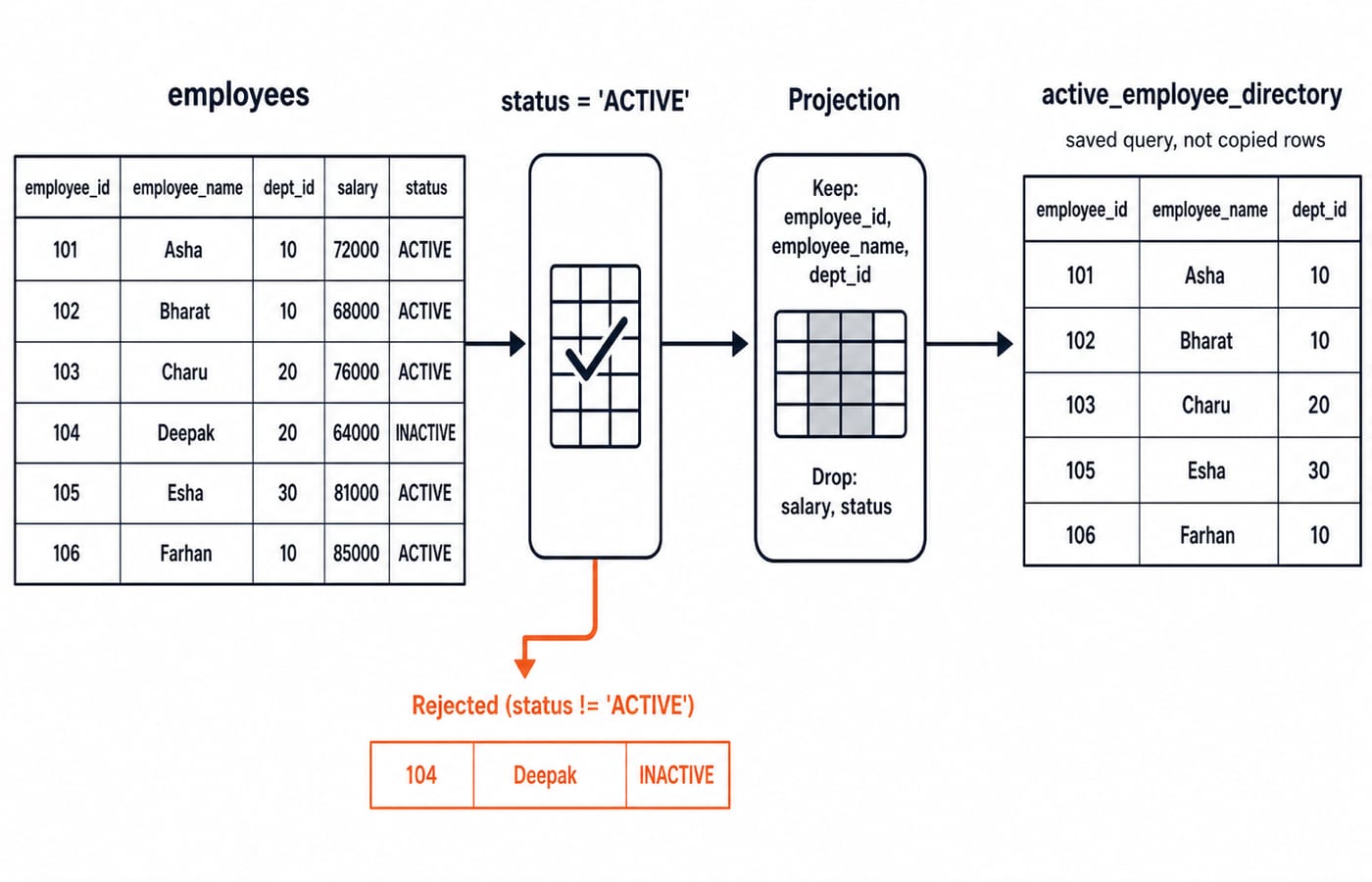
CREATE VIEW active_employee_directory AS
SELECT employee_id, employee_name, dept_id
FROM employees
WHERE status = 'ACTIVE';
With ORDER BY employee_id, the view returns 101 | Asha | 10, 102 | Bharat | 10, 103 | Charu | 20, 105 | Esha | 30, and 106 | Farhan | 10. Deepak is inactive; unprojected salary and status are unavailable.
This reversible trace proves the result is not a snapshot:
BEGIN;
UPDATE employees SET status = 'INACTIVE' WHERE employee_id = 103;
SELECT * FROM active_employee_directory ORDER BY employee_id;
ROLLBACK;
Inside the transaction, only IDs 101, 102, 105, 106 appear. Rollback restores Charu and the original five rows.
Build join and aggregate views with exact results
CREATE VIEW active_employee_details AS
SELECT e.employee_id, e.employee_name,
       d.dept_name AS department, d.city
FROM employees AS e
JOIN departments AS d ON d.dept_id = e.dept_id
WHERE e.status = 'ACTIVE';

SELECT * FROM active_employee_details
WHERE city = 'Pune' ORDER BY employee_id;
The result is 101 | Asha | Engineering | Pune, 102 | Bharat | Engineering | Pune, and 106 | Farhan | Engineering | Pune. The outer WHERE filters these rows without altering the saved definition.
CREATE VIEW department_payroll AS
SELECT d.dept_name AS department,
       COUNT(*) AS employee_count,
       SUM(e.salary) AS total_salary,
       ROUND(AVG(e.salary), 2) AS average_salary
FROM employees AS e
JOIN departments AS d ON d.dept_id = e.dept_id
WHERE e.status = 'ACTIVE'
GROUP BY d.dept_name;
Engineering is 3 | 225000 | 75000.00, since 72000 + 68000 + 85000 = 225000. Sales is 1 | 55000 | 55000.00; Support is 1 | 48000 | 48000.00. Deepak's 61000 is excluded because he is inactive.
Query views like tables, with explicit order
Views can be composed:
SELECT d.employee_id, d.employee_name, d.department,
       p.employee_count, p.total_salary
FROM active_employee_details AS d
JOIN department_payroll AS p USING (department)
WHERE p.employee_count >= 2
ORDER BY d.employee_id;
Only Engineering qualifies, so IDs 101, 102, and 106 each carry employee_count = 3 and total_salary = 225000. Expand each view into its SELECT, apply the join and outer filter, then sort to expose duplicates, exclusions, and aggregates.
Rows have no guaranteed presentation order. Put ORDER BY in the outer query, adding a stable key such as employee_id for ties. Name exposed columns deliberately: SELECT * makes the interface brittle when columns change. A named interface avoids repeating the employee-to-department join, but still needs deliberate maintenance.
Update a PostgreSQL view and enforce CHECK OPTION
The same PostgreSQL documentation says eligible simple views are automatically updatable. Its CHECK OPTION rejects a write whose resulting row would fail the view filter. Before granting write access through a view, check every structural condition and permission in the selected engine.
CREATE VIEW active_employee_editor AS
SELECT employee_id, employee_name, dept_id, salary, status
FROM employees
WHERE status = 'ACTIVE'
WITH CHECK OPTION;

BEGIN;
UPDATE active_employee_editor
SET salary = 74000 WHERE employee_id = 101;
SELECT salary FROM employees WHERE employee_id = 101;
ROLLBACK;
The base-table query temporarily returns 74000; rollback restores Asha's 72000. This standalone statement is rejected because Bharat would leave the view:
UPDATE active_employee_editor
SET status = 'INACTIVE' WHERE employee_id = 102;
Bharat remains active on 68000. PostgreSQL also rejects UPDATE department_payroll SET total_salary = 226000 WHERE department = 'Engineering'; because an aggregate does not map to one unambiguous base row. Other engines have their own updatability rules.
Replace and drop views without breaking dependencies
The PostgreSQL documentation allows compatible replacement while retaining existing output column names, order, and types. New columns may be appended:
CREATE OR REPLACE VIEW active_employee_directory AS
SELECT employee_id, employee_name, dept_id, status
FROM employees
WHERE status = 'ACTIVE';

CREATE VIEW pune_active_employees AS
SELECT employee_id, employee_name
FROM active_employee_details
WHERE city = 'Pune';
The dependent view contains 101 Asha, 102 Bharat, and 106 Farhan. PostgreSQL refuses DROP VIEW active_employee_details; while that dependency exists. Test the dependency, then run DROP VIEW pune_active_employees; followed by DROP VIEW active_employee_details;.
Regular views, materialized views, and performance
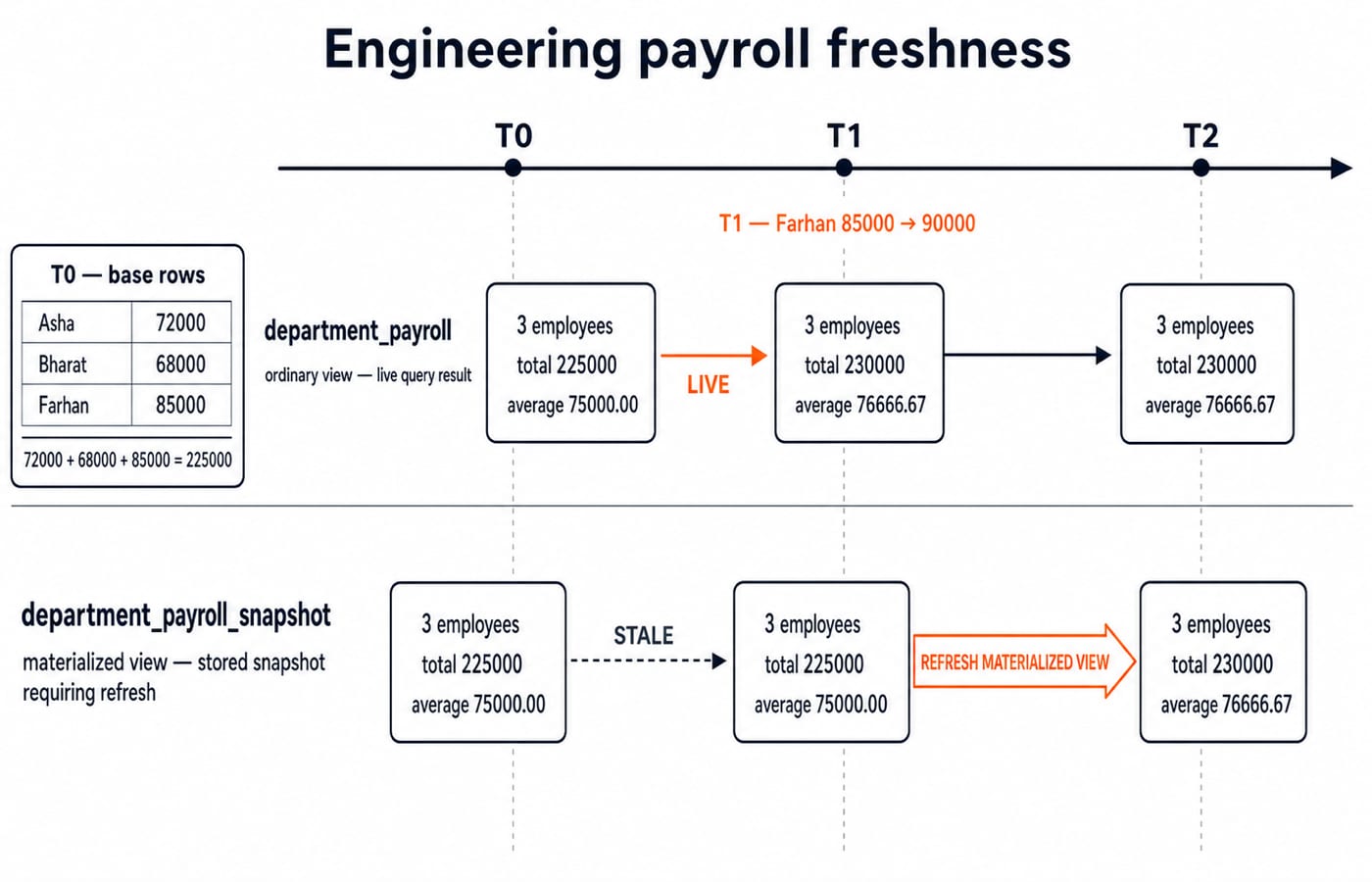
PostgreSQL can store the computed payroll as a snapshot:
CREATE MATERIALIZED VIEW department_payroll_snapshot AS
SELECT * FROM department_payroll;

UPDATE employees SET salary = 90000 WHERE employee_id = 106;
REFRESH MATERIALIZED VIEW department_payroll_snapshot;

UPDATE employees SET salary = 85000 WHERE employee_id = 106;
REFRESH MATERIALIZED VIEW department_payroll_snapshot;
Initially, both objects show Engineering as 3 | 225000 | 75000.00. After Farhan changes from 85000 to 90000, the ordinary view immediately computes 72000 + 68000 + 90000 = 230000, with average 230000 / 3 = 76666.67. The snapshot remains 225000 | 75000.00 until its first refresh, then becomes 230000 | 76666.67. The last two statements restore the original data and snapshot.
An ordinary view is an abstraction, not a cache. A materialized view trades freshness and refresh work for stored results. Base-table indexes and the actual query plan still govern ordinary-view performance. Use EXPLAIN on the underlying query. These materialized-view commands use PostgreSQL syntax; support and refresh rules differ elsewhere.
SQL view mistakes, exercises, and the next step
Mistake | Consequence | Correction |
|---|---|---|
Treating a regular view as copied data | Freshness is misunderstood | Trace its saved query against current rows |
Expecting view order | Displays can change | Sort the outer query with a stable tie key |
Updating a grouped view | The write is rejected | Update the intended base rows |
Exposing | The interface becomes brittle | List deliberate output columns |
Treating a view as complete security | Access may still leak | Configure permissions, ownership, and row policies |
Answer these exercises before checking the solutions:
Query active Pune employees in ID order. Answer:
101 Asha, 102 Bharat, 106 Farhan.Filter payroll to
average_salary >= 60000. Answer: onlyEngineering | 3 | 225000 | 75000.00.Predict
UPDATE active_employee_editor SET status = 'INACTIVE' WHERE employee_id = 103;. PostgreSQL rejects it underCHECK OPTION; Charu stays active and Sales remains1 | 55000 | 55000.00.Design an interface exposing only ID, name, department, and city for active staff. Answer: reuse
active_employee_details, which deliberately hides salary, status, and department IDs.
For more output tracing, solve SQL Query MCQs: 12 Solved (SELECT, Joins, Subqueries).
The short decision rule is simple. Use an ordinary view for a reusable live query interface, a simple updatable view only after checking the engine's rules, and a materialized view when a managed snapshot matches the freshness requirement. Placement-focused readers can continue with CS Fundamentals for Placements by Sanchit Sir. For a broader semester-level CS route, use ZERO TO HERO.
Keep learning

Perspective vs Parallel Projection and View-Volume Clipping: Worked Examples
Follow one 3-D segment through orthographic and perspective projection, then clip it against a parallel box and a perspective frustum step by step.
Updated 16 Sep 20266 min read83 viewsUGC NET Computer Science
Views and PL/SQL Basics MCQs: 12 Solved Questions with Explanations
Test views, materialized views, PL/SQL purity, Pro*C and trigger syntax with 12 solved MCQs. Each explanation separates the right rule from its distractors.
Updated 29 Oct 20267 min readDBMS MCQs

Python Lists Tutorial: Create, Update, Slice and Use Lists with Examples
Learn Python lists through one clear path, from creation and indexing to mutation, comprehensions, copying, and exam-style output questions.
Updated 13 Aug 20266 min readPython
Vector in C++: Create, Update, Iterate and Sort with Runnable Examples
Build a reliable model of std::vector through exact construction cases, safe access, mutation traces, iterator rules, storage choices and practice exercises.
Updated 26 Jul 20266 min read50 viewsC++