int score = 87; looks easy, but Java output questions quickly mix literal types, integer division, numeric promotion, narrowing casts and overflow. A variable's declared type limits the values it can hold and controls how its expressions are evaluated. The Coding & DSA Courses for Placements page connects these Java foundations to the wider placement-preparation route.
1. Java variables: declaration, initialisation and assignment
In int score = 87;, int is the declared type, score is the identifier and 87 is the initializer. You can separate those steps:
int attempts;
attempts = 3;
The second statement assigns a value without redeclaring attempts or changing its type.
studentScore, _index2 and $limit are legal names. 2score cannot start with a digit, and class is a keyword. Java is case-sensitive, so score and Score differ. Although $ is legal, it is normally left to generated or framework-oriented names.
A local variable such as int count; must be definitely assigned before it is read. An instance field declared as int count; receives the default value 0. A declaration such as final int MAX_ATTEMPTS = 3; allows one assignment and no reassignment, but final alone does not make every variable a compile-time constant.
2. Java primitive types: all eight value sets and ranges
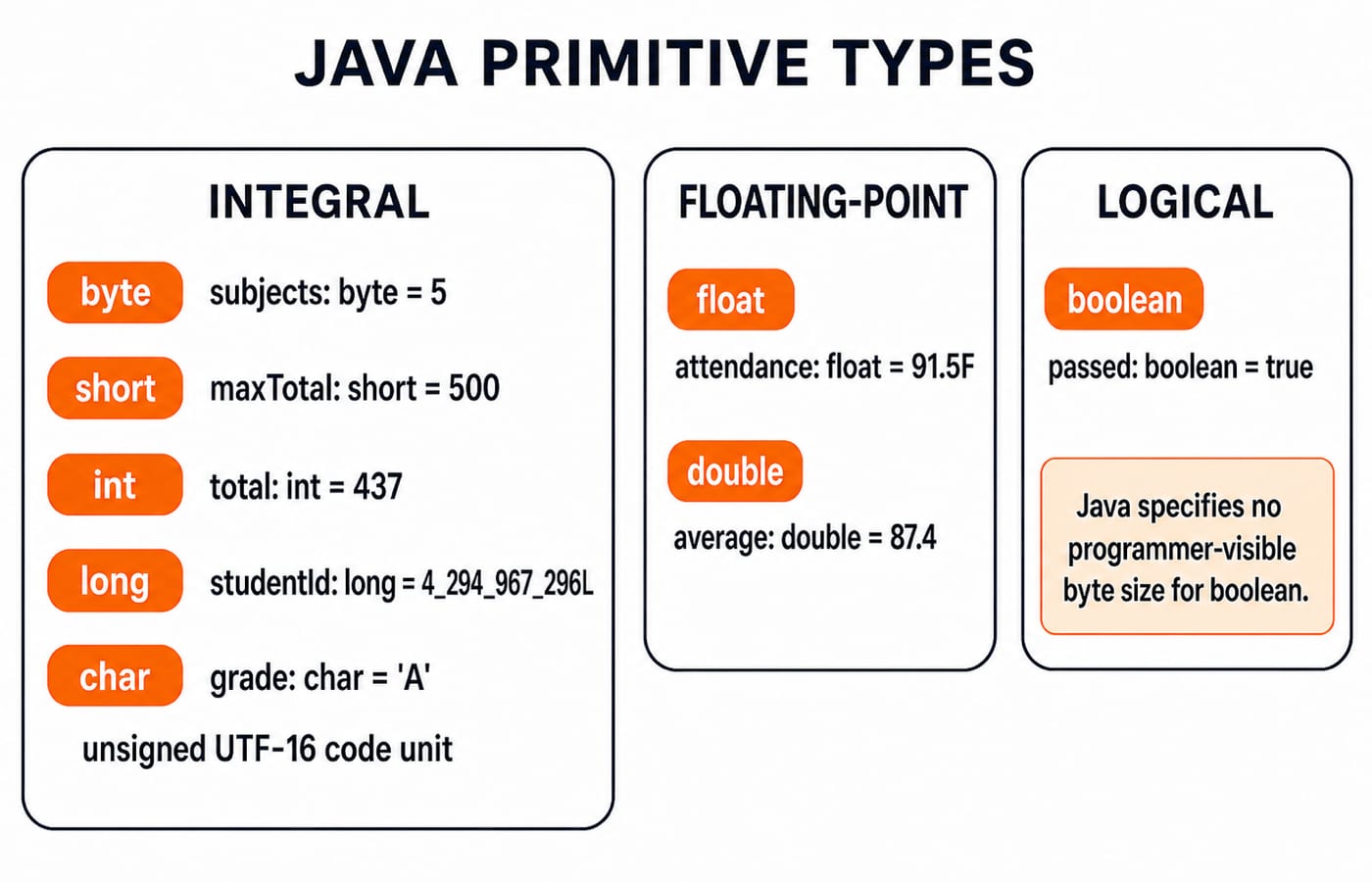
Java has exactly eight primitive types:
type | width or value set | exact range | example |
|---|---|---|---|
| 8-bit signed integer | -128 to 127 |
|
| 16-bit signed integer | -32,768 to 32,767 |
|
| 32-bit signed integer | -2,147,483,648 to 2,147,483,647 |
|
| 64-bit signed integer | -9,223,372,036,854,775,808 to 9,223,372,036,854,775,807 |
|
| 32-bit binary floating point | positive nonzero magnitudes about 1.4E-45 to 3.4028235E38 |
|
| 64-bit binary floating point | positive nonzero magnitudes about 4.9E-324 to 1.7976931348623157E308 |
|
| unsigned 16-bit UTF-16 code unit |
|
|
| logical values |
|
|
Both floating-point types also represent negative values, signed zero, infinities and NaN. Java does not define a programmer-visible storage size for boolean, so treating it as a one-byte type is incorrect.
Use int for ordinary whole-number arithmetic, long for values beyond the int range, and double for general fractional work. Use char for one UTF-16 code unit and boolean for a condition. The powers-of-two boundaries behind signed integer ranges become clearer after Number Systems and Base Conversions Explained.
3. Java literals: suffixes, bases, characters and underscores
The literal 87 has type int. 4_294_967_296L needs L because its value exceeds the int range, and uppercase L is clearer than lowercase l. Decimal floating literals are double by default, so 91.5F needs F, while 87.4 does not.
These declarations all store 42:
int decimal = 42;
int binary = 0b101010;
int hex = 0x2A;
Underscores make 1_000_000 readable, but cannot sit at either end or beside a radix prefix, decimal point or suffix. 'A' is a char; "A" is a String. char omega = '\u03A9'; stores the Greek capital omega, and char letter = 65; stores 'A' because 65 is an in-range constant expression. Some supplementary Unicode code points need a surrogate pair, so one char does not guarantee one complete visible character.
4. Java primitive types: a complete worked program trace
public class PrimitiveReport {
    public static void main(String[] args) {
        byte subjects = 5;
        short maxPerSubject = 100;
        int total = 437;
        long studentId = 4_294_967_296L;
        float attendance = 91.5F;

        double average = total / (double) subjects;
        char grade = average >= 80.0 ? 'A' : 'B';
        boolean passed = total >= subjects * 40
                && attendance >= 75.0F;

        System.out.println(studentId);
        System.out.println(subjects * maxPerSubject);
        System.out.println(average);
        System.out.println(grade);
        System.out.println(passed);
    }
}
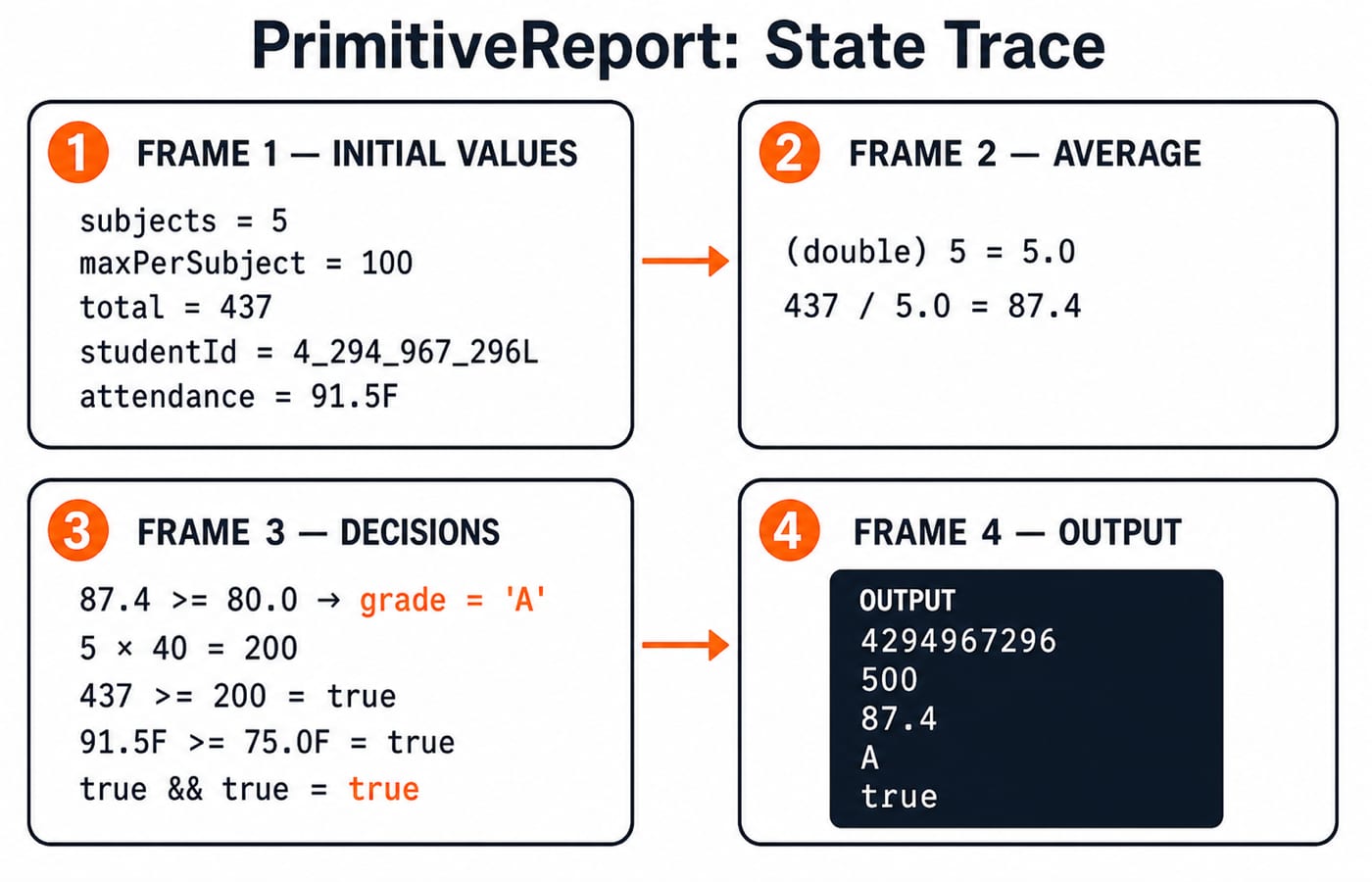
The cast changes 5 to 5.0, so 437 / 5.0 = 87.4. Then 87.4 >= 80.0 selects 'A'. For the pass condition, the byte value 5 is promoted to int: 5 * 40 = 200. Both 437 >= 200 and 91.5F >= 75.0F are true, so true && true produces true.
The output is:
4294967296
500
87.4
A
true
subjects * maxPerSubject equals 500 and has type int after binary numeric promotion, although both stored operands use smaller integral types.
5. Java type conversion and numeric promotion
Widening preserves byte small = 120; int wide = small; as 120. Narrowing can change a value: int n = 260; byte wrapped = (byte) n; keeps the low eight bits and produces 4. double mark = 87.9; int whole = (int) mark; produces 87 because conversion discards the fractional part toward zero.
With byte a = 100; byte b = 27;, a + b has type int and value 127. Therefore int sum = a + b; compiles, but byte sum = a + b; does not. byte constant = 100 + 27; does compile because the compiler knows that the constant value 127 fits in byte.
char letter = 'A'; int code = letter; gives 65. char next = (char) (letter + 2); gives 'C'. A boolean never converts to or from an integer in Java, so C-style 0 and 1 truth values are invalid.
6. Java primitive-type traps: overflow, division and precision
trap | incorrect assumption | correction |
|---|---|---|
integer division |
|
|
integer overflow | 2,500,000,000 fits in an |
|
binary floating point |
| the result is approximately |
float spacing | adding 1 always changes a large | after |
Convert an operand before division when you need a fraction. Use Math.addExact when silent integer wraparound is unacceptable. For the representation behind the last two rows, read Floating Point Representation: IEEE 754 Format. Exact decimal money arithmetic normally needs BigDecimal, which is a class, not a primitive type.
7. How questions test variables and primitive types in Java
Common questions ask you to identify a literal's type, decide whether an assignment compiles, predict promotion and casts, trace ++ or compound assignment, and spot overflow or lost precision. Four quick checks expose the main rules:
double x = 9 / 4;gives2.0.double y = 9 / 4.0;gives2.25.After
byte b = 127; b++;,bis -128 because increment includes an implicit narrowing conversion.After
char ch = 'A'; ch += 2;,chis'C'. In contrast,ch = ch + 2;needs an explicit cast becausech + 2is anint.
Solve these in three steps: annotate each operand's type, apply promotion and the operator, then apply any cast or destination conversion.
8. Variables and primitive types in Java: the short version
Keep six rules together:
Distinguish declaration from later assignment.
Know the value sets of all eight primitive types.
Read literal suffixes and spellings before calculating.
Promote operands before evaluating an expression.
Treat narrowing as a possible value change.
Test overflow and floating precision instead of assuming arithmetic is exact.
The Java Course: Concepts, MCQs & Coding Questions continues from primitive fundamentals into Java concepts, practice questions and coding work.
Finish with this trace before compiling: byte a = 120; int b = a + 140; byte c = (byte) b; double d = b / 6; double e = b / 6.0; Predict a, b, c, d and e using the three-step method.
Pause, then check: the values are 120, 260, 4, 43.0 and 43.333333333333336.