UP Police Computer Operator Cyber Safety: Threats and Safe Handling
Learn to recognise common cyber threats, protect operational data and choose a safe first response through practical workstation scenarios.
KnowledgeGate Team
Exam prep & CS education
Updated 10 Aug 20264 min read
Threat names are easier to memorise than safe first actions. A candidate who can define ransomware still hesitates when a workstation shows a lock screen, an unknown USB turns up on the desk, or an urgent email demands a roster change in fifteen minutes. In each of those moments the safe move has the same shape: read the signal, stop, preserve what you saw, and report before anyone tries to repair the damage.
Cyber safety protects confidentiality, integrity and availability
Confidentiality restricts data to authorised readers. Integrity keeps records accurate and traceable. Availability keeps authorised work accessible.
On OPS-07, daily_dispatch.csv holds 248 records. An unauthorised USB copy breaks confidentiality. Changing record 117 from Pending to Closed without authority breaks integrity. Ransomware making all 248 records unreadable breaks availability.
Recipient checks protect confidentiality, authorised edits protect integrity, and prompt reporting supports availability.
Threat | Signal | Unsafe reaction | Safe first move |
|---|---|---|---|
Phishing or social engineering | Urgent unknown request | Click or disclose | Stop and verify independently |
Malware or ransomware | Lock message | Keep clicking | Stop and report |
Unauthorised access | Unknown sign-in | Share credentials | Preserve and report |
Unsafe removable media | Unknown USB | Plug it in | Leave disconnected and report |
Network or web deception | Mismatched domain | Trust the padlock | Check via a known route |
These five families cover almost everything a computer operator meets at the desk. For the surrounding computer-awareness ground, read UP Police Computer Operator: Binary, OS and Subnet Basics.
Spot phishing before a message becomes an incident
Check four items. The sender domain in shift.notice@up-police-help.example is unfamiliar. The request, subject Urgent roster correction in 15 minutes, creates pressure. The link destination, https://up-police-help.example/login, is not proved genuine merely by https. The attachment type, Duty_Roster_July.pdf.exe, sized 2.4 MB, is an executable with a double extension.
Do not click, open, reply or forward the attachment. Preserve the message, verify through a known approved channel, and report the sender, subject, filename and receipt time 09:40. An OTP or password request by phone is social engineering without a file. End the request, verify independently and never disclose the secret.
Distinguish malware types by behaviour
A virus attaches to a host file; a worm spreads between systems; a trojan pretends to be useful; ransomware blocks access or encrypts data; spyware gathers information; a keylogger records keystrokes.
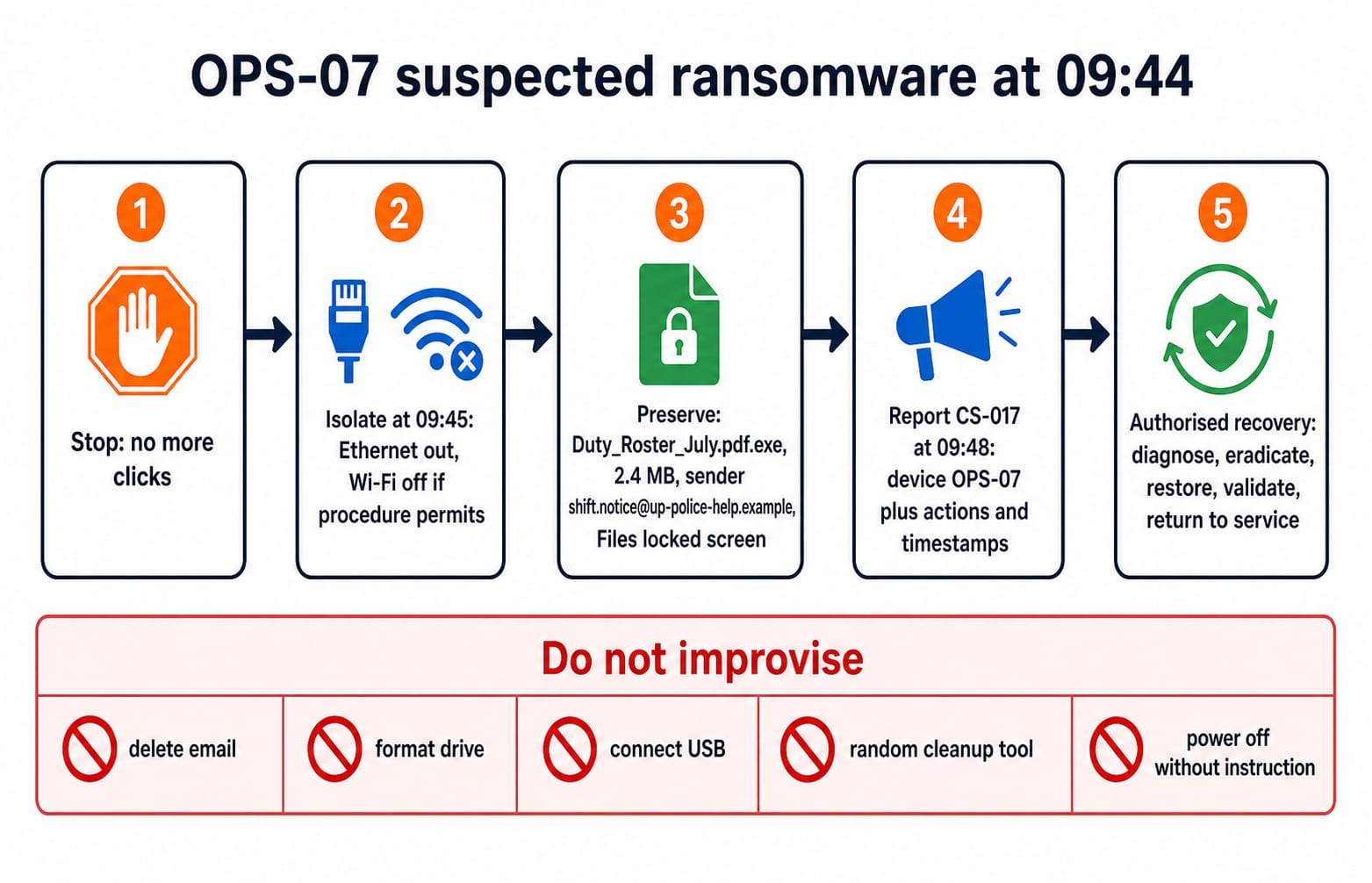
After Duty_Roster_July.pdf.exe is opened on OPS-07 at 09:43, Files locked appears at 09:44, names gain .locked, and the network drive stops opening. This is a suspected ransomware incident; authorised responders must confirm it. Patched software, approved antivirus, least privilege, known backups and controlled USB use reduce risk. Once symptoms start, repeated clicks, renamed encrypted files or another connected drive can increase harm.
Handle a suspected incident in the right order
Use Stop, Isolate, Preserve, Report, Recover: stop; if procedure permits, disconnect OPS-07 Ethernet and Wi-Fi; preserve screen, email and times; report through the approved channel; let authorised personnel scan, eradicate, restore and return it to service.
Timeline: email received 09:40; attachment opened 09:43 (3 minutes later); Files locked appears 09:44 (1 minute later); user stops clicking and disconnects the network 09:45 (another 1 minute); incident CS-017 is logged 09:48 (3 minutes after isolation, 8 minutes after receipt). Record device ID, sender, filename, symptoms and last action.
Deleting the email, formatting, random cleanup or uninstructed power-off may destroy evidence or hinder recovery. Where a unit's written procedure sets a different order, that procedure wins. For a safety-critical system or physical danger, use the authorised emergency route immediately.
Reduce risk with access and data-handling controls
Account | Least-privilege access on OPS-07 |
|---|---|
| Create and update assigned records, not users |
| Review and approve |
| Manage accounts, not routine entry |
| No operational-record access |
Shared logins erase accountability. When op_17 records 5 failed sign-in attempts in 3 minutes, stop guessing, preserve the alert and contact approved support. Never share credentials. A unique passphrase protects the account; a second factor adds a separate check; an OTP is secret.
Verify recipients, lock unattended screens, use approved storage, avoid personal email or cloud drives, and dispose of printouts or media through the authorised process.
Solve cyber-safety questions with first-action logic
Ask: Active threat? Protection target? Safest reversible first action? Evidence to preserve? Authorised next actor? Reject opening a file to test it or deleting everything.
At 11:20, op_17 receives an unexpected OTP while its operator is signed in. At 11:21, a caller asks for it to “cancel a login”. What should the operator do?
A. Share it because the caller knows the username.
B. Sign out, share it, then change the password.
C. Refuse, end the call, preserve the alert and report through the approved channel.
D. Post the OTP in the team chat for verification.
C is correct. The call follows by 1 minute, but speed proves nothing. A, B and D disclose the second factor. C preserves control for independent reporting. The SSC CGL Tier 2 Computer Knowledge MCQs give more first-action practice in the same style. Then move to the UP Police Computer Operator Test Series for practice built around this exam.
Short version and next step
Recall seven lines:
Verify the sender.
Inspect extensions.
Never disclose passwords or OTPs.
Stop when behaviour turns suspicious.
Isolate only as procedure permits.
Preserve names, screens and times.
Report before recovery.
Protect all 248 records in daily_dispatch.csv from exposure, unauthorised change and lost access. Drill for 15 minutes: 5 minutes classifying five signals, 5 minutes ordering the CS-017 response, and 5 minutes explaining why C wins. Justify actions, not labels.
Choose the UP Police Computer Operator Course for structured study, or compare it with the test series on the UP Police Computer Operator exam prep page. For vacancies, eligibility and the current recruitment notice, check the Uttar Pradesh Police Recruitment and Promotion Board (uppbpb.gov.in).
Keep learning
UP Police Computer Operator DBMS and SQL: Learn Tables, Keys and Queries with a Police-Records Database
Build one fictional police-records database from schema to SQL. Learn key types, relationships, 3NF, table constraints and exact query results from consistent data.
Updated 18 Aug 20266 min read70 viewsUP Police Computer Operator
UP Police Computer Operator Typing Test: Build Speed Without Losing Accuracy
Build typing speed without letting errors undo the gain. This practice plan separates Hindi and English, tracks accuracy, and turns each weak attempt into a focused repair drill.
Updated 16 Aug 20265 min readUP Police Computer Operator
UP Police Computer Operator PYQs: Diagnose Recurring Skill Gaps
Turn solved papers into a ranked repair list. Tag the recurring errors, repair the exact skill behind each one, then measure the change with a fresh 18-question mixed check.
Updated 14 Aug 20265 min readUP Police Computer Operator
UP Police Computer Operator Job Profile: Salary, Duties and Promotion Path
Understand the UP Police Computer Operator Grade-A role, its duties, historical pay matrix, probation, transfers, and selection-based promotion path.
Updated 12 Aug 20265 min read112 viewsUP Police Computer Operator