

Types of Software Interview Questions and Answers: Model Answers with Examples
Learn to classify system, application, utility, programming and firmware examples by primary purpose, then defend the difficult boundary cases aloud.
KnowledgeGate Team
Exam prep & CS education
Updated 20 Nov 20266 min read

Types of software questions become difficult when an interviewer names UEFI firmware, a Linux kernel, a Wi-Fi driver, javac, a notification application, a message broker and a log-compression tool in one breath. Classify each item by its primary job, then state whether the taxonomy treats utilities and programming tools separately or under system software. For exam-style category definitions and objective-question traps, use Types of Software Explained: Classification, Worked Examples and Exam Traps. In interviews, organise the same knowledge as a spoken defence: answer, example, boundary and follow-up. Computer Science Fundamentals for Placements by Sanchit Sir supplies the wider placement syllabus.
1. Start with the two-level map of software
Software comprises executable instructions and programs. System software supports the platform; application software performs user or organisational work. Documents, CSV rows and database records remain data when processed.
Name the scheme. A two-way scheme groups operating systems, drivers, utilities and translators under system software. A detailed scheme separates system, application, utility, programming, firmware and middleware. State it before defending a boundary.
2. Know the core types, their primary jobs and defensible examples
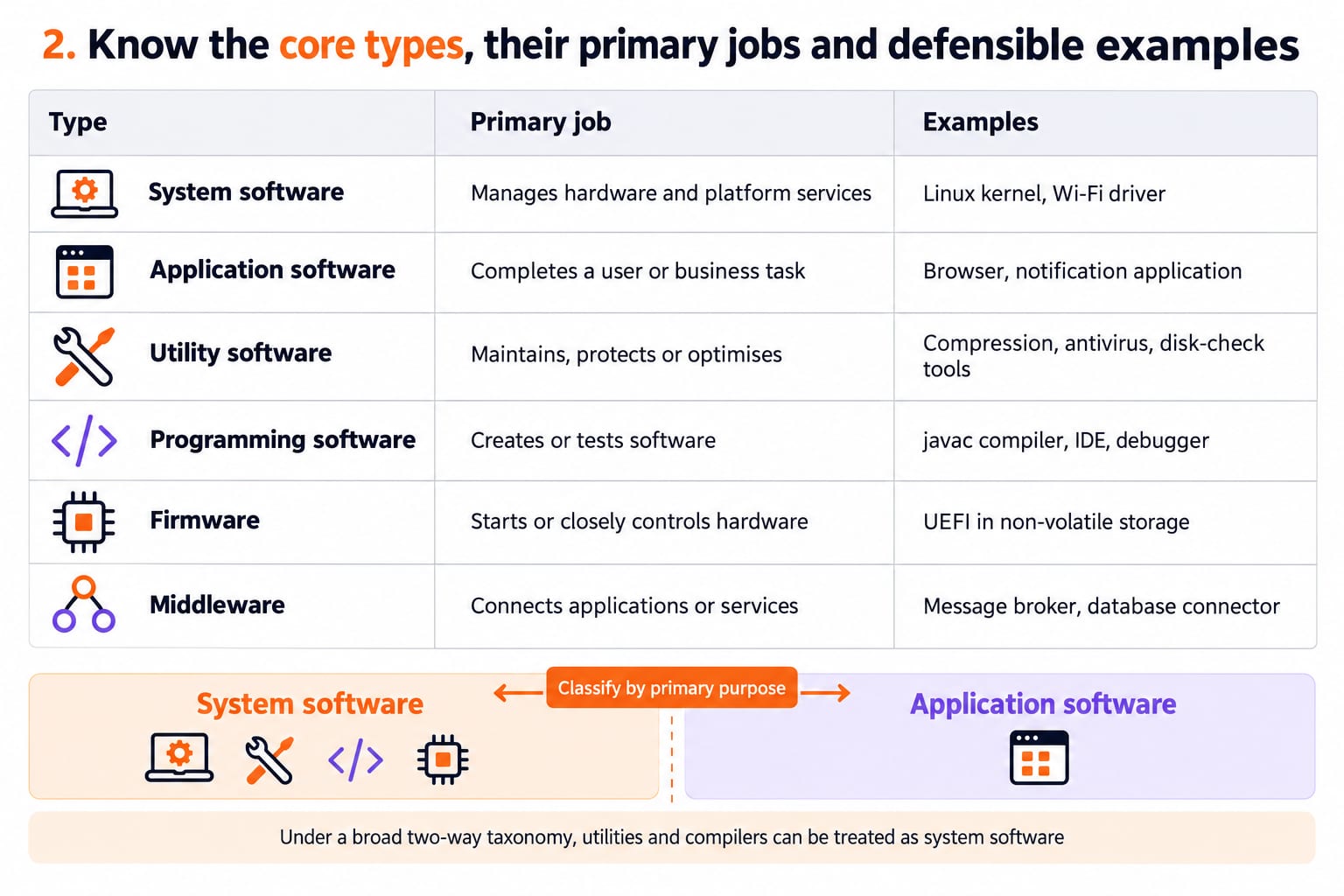
Type | Primary job | Who or what it serves | Examples | Boundary note |
|---|---|---|---|---|
System software | Manages hardware and platform services | Computer and applications | Linux kernel, Wi-Fi driver | Broad schemes include support tools |
Application software | Completes a user or business task | User or organisation | Browser, notification application | Interface does not decide the role |
Utility software | Maintains, protects or optimises | System or data | Compression, antivirus, disk-check tools | Often nested under system software |
Programming software | Creates or tests software | Developers | javac compiler, IDE, debugger | Often grouped under system software |
Firmware | Starts or closely controls hardware | Hardware device | UEFI in non-volatile storage | Hardware-close, but still software |
Middleware | Connects applications or services | Software components | Message broker, database connector | Sometimes platform software |
A compact model answer is: System software runs and supports the platform, while application software solves a user-facing task. Utilities maintain or protect the environment, and programming tools build other programs. Under a broad two-way taxonomy, utilities and compilers can be treated as system software, so I would state the taxonomy before classifying a borderline item.
Classify by primary purpose, not interface, preinstallation or the user's technical skill. An antivirus dashboard remains a utility; a command-line notification client remains application software.
3. Worked interview trace: classify one developer laptop from boot to log compression
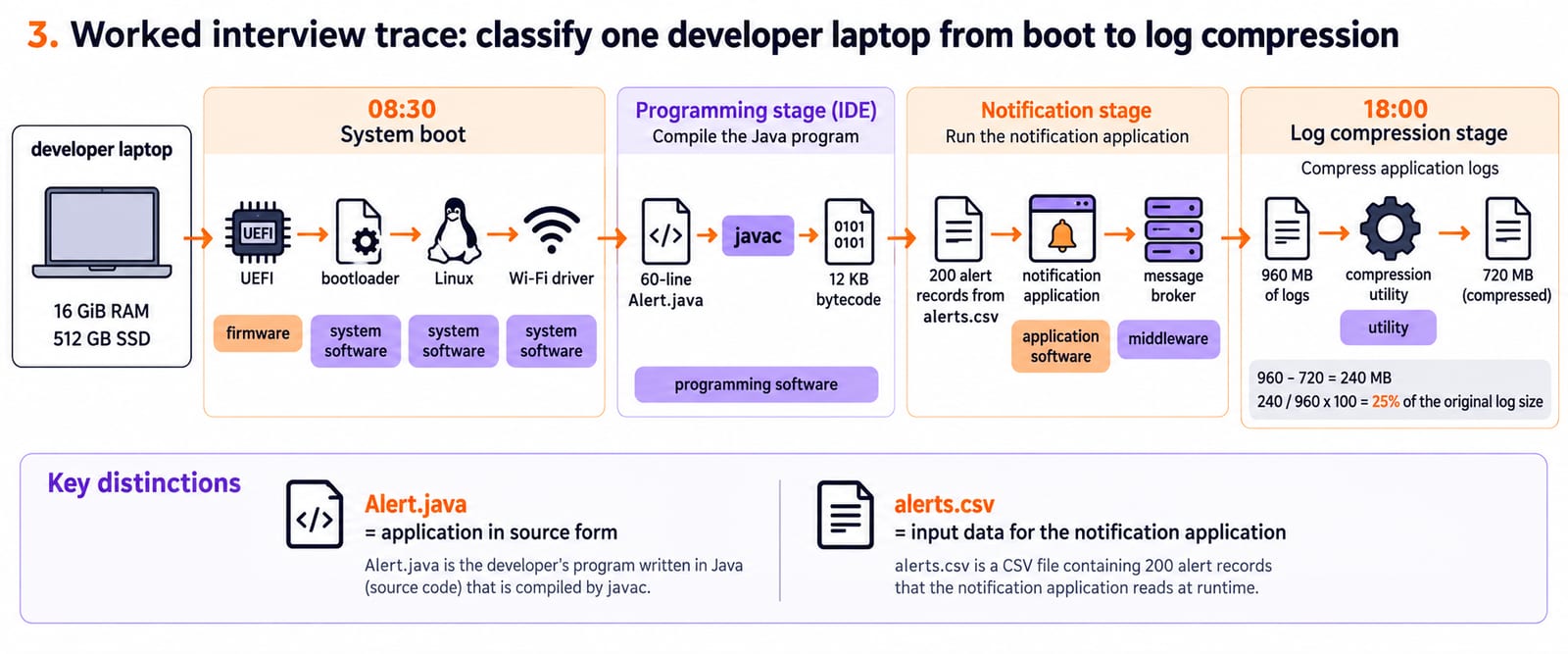
Consider a developer laptop with 16 GiB RAM and a 512 GB SSD. At 08:30, UEFI hands control to a bootloader; Linux starts and loads the Wi-Fi driver. In an IDE, javac turns 60-line Alert.java into 12 KB bytecode. A notification application reads 200 alert records from alerts.csv and sends jobs through a message broker. At 18:00, a compression utility reduces 960 MB of logs to 720 MB.
UEFI is firmware. The bootloader, kernel and driver are system software. The IDE and javac are programming software. The notification client is application software, the message broker is middleware, and the compressor is a utility. Alert.java and alerts.csv differ: the Java file is the application in source form, while the CSV contains its input data. A broad scheme may group firmware, programming tools and utilities under system software.
The notification application requests OS and network services; the OS reaches the Wi-Fi hardware through its driver. javac creates bytecode but does not perform the application's run-time job. Compression saves 960 - 720 = 240 MB, and 240 / 960 x 100 = 25% of the original log size.
4. Basic types-of-software interview questions with model answers
1. What is the difference between system and application software? System software supports the platform; application software performs user or business work. The kernel and driver support the notification client.
2. Why is an operating system system software? It manages processors, memory, files and devices for applications. Its job is platform support, not one business task.
3. Is a compiler system or application software? A detailed scheme calls javac programming software because it translates source. A broad scheme may place language translators under system software.
4. Is utility software a separate type? It can stand separately because maintenance is distinct. A two-way scheme nests it under system software.
5. Is firmware hardware or software? It is software in non-volatile memory for startup or control. Storage location does not make it hardware.
Use definition -> primary function -> concrete example -> boundary note. Ten-second correction: Is alerts.csv software? No, it is input data for the notification application. Files can hold code, executables or data, so role matters.
5. Follow-up questions that test whether the classification holds
How would you classify a desktop web browser? Application software because it accesses web content, not because it has a UI.
A user launches a compression tool, so why not call it an application? Maintenance and storage optimisation make utility the more informative label.
Does javac remain part of the notification application while it runs? No. javac produces bytecode; the JVM executes that bytecode later under OS services.
Can middleware be system software? Some schemes say yes. A detailed scheme separates its connecting role.
Sort UEFI, Linux kernel, Wi-Fi driver, IDE, javac, notification client, message broker, compressor, alerts.csv aloud. Ask, Which taxonomy should I use?, before disputing a translator or utility. Definitions test recall; follow-ups test whether role, lifecycle and taxonomy remain consistent.
6. Common classification traps and exact repairs
Mistake | Why it fails | Repair |
|---|---|---|
Has a GUI, so is an application | UI does not determine purpose | Ask what work it performs |
Preinstalled means system software | Installation source is irrelevant | Inspect the role |
Firmware is hardware | Storage location does not change its nature | Call it hardware-close software |
Compiler and output have one type | Builder and built program differ | javac builds; the notification client is the application |
CSV and log archives are software | They are data here | Identify what executes |
Utility is always top-level | Taxonomies differ | State the scheme |
Software type and software quality answer different questions. Application software names a role; reliability, usability, maintainability and security describe qualities. A reliable utility remains a utility, and an unreliable application remains an application.
Do not say system software needs no users or applications never reach hardware. Applications use OS services and drivers; system components support work.
7. How to practise the interview ladder without memorising labels
Round 1, 30 seconds: Define system and application software with the kernel and notification client.
Round 2, 60 seconds: Add programming software and utility software using
60 lines -> 12 KBand960 MB -> 720 MB.Round 3, 90 seconds: Separate firmware and middleware, then defend the two-way taxonomy.
Verify: the driver connects hardware for the OS; javac creates bytecode; the message broker connects services; the notification client performs the user task. Test relationships, not list length.
For operating-system follow-ups about processes, memory and device management, continue with OS Interview Questions for Freshers: Top 50 with Answers.
8. Types of software: the short version and next step
System: supports the platform.
Application: performs user or business work.
Utility: maintains or protects.
Programming: builds or tests programs.
Firmware: controls startup or hardware closely.
Middleware: connects software components.
Final rule: state the taxonomy before defending a boundary.
On the 16 GiB RAM, 512 GB SSD laptop, system software boots the platform, javac turns 60 lines into 12 KB bytecode, middleware carries jobs between services, the notification client handles 200 records, and the utility reduces 960 MB to 720 MB.
Change one variable: replace the notification client with a browser, javac with Python and the compressor with antivirus. Classify all three under both schemes. For wider core CS, continue with ZERO TO HERO.
Keep learning
Computer Hardware and Software Explained: COA Basics with Worked Examples
See how software instructions become hardware actions. Trace an addition through registers and memory, then calculate address width and a complete memory map.
Updated 15 Nov 20266 min readComputer Organization & Architecture
Types of Software Explained: Classification, Worked Examples and Exam Traps
Classify system, application, programming and utility software by the job each performs. Then apply the rule to memory use, a program lifecycle and common exam traps.
Updated 12 Nov 20266 min readComputer Organization & Architecture
Software Maintenance MCQs: 11 Solved Re-engineering and Reverse Engineering Questions
Attempt 11 published Software Maintenance MCQs, then use the worked explanations to separate reverse engineering, refactoring, re-engineering and perfective maintenance.
Updated 19 Nov 20267 min readUGC NET Computer Science
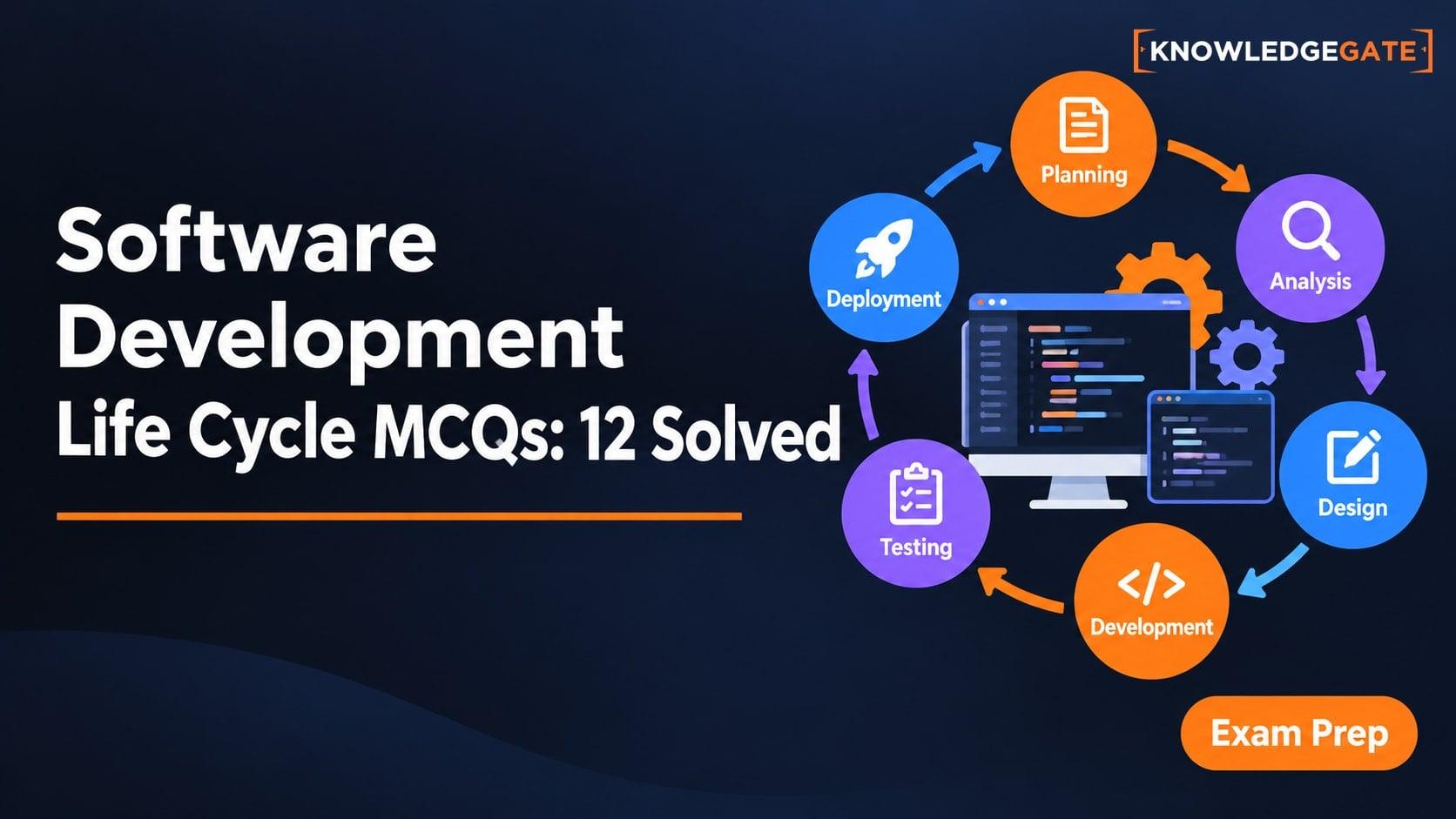
Software Development Life Cycle MCQs: 12 Solved Questions on SDLC Stages
Solve 12 published SDLC MCQs with direct explanations, stage cues, and a worked campus clinic portal that connects requirements, design, testing, and maintenance.
Updated 17 Nov 20267 min readUGC NET Computer Science