Strings in C++: Beginner Tutorial with Runnable Examples
Learn how std::string behaves through exact outputs, safe input patterns, a worked index trace, common traps, and three short practice problems.
KnowledgeGate Team
Exam prep & CS education
Updated 25 Aug 20265 min read
A C++ string looks simple until input stops at a space, an index crosses the valid range, or find() returns something that is not a normal position. std::string supports input, indexing, editing, and searching. The code uses C++17.
C++ strings: what std::string stores and how to create one
std::string is the standard-library type for a sequence of characters. The text "Gate" is a string literal, while a C-style string is stored in a character array. Both matter in C++, and std::string provides length, search, and editing operations directly.
Include <string> and qualify library names, so the program does not depend on using namespace std;:
#include <iostream>
#include <string>

int main() {
    std::string topic = "C++ strings";
    std::string empty;
    std::string border(4, '*');

    std::cout << topic << '\n';
    std::cout << empty.size() << '\n';
    std::cout << border << '\n';
}
The exact output is:
C++ strings
0
****
The empty string has length 0, and the repeated-character constructor creates four asterisks. Coding & DSA Courses for Placements is the broader route from language fundamentals to problem-solving.
C++ string input: cin, getline, and spaces
std::cin >> value reads one whitespace-delimited token. std::getline(std::cin, value) reads the rest of a line. The difference becomes important when one input operation leaves a newline waiting in the stream.
#include <iostream>
#include <string>

int main() {
    int age;
    std::string fullName;

    std::cin >> age;
    std::getline(std::cin >> std::ws, fullName);
    std::cout << fullName << " is " << age << '\n';
}
For the two-line input 21 and Asha Verma, the output is Asha Verma is 21. The manipulator std::ws consumes leading whitespace, including the pending newline, before getline starts.
Method for input | Stored value |
|---|---|
|
|
|
|
Neither method is universally better. Use token input for one word and line input when spaces belong to the value.
C++ string length, indexing, and substrings: one worked example
Take std::string word = "Knowledge";. Count and inspect it before changing anything:
word.size()is9, so the valid indices are0through8.word.front()is'K',word.back()is'e', andword[4]is'l'.word.at(8)is'e'.word.substr(0, 4)starts at index0and takes four characters, producing"Know".word.find("edge")is5, the index where the matching substring begins.After
word[0] = 'k';, the value becomes"knowledge".
operator[] does not check whether an index is valid. By contrast, at() reports an invalid access by throwing std::out_of_range. The accesses above stay inside the valid range.
std::string word = "Knowledge";  // place inside main after including <string>
std::cout << word.size() << ' ' << word.substr(0, 4) << ' '
          << word.find("edge") << '\n';
This directly runnable fragment prints 9 Know 5 when placed inside main with <iostream> and <string> included.
![Index diagram for the string Knowledge marking substr(0,4) as Know, word[4] as the letter l, and find(edge) starting at index 5.](https://cdn.knowledgegate.ai/blog-assets/blog_asset_1784268906792_ldphl6.jpg)
C++ string concatenation, insertion, replacement, and erasure
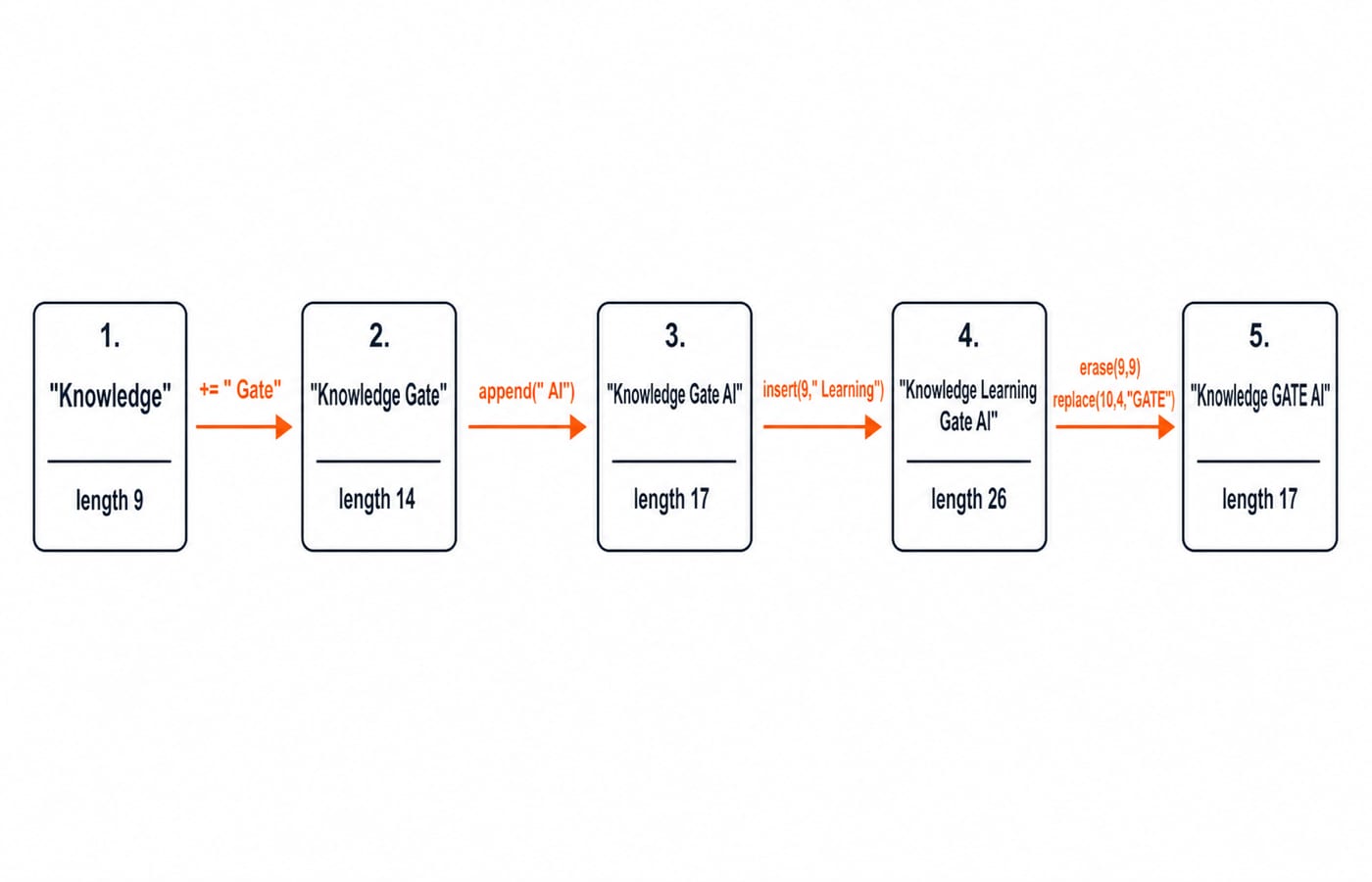
String positions refer to the value at that step. Count the nine characters in Knowledge before using position 9 in this pipeline:
std::string brand = "Knowledge";       // length 9
brand += " Gate";                      // "Knowledge Gate", length 14
brand.append(" AI");                   // "Knowledge Gate AI", length 17
brand.insert(9, " Learning");          // "Knowledge Learning Gate AI", length 26
brand.erase(9, 9);                      // "Knowledge Gate AI", length 17
brand.replace(10, 4, "GATE");          // "Knowledge GATE AI", length 17
std::cout << brand << '\n';
Placed inside main with <iostream> and <string>, the fragment prints Knowledge GATE AI. Each member operation mutates brand. In contrast, std::string joined = first + " " + second; creates a combined value and assigns it to a separate string.
C++ string search, comparison, and character traversal
With std::string text = "Knowledge Gate";, text.find("Gate") returns 10. Searching for "Java" returns std::string::npos, so test it safely:
auto position = text.find("Java");
if (position != std::string::npos) {
    std::cout << position << '\n';
}
The comparison text == "Knowledge Gate" is true, while text == "knowledge gate" is false because string comparison is case-sensitive.
For std::string compact = "KnowledgeGate";, a range-based loop visits all 13 characters once. Counting a, e, i, o, and u finds o, e, e, a, e, so the final count is 5. This is linear work, which Time Complexity and Asymptotic Notation: Big-O explains in a wider context. Strings are also common hash-table keys; Hashing and Collision Resolution is the next data-structure concept.
C++ string errors beginners actually hit
With std::string s = "cat";, the character indices are 0, 1, and 2. In C++17, reading s[3] returns the terminating null character, not a character in the string, so do not treat it as data. s.at(3) instead throws std::out_of_range. Calling front() or back() on an empty string is also invalid, so first check if (!s.empty()).
After std::cin >> age, plain std::getline(std::cin, fullName) may consume the pending newline and return an empty line. Correct it with std::getline(std::cin >> std::ws, fullName).
The test if (s.find("x") != -1) relies on an unsigned conversion and hides the interface's meaning. Write if (s.find("x") != std::string::npos) instead, and store positions in std::size_t or auto.
Finally, an integer is not automatically appended as decimal text. Build the exact value "Count: 5" with std::string("Count: ") + std::to_string(5).
C++ string questions in MCQs, output tracing, and coding rounds
Trace this code by marking the indices b0 a1 n2 a3 n4 a5:
std::string s = "banana";
std::cout << s.find("na") << ' ' << s.substr(1, 3);
The first na starts at index 2. The substring starts at index 1 and takes three characters, so the exact output is 2 ana.
Try these three exercises, then compare your approach:
Read
4, then the lineData Structures. Usestd::getline(std::cin >> std::ws, subject)and print4: Data Structures.Test
"level"with left and right indices moving inward. If every pair matches, printpalindrome. Empty and one-character strings are palindromes because no mismatched pair exists.Remove consecutive duplicates from
"aaabbccccdaa". Guard the empty input, copy the first character, then append a character only when it differs from the last copied one. The result is exactly"abcda".
Assessors are checking whether you understand indices, npos, input boundaries, case sensitivity, and clean single-pass traversal, not whether you remember a long list of member functions.
C++ strings: the short version and next step
Use std::string for editable text, getline for whole lines, indices strictly below size(), and std::string::npos for a failed search. Practise mutation and traversal with exact outputs. Next, rerun the Knowledge example with "Programming", then recompute its length, last index, first four-character substring, and one search position before compiling. The C++ Programming Course is a structured route into more concepts, MCQs, and coding questions after this tutorial.
Keep learning
ctype.h Functions in C: Classify Characters and Convert Case Safely
Learn which character test to choose, trace a complete C classifier, and avoid signed-char and EOF mistakes. Worked examples separate classification from case conversion.
Updated 5 Oct 20266 min readC
Key Features of the C Programming Language: Code Examples
What do C's features actually do in a program? Follow an even-number sum and a pointer update, then test your understanding with small code changes.
Updated 30 Sep 20266 min readC
Preprocessor and Macros in C: Expansion Rules and Worked Examples
Learn what happens before C compilation, expand object-like and function-like macros by hand, and avoid precedence and repeated-evaluation bugs.
Updated 18 Sep 20266 min readC
Variables and Data Types in C: Declarations, Conversions and Runnable Examples
Learn how C types control stored values, expressions and I/O. Compile a complete marks program, trace its conversions and repair common type mistakes.
Updated 17 Sep 20266 min readC