Preprocessor and Macros in C: Expansion Rules and Worked Examples
Learn what happens before C compilation, expand object-like and function-like macros by hand, and avoid precedence and repeated-evaluation bugs.
KnowledgeGate Team
Exam prep & CS education
Updated 18 Sep 20266 min read
A #define line resembles C code, but the compiler does not execute it as a statement or call it as a function. The preprocessor rewrites tokens before ordinary compilation begins, which is why SQUARE_BAD(2 + 3) becomes 11 while a corrected macro becomes 25.
Related reading: macro definition traps and C output and conversion traps.
What the C preprocessor does before compilation
The build sequence is source.c -> preprocessing -> expanded C source -> compilation -> linking. Directives such as #include, #define, and #if are handled in the preprocessing stage. A macro definition itself takes no trailing semicolon.
#include <stdio.h>
#define LIMIT 4

int main(void) {
    int values[LIMIT] = {3, 5, 7, 9};
    printf("%d\n", values[LIMIT - 1]);
    return 0;
}
The relevant tokens become int values[4] = {3, 5, 7, 9}; and values[4 - 1]. The subscript is 3, so the compiled program prints 9. Inspect the expanded source with gcc -E -P demo.c. Included headers create plenty of output, so search it for values.
![Four-stage diagram showing the LIMIT macro replaced by 4 so values[4 - 1] prints 9 after compilation.](https://cdn.knowledgegate.ai/blog-assets/blog_asset_1784572042215_i7c65h.jpg)
Includes, object-like macros, and removing a definition
#include <stdio.h> is the usual form for an implementation or installed header. #include "score.h" suits a header belonging to your project.
Object-like macros replace a name with tokens. Consider a made-up quiz rule, not an official marking scheme:
#define MARKS_CORRECT 2
#define PENALTY_WRONG 1
int correct = 18, wrong = 4;
int score = correct * MARKS_CORRECT - wrong * PENALTY_WRONG;
Expansion gives 18 * 2 - 4 * 1 = 36 - 4 = 32. After #undef PENALTY_WRONG and #define PENALTY_WRONG 0, the same expression gives 18 * 2 - 4 * 0 = 36. This is textual substitution, not a typed const variable. Prefer a typed constant when type checking or debugger visibility matters.
Function-like macros and the parenthesis rule
Compare these definitions:
#include <stdio.h>
#define SQUARE_BAD(x) x * x
#define SQUARE(x) ((x) * (x))
#define AREA(w, h) ((w) * (h))

int main(void) {
    printf("bad=%d safe=%d\n", SQUARE_BAD(2 + 3), SQUARE(2 + 3));
    return 0;
}
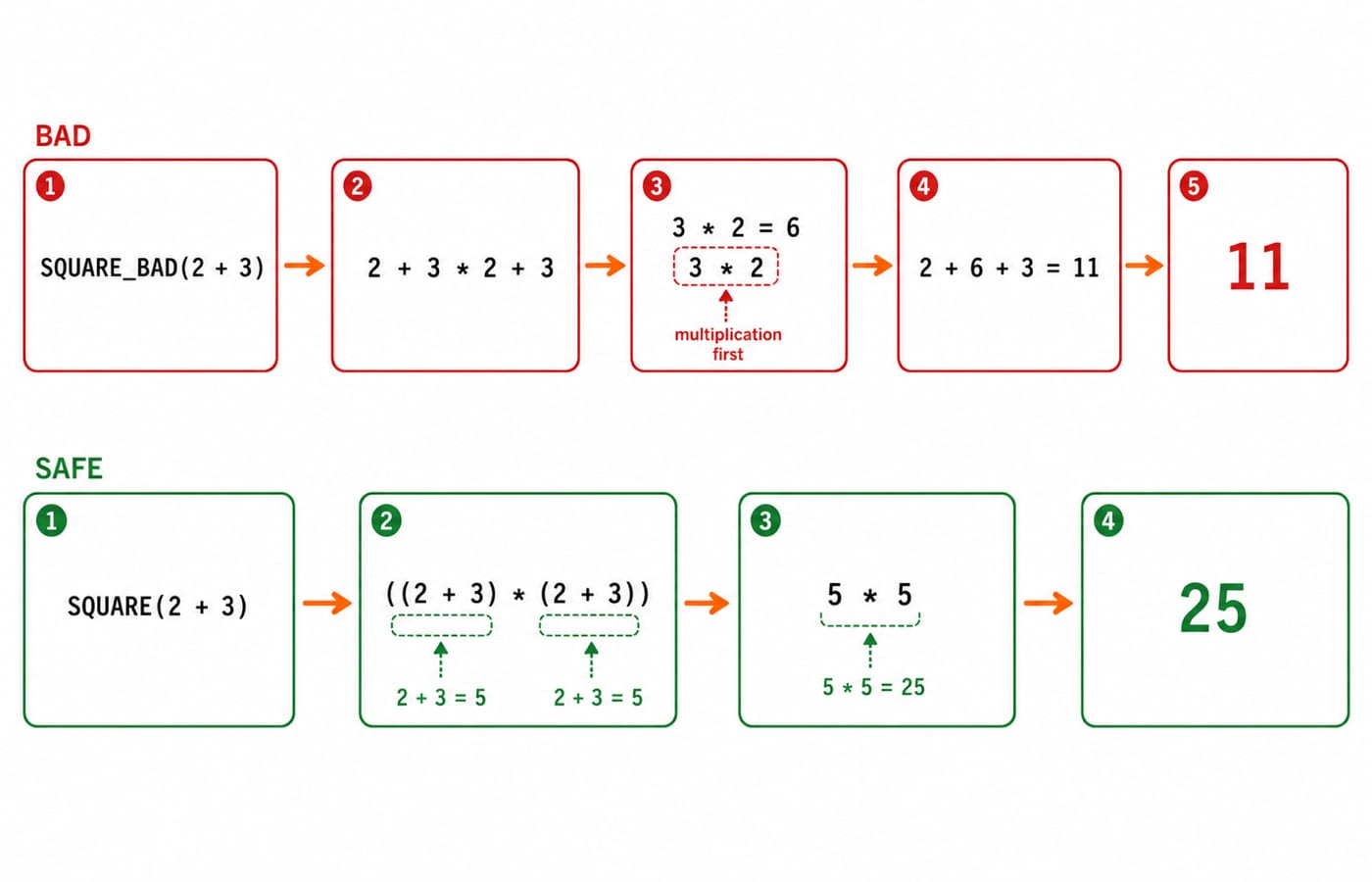
SQUARE_BAD(2 + 3) expands to 2 + 3 * 2 + 3. Multiplication happens first, giving 2 + 6 + 3 = 11. SQUARE(2 + 3) expands to ((2 + 3) * (2 + 3)) = 5 * 5 = 25. A program printing both expressions produces bad=11 safe=25.
The rule follows from the expansion: parenthesise every parameter use and the complete replacement expression. Thus AREA(6, 4) becomes ((6) * (4)) = 24. A function-like macro expands only when its name is followed by invocation parentheses. It is still token substitution, not a function call.
Repeated evaluation, side effects, and inline functions
Parentheses fix precedence, but not repeated evaluation:
#define MAX(a, b) ((a) > (b) ? (a) : (b))
int i = 4, j = 7;
int result = MAX(i++, j++);
The call expands to ((i++) > (j++) ? (i++) : (j++)). The comparison uses 4 > 7, which is false, leaving i = 5 and j = 8. The selected branch returns 8 and increments j again. Therefore result = 8, i = 5, and j = 9. The larger operand was evaluated twice.
SQUARE(k++) is worse: it expands to ((k++) * (k++)). The two modifications of k are unsequenced, so the expression has undefined behaviour. Do not invent an output. Use a typed alternative:
static inline int square_int(int x) { return x * x; }square_int(6) safely gives 36. As the Functions in C tutorial explains, functions provide parameter types and evaluate each argument once. Use a macro when preprocessing is genuinely required; prefer a function or static inline function for ordinary computation.
Stringification, token pasting, and variadic macros
The # operator turns a macro argument into a string:
#define STRINGIFY_RAW(x) #x
#define STRINGIFY(x) STRINGIFY_RAW(x)
#define LIMIT 64
STRINGIFY_RAW(LIMIT) produces "LIMIT". The extra level in STRINGIFY(LIMIT) permits expansion first, producing "64".
The ## operator pastes tokens. With #define SENSOR_ID(n) sensor_##n and int sensor_3 = 42;, SENSOR_ID(3) becomes sensor_3, so printf("%d\n", SENSOR_ID(3)); prints 42. It forms a token, not a runtime string.
A variadic macro accepts additional arguments: #define LOG(fmt, ...) printf("[LOG] " fmt "\n", __VA_ARGS__). Then LOG("count=%d", 3) prints [LOG] count=3.
Conditional compilation and header guards
Conditional directives decide which source reaches the compiler:
#include <stdio.h>
#ifndef FEATURE_X
#define FEATURE_X 0
#endif
#ifndef LEVEL
#define LEVEL 0
#endif
#if FEATURE_X && LEVEL >= 2
#define MODE_NAME "detailed"
#else
#define MODE_NAME "basic"
#endif
int main(void) { printf("mode=%s\n", MODE_NAME); }
gcc config.c -o config && ./config prints mode=basic. gcc -DFEATURE_X=1 -DLEVEL=3 config.c -o config && ./config prints mode=detailed. In the same branch tree, #if tests an expression, #ifdef and #ifndef test whether a name is defined, #elif adds another test, #else supplies the fallback, and #endif closes it.
A header guard prevents a header body from appearing more than once in one translation unit:
#ifndef SCORE_H
#define SCORE_H
int score(int correct, int wrong);
#endif
Header guards solve duplicate inclusion within one translation unit. The Header Files and Linking in C: Build a Multi-File Program Step by Step continues into declarations, object files, symbol resolution, and linker errors, while #if and #ifndef remain token-selection directives handled before compilation.
Common macro mistakes and a debugging checklist
Four traps account for many macro bugs:
#define TEN 10;wrongly puts a semicolon into every expansion.Missing parentheses can change precedence.
Arguments containing
++,--, assignments, or function calls can repeat side effects.#ifdef DEBUGis true after#define DEBUG 0, because the name remains defined.
For a multi-statement macro, use one statement-shaped wrapper:
#define SWAP_INT(a, b) do { \
    int temp = (a); (a) = (b); (b) = temp; \
} while (0)
Starting with x = 3 and y = 8, SWAP_INT(x, y); leaves x = 8 and y = 3. The wrapper behaves as one statement in an if/else. Even here, pass simple modifiable variables, not side-effecting expressions.
To debug a macro, run gcc -E -P, locate its invocation, write the exact expansion, apply normal C precedence, and count every evaluation of each argument. Then ask whether a typed constant or inline function is clearer.
Macro practice and the short version
Assessment questions can ask you to predict output, find a precedence bug, select an active #if branch, distinguish # from ##, or spot repeated evaluation. Try these:
DOUBLE(6 - 1)with#define DOUBLE(x) ((x) + (x))becomes((6 - 1) + (6 - 1)) = 5 + 5 = 10.SQUARE_BAD(4 + 1)becomes4 + 1 * 4 + 1 = 4 + 4 + 1 = 9, not25.The configuration program with
FEATURE_X=1andLEVEL=1selectsmode=basic, becauseLEVEL >= 2is false.SWAP_INTstarting atx = 12,y = 20ends atx = 20,y = 12.
In short, the preprocessor rewrites tokens. Parenthesised macros still must not repeat side effects, # makes strings, ## makes tokens, and conditional directives choose what reaches the compiler. You can practise with about 900 live C Programming questions on KnowledgeGate. For a structured start, use the Complete C Programming course and the programming course catalogue. Continue the C ladder with the Pointers in C tutorial.
Keep learning
ctype.h Functions in C: Classify Characters and Convert Case Safely
Learn which character test to choose, trace a complete C classifier, and avoid signed-char and EOF mistakes. Worked examples separate classification from case conversion.
Updated 5 Oct 20266 min readC
Key Features of the C Programming Language: Code Examples
What do C's features actually do in a program? Follow an even-number sum and a pointer update, then test your understanding with small code changes.
Updated 30 Sep 20266 min readC
Variables and Data Types in C: Declarations, Conversions and Runnable Examples
Learn how C types control stored values, expressions and I/O. Compile a complete marks program, trace its conversions and repair common type mistakes.
Updated 17 Sep 20266 min readC
Unions in C: Syntax, Shared Memory and Worked Examples
A C union reuses one storage region for alternative member types, while a separate enum tag keeps each payload read consistent. Safe member switching prevents stale reads, layout mistakes, and character-array errors.
Updated 15 Sep 20265 min readC