Classes and Objects in C++: Beginner Tutorial with Runnable Examples
Build a precise mental model of C++ classes and objects with two Rectangles, a checked setter, exact output traces, common error fixes, and short exercises.
KnowledgeGate Team
Exam prep & CS education
Updated 26 Aug 20266 min read
A class definition can look like a renamed struct, but the important shift is deciding which data belongs to each object and which operations may change it. One Rectangle program traces areas 8 * 5 = 40 and 3 * 7 = 21. The guard accepts only positive dimensions, so a rejected call leaves that object's state unchanged. The Coding & DSA catalogue groups the longer programming paths that build on these basics.
Classes and objects in C++: blueprint, instance, state and behaviour
A class is a programmer-defined type that groups a representation with the operations allowed on it. An object is one concrete instance of that type. Here, Rectangle is the type. noticeBoard and photoFrame are two separate objects, not alternative names for the class.
Their state is the pair of member values width_ and height_. Their behaviour comes from setDimensions() and area(). The public interface tells caller code what it may use, while the private representation prevents direct access to those stored values.
The key invariant is independence. Giving noticeBoard dimensions 8, 5 produces area 40. Giving photoFrame dimensions 3, 7 produces area 21. Both objects follow one class definition, but each owns its ordinary data members.
Read a C++ class definition line by line
Start with the class itself:
class Rectangle {
private:
    int width_{0};
    int height_{0};

public:
    bool setDimensions(int width, int height) {
        if (width <= 0 || height <= 0) {
            return false;
        }
        width_ = width;
        height_ = height;
        return true;
    }

    int area() const {
        return width_ * height_;
    }
};
class Rectangle introduces a type, and the braces contain its members. private: and public: change access for the declarations that follow them. {0} gives every new object's dimensions a known initial value. A member function operates on the particular object used for its call. The semicolon after the closing brace is required.
The const in area() const means this function reads the object without changing width_ or height_. In-class initialisers give every object a known starting state, and the checked setter accepts both dimensions only when they are positive.
Runnable C++ example: create two Rectangle objects and trace their output
Save this complete program as main.cpp:
#include <iostream>

class Rectangle {
private:
    int width_{0};
    int height_{0};

public:
    bool setDimensions(int width, int height) {
        if (width <= 0 || height <= 0) {
            return false;
        }
        width_ = width;
        height_ = height;
        return true;
    }

    int area() const {
        return width_ * height_;
    }
};

int main() {
    Rectangle noticeBoard;
    Rectangle photoFrame;

    noticeBoard.setDimensions(8, 5);
    photoFrame.setDimensions(3, 7);

    std::cout << "Notice board area: " << noticeBoard.area() << '\n';
    std::cout << "Photo frame area: " << photoFrame.area() << '\n';

    const bool changed = photoFrame.setDimensions(-2, 9);
    std::cout << std::boolalpha;
    std::cout << "Update accepted: " << changed << '\n';
    std::cout << "Photo frame area after rejected update: "
              << photoFrame.area() << '\n';
    return 0;
}
On macOS or Linux, compile and run it with:
g++ -std=c++17 -Wall -Wextra main.cpp -o classes_demo
./classes_demo
On Windows, run the corresponding .exe. Before checking the output, trace the values. The first area is 8 * 5 = 40. The second is 3 * 7 = 21. In the later call, -2 <= 0 is true, so the method returns false before either assignment. photoFrame therefore remains 3, 7, and its area remains 21.
Notice board area: 40
Photo frame area: 21
Update accepted: false
Photo frame area after rejected update: 21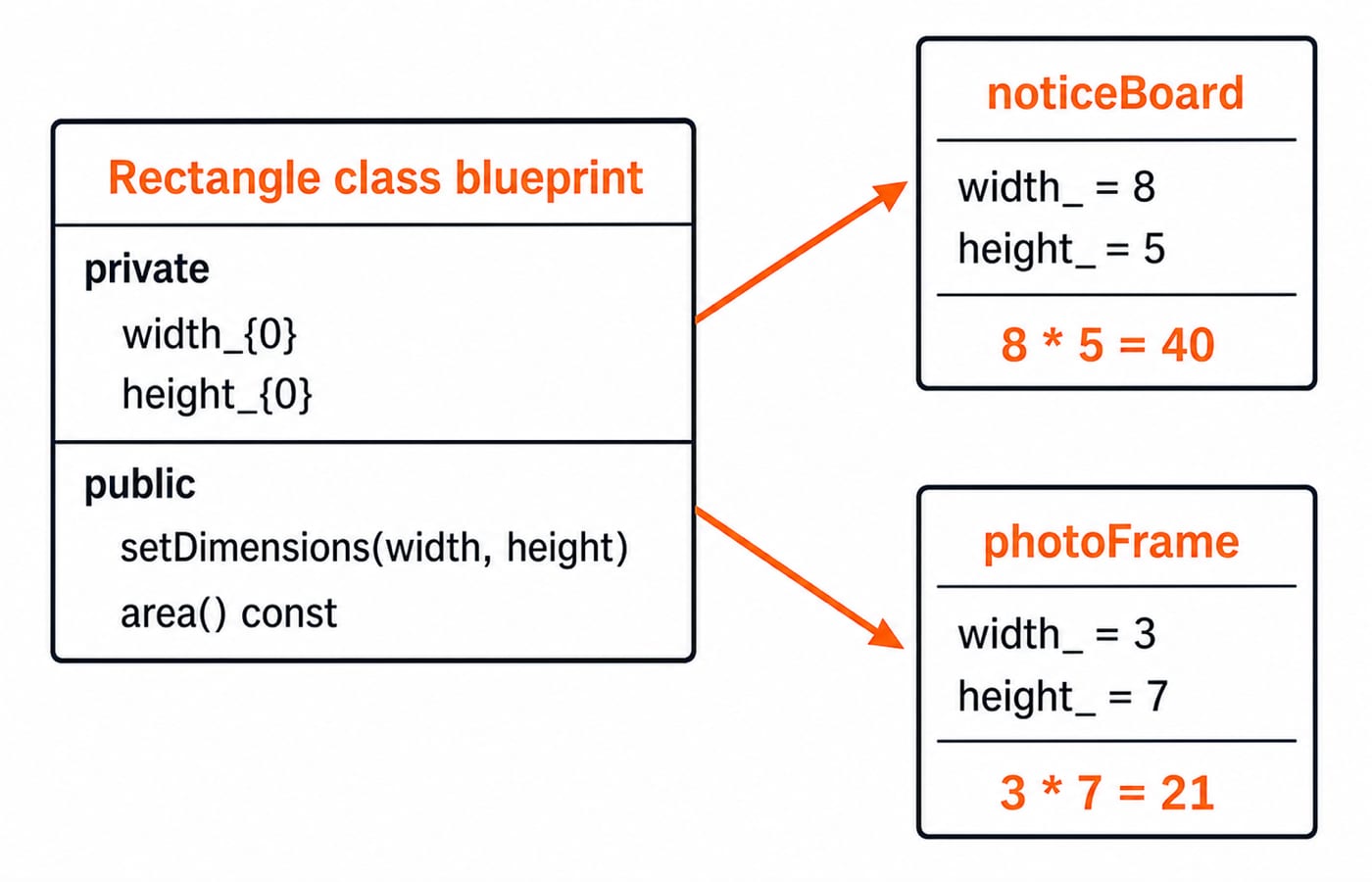
Object creation, member access and independent state
Rectangle noticeBoard; declares and creates one object whose two members begin at 0. Defining the class alone creates no Rectangle object. The call noticeBoard.setDimensions(8, 5) uses the dot operator to select a public member function on that object.
If we later call noticeBoard.setDimensions(10, 6), its area becomes 10 * 6 = 60. photoFrame.area() is still 21. This proves that the objects do not share width_ and height_.
A pointer uses different member-access syntax:
Rectangle *selected = &photoFrame;
std::cout << selected->area();
Here, selected->area() returns 21. Use . with an object expression and -> with a pointer to an object.
Encapsulation protects a valid Rectangle state
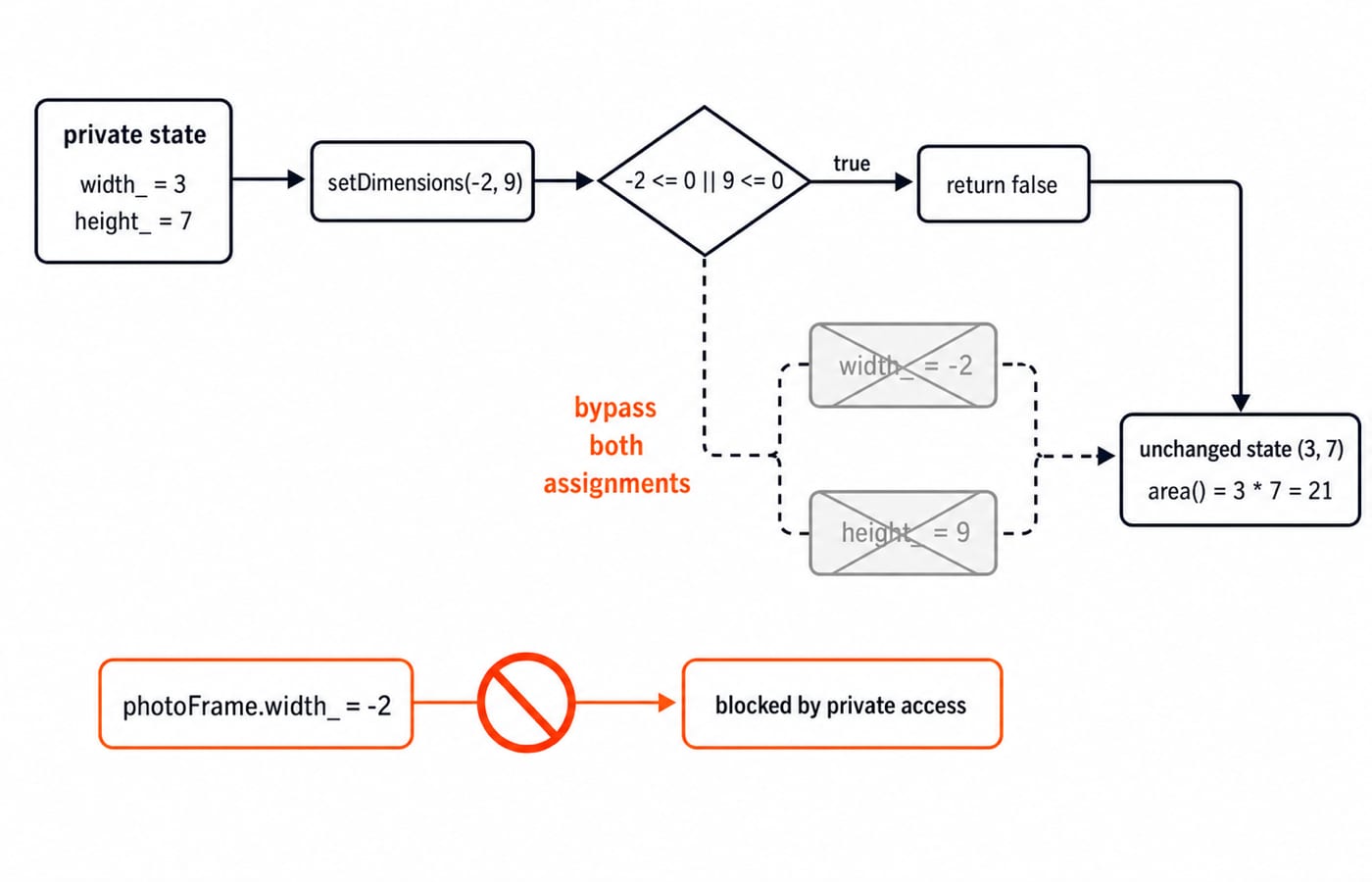
Making width_ and height_ private gives the class control over updates. Caller code such as photoFrame.width_ = -2; fails at compile time. All accepted changes must therefore pass through setDimensions(), allowing the class to promise that accepted dimensions are positive.
Trace the rejected update as a state transition. Before the call, photoFrame is (3, 7). For setDimensions(-2, 9), the condition width <= 0 || height <= 0 is true because -2 <= 0. The method returns false, neither assignment runs, the stored pair stays (3, 7), and area() stays 3 * 7 = 21.
Validating both inputs before either assignment matters. Assigning width_ = width first and only then discovering an invalid height could leave a mixed state. Check the complete proposed state, then update both members.
Common C++ class and object errors
Small syntax mistakes often reveal a wrong mental model:
mistake | what happens | correction |
|---|---|---|
Omit | Compilation fails after the closing brace | End the definition with |
Use | Private access causes a compile-time error | Use a public member function |
Write | The type is treated as if it were an object | Call |
Use |
| Write |
Leave | Calling | Keep the |
Write | The parameter is assigned to itself | Use |
Members of a class are private until an access label changes that. Members of a struct are public by default. That default is not the whole difference in design intent, and either form can contain data and member functions in C++.
How assessments and interviews test classes and objects
Common questions ask you to distinguish a class from an object, count independently created objects, predict method output, identify an access-control error, or trace state after accepted and rejected calls. Test yourself with these checkable cases:
A fresh
Rectangle rreceivesr.setDimensions(6, 4)and thenr.setDimensions(0, 9). Its area is6 * 4 = 24because the second call is rejected.leftis set to(2, 5)andrightto(4, 4). Their areas are2 * 5 = 10and4 * 4 = 16.For
Rectangle *p = &left;, repairp.area()top->area(). It returns10.
Practise the same invariant by defining a Box class with three private integer dimensions, a checked setDimensions(), and volume() const. Length 4, width 3, and height 2 must give 4 * 3 * 2 = 24. Once object-state tracing feels natural, see Stacks and queues: operations, applications and the exam angle and Sorting Algorithms Compared: complexity, stability, and the n log n lower bound as later applications.
Classes and objects in C++: the short version and next step
A class defines a type and its allowed operations. Each object owns its ordinary member state, public methods form the usable interface, and private members protect the representation. Use . for an object and -> for an object pointer. The traced output is 40, 21, false, and an unchanged 21. The C++ Programming course adds concept practice, while Coding For Placements connects the same foundation to multi-language interview preparation.
Keep learning

ctype.h Functions in C: Classify Characters and Convert Case Safely
Learn which character test to choose, trace a complete C classifier, and avoid signed-char and EOF mistakes. Worked examples separate classification from case conversion.
Updated 5 Oct 20266 min readC

Key Features of the C Programming Language: Code Examples
What do C's features actually do in a program? Follow an even-number sum and a pointer update, then test your understanding with small code changes.
Updated 30 Sep 20266 min readC

Preprocessor and Macros in C: Expansion Rules and Worked Examples
Learn what happens before C compilation, expand object-like and function-like macros by hand, and avoid precedence and repeated-evaluation bugs.
Updated 18 Sep 20266 min readC

Variables and Data Types in C: Declarations, Conversions and Runnable Examples
Learn how C types control stored values, expressions and I/O. Compile a complete marks program, trace its conversions and repair common type mistakes.
Updated 17 Sep 20266 min readC