Python Standard Libraries MCQs: Solved Questions with Explanations
Solve 14 Python standard-library questions by tracing imports, return types, ranges, statistics, NumPy operations and two deceptively tricky outputs.
KnowledgeGate Team
Exam prep & CS education
Updated 9 Aug 20267 min read
Students preparing for KVS, EMRS and similar computer science papers often lose easy marks on Python standard-library questions because they memorise outputs instead of tracing the code. The patterns become predictable once you know what each module does and check return types and range boundaries carefully. The traps are narrow and they repeat: floor and ceil hand back integers while fabs hands back a float, randint includes its upper bound while randrange excludes it, and a Thread subclass that skips super().__init__() fails at start() rather than inside run().
How the exam frames "standard library" questions
Most questions use one of three forms: identify the correct module or import syntax, trace a short program, or spot a function that does not belong to a module. Import questions become much easier when you read from ... import ... from left to right.
Q1. Import the math module (KVS)
Which of the following statements correctly imports the math module in Python?
(a) include math
(b) import math
(c) using math
(d) #import math
Answer: (b) import math
Python uses the import keyword. include, using and #import are not Python import mechanisms.
Q2. Find the incorrect import syntax
Which out of the following is incorrect syntax for importing a module of Python?
(a) import math
(b) from math import sin, cos
(c) from sin, cos import math
(d) import math as mt
Answer: (c) from sin, cos import math
The name after from must be the module, while the names after import are items taken from it. Option (c) reverses that order. The other options show a normal import, a selective import and aliasing with as.
Read the direction first: from <module> import <names>. The Python Programming course provides more practice on these import and output-tracing patterns.
The math module: floor, ceil, fabs and pi
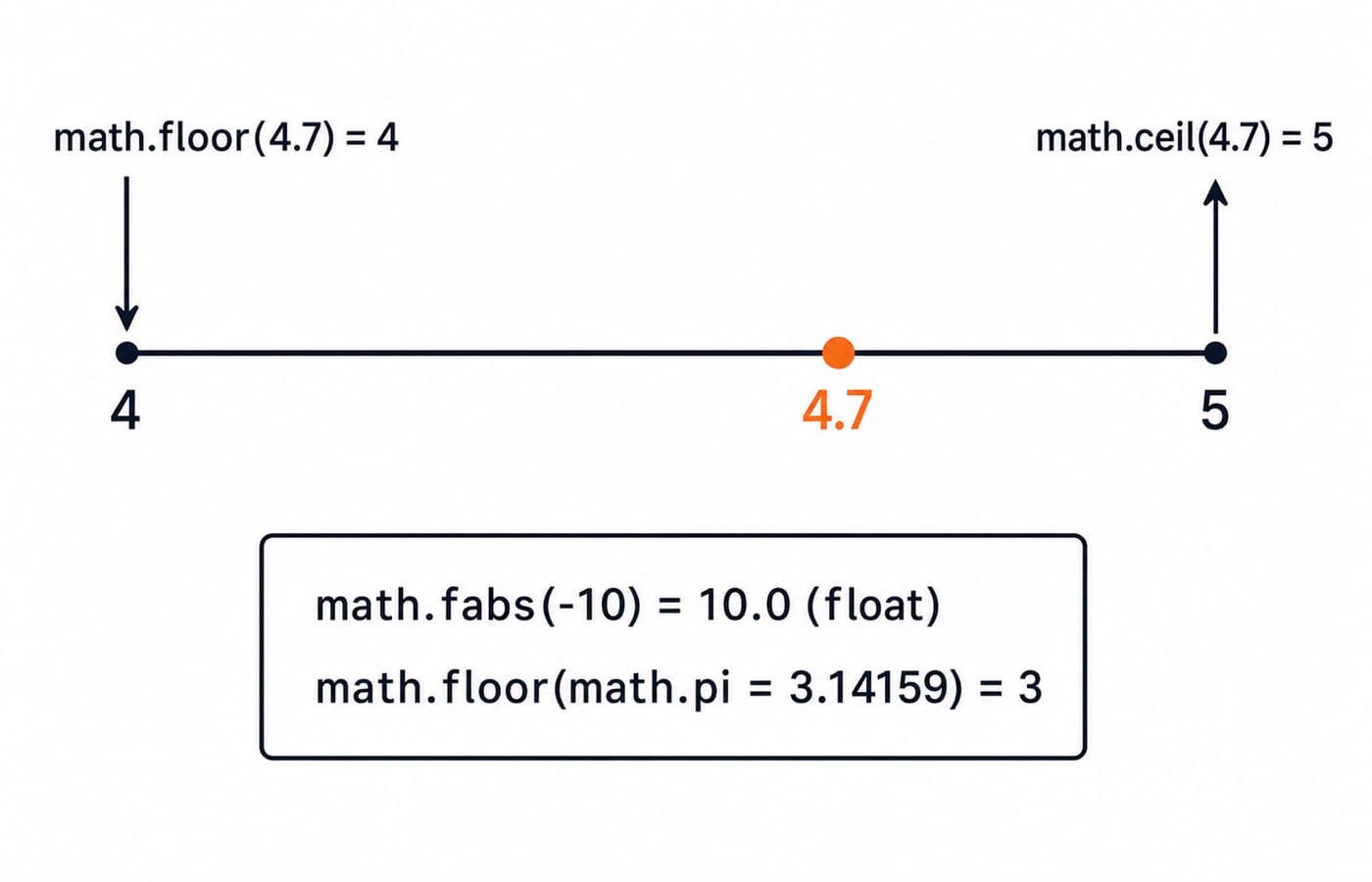
The main trap here is not the arithmetic. It is the result type. floor and ceil return integers, while fabs returns a floating-point value.
Q3. Trace floor and ceil
What will be the results of math.floor(4.7) and math.ceil(4.7) respectively?
(a) 5 and 4
(b) 4 and 5
(c) 4.0 and 4.0
(d) 5.0 and 5.0
Answer: (b) 4 and 5
math.floor(4.7) gives the greatest integer less than or equal to 4.7, which is 4. math.ceil(4.7) gives the smallest integer greater than or equal to 4.7, which is 5. Both results are integers.
Q4. Apply floor to pi
import math
print(math.floor(math.pi))
(a) 2
(b) 3
(c) 4
(d) The code raises an error
Answer: (b) 3
math.pi is approximately 3.14159. The greatest integer not exceeding it is 3, so floor returns 3.
Q5. Check the return type of fabs
import math
print(math.fabs(-10))
(a) 1
(b) -10
(c) -10.0
(d) 10.0
Answer: (d) 10.0
Absolute value removes the negative sign, and math.fabs returns a float. The result is therefore 10.0, not integer 10.
The statistics module: mean, median, mode
For these questions, calculate in a fixed order. Add and divide for the mean, sort before taking the median, then count repetitions for the mode.
Q6. Compute all three measures
import statistics

Data = [3, 2, 4, 2, 9]
M1 = statistics.mean(Data)
M2 = statistics.median(Data)
M3 = statistics.mode(Data)
print(M1, M2, M3)
(a) 432
(b) 333
(c) 423
(d) 422
Answer: (a) 432
The mean is (3 + 2 + 4 + 2 + 9) / 5 = 20 / 5 = 4. Sorting gives [2, 2, 3, 4, 9], so the middle value and median are 3. The most frequent value is 2, since it appears twice and nothing else repeats. Python prints 4 3 2, which the options print without the spaces as 432.
Q7. Find the function outside statistics
Which of the following functions is not defined in the Python statistics module?
(a) sum()
(b) mode()
(c) mean()
(d) median()
Answer: (a) sum()
sum() is a Python built-in. statistics.mean, statistics.median and statistics.mode belong to the statistics module.
Q8. Trace mean and mode carefully
from statistics import mean, mode

Data = [4, 4, 1, 2, 4]
print(mean(Data), mode(data))
(a) 1 4
(b) 4 1
(c) 3 4
(d) 4 3
Answer: (c) 3 4
The intended arithmetic is (4 + 4 + 1 + 2 + 4) / 5 = 15 / 5 = 3, and 4 is the mode because it appears three times. There is also a case-sensitivity trap in the printed code: the list is named Data, but the final call says mode(data). Run it exactly as printed and Python raises a NameError. Option (c) is the intended answer once that call is corrected to mode(Data).
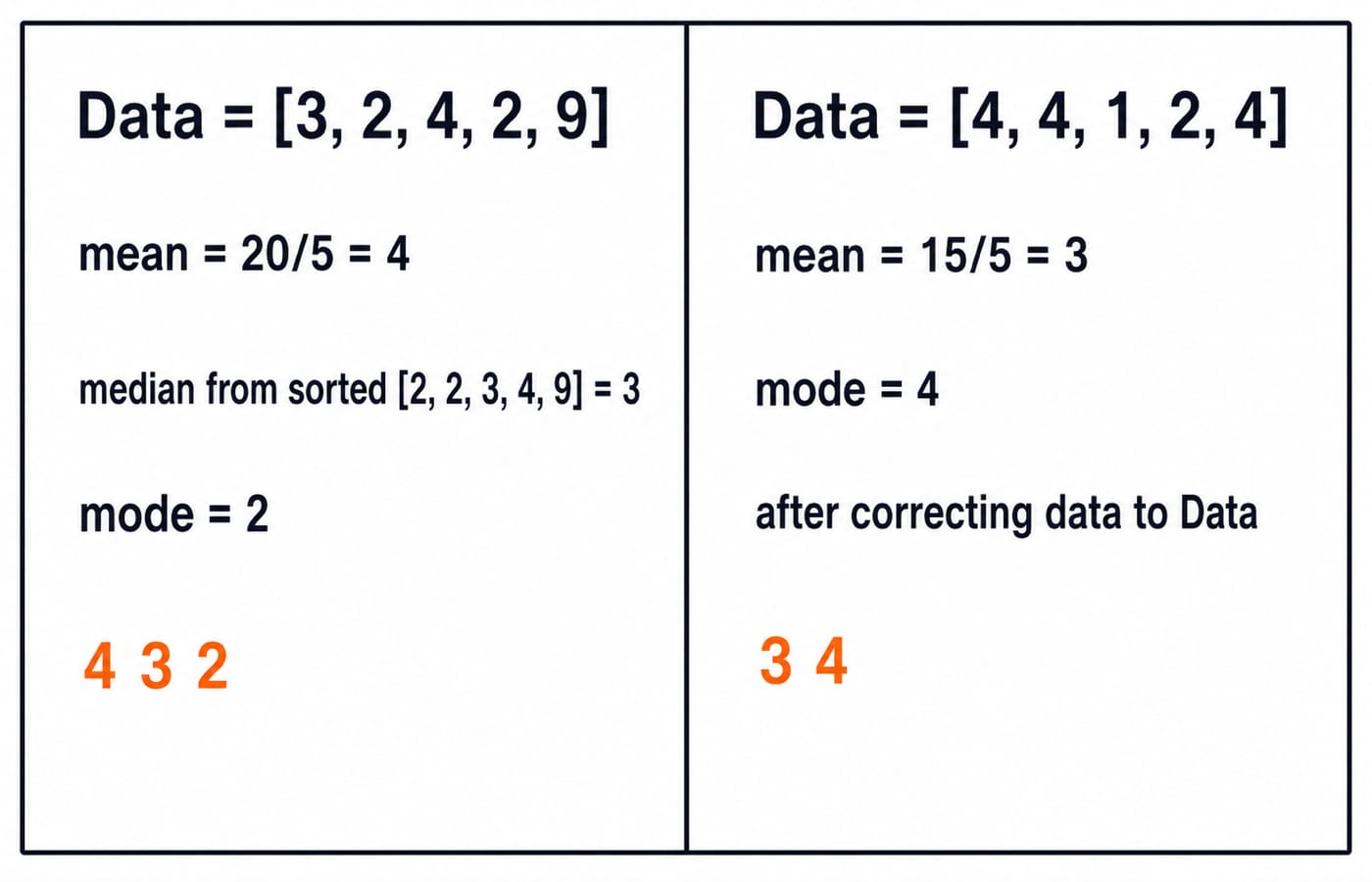
The arithmetic, not the wording, is the reusable skill. Write the sum, then the sorted list, then the frequency count, and the answer is settled before you read the options.
The random module: predicting the range
Write the smallest and largest values a function can produce before tracing the rest. Remember that randint(a, b) includes b, while randrange(a, b) and range(a, b) exclude b.
Q9. Shift the randrange interval
What minimum and maximum values will be generated for the following Python statement? print(random.randrange(100) + 1)
(a) 1 and 100
(b) 0 and 100
(c) 1 and 99
(d) 0 and 99
Answer: (a) 1 and 100
randrange(100) can produce every integer from 0 through 99. Adding 1 shifts both boundaries, producing values from 1 through 100.
Q10. Combine randint, randrange and range
from random import *

Low = randint(2, 3)
High = randrange(5, 7)
for N in range(Low, High):
    print(N, end=' ')
(a) 3 4 5
(b) 2 3
(c) 4 5
(d) 3 4 5 6
Answer: (a) 3 4 5
Low can be 2 or 3, and High can be 5 or 6. The four possible traces are 2 3 4, 2 3 4 5, 3 4 and 3 4 5. Option (a) is the only listed output that can occur, specifically when Low = 3 and High = 6. It is possible, not guaranteed on every run.
NumPy basics: shape and broadcasting
NumPy questions often test whether you recognise array structure and element-wise operations. The DSA Using Python course is the natural next step for the array-heavy side of Python work.
Q11. Read an array's shape
Given a NumPy array Arr = np.array([[1, 2, 3], [4, 5, 6]]). What will be the output of Arr.shape?
(a) (6,)
(b) (3, 2)
(c) (2, 3)
(d) (1, 6)
Answer: (c) (2, 3)
The array has 2 rows and 3 columns. NumPy reports shape in (rows, columns) order, so the result is (2, 3).
Q12. Add a scalar by broadcasting
In NumPy, what is the result of the operation np.array([1, 2, 3]) + 5?
(a) An error
(b) [6, 7, 8]
(c) [1, 2, 3, 5]
(d) [5, 10, 15]
Answer: (b) [6, 7, 8]
NumPy broadcasts the scalar 5 across the array and adds it element by element: 1 + 5 = 6, 2 + 5 = 7, and 3 + 5 = 8. This is neither list concatenation nor multiplication.
Threading and random.choices: the two that catch everyone out
Harder output questions become manageable if you determine the result's shape and check object initialisation before focusing on the most obvious value.
Q13. Initialise the Thread base class
import threading


class thread(threading.Thread):
    def __init__(self, thread_ID):
        self.thread_ID = thread_ID

    def run(self):
        print(self.thread_ID)


thread1 = thread(100)
thread1.start()
(a) 100
(b) Compilation error
(c) Runtime error
(d) None of these
Answer: (c) Runtime error
The subclass overrides __init__ but never calls threading.Thread.__init__(self) or super().__init__(). Its internal initialisation flag is therefore not set, and start() raises RuntimeError before run() can print 100.
Q14. Check the shape returned by random.choices
import math
import random

L = [1, 2, 30000000000000]
for x in range(3):
    L[x] = math.sqrt(L[x])

string = random.choices(['apple', 'carrot', 'pineapple'], L, k=1)
print(string)
(a) ['pineapple']
(b) ['apple']
(c) 'pineapple'
(d) Both ['pineapple'] and ['apple']
Answer: (d) Both ['pineapple'] and ['apple']
The weights become 1.0, approximately 1.414, and approximately 5477225.575. Pineapple is overwhelmingly likely, but apple still has a positive weight, so both listed one-item lists are possible. Carrot is possible too. A bare string is impossible because random.choices(..., k=1) returns a list of length 1.
Common traps in one place
These mistakes repeat across almost every standard-library MCQ:
Return type:
floorandceilreturn integers, whilefabsreturns a float.Range boundary:
randintincludes its upper boundary;randrangeandrangeexclude it.Module ownership:
sum()andlen()are built-ins, while mean, median and mode belong tostatistics.Import direction: write
from <module> import <names>, never the reverse.Array behaviour: NumPy
+broadcasts element-wise. It does not append to an array.
The short version and your next step
For imports, check the direction. For math, remember floor down, ceil up and fabs as a float. For statistics, show the arithmetic. For random, write both boundaries. For NumPy, check shape first and then apply the operation element by element.
Standard-library questions draw on a small, repeating pattern set, which is why one focused revision pass covers most of what a paper can ask. Drill the traces through Python Programming, use DSA Using Python for the array-heavy NumPy side, and browse the wider Coding and DSA courses. For another solved set, continue with Data Structures MCQs. If option formats are causing confusion, read GATE question types: MCQ, MSQ and NAT.
Keep learning

Ecosystem Fundamentals MCQs: 10 Solved Questions on Meaning and Ecological Organisation
Solve 10 ecosystem MCQs with clear explanations of ecological organisation, productivity, sustainability, environmental ethics, energy balance and conservation.
8 Sep 20268 min readMCQ Practice

Architectural and Component Design MCQs: 12 Solved Questions
Solve 12 bank MCQs on software architecture, component roles, repositories, MVC, DFDs, structure charts and UML, each with a direct worked explanation.
Updated 6 Sep 20268 min readMCQ Practice

C++ Constructors MCQs: 12 Solved Object-Initialization Questions
Solve 12 published C++ constructor questions by tracing object creation, copy semantics, arrays, access, virtual rules, and dynamic allocation.
Updated 5 Sep 20267 min readMCQ Practice

Clipping Algorithms MCQs: 11 Solved Cohen-Sutherland and Cyrus-Beck Questions
Solve 11 clipping questions with fresh explanations, checked outcodes, line classifications, boundary intersections and a practical revision routine.
Updated 3 Sep 20268 min readMCQ Practice