

Signals and Network Metrics Explained: Bandwidth, Throughput, Latency, Worked Examples and Exam Traps
Separate signal properties from link and path metrics, then solve bandwidth, capacity, throughput, delay and bandwidth-delay product questions step by step.
KnowledgeGate Team
Exam prep & CS education
Updated 23 Nov 20266 min read

Amplitude uses volts; frequency and analogue bandwidth use hertz; link rate and throughput use bit/s; latency uses seconds. Mixing these quantities can ruin a simple numerical. Signal, link and end-to-end path metrics use different quantities and calculations. For broader coverage, study this topic alongside other CS fundamentals.
Signal metrics: amplitude, frequency, phase, period and wavelength
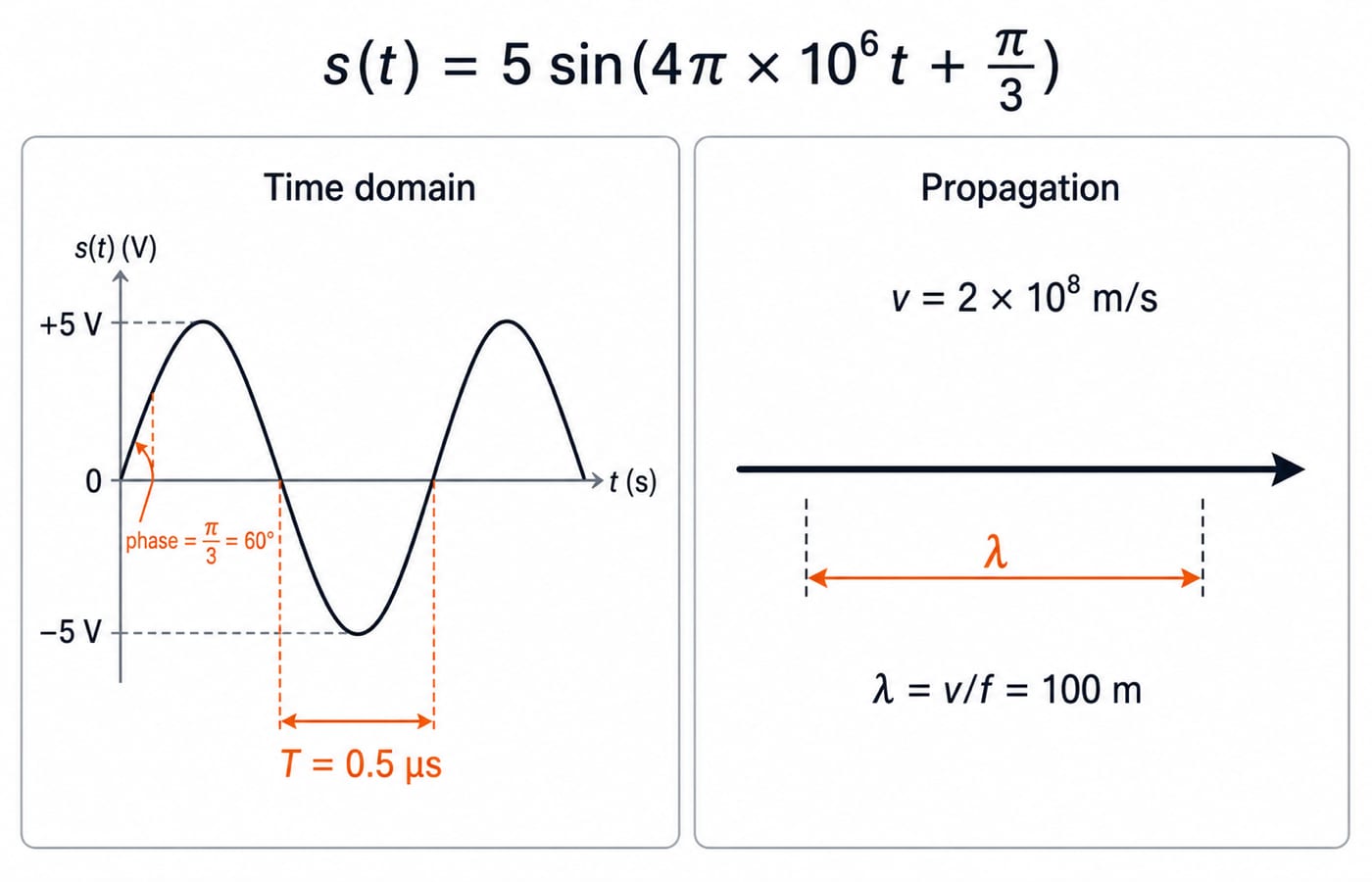
A periodic sinusoid is s(t) = A sin(2πft + φ). Amplitude A is the peak voltage. Frequency f is cycles per second in hertz, period T = 1/f is seconds per cycle, and phase φ is the angular offset. For propagation speed v, wavelength λ = v/f is the distance travelled per cycle. The other four quantities describe the signal in the time domain.
For the exact signal:
s(t) = 5 sin(4π × 10^6 t + π/3)
A = 5 V.Compare the coefficient of
t:2πf = 4π × 10^6, sof = 2 × 10^6 Hz = 2 MHz.T = 1/f = 1/(2 × 10^6) = 0.5 × 10^-6 s = 0.5 μs.φ = π/3 = 60°.For
v = 2 × 10^8 m/s,λ = v/f = (2 × 10^8)/(2 × 10^6) = 100 m.
Signal-to-noise ratio needs one more unit check. With signal power 10 mW and noise power 0.1 mW:
S/N = 10/0.1 = 100
SNR_dB = 10 log10(100) = 10 × 2 = 20 dB
The answer 20 dB is a logarithmic representation of the linear power ratio 100. It is not a linear ratio of 20.
Bandwidth and capacity: hertz is not bits per second
Analogue bandwidth is a frequency span: B = f_high - f_low, measured in hertz. A composite signal occupying 1 MHz through 5 MHz has bandwidth 5 - 1 = 4 MHz. A digital link rated at 20 Mbit/s instead states a bit rate. Converting between the two requires a channel model.
For a noiseless channel, the Nyquist limit is 2B log2 L, where L is the number of valid signal levels. With B = 3 kHz and L = 8:
2 × 3000 × log2(8) = 2 × 3000 × 3 = 18,000 bit/s
For a noisy channel, the Shannon limit is B log2(1 + S/N). With the same bandwidth and linear S/N = 63:
3000 log2(1 + 63) = 3000 log2(64) = 3000 × 6 = 18,000 bit/s
When both constraints apply, the usable upper bound cannot exceed the smaller limit. Here both give 18 kbit/s. Hertz counts cycles per second, baud counts signal elements per second, and bit/s counts information bits per second. Multiple signal levels can carry more than one bit per symbol, but that is not automatic.
This section separates hertz from bit/s inside a broader metrics workflow. exam hub owns dB conversion, inverse-design cases and active-bottleneck analysis; the sections below continue with measured link and path performance.
Throughput, goodput and utilisation: what the link delivers
Link rate or capacity is the nominal upper bound. Throughput is all successfully delivered bits divided by observation time, while goodput counts only useful application payload. Utilisation is throughput/capacity. Congestion, protocol overhead, retransmissions and a slower bottleneck can all reduce the observed result.
Take a 20 Mbit/s link observed for 5 s. It delivers 75 Mbit of wire data, including 60 Mbit of application payload.
Throughput:
75 Mbit / 5 s = 15 Mbit/s.Goodput:
60 Mbit / 5 s = 12 Mbit/s.Utilisation:
15/20 = 0.75 = 75%.Delivered non-payload data:
75 - 60 = 15 Mbit.
Neither 15 Mbit/s nor 12 Mbit/s should be called bandwidth without qualification. The first is measured throughput and the second is measured goodput. TCP Congestion Control for GATE explains one mechanism that can prevent a sender from sustaining the nominal link rate.
Latency: transmission, propagation, processing and queueing delay
One-way nodal delay is:
d_total = d_transmission + d_propagation + d_processing + d_queueing
Transmission delay L/R depends on packet length and link rate. Propagation delay d/v depends on path length and propagation speed. Processing and queueing delays depend on devices and current load.
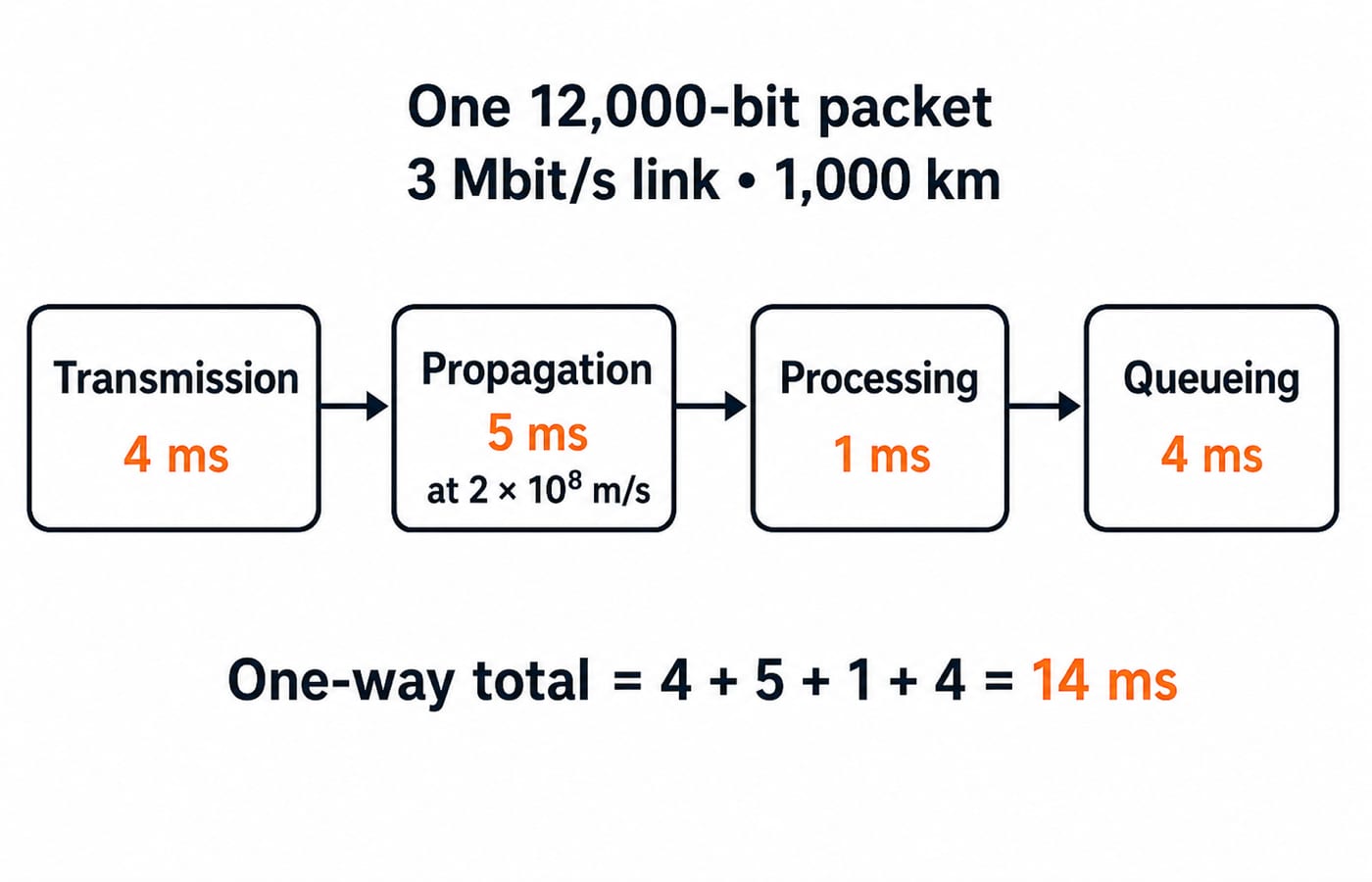
Now send a 12,000-bit packet over a 3 Mbit/s link across 1,000 km. Let propagation speed be 2 × 10^8 m/s, processing delay be 1 ms, and queueing delay be 4 ms.
d_transmission = 12,000/3,000,000 = 0.004 s = 4 ms
Convert the distance first: 1,000 km = 1,000,000 m.
d_propagation = 1,000,000/(2 × 10^8) = 0.005 s = 5 ms
Therefore, total one-way delay is 4 + 5 + 1 + 4 = 14 ms. The packet can face 14 ms of one-way latency even though the link transmits at 3 Mbit/s. Transport behaviour can change reliability and overhead, but not propagation speed.
Bandwidth-delay product: how many bits can be in flight
Bandwidth-delay product uses a bit rate and a round-trip time. Its result is a number of bits, not a delay. For R = 20 Mbit/s and RTT = 50 ms = 0.05 s:
BDP = R × RTT = 20,000,000 × 0.05 = 1,000,000 bits
That is 1,000,000/8 = 125,000 bytes, or 125 kB in decimal units. If the sender may keep only 500,000 bits unacknowledged, its approximate window-limited ceiling is:
window/RTT = 500,000/0.05 = 10,000,000 bit/s = 10 Mbit/s
This is half the nominal 20 Mbit/s rate, assuming losses and other overheads are ignored. Computer networks provides the layer-by-layer context for these link and transport quantities.
Signals and network metrics exam traps
Trap | Correct check |
|---|---|
Treating MHz as Mbit/s | Identify whether the value is a frequency span or a bit rate. |
Using | Use |
Leaving | Convert it to |
Using kilometres with speed in metres per second | Convert |
Swapping | Packet length belongs to transmission; path length belongs to propagation. |
Calling goodput throughput | Check whether protocol overhead is included. |
Choosing the larger capacity ceiling | When both models constrain the channel, use the smaller ceiling. |
Definition questions test the correct unit or dependency. Numerical-answer questions may change one variable and require a fresh calculation. Comparison questions ask whether a changed link improves transmission delay, propagation delay or throughput.
Use two quick oral checks. Doubling packet length doubles transmission delay but does not change propagation delay. Doubling path length doubles propagation delay but does not change transmission delay.
On scratch paper: write the requested metric, copy every value with its unit, convert to base units, then check whether the result should be in volts, hertz, bit/s, seconds or bits.
Signals and network metrics: the short version and next step
Metric | Meaning | Unit | Core relation |
|---|---|---|---|
Period | Time per cycle | s |
|
Wavelength | Distance per cycle | m |
|
Analogue bandwidth | Frequency span | Hz |
|
Throughput | Delivered bits per time | bit/s |
|
Goodput | Payload bits per time | bit/s |
|
Transmission delay | Time to place a packet on a link | s |
|
Propagation delay | Time for a signal to cross a path | s |
|
BDP | Bits that can be in flight | bit |
|
Recompute the 2 MHz signal frequency, 15 Mbit/s throughput, 14 ms one-way delay and 1,000,000-bit BDP without looking. Across these examples, unit errors are the main distractor. For a structured route through computer networks and other core CS fundamentals, continue with CS Fundamentals for Placements by Sanchit Sir.
Keep learning

Signals and Metrics MCQs: 12 Solved Data Communication Questions
Practise 12 published Signals and Metrics PYQs with fresh, step-by-step explanations. Learn how units separate frequency, baud, throughput, delay and related measures.
Updated 29 Oct 20268 min readComputer Networks MCQs

Computer Network Troubleshooting Scenarios: Diagnose Latency, DNS and Packet Flow
Work through three evidence-led network troubleshooting cases: a 650 ms latency split, a stale DNS answer, and a TCP SYN-ACK lost on the return path.
Updated 12 Sep 20266 min readInterview Corner

Transmission and Propagation Delay for GATE
Separate the time needed to put a packet on a link from the time needed for its bits to travel. Then solve delay, pipe-capacity and utilisation questions without unit mistakes.
Updated 30 Oct 20266 min read230 viewsGATE Strategy & Roadmap
ALOHA Protocols Explained: Pure vs Slotted ALOHA, Throughput Numericals and Exam Traps
Build Pure and Slotted ALOHA from their vulnerable periods, then calculate throughput, useful bit rate, and peak load without mixing up G, probability, and S.
Updated 1 Nov 20266 min readComputer Networks