

Office Mixed Concepts MCQs: 12 Solved Questions with Explanations
Solve 12 mixed MS Office questions by identifying the task, choosing the application and separating similar features, from OLE and mail merge to Access field types.
KnowledgeGate Team
Exam prep & CS education
Updated 8 Nov 20267 min read

Mixed Office questions switch applications and vocabulary without warning. Recall alone can fail when every option is a plausible name from Word, Excel, Access, PowerPoint or Teams. The options reward careful classification, not a familiar-looking guess. Office tasks range from document integration through application choice, interface actions, Access fields and cross-application matching. Select an option before reading each explanation.
The earlier Office Mixed Concepts Explained teaches application choice, Access field types and link-versus-embed workflows. These 12 questions test those distinctions across Word, Excel, PowerPoint, Access and Teams. Use the Office Mixed Concepts PYQ Questions practice hub for a larger set, or browse UGC NET preparation for the wider Paper 1 route.
Build a working Office map before solving the MCQs
Map each task to its natural tool or feature.
Task | Tool or feature |
|---|---|
Documents and mail merge | Word |
Worksheets, formulas and charts | Excel |
Slide presentations | PowerPoint |
Relational data, queries and long-text fields | Access |
Online meetings | Teams |
Link or embed an object across applications | OLE |
The Word main document Patient-Letter.docx contains merge fields Name and City. Its Excel data source, patients.xlsx, has row 2 as Anika | Jaipur and row 3 as Ravi | Pune. Mail merge produces two personalised letters.
In Excel, let A1 = 14, B1 = 9, and C1 = SUM(A1:B1) = 23. Embedding the sheet in Word stores a copy containing 23. Linking it to the source means changing B1 from 9 to 11 can update the linked C1 to 14 + 11 = 25.
Identify the task first, the application second, and the feature third. Use Office Mixed Concepts Explained for the full Access-object and cross-application transfer model. Access's older Memo label is Long Text in current versions.
Office Mixed Concepts MCQs 1-3: OLE, mail merge and an Excel object in Word
Question 1 (KVS 2017)
OLE, A Microsoft’s component document technology, means :
A. Overlay Linking and Exchange
B. Online Linking and Embedding
C. Open Learning Exchange
D. Object Linking and Embedding
Correct answer: D. Object Linking and Embedding.
OLE expands to Object Linking and Embedding. An object is stored inside Word when embedded, but connected to its source when linked. An embedded copy keeps C1 = 23, while a linked object can reflect C1 = 25 after B1 changes from 9 to 11.
Question 2 (Accenture 2024)
Which of the following is not essential component to perform a mail merge operation?
A. Main document
B. Data source
C. Merge fields
D. Word fields
Correct answer: D. Word fields.
Patient-Letter.docx is the main document, patients.xlsx is the data source, and Name plus City are merge fields. Word fields can add controls, but are not one of these three essential components. D is the exception.
Question 3 (REET 2022)
When you insert an Excel file into a Word document, the data are -
A. placed in a word table
B. linked
C. hyperlinked
D. embedded
Correct answer: D. embedded.
Inserting an Excel file this way is the standard Insert Object action. Excel content is stored inside Word, like the C1 = 23 copy. Linking requires a separate choice, a hyperlink only points elsewhere, and a Word table is a different structure. Practise with more object-insertion questions.
Office Mixed Concepts MCQs 4-6: choose the application and system scope
Question 4 (Accenture 2023)
Which Microsoft Office application is used for conducting online meetings, webinars, and video conferences?
A. Microsoft Word
B. Microsoft Excel
C. Microsoft PowerPoint
D. Microsoft Teams
Correct answer: D. Microsoft Teams.
The question asks for real-time communication. Teams fits; Word creates documents, Excel handles worksheets, and PowerPoint creates slide presentations. The task is synchronous communication, so D is the only application with the required scope.
Question 5 (Accenture 2024)
Which Microsoft Office application is suitable for performing calculations and creating complex formulas?
A. Microsoft Word
B. Microsoft Excel
C. Microsoft PowerPoint
D. Microsoft Outlook
Correct answer: B. Microsoft Excel.
Excel is built for cell-based formulas. With A1 = 14 and B1 = 9, SUM(A1:B1) = 14 + 9 = 23. Word is document-first, PowerPoint is slide-first, and Outlook handles communication and scheduling.
Question 6 (DSSSB TGT Computer Science 2021)
Office Automation System deals with which of the following?
I. Word processing
II. Annual budgeting
A. Only I
B. Only II
C. Both I and II
D. Neither I nor II
Correct answer: A. Only I.
Word processing is a routine office-document activity and belongs directly to office automation. In the information-systems classification tested by DSSSB, annual budgeting is a management-information-system task rather than an office-automation function. Therefore only statement I is correct. For more questions of this kind, use the linked topic practice hub; this item has no stable single-question page.
Office Mixed Concepts MCQs 7-8: Excel navigation and PowerPoint mouse action
Question 7 (Accenture 2024)
Where are the Sheet Tab Scroll Buttons located on the Excel screen?
A. Towards the bottom right corner
B. Towards the bottom left corner
C. Towards the top right corner
D. Towards the top left corner
Correct answer: B. Towards the bottom left corner.
These buttons sit at the lower left, beside the worksheet tabs. View and zoom controls are commonly toward the lower right. Appearance varies by version, but bottom left is the tested location. Revisit more Excel interface questions next.
Question 8 (Bihar STET 2019)
What is the term used when you press and hold the left mouse key and move the mouse around the slide?
A. Moving
B. Dragging
C. Monitoring
D. Highlighting
E. None of these
Correct answer: B. Dragging.
Dragging means press, hold, move and release. On a slide, press an object's edge at (120, 80), move it to (260, 160) while holding the button, then release. A click or hover is different. Try more PowerPoint action questions next.
Office Mixed Concepts MCQs 9-10: Access indexes and long text
Question 9 (HTET 2024)
In MS Access Index can not be defined using .......... field.
A. OLE object
B. Attachment
C. Both options are correct
D. All options are wrong
Correct answer: C. Both options are correct.
An index needs values Access can order and search as keys. OLE Object and Attachment fields hold complex content unsuitable for indexing. A and B are both true, making C correct. Work through more Access index questions.
Question 10 (HTET 2024)
In Microsoft Access, which data type is used to store long alphanumeric data such as sentences or paragraphs?
A. Text
B. Hyperlink
C. Memo
D. OLE object
Correct answer: C. Memo.
Older Access versions use the label Memo; current versions call it Long Text. Text is shorter, Hyperlink stores links, and OLE Object stores embedded objects. Drill more Access data-type questions to keep the two labels straight.
Office Mixed Concepts MCQs 11-12: map tasks to software and analysis tools
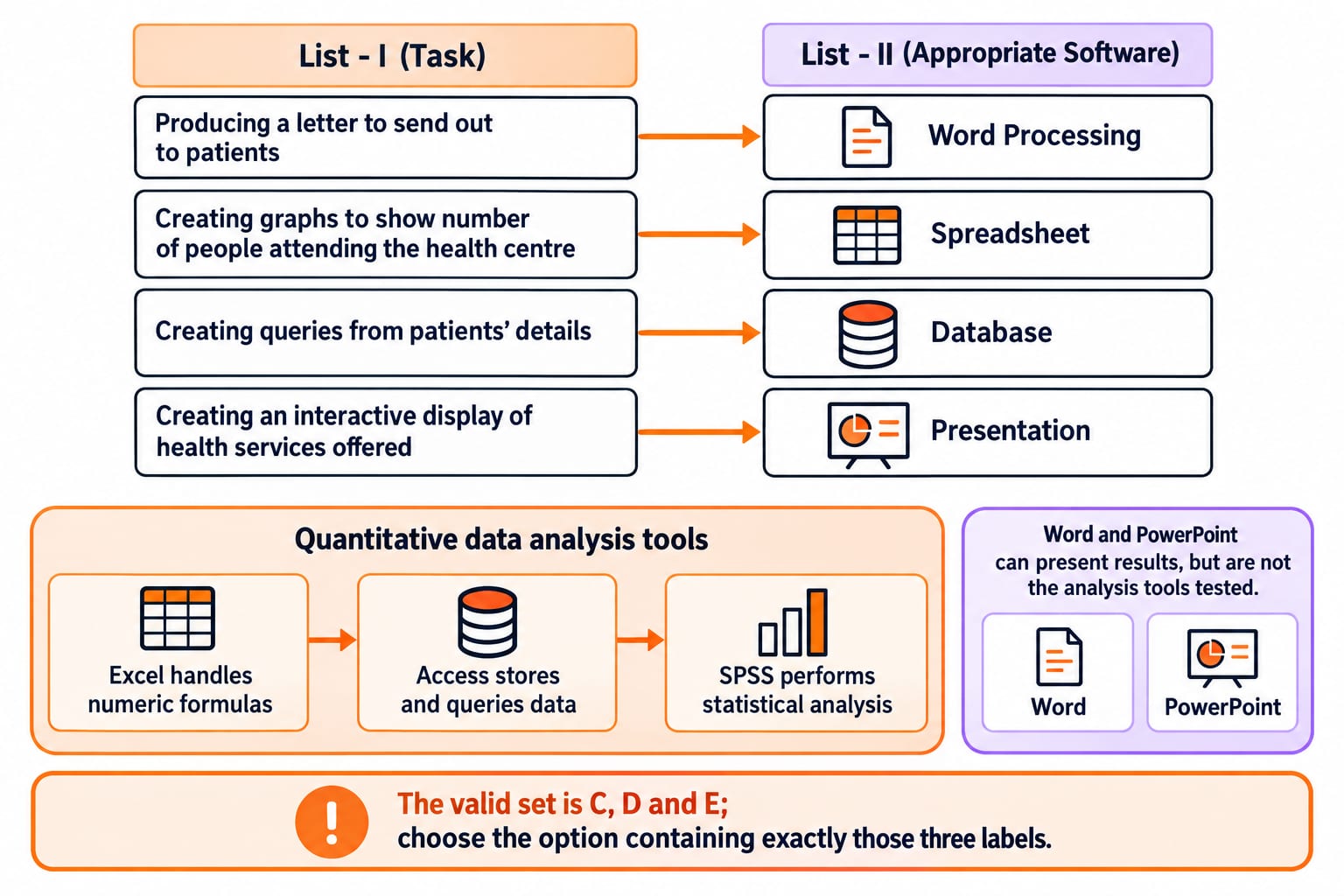
Question 11 (UGC NET January 2026) (practice module)
Match List - I (Task) with List - II (Appropriate Software)
List - I (Task) | List - II (Appropriate Software) |
|---|---|
(A) Producing a letter to send out to patients | (II) Word Processing |
(B) Creating graphs to show number of people attending the health centre | (IV) Spreadsheet |
(C) Creating queries from patients' details | (I) Database |
(D) Creating an interactive display of health services offered | (III) Presentation |
A. A-III, B-IV, C-I, D-II
B. A-II, B-IV, C-I, D-III
C. A-I, B-III, C-II, D-IV
D. A-IV, B-II, C-I, D-III
Correct answer: B. A-II, B-IV, C-I, D-III.
A letter maps to word processing, graphs to a spreadsheet, queries to a database, and an interactive display to presentation software. That gives A-II, B-IV, C-I, D-III, so B is correct. The four-pair match is quicker when each task is classified before the answer sequences are compared.
Question 12 (UGC NET June 2025) (practice module)
Which of the following programmes/software can be used for quantitative data analysis?
A. MS WORD
B. MS POWERPOINT
C. MS EXCEL
D. MS ACCESS
E. SPSS
A. A, C, D, and B Only
B. A, D, and E Only
C. C, D, and E Only
D. B, D, and E Only
Correct answer: C. C, D, and E Only.
Excel handles numeric formulas, Access stores and queries data, and SPSS performs statistical analysis. Word and PowerPoint can present results, but are not the analysis tools tested. The valid set is C, D and E; choose the option containing exactly those three labels.
Turn each wrong answer into an Office decision rule
For Questions 1-3, draw a source box and a destination box, then label the operation link, embed or merge.
For Questions 4-6, 11 and 12, say the task noun and verb before naming the application or information-system class.
For Questions 7-8, reproduce the location or mouse action in the application instead of memorising a sentence.
For Questions 9-10, pair the current Access term with its older label, then state whether the field can be indexed.
For formula evaluation, reference tracing and chart distinctions, use NTA-UGC-NET Paper 1 course; this mixed set concentrates on switching correctly between applications and feature classes. Continue with the NTA-UGC-NET Paper - 1 course for sequenced Paper 1 preparation.
Retake only the missed questions in shuffled order. Before choosing, state the task, the owning application and the feature scope aloud. A correction is secure when you can reject each distractor for a named reason.
The short version: identify the task noun and verb, choose the application, then distinguish the feature. For OLE and mail merge, draw the source and destination before deciding whether the result stays connected, becomes a stored copy or produces personalised documents.
Keep learning

Office Mixed Concepts Explained: Access, Clipboard, File Formats and Exam Traps
Learn how Word, Excel, PowerPoint and Access differ, then trace six learner records through a query, an export, a linked chart and a static picture.
Updated 25 Oct 20265 min readTeaching Recruitment (Computer Science)
SELECT, WHERE and DISTINCT MCQs: 12 Solved SQL Questions with Explanations
Test the SQL basics that decide columns, filter rows and remove duplicates. Attempt 12 MCQs, then use each short solution to diagnose the exact rule involved.
Updated 31 Oct 20267 min readDBMS MCQs
Two Process Solutions MCQs: 12 Solved Synchronization Questions with Explanations
Solve 12 published two-process synchronization questions, then use the worked interleavings to spot failures in mutual exclusion, progress and bounded waiting.
Updated 29 Oct 20268 min readOperating System MCQs
Third Normal Form (3NF) MCQs: 12 Solved Questions with Explanations
Solve 12 real 3NF exam MCQs with clear explanations, candidate-key closures, a raw-row decomposition, and the prime-attribute exception that separates 3NF from BCNF.
Updated 30 Oct 20267 min read88 viewsDBMS MCQs