Pixel and Color Models Explained: RGB, CMY and HSV Worked Examples
Follow one 8-bit RGB pixel through raster coordinates, raw storage, ideal CMY, HSV, two grayscale rules and 2-bit quantisation, with every convention stated.
KnowledgeGate Team
Exam prep & CS education
Updated 31 Aug 20266 min read
A pixel is a sampled location carrying numeric channel values, while RGB, CMY, HSV and grayscale interpret or reorganise those values in different ways. Students often mix spatial resolution with colour depth, treat every conversion as a simple complement, or calculate storage without stating the channels and bits per channel. Image Fundamentals Explained: Concepts and Worked Examples develops spatial sampling and image geometry; colour channels, model transforms and bit depth form the separate axis around P = (64,128,192). One conventionally defined pixel is enough to calculate raster storage, normalisation, CMY, HSV, grayscale and 2-bit quantisation without mixing those axes.
Start with a pixel, a raster and an explicit coordinate convention
A digital image is a rectangular array of samples. A pixel is one location plus its stored value or tuple, not a square with an inherent physical size.
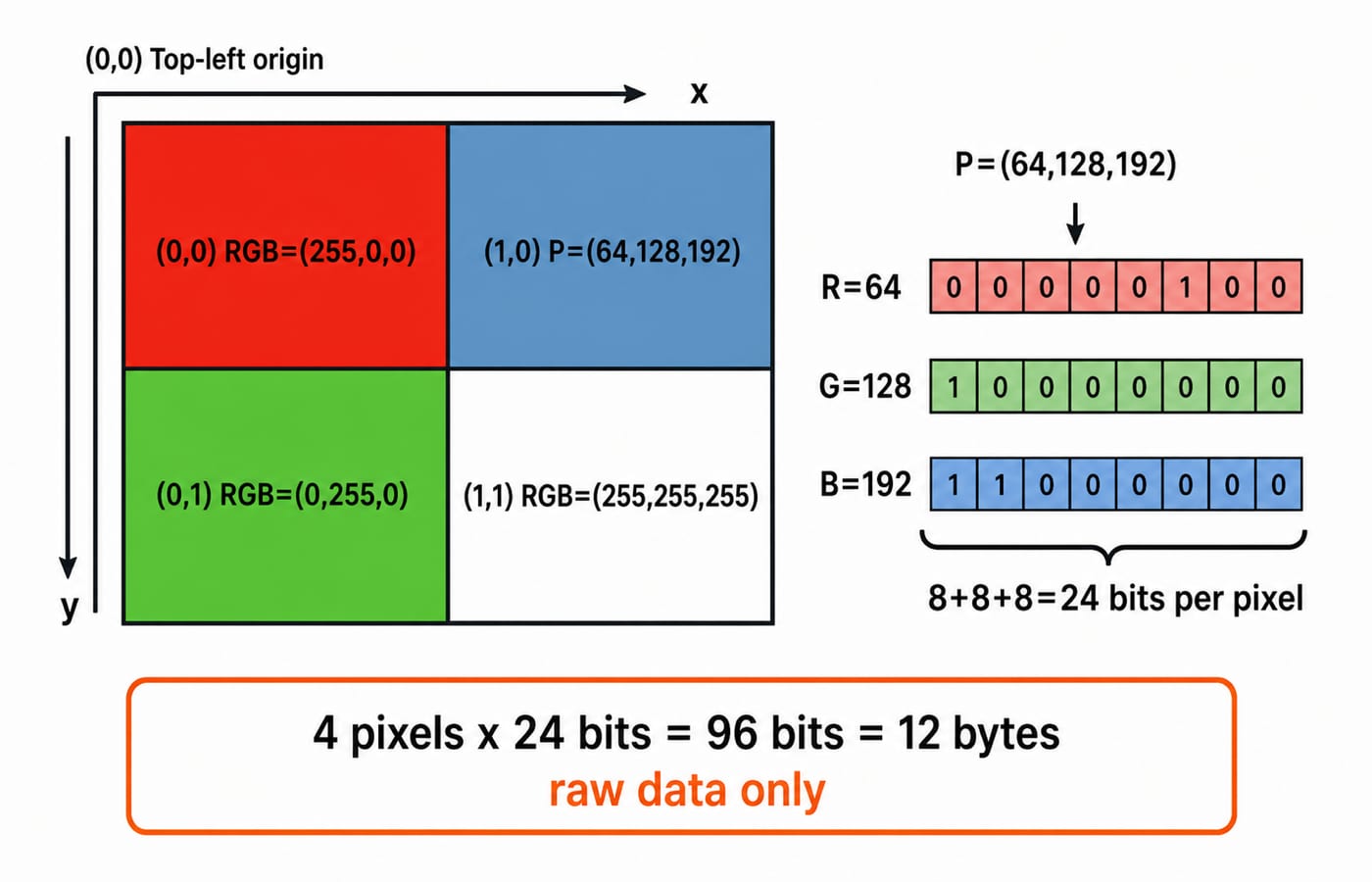
Here, x = column increases right, y = row increases down, and the top-left pixel is (0,0). Other origins are possible, so coordinates require a convention.
Our 2 x 2 RGB raster is:
Coordinate | RGB value |
|---|---|
|
|
|
|
|
|
|
|
Each tuple is (R,G,B). Every 8-bit channel holds 0 through 255, so P stores red 64, green 128 and blue 192.
Separate spatial resolution, the number of locations such as 1920 x 1080, from channel depth, the bits per channel. Bits per pixel combines channels, so 8-bit RGB uses 3 x 8 = 24 bits per pixel, not per channel.
Compute intensity levels, colour capacity and raw image storage
A b-bit channel has 2^b codes. Three independent RGB channels have 2^(3b) tuples. Thus 8-bit RGB has 256 codes per channel, 24 bits per pixel and 256^3 = 2^24 = 16,777,216 tuples. These combinations need not be visually distinguishable.
For the small raster:
2 x 2 x 24 = 96 bits96 / 8 = 12 bytes
For an uncompressed 1920 x 1080 RGB image:
1920 x 1080 x 24 = 49,766,400 bits49,766,400 / 8 = 6,220,800 bytes6,220,800 / 1,048,576 = 5.93 MiBapproximately
One extra 8-bit alpha channel makes 32 bits per pixel: 1920 x 1080 x 32 / 8 = 8,294,400 bytes, approximately 7.91 MiB.
These are raw sample sizes, excluding headers, row padding, metadata and compression. If needed, review powers of two and binary-to-decimal reasoning.
Choose a colour model by what the channels are meant to express
Model | Channels | Useful mental model | Important limit |
|---|---|---|---|
RGB | Red, green, blue | Additive display and array codes | Complete meaning needs a colour space |
Ideal CMY | Cyan, magenta, yellow | Subtractive RGB complements | Not a universal print conversion |
CMYK | Cyan, magenta, yellow, black | Practical printing channels | Process and profile dependent |
HSV | Hue, saturation, value | Colour selection and adjustment | Not perceptually uniform |
Grayscale | One intensity or luma-like code | One brightness-related value | Formulas can disagree |
YCbCr-style | Luma-like value, two chroma values | Separates brightness-related and colour information | Transform depends on convention |
Alpha describes coverage or opacity, not a colour coordinate. In RGBA = (64,128,192,128), alpha 128 commonly means roughly half coverage. Displayed colour also depends on the background, transfer function, 0-to-255 convention and premultiplication.
The same triple needs a colour space or conversion convention. With 8-bit RGB codes, every conversion must name its formula and rounding rule.
Worked example: convert P = (64,128,192) without losing the convention
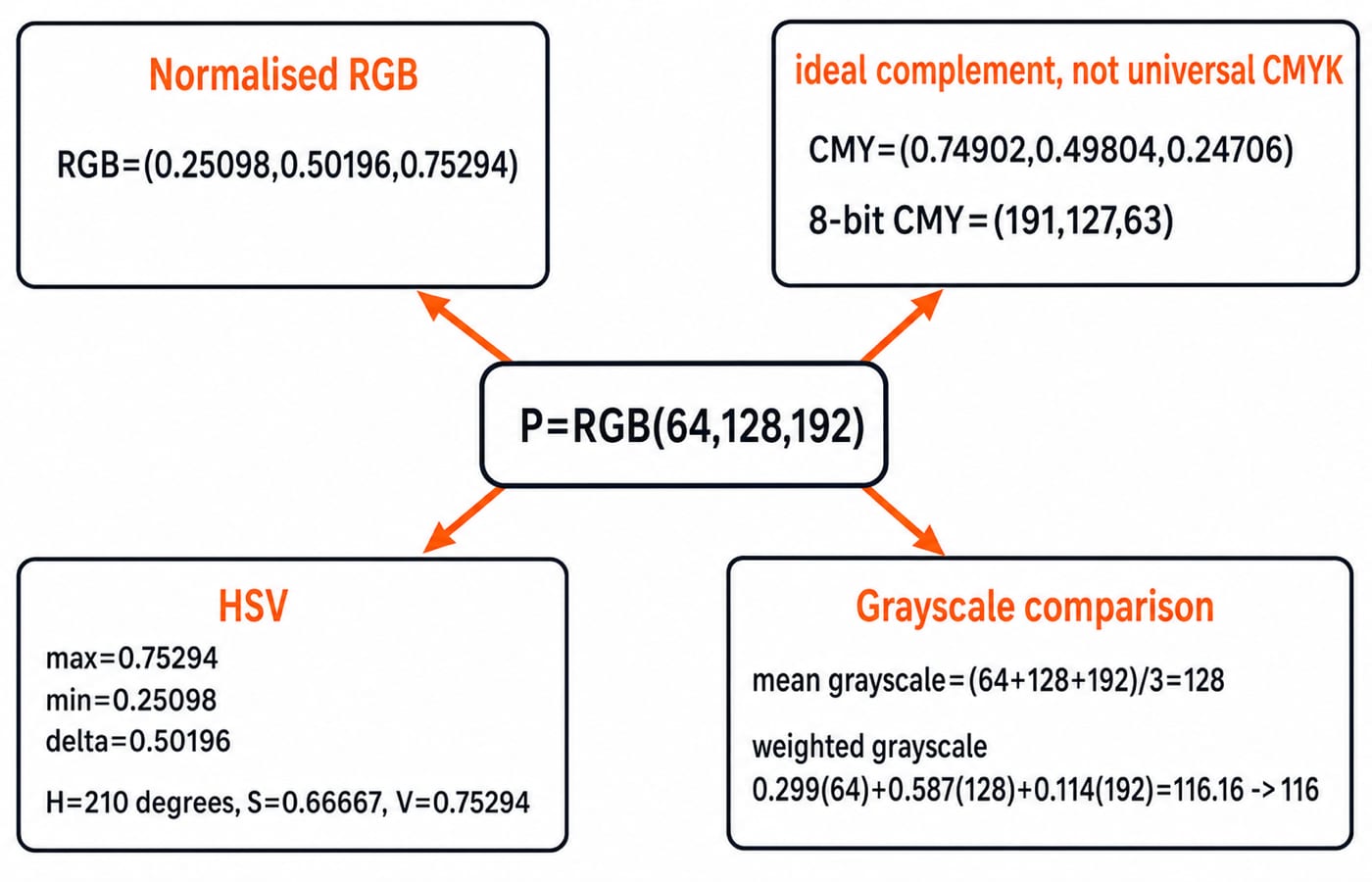
First normalise by dividing every channel by 255:
R' = 64/255 = 0.25098G' = 128/255 = 0.50196B' = 192/255 = 0.75294
For ideal CMY, C = 1-R' = 0.74902, M = 1-G' = 0.49804, and Y = 1-B' = 0.24706. In 8-bit codes, C8 = 255-64 = 191, M8 = 255-128 = 127, and Y8 = 255-192 = 63, giving (191,127,63). This is not device-specific CMYK.
For HSV, keep full precision and select the branch from max = B' = 0.75294, min = R' = 0.25098, and delta = max-min = 0.50196:
V = max = 0.75294S = delta/max = 2/3 = 0.66667Because blue is maximum,
H = 60 x [4 + (R'-G')/delta] = 60 x (4-0.5) = 210 degrees
If delta = 0, saturation is 0 and hue is undefined or given a software placeholder.
The mean grayscale is (64+128+192)/3 = 128. The supplied weighted rule gives Y = 0.299R + 0.587G + 0.114B = 19.136 + 75.136 + 21.888 = 116.16, rounded to 116. The formulas differ, so the answers differ.
See what lower bit depth does to the same pixel
Apply the declared nearest-level rule q = round(3c/255) to reduce each channel from 8 bits to 2. Then q is in 0,1,2,3.
qR = round(192/255) = 1qG = round(384/255) = 2qB = round(576/255) = 2
The 6-bit tuple is (1,2,2). Reconstruct with c_hat = 85q to get (85,170,170). Signed error, reconstructed minus original, is (85-64,170-128,170-192) = (+21,+42,-22).
Two-bit RGB represents 4^3 = 64 tuples instead of 256^3 = 16,777,216. Neighbouring originals share levels, possibly causing banding or contouring.
Quantisation restricts values at retained locations. Downsampling removes or combines locations. A 960 x 540 24-bit image and a 1920 x 1080 6-bit image change different axes, although both contain 12,441,600 raw bits.
Traps and the ways a question can test pixel and colour reasoning
Trap | What goes wrong | Correct check | Evidence from P |
|---|---|---|---|
| Merges locations and depth | State each separately | P has three 8-bit channels |
| Assigns tuple capacity to one channel | Use | P channels span 0 to 255 |
No bits-to-bytes step | Makes storage eight times too large | Divide by 8 | 96 bits is 12 bytes |
Mixing MB and MiB | Mixes unit bases | State the divisor |
|
Swapped RGB order | Changes the tuple | Declare | B = 192 is maximum |
CMY as universal CMYK | Overgeneralises a complement | Name the convention | Ideal CMY is |
Red HSV branch | Uses the wrong maximum | Find | B is maximum, H = 210 degrees |
Mean despite weights | Ignores the supplied formula | Follow the rule | Mean 128, weighted 116 |
Early HSV rounding | Introduces intermediate error | Round last | S is |
Alpha as colour | Confuses coverage and colour | Handle compositing separately | Alpha leaves P's RGB unchanged |
Downsampling as quantisation | Changes the wrong axis | Ask locations or codes | Quantised P is |
A 640 x 480 4-bit grayscale raster needs 640 x 480 x 4 = 1,228,800 bits = 153,600 bytes = 150 KiB raw. RGB with 5 bits per channel has 15 bits per pixel and 2^15 = 32,768 tuples. Identify the convention before calculating; bit depth alone does not identify the model or the rounding rule.
Pixel and colour models: the short version and next step
Declare raster coordinates, count locations, state channels and bits per channel, and separate bits per pixel from spatial resolution. Identify the colour model, normalise when required, preserve precision until final rounding, and label raw-storage assumptions.
Without notes, recover 24 bits per pixel and 12 raw bytes for the 2 x 2 raster. For P = (64,128,192), recover ideal CMY (191,127,63), HSV (210 degrees,0.66667,0.75294), weighted grayscale 116, and 2-bit reconstruction (85,170,170) with error (+21,+42,-22). For a structured route through connected Computer Science foundations, continue with Zero to Hero: Complete CS Course, then use the CS Fundamentals catalog to place this arithmetic within the wider subject.
Keep learning
NOT, OR and AND Gates: Evolution, Truth Tables and a Worked Circuit
Learn how NOT, OR and AND gates developed from switching ideas, then trace F=(A+B')C node by node and confirm it with a complete truth table.
Updated 23 Oct 20265 min readDigital Logic

Binary Arithmetic Operations Explained: Rules and Worked Examples
Learn binary addition, subtraction, multiplication and division with aligned worked examples, then separate carry, borrow and two's-complement overflow.
Updated 19 Oct 20266 min readDigital Logic

1's Complement Explained: Binary Conversion, Addition and Worked Examples
Learn how fixed-width 1's complement numbers represent negatives, why zero has two encodings, and how end-around carry works through exact examples.
Updated 15 Oct 20266 min readDigital Logic
Decimal Conversion Explained: Binary, Octal and Hexadecimal Worked Examples
Learn one dependable method for converting values between decimal, binary, octal and hexadecimal, including fractions, shortcuts and checks.
Updated 11 Oct 20265 min readDigital Logic