

String Functions in SQL: Clean, Extract and Combine Text with Examples
Build reliable SQL text expressions from small, checkable examples, then combine them into a complete contact-cleaning query with explicit NULL handling.
KnowledgeGate Team
Exam prep & CS education
Updated 9 Nov 20265 min read
SQL string functions are easy to memorise one at a time. Real questions are harder because they combine trimming, case conversion, extraction and NULL handling in one expression. A one-character position error or one unhandled NULL can change the whole result.
One contact-cleaning query combines these functions against exact inputs, including a deliberately missing surname. Each string is short enough to verify character by character while building your CS Fundamentals base.
Start with a fixed table and five function families
The same four rows, including their spaces and SQL NULL, supply the data:
CREATE TABLE learner_contacts (
  learner_id INTEGER PRIMARY KEY,
  first_name VARCHAR(30),
  last_name VARCHAR(30),
  email VARCHAR(80),
  track_code VARCHAR(30)
);

INSERT INTO learner_contacts VALUES
  (101, '  anita',   'SHARMA  ', 'anita.sharma@kgmail.in', 'gate-cs'),
  (102, 'RAVI',      NULL,       'ravi.kumar@kgmail.in',   'sql-practice'),
  (103, 'meera',     'iyer',     'meera.i@kgmail.in',      'placement'),
  (104, '  Arjun  ', 'SINGH',    'arjun.singh@kgmail.in',  'dbms');
Think in five jobs: normalise with TRIM, UPPER and LOWER; measure with CHAR_LENGTH; extract with LEFT, RIGHT, SUBSTRING and POSITION; combine with CONCAT; modify or format with REPLACE and LPAD.
These functions return derived values in a SELECT. They do not rewrite stored data unless you use them inside an UPDATE. The Zero to Hero, Complete CS Course is the broader semester-level route for DBMS and related CS concepts.
Normalise case and spaces first
Clean the edges before measuring or splitting text:
SELECT learner_id,
       UPPER(TRIM(first_name)) AS clean_first,
       LOWER(TRIM(last_name)) AS clean_last,
       CHAR_LENGTH(TRIM(first_name)) AS first_chars
FROM learner_contacts
ORDER BY learner_id;
learner_id | clean_first | clean_last | first_chars |
|---|---|---|---|
101 | ANITA | sharma | 5 |
102 | RAVI | NULL | 4 |
103 | MEERA | iyer | 5 |
104 | ARJUN | singh | 5 |
For row 101, raw ' anita' contains two leading spaces. TRIM produces 'anita', UPPER produces 'ANITA', and CHAR_LENGTH of the trimmed value returns 5. Nested calls run from the innermost function outwards.
Be cautious when comparing CHAR_LENGTH with LENGTH. Character and byte counts can differ for multibyte text in some engines. Use CHAR_LENGTH when a question asks for characters, and check your engine's documentation before making byte-level assumptions.
Extract by position with LEFT, RIGHT, SUBSTRING and POSITION
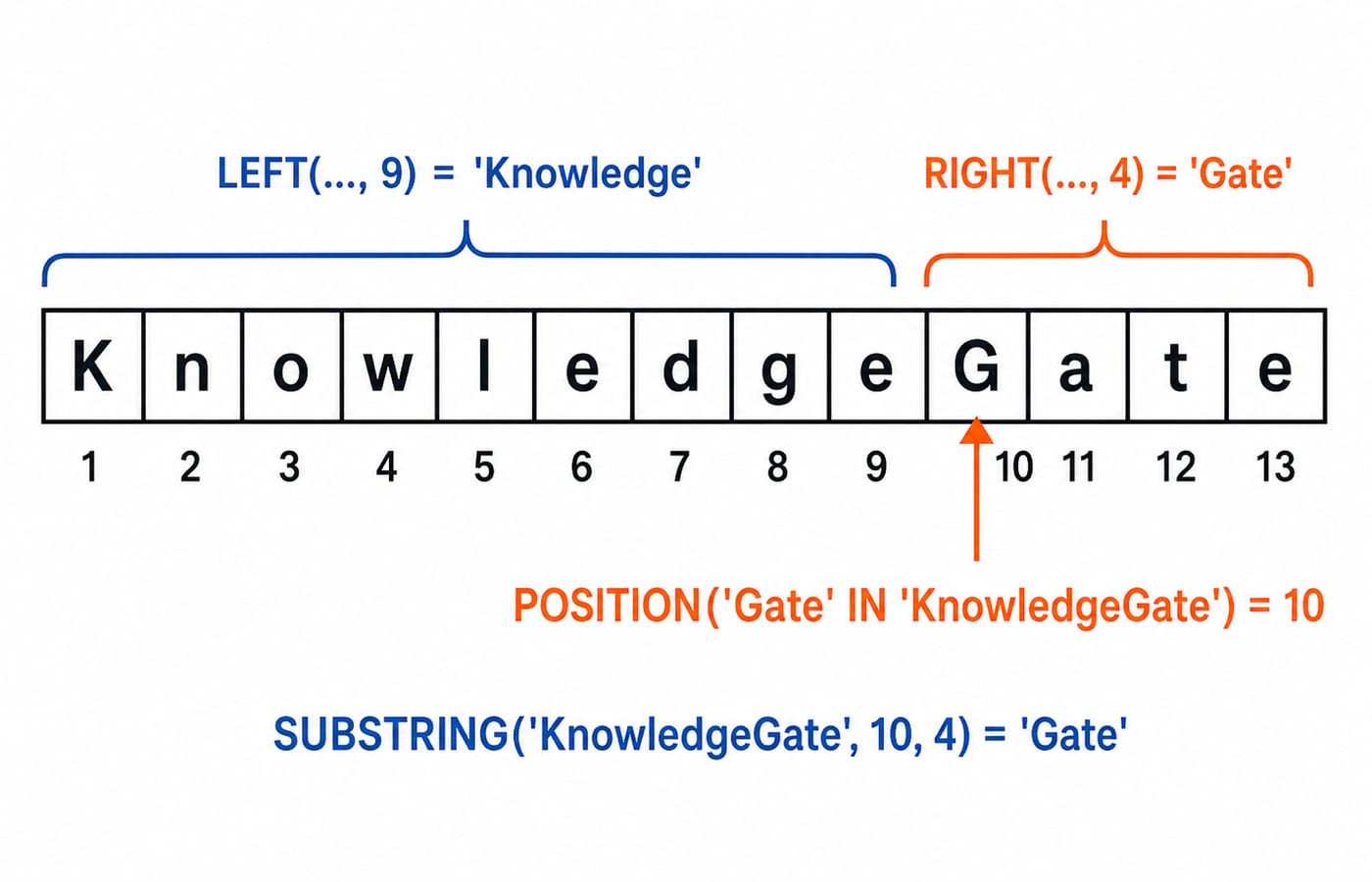
Use one-based positions for the literal 'KnowledgeGate':
K1 n2 o3 w4 l5 e6 d7 g8 e9 G10 a11 t12 e13
Expression | Result |
|---|---|
|
|
|
|
|
|
|
|
Now extract each email username:
SELECT learner_id,
       LEFT(email, POSITION('@' IN email) - 1) AS username
FROM learner_contacts
ORDER BY learner_id;
The outputs are anita.sharma, ravi.kumar, meera.i and arjun.singh. POSITION points at @, so subtracting 1 stops the slice at the character before it.
Some engines accept other SUBSTRING forms or use a different search-function spelling. Keep one consistent form within a query, run these snippets in your own SQL engine, and check its documentation for the equivalent syntax.
Combine values safely when a column can be NULL
Ordinary string expressions can behave unexpectedly around NULL, and CONCAT does not handle it identically in every engine. Do not depend on implicit behaviour. This expression states the missing-surname policy with CASE:
CONCAT(
  UPPER(LEFT(TRIM(first_name), 1)),
  LOWER(SUBSTRING(TRIM(first_name), 2)),
  ' ',
  CASE WHEN last_name IS NULL THEN '[no surname]'
       ELSE CONCAT(UPPER(LEFT(TRIM(last_name), 1)),
                   LOWER(SUBSTRING(TRIM(last_name), 2)))
  END
) AS display_name
Each part is trimmed. Its first character is uppercased, and the remaining characters are lowercased. In learner order, the results are Anita Sharma, Ravi [no surname], Meera Iyer and Arjun Singh.
SQL NULL means missing or unknown. It is different from '', an empty string, and from 'NULL', which contains four stored characters.
Replace separators, pad identifiers and respect TRIM's limit
Start with three fixed expressions:
Expression | Result |
|---|---|
|
|
|
|
|
|
For the table, UPPER(REPLACE(track_code, '-', ' ')) returns GATE CS, SQL PRACTICE, PLACEMENT and DBMS for learners 101 to 104. REPLACE changes every matching hyphen. TRIM removes surrounding spaces, but it does not collapse spaces inside a phrase.
Use LPAD for display formatting, not arithmetic conversion. LPAD('101', 6, '0') gives the display code '000101', while the stored primary key remains integer 101. An overly small target width can truncate in some implementations, so test that edge case in your chosen engine instead of assuming one cross-database result.
Fully worked contact-cleaning query
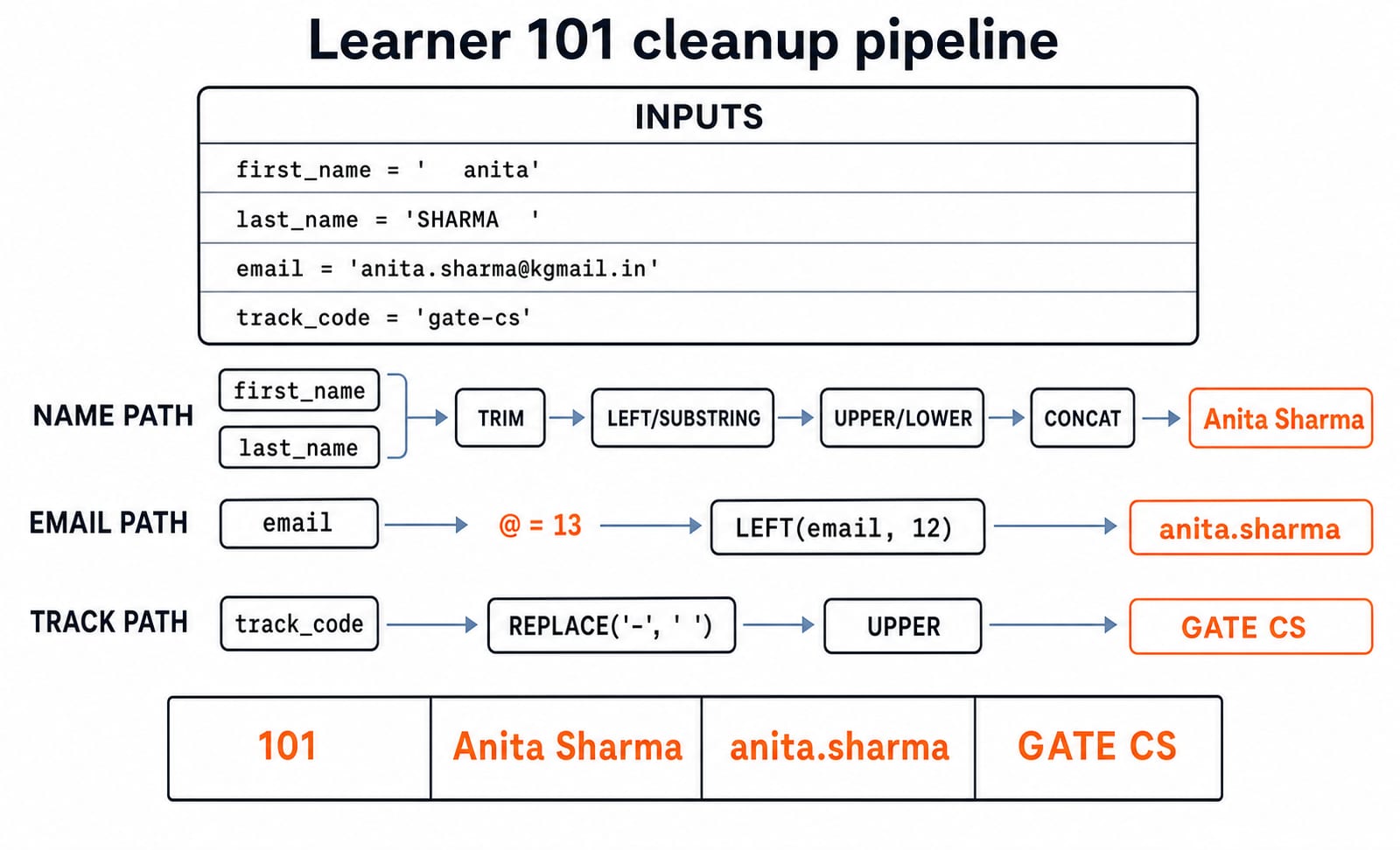
The contact-cleaning query combines the expressions without relying on engine-dependent CONCAT(NULL) behaviour:
SELECT learner_id,
       CONCAT(
         UPPER(LEFT(TRIM(first_name), 1)),
         LOWER(SUBSTRING(TRIM(first_name), 2)),
         ' ',
         CASE WHEN last_name IS NULL THEN '[no surname]'
              ELSE CONCAT(
                UPPER(LEFT(TRIM(last_name), 1)),
                LOWER(SUBSTRING(TRIM(last_name), 2))
              )
         END
       ) AS display_name,
       LEFT(email, POSITION('@' IN email) - 1) AS username,
       UPPER(REPLACE(track_code, '-', ' ')) AS track
FROM learner_contacts
ORDER BY learner_id;
learner_id | display_name | username | track |
|---|---|---|---|
101 | Anita Sharma | anita.sharma | GATE CS |
102 | Ravi [no surname] | ravi.kumar | SQL PRACTICE |
103 | Meera Iyer | meera.i | PLACEMENT |
104 | Arjun Singh | arjun.singh | DBMS |
Follow row 101 through every layer. ' anita' becomes 'anita'; then 'A' plus 'nita' becomes 'Anita'. 'SHARMA ' becomes 'SHARMA'; then 'S' plus 'harma' becomes 'Sharma'. The @ in anita.sharma@kgmail.in is at position 13, so LEFT(email, 12) gives anita.sharma. Replacing the hyphen in gate-cs and applying UPPER gives GATE CS.
Test each inner function in a temporary SELECT before nesting it. That exposes the failing layer faster than guessing inside one long expression.
Common errors and how SQL questions test them
Mistake | Wrong result or assumption | Correction |
|---|---|---|
Start positions at zero |
| Count from |
Forget | The username keeps | Slice one character before |
Count before trimming | Edge spaces inflate the count | Apply |
Expect | Internal gaps remain | Use the function suited to that cleanup rule |
Treat | Missing data becomes four characters | Test SQL |
Mix dialect spellings | One statement may not parse | Use forms supported by one chosen engine |
Typical questions ask you to predict nested-function output, find an off-by-one boundary, decide how NULL affects a result, or choose an expression that normalises text without updating the stored row.
Read the SQL queries and joins guide for the next concept lesson. For the applied next step, work through SQL Queries for Placement Interviews, Step by Step and test each expression in your own engine.
String-function exercises and next steps
LOWER(TRIM(' DBMS '))returns'dbms'.SUBSTRING('KnowledgeGate', 4, 5)returns'wledg'.POSITION('@' IN 'meera.i@kgmail.in')returns8.REPLACE('gate-dbms-sql', '-', '/')returns'gate/dbms/sql'.Learner 102 needs an explicit
CASEbecauselast_nameis SQLNULL, so the output policy must be stated rather than assumed.
The shortest reliable sequence is: clean the ends, normalise case, locate boundaries, extract pieces, handle NULL, then combine. Change row 104's first name to ' ARJUN ', rerun the report, and confirm that its output remains Arjun Singh.
Use SQL Query MCQs: 12 Solved (SELECT, Joins, Subqueries) for output-prediction practice. Interview-focused readers can continue with CS Fundamentals for Placements by Sanchit Sir.
Keep learning
Stored Procedures in SQL: PostgreSQL Tutorial with Parameters, Transactions and Examples
Build and test a PostgreSQL procedure that validates a transfer, locks accounts, updates balances and writes an audit row. Then trace rollback and INOUT behaviour.
Updated 8 Nov 20266 min readDBMS
Set Operations in SQL: UNION, INTERSECT and EXCEPT with Worked Examples
Learn how SQL combines compatible query results, why duplicates and column order matter, and how to calculate UNION, INTERSECT and EXCEPT outputs by hand.
Updated 7 Nov 20266 min readDBMS

INSERT, UPDATE and DELETE in SQL: Runnable DML Tutorial with Safe Worked Examples
Follow one table from its first insert through targeted updates and a rolled-back deletion. The runnable lab makes affected rows, defaults and NULL behaviour visible.
Updated 5 Nov 20266 min readDBMS
Indexes in SQL: B-Tree, Composite and Partial Indexes with Examples
Build and test SQL indexes on one PostgreSQL dataset. Follow exact results from a single-column B-tree through composite, partial, expression and covering designs.
Updated 4 Nov 20266 min readDBMS