

Set Operations in SQL: UNION, INTERSECT and EXCEPT with Worked Examples
Learn how SQL combines compatible query results, why duplicates and column order matter, and how to calculate UNION, INTERSECT and EXCEPT outputs by hand.
KnowledgeGate Team
Exam prep & CS education
Updated 7 Nov 20266 min read
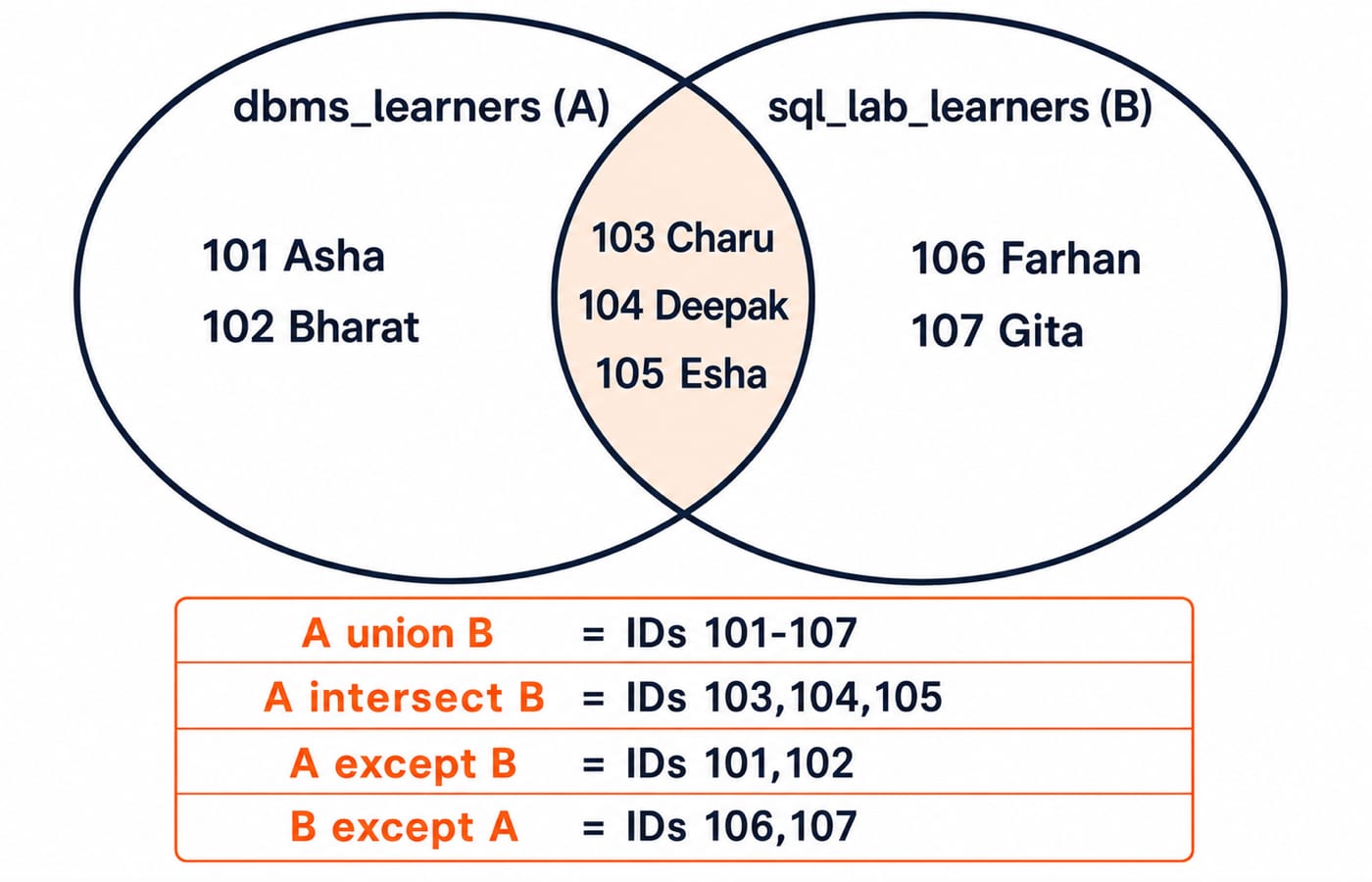
Two SELECT statements can both work correctly and still produce a surprise when you combine them. The confusing part is that each branch can look sensible in isolation. UNION, UNION ALL, INTERSECT and EXCEPT stack or compare rows, unlike a JOIN, while duplicate removal, column compatibility and left-to-right direction can change the answer. Across the same two small learner tables, UNION produces seven distinct rows, UNION ALL ten occurrences, INTERSECT three shared rows, and EXCEPT two left-only rows.
What SQL set operations combine, and how that differs from a JOIN
A set operation combines or compares the result rows of two compatible query expressions. It acts vertically on complete projected rows. A join matches source rows and usually adds related columns horizontally.
Set Operations and Cartesian Product in Relational Algebra owns pure set semantics, union-compatibility formulas and Cartesian-product cardinality. SQL adds executable operator syntax, UNION ALL multiplicity, NULL duplicate semantics, aliases, final ORDER BY placement and engine-specific support.
The four operators have different jobs:
UNIONreturns distinct rows present in either input.UNION ALLkeeps every occurrence from both inputs. It is not a mathematical set because multiplicity remains.INTERSECTreturns distinct rows present in both inputs.EXCEPTreturns distinct rows in the left result but not the right result.
Both branches must project the same number of columns in the same order, with compatible types in corresponding positions. The final column names come from the first SELECT. This compatibility rule is a useful part of the wider CS Fundamentals for Exams & Placements toolkit.
Build two exact learner sets for every worked example
Run this PostgreSQL-compatible setup exactly as written:
CREATE TABLE dbms_learners (
    student_id INTEGER PRIMARY KEY,
    student_name VARCHAR(30) NOT NULL,
    city VARCHAR(20) NOT NULL
);

CREATE TABLE sql_lab_learners (
    student_id INTEGER PRIMARY KEY,
    student_name VARCHAR(30) NOT NULL,
    city VARCHAR(20) NOT NULL
);

INSERT INTO dbms_learners VALUES
    (101, 'Asha',   'Delhi'),
    (102, 'Bharat', 'Pune'),
    (103, 'Charu',  'Delhi'),
    (104, 'Deepak', 'Jaipur'),
    (105, 'Esha',   'Pune');

INSERT INTO sql_lab_learners VALUES
    (103, 'Charu',  'Delhi'),
    (104, 'Deepak', 'Jaipur'),
    (105, 'Esha',   'Pune'),
    (106, 'Farhan', 'Lucknow'),
    (107, 'Gita',   'Delhi');
For the usual projection (student_id, student_name), call the left result A = {101 Asha, 102 Bharat, 103 Charu, 104 Deepak, 105 Esha}. Call the right result B = {103 Charu, 104 Deepak, 105 Esha, 106 Farhan, 107 Gita}. Their shared rows are exactly 103 Charu, 104 Deepak and 105 Esha.
Set operators compare projected row values, not the identity of the table that supplied them. Project (student_id, student_name) for row-level membership; project city to see how duplicate value counts change.
UNION versus UNION ALL: seven distinct rows or ten occurrences
Start with the distinct form:
SELECT student_id, student_name
FROM dbms_learners
UNION
SELECT student_id, student_name
FROM sql_lab_learners
ORDER BY student_id;
The exact result is:
student_id | student_name |
|---|---|
101 | Asha |
102 | Bharat |
103 | Charu |
104 | Deepak |
105 | Esha |
106 | Farhan |
107 | Gita |
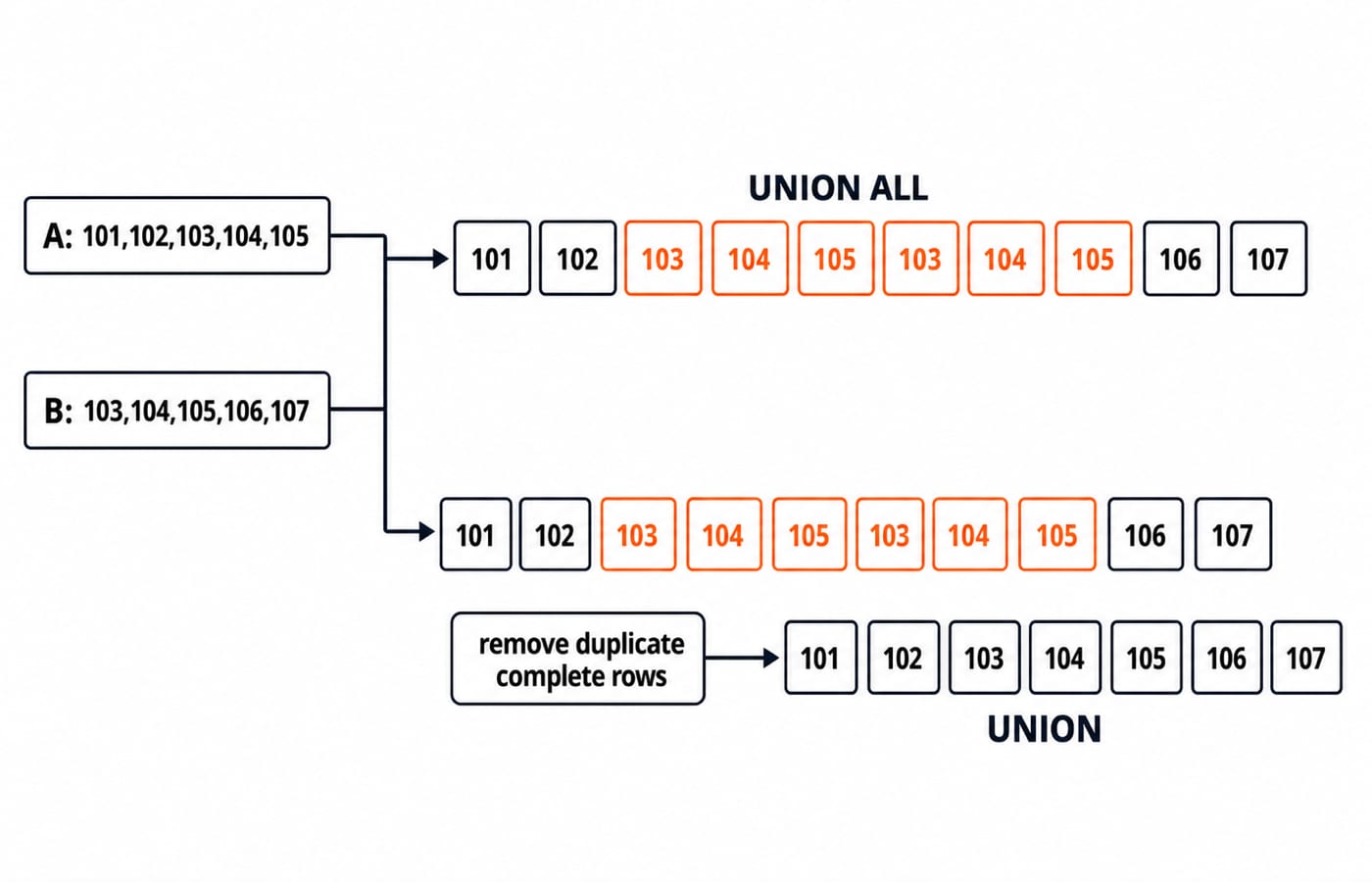
Each input contributes five rows, so concatenation initially gives 5 + 5 = 10 occurrences. Three complete rows, 103 Charu, 104 Deepak and 105 Esha, appear in both inputs. UNION removes one repeated occurrence of each, so 10 - 3 = 7 distinct output rows.
Change only UNION to UNION ALL, and no occurrence is removed. IDs 101 and 102 appear once each, IDs 103, 104 and 105 appear twice each, and IDs 106 and 107 appear once each. That is 2 + 6 + 2 = 10 occurrences.
Use UNION when duplicate result rows must collapse. Use UNION ALL when every source occurrence matters or the inputs are known to be disjoint. UNION ALL avoids de-duplication work, but correctness decides the operator.
INTERSECT returns complete rows found in both results
INTERSECT keeps only the shared projected rows:
SELECT student_id, student_name
FROM dbms_learners
INTERSECT
SELECT student_id, student_name
FROM sql_lab_learners
ORDER BY student_id;
The result is exactly 103 Charu, 104 Deepak and 105 Esha, which gives three rows.
Complete projected row matters. This expression returns no row because the names differ, even though the IDs match:
SELECT 103 AS student_id, 'Charu' AS student_name
INTERSECT
SELECT 103, 'Charu S.';
The ID-only expression SELECT 103 AS student_id INTERSECT SELECT 103; returns 103. Project only the columns that define membership. If membership depends on student_id but the output needs a changeable name, intersect the IDs first, then join to the authoritative learner table. Check the spelling and availability of INTERSECT in your chosen database engine.
EXCEPT is directional: left-only is not right-only
A EXCEPT B asks for rows found on the left but not on the right:
SELECT student_id, student_name
FROM dbms_learners
EXCEPT
SELECT student_id, student_name
FROM sql_lab_learners
ORDER BY student_id;
The result is 101 Asha and 102 Bharat. These two rows occur in dbms_learners but not in sql_lab_learners.
Reverse the branches, keeping the projected columns unchanged, and sql_lab_learners EXCEPT dbms_learners returns 106 Farhan and 107 Gita. In words, A EXCEPT B means left minus right. It does not mean rows that differ in either direction.
Where EXCEPT is unavailable, or matching depends on selected keys, a correlated NOT EXISTS can express left-only membership:
SELECT d.student_id, d.student_name
FROM dbms_learners AS d
WHERE NOT EXISTS (
    SELECT 1
    FROM sql_lab_learners AS s
    WHERE s.student_id = d.student_id
)
ORDER BY d.student_id;
For this data, the fallback also returns IDs 101 and 102.
Column compatibility, NULLs, aliases and ORDER BY traps
Most set-operation errors come from the shape of the two branches, not from the operator itself.
Mistake | Consequence | Correction |
|---|---|---|
| The first branch has two columns and the second has one, so the expression fails. | Project two corresponding columns in each branch. |
| Integer IDs and text names occupy corresponding positions, so the query may fail or coerce values unexpectedly. | Select matching columns in matching order. |
An | Branch ordering does not define the order of the combined result and may be rejected. | Put one |
Aliases on the first branch name the combined result columns:
SELECT student_id AS learner_key, student_name AS learner_label
FROM dbms_learners
UNION
SELECT student_id, student_name
FROM sql_lab_learners
ORDER BY learner_key;
Here the output names are learner_key and learner_label.
Missing values also follow set duplicate semantics. SELECT CAST(NULL AS VARCHAR(20)) AS city UNION SELECT CAST(NULL AS VARCHAR(20)); returns one NULL row. Change to UNION ALL, and it returns two NULL rows. For duplicate removal, two NULL fields can be treated as duplicates even though the ordinary predicate NULL = NULL is not true.
Finally, do not rely on mixed-operator precedence. When UNION, INTERSECT and EXCEPT appear together, use parentheses or named CTEs so every intermediate result is visible and portable.
Test your understanding with four exact exercises
Stable question forms ask you to predict rows, count UNION ALL occurrences, spot incompatible columns, reverse an EXCEPT, or decide whether the task needs a set operation or a join. Try these before reading the key. For each one, write both the rows and the row count.
Select
cityfrom both tables withUNION.Select
cityfrom both tables withUNION ALL.Select
cityfrom both tables withINTERSECT.Select IDs from
sql_lab_learners EXCEPT dbms_learners.
The exact answers are:
Four distinct cities:
Delhi,Jaipur,Lucknow,Pune.Ten rows:
Delhifour times,Jaipurtwice,Lucknowonce andPunethree times. The count check is4 + 2 + 1 + 3 = 10.Three distinct cities:
Delhi,Jaipur,Pune.Two IDs:
106,107.
For more output tracing, work through SQL Query MCQs: 12 Solved after you can explain every count above without running the query.
Set operations in SQL: the short version and next step
First match the columns. Choose UNION for distinct either-side rows, UNION ALL for every occurrence, INTERSECT for shared projected rows, and EXCEPT for left-only rows. Put the final ORDER BY after the combined expression. Use a join when the desired result adds related columns instead of stacking or comparing rows.
Placement-focused readers can continue with CS Fundamentals for Placements by Sanchit Sir. For a wider GATE CS sequence, use GATE Guidance by Sanchit Sir. Then run all four operators, swap the two EXCEPT branches, and predict the result before execution.
Keep learning
String Functions in SQL: Clean, Extract and Combine Text with Examples
Build reliable SQL text expressions from small, checkable examples, then combine them into a complete contact-cleaning query with explicit NULL handling.
Updated 9 Nov 20265 min readDBMS

Stored Procedures in SQL: PostgreSQL Tutorial with Parameters, Transactions and Examples
Build and test a PostgreSQL procedure that validates a transfer, locks accounts, updates balances and writes an audit row. Then trace rollback and INOUT behaviour.
Updated 8 Nov 20266 min readDBMS

INSERT, UPDATE and DELETE in SQL: Runnable DML Tutorial with Safe Worked Examples
Follow one table from its first insert through targeted updates and a rolled-back deletion. The runnable lab makes affected rows, defaults and NULL behaviour visible.
Updated 5 Nov 20266 min readDBMS
Indexes in SQL: B-Tree, Composite and Partial Indexes with Examples
Build and test SQL indexes on one PostgreSQL dataset. Follow exact results from a single-column B-tree through composite, partial, expression and covering designs.
Updated 4 Nov 20266 min readDBMS