Your JavaScript variables can change while the page still looks unchanged. DOM manipulation closes that gap: select the browser's live nodes, then read, change, create, or remove them. The planner starts at 0 of 3 complete | 0 points and updates as tasks are completed. Review the Complete JavaScript course first if selectors and event listeners are unfamiliar.
What the DOM is: turn HTML into a node tree
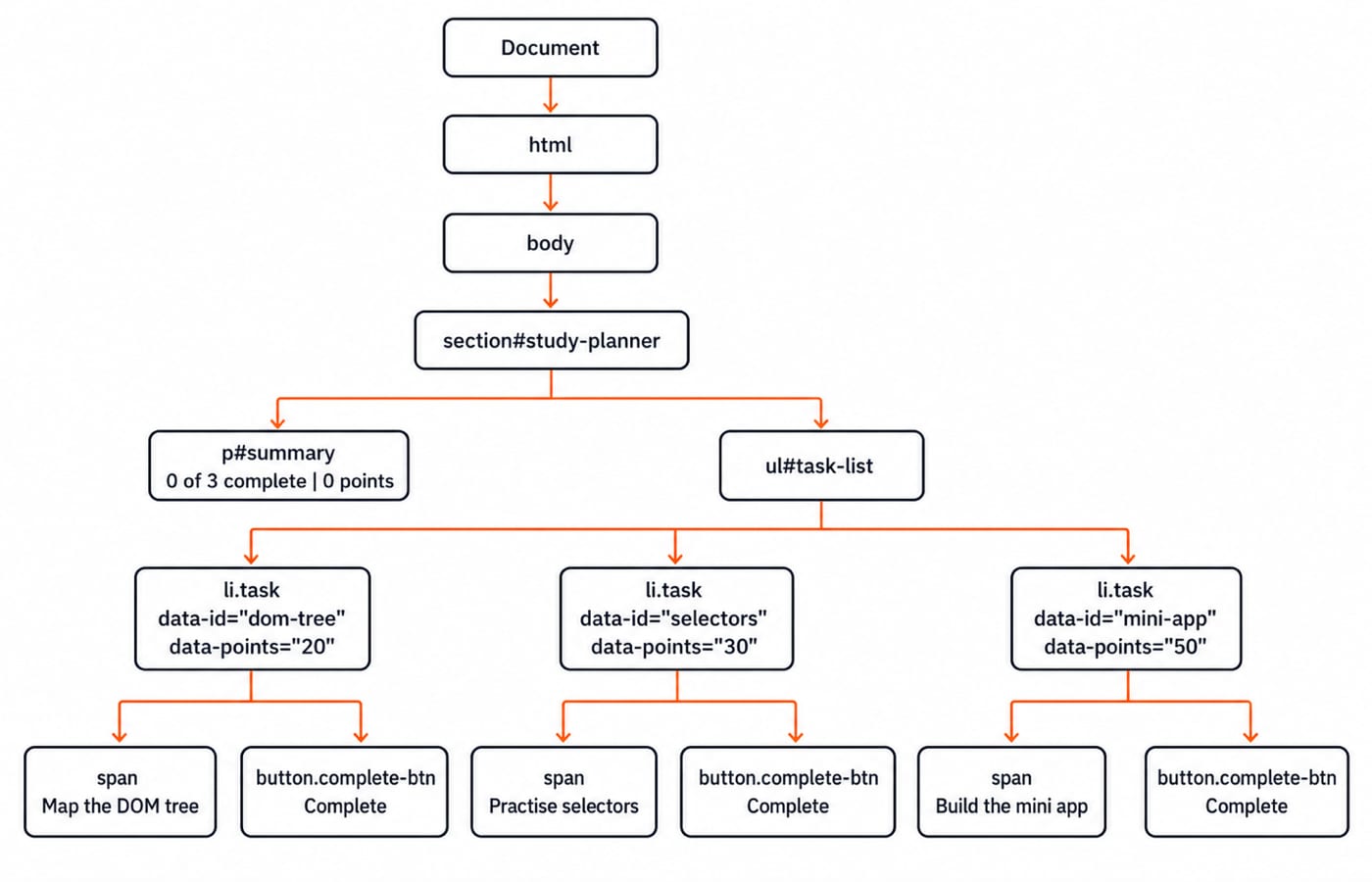
HTML is source text. The browser parses it into the Document Object Model, a live tree headed by document. Element nodes represent tags, text nodes hold text, and relationships describe position.
The browser parses the following HTML into a live node tree:
<section id="study-planner">
  <p id="summary">0 of 3 complete | 0 points</p>
  <ul id="task-list">
    <li class="task" data-id="dom-tree" data-points="20"><span>Map the DOM tree</span><button class="complete-btn">Complete</button></li>
    <li class="task" data-id="selectors" data-points="30"><span>Practise selectors</span><button class="complete-btn">Complete</button></li>
    <li class="task" data-id="mini-app" data-points="50"><span>Build the mini app</span><button class="complete-btn">Complete</button></li>
  </ul>
</section>
The section parents the paragraph and list. Its three list items are siblings. Each item contains a span, button, and text nodes.
Select the right element before changing it
Selection comes before mutation. These calls return different shapes:
Selector | Return shape | Exact result |
|---|---|---|
| One element or |
|
| First match or |
|
| First match or | The 30-point task |
| First match or | The 20-point task |
| Static | Initial |
Use [...document.querySelectorAll('.task')] for array methods such as filter and reduce. A static NodeList does not grow after an append. Single-element selectors can return null, so check before reading .textContent.
Change text, classes, attributes, and data values safely
This mutation marks the first task complete and updates its button and summary:
const firstTask = document.querySelector('.task');
firstTask.classList.add('done');
firstTask.dataset.complete = 'true';
firstTask.querySelector('button').textContent = 'Undo';
firstTask.querySelector('button').setAttribute('aria-pressed', 'true');
document.getElementById('summary').textContent = '1 of 3 complete | 20 points';
dataset.points returns the string '20', not the number 20. Convert it with Number(firstTask.dataset.points) before arithmetic. Use classList.toggle('done') for reversible state, setAttribute or removeAttribute for attributes, and a .done class for appearance.
For the literal input <img src=x onerror=alert(1)>, textContent displays characters as text. innerHTML parses markup, so never give it untrusted input. This planner uses textContent for labels.
Create, insert, replace, and remove elements
createTask(label, points, id) creates an li, sets className, dataset.id, and dataset.points, builds a span and button with textContent, then calls taskList.append(item). After createTask('Review event delegation', 40, 'event-delegation'), a fresh querySelectorAll('.task').length is 4.
For a notice before the list, create a paragraph containing Today's target: 140 points, then call document.getElementById('study-planner').prepend(notice). Replace with oldNode.replaceWith(newNode). Remove the added task with document.querySelector('[data-id="event-delegation"]').remove(); a fresh count returns to 3.
Sorting data and rendering nodes are separate jobs. If you later order by data-points, review Sorting Algorithms Compared without mixing sorting into the rendering helper.
Handle clicks with one delegated event listener
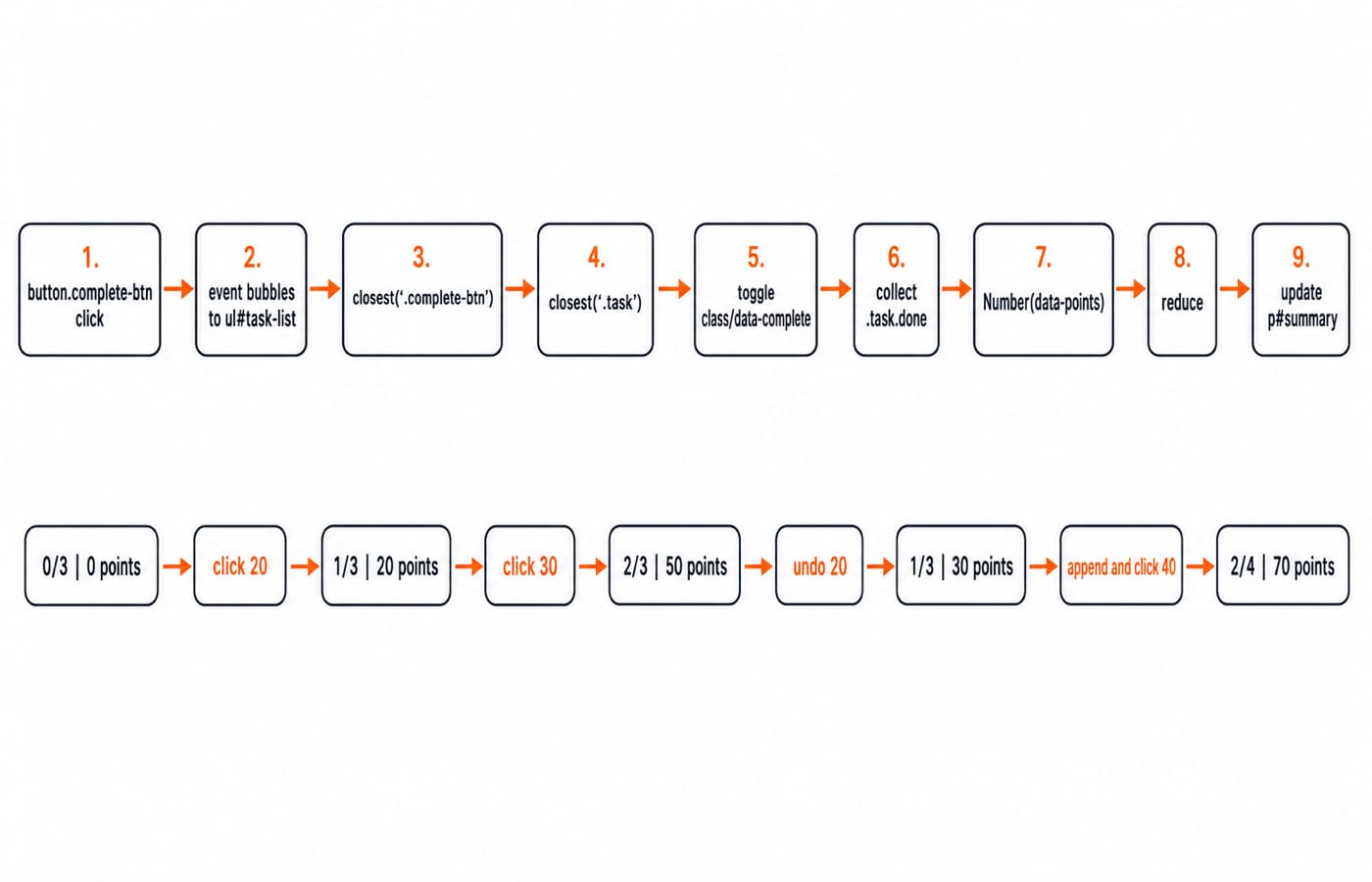
Attach one listener to #task-list. A click bubbles to the list: event.target is the button, while event.currentTarget remains ul#task-list. Delegation also catches buttons appended later.
The callback finds event.target.closest('.complete-btn') and returns without a button. It finds button.closest('.task'), toggles state, changes Complete to Undo, aligns aria-pressed, and calls updateSummary(). That function re-queries tasks, filters .task.done, converts with Number, reduces, and updates the summary.
Fully worked DOM manipulation example
Copy this into one HTML file and open it in a browser:
<!doctype html>
<html lang="en">
<head>
  <meta charset="utf-8">
  <title>Study planner</title>
  <style>.done span { text-decoration: line-through; opacity: .65; }</style>
</head>
<body>
  <section id="study-planner">
    <p id="summary">0 of 3 complete | 0 points</p>
    <ul id="task-list">
      <li class="task" data-id="dom-tree" data-points="20"><span>Map the DOM tree</span> <button class="complete-btn" aria-pressed="false">Complete</button></li>
      <li class="task" data-id="selectors" data-points="30"><span>Practise selectors</span> <button class="complete-btn" aria-pressed="false">Complete</button></li>
      <li class="task" data-id="mini-app" data-points="50"><span>Build the mini app</span> <button class="complete-btn" aria-pressed="false">Complete</button></li>
    </ul>
  </section>
  <button id="add-review">Add review task</button>
  <script>
    const taskList = document.getElementById('task-list');
    const summary = document.getElementById('summary');

    function updateSummary() {
      const tasks = [...document.querySelectorAll('.task')];
      const completed = tasks.filter(item => item.classList.contains('done'));
      const points = completed.reduce((sum, item) => sum + Number(item.dataset.points), 0);
      summary.textContent = `${completed.length} of ${tasks.length} complete | ${points} points`;
    }

    function createTask(label, points, id) {
      const item = document.createElement('li');
      item.className = 'task';
      item.dataset.id = id;
      item.dataset.points = points;
      const span = document.createElement('span');
      span.textContent = label;
      const button = document.createElement('button');
      button.className = 'complete-btn';
      button.textContent = 'Complete';
      button.setAttribute('aria-pressed', 'false');
      item.append(span, ' ', button);
      taskList.append(item);
    }

    taskList.addEventListener('click', event => {
      const button = event.target.closest('.complete-btn');
      if (!button) return;
      const item = button.closest('.task');
      if (!item) return;
      const done = item.classList.toggle('done');
      item.dataset.complete = String(done);
      button.textContent = done ? 'Undo' : 'Complete';
      button.setAttribute('aria-pressed', String(done));
      updateSummary();
    });

    document.getElementById('add-review').addEventListener('click', () => {
      if (!document.querySelector('[data-id="event-delegation"]')) {
        createTask('Review event delegation', 40, 'event-delegation');
        updateSummary();
      }
    });
  </script>
</body>
</html>
Trace the visible state, including every sum:
Action | Calculation | Output |
|---|---|---|
Start | No completed tasks | 0 of 3 complete | 0 points |
Complete Map the DOM tree |
| 1 of 3 complete | 20 points |
Complete Practise selectors |
| 2 of 3 complete | 50 points |
Undo Map the DOM tree |
| 1 of 3 complete | 30 points |
Add and complete Review event delegation |
| 2 of 4 complete | 70 points |
Common DOM manipulation mistakes and a debugging checklist
Trap | Fix |
|---|---|
Script runs before the HTML exists, producing | Use |
| Use |
A static | Run a fresh query |
Dataset strings are added directly | Convert each value with |
Every button gets its own listener, so new buttons are missed | Delegate one listener from the list |
Learner input is assigned to | Assign it to |
Guard closest() before accessing its result. Debug in order: confirm the script loaded, log the selection, inspect target and currentTarget, check the class and data-complete in DevTools, then compare with the trace table.
How quizzes and interviews test DOM knowledge
Prediction questions expose your model of the live tree. With a listener on div#panel and a clicked button.save, event.target.className is save, while event.currentTarget.id is panel. Capture querySelectorAll('.task') at three tasks, append a fourth, and its length stays 3; a fresh query returns 4.
The broader JavaScript fresher interview guide connects DOM questions to scope, closures, async JavaScript, and the event loop. DOM-specific questions narrow the task to predicting selector results, mutation output, target versus currentTarget, static collections, and safe text updates.
The short version and what to learn next
Select, inspect, mutate, listen, then re-check the visible state. The five trace totals are 0, 20, 50, 30, and 70, each derived from the tasks currently marked done.
Use Complete JavaScript for the language sequence. Move to the MERN Stack course for full-stack projects, browse the Coding & Skills category for the wider inventory, or study Dynamic Programming Explained after the DOM mini app works.