Java array syntax looks small, but output questions become difficult when declaration, object creation, zero-based indexing, reference aliasing and jagged rows blur into one vague idea. A five-mark trace grounds each concept: the final sum is 392, average 78.4, maximum 91 at index 3, and three values meet the threshold of 75. For broader programming and problem-solving study, see Coding & DSA Courses for Placements.
1. Arrays in Java: type, creation, initialisation and indexing
A Java array is an object containing a fixed number of variables of one component type. The declaration int[] marks; creates a reference variable. The statement marks = new int[5]; creates an array object of length 5, with valid indices from 0 to 4.
Indexed construction works like this:
int[] marks = new int[5];
marks[0] = 72;
marks[1] = 88;
marks[2] = 65;
marks[3] = 91;
marks[4] = 76;
Or use a one-statement initialiser:
int[] marks = {72, 88, 65, 91, 76};Here, marks.length is 5, marks[0] is 72, marks[3] is 91, and marks[marks.length - 1] is 76. A bare brace initialiser cannot be used later as an ordinary assignment.
Creation | Default contents |
|---|---|
|
|
|
|
| Three |
The Oracle Java Language Specification, Chapter 10, Arrays defines fixed-length array objects with indices from 0 through length - 1.
2. Java array traversal: fully worked marks example
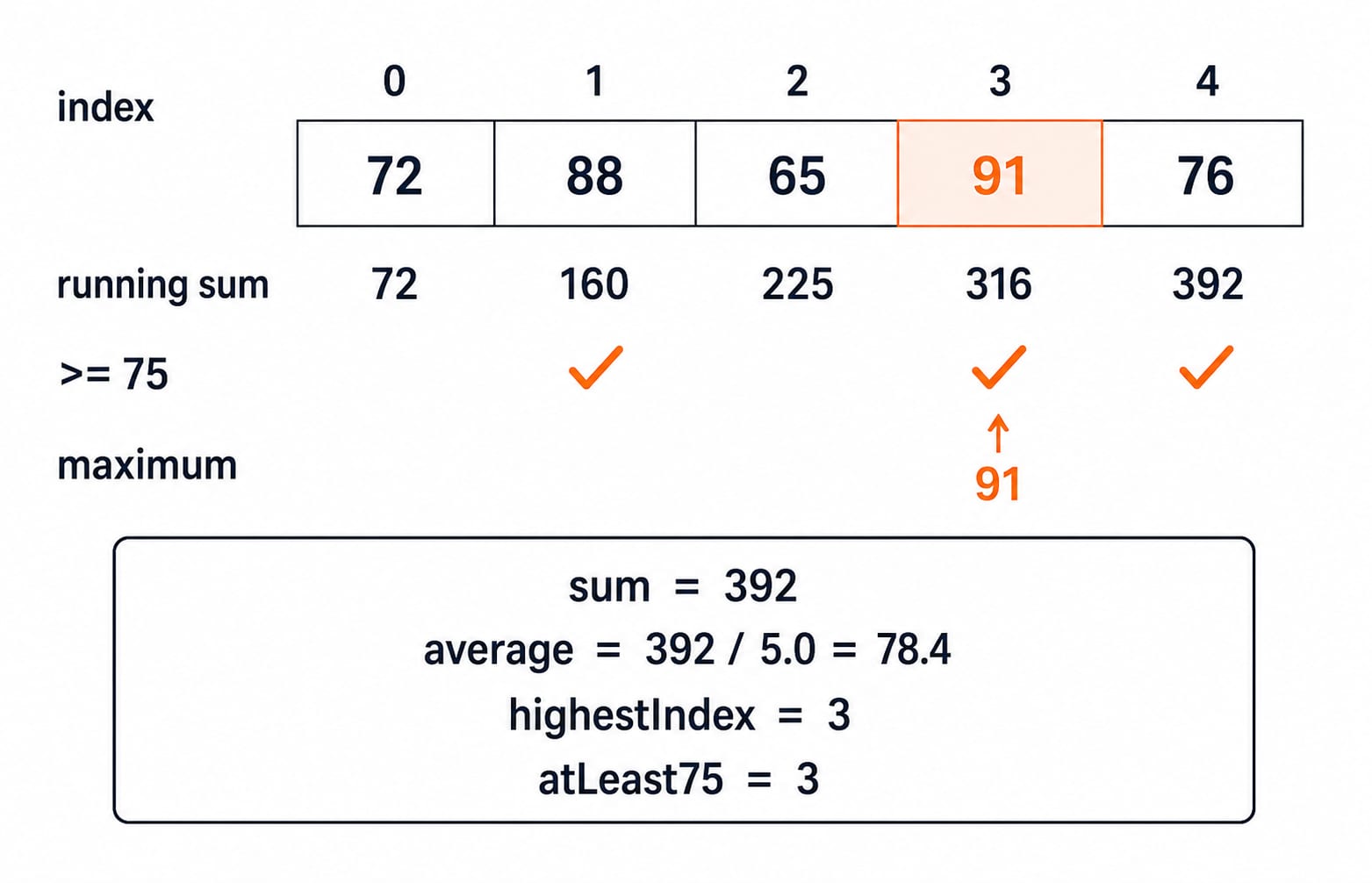
This loop computes a sum, average, maximum and threshold count in one traversal:
int[] marks = {72, 88, 65, 91, 76};
int sum = 0;
int highest = marks[0];
int highestIndex = 0;
int atLeast75 = 0;

for (int i = 0; i < marks.length; i++) {
    sum += marks[i];
    if (marks[i] > highest) {
        highest = marks[i];
        highestIndex = i;
    }
    if (marks[i] >= 75) {
        atLeast75++;
    }
}

double average = sum / (double) marks.length;
i | marks[i] | sum after addition | highest | highestIndex | atLeast75 |
|---|---|---|---|---|---|
0 | 72 | 72 | 72 | 0 | 0 |
1 | 88 | 160 | 88 | 1 | 1 |
2 | 65 | 225 | 88 | 1 | 1 |
3 | 91 | 316 | 91 | 3 | 2 |
4 | 76 | 392 | 91 | 3 | 3 |
The arithmetic is 72 + 88 + 65 + 91 + 76 = 392, then 392 / 5.0 = 78.4. The maximum is 91 at index 3. The values 88, 91 and 76 make the count at least 75 equal to 3.
Sum = 392
Average = 78.4
Highest = 91 at index 3
At least 75 = 3
Direct indexed access is O(1). This full traversal is O(n) time and uses O(1) extra space.
3. Java array references, aliases, copies and equality
Consider int[] original = {10, 20, 30};, int[] alias = original;, and int[] copy = Arrays.copyOf(original, original.length);. Initially, original == alias is true, original == copy is false, and Arrays.equals(original, copy) is true because the separate arrays hold equal values.
After alias[1] = 99, both original and alias are [10, 99, 30], while copy remains [10, 20, 30]. After copy[2] = 77, the final states are:
original = [10, 99, 30]
alias    = [10, 99, 30]
copy     = [10, 20, 77]
The == operator compares array references. Arrays.equals compares one-dimensional contents. Assigning one array variable to another does not copy elements.
Because Java passes the array reference value, a method can mutate the caller's object with a[0] = -1;. Rebinding its parameter with a = new int[3]; does not rebind the caller's variable.
4. Two-dimensional arrays in Java: rectangular-looking syntax, jagged storage
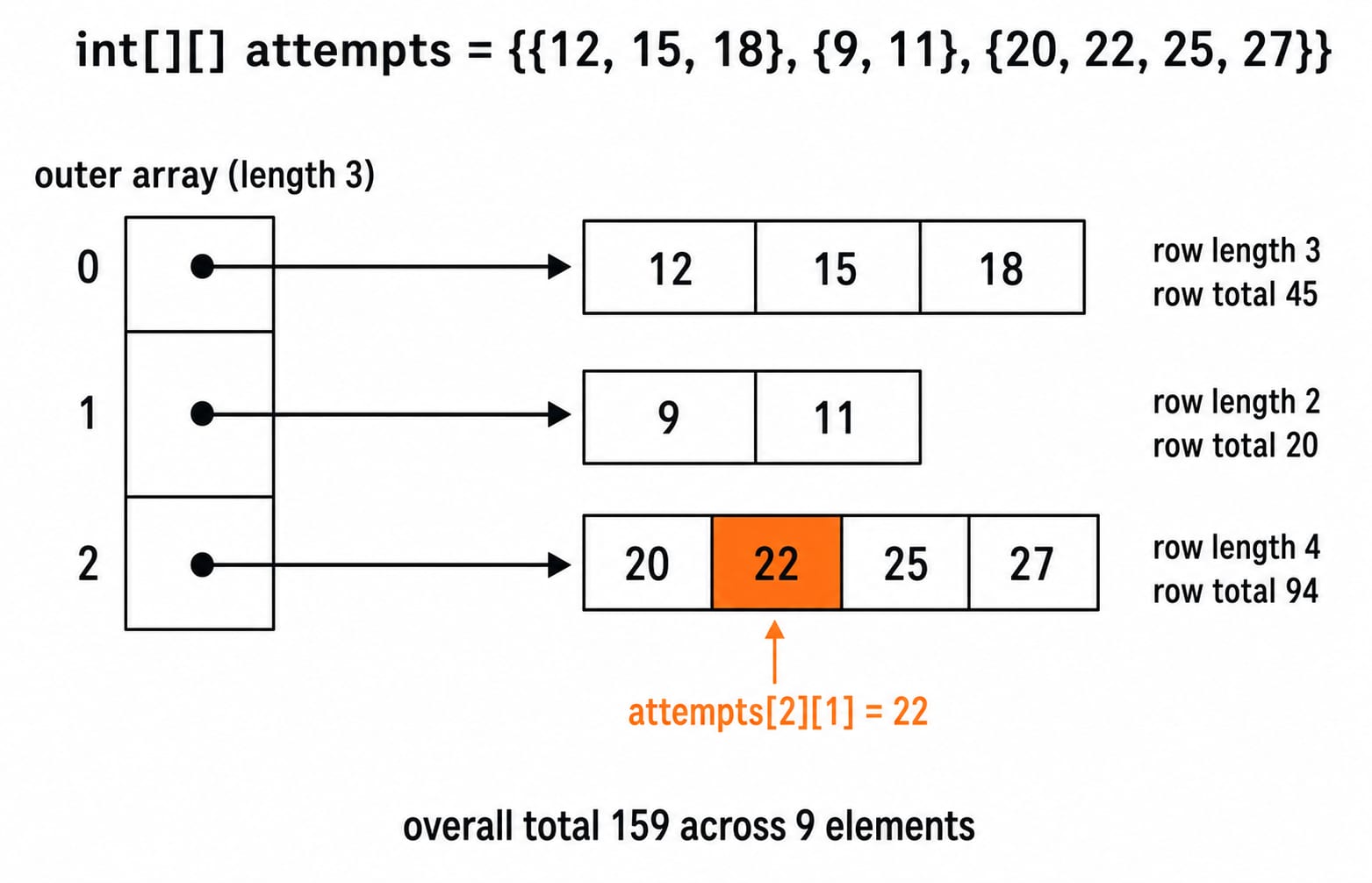
int[][] attempts = {{12, 15, 18}, {9, 11}, {20, 22, 25, 27}}; has attempts.length = 3; attempts[0].length = 3, attempts[1].length = 2, and attempts[2].length = 4. Outer cells reference separate row arrays, so lengths may differ.
A safe nested traversal uses each row's own bound:
for (int row = 0; row < attempts.length; row++) {
    int rowTotal = 0;
    for (int col = 0; col < attempts[row].length; col++) {
        rowTotal += attempts[row][col];
    }
}
The row totals are 12 + 15 + 18 = 45, 9 + 11 = 20, and 20 + 22 + 25 + 27 = 94. Thus there are 3 + 2 + 4 = 9 elements and the overall total is 45 + 20 + 94 = 159. Also, attempts[2][1] is 22.
The expression attempts[1][2] is invalid because row 1 has only indices 0 and 1. Use col < attempts[row].length, not a bound copied from row 0.
5. java.util.Arrays: sort, search, copy ranges and print values
For int[] data = {42, 17, 23, 17, 31};, Arrays.sort(data) produces [17, 17, 23, 31, 42]. Print it with Arrays.toString(data). Next, study why methods have different costs in Sorting Algorithms: Complexity and Comparison.
On this sorted array, Arrays.binarySearch(data, 31) returns index 3. Searching for 20 finds insertion point 2, so Java returns -(2) - 1 = -3. The range must already be sorted with the same ordering. A negative result encodes an insertion point, not simply “index minus one”.
int[] middle = Arrays.copyOfRange(data, 1, 4); produces [17, 23, 31]: start is inclusive and end is exclusive. Finally, int[] flags = new int[4]; Arrays.fill(flags, -1); produces [-1, -1, -1, -1].
6. Arrays in Java: seven traps and their corrections
Trap | What happens | Correct rule |
|---|---|---|
| Does not compile: length is a field | Use |
| Throws | Last index is |
Expecting random values in | Wrong: elements are zeroes | Integer elements default to zero |
| Variables alias one object | Use |
| Only the loop variable changes | Use an index loop or |
| Does not show the desired list | Use |
Binary search before sorting | Result cannot be interpreted reliably | Satisfy the sorted-range precondition first |
An interview edge case concerns covariant reference arrays. Number[] nums = new Integer[2]; nums[0] = 3.5; compiles, but throws ArrayStoreException because the actual array object can store only Integer references.
7. How array questions test Java understanding
Common formats test declaration versus creation, defaults, bounds, loop tracing, alias versus copy, jagged indexing, utility preconditions, and O(1) access versus O(n) traversal. Try four checks:
int[] x = new int[4]; x[2] = 7; System.out.println(x[0] + x[2] + x.length);prints11, since0 + 7 + 4 = 11.For
int[] a = {2, 4, 6}; int[] b = a; b[0] = 9;,a[0]is9.For
int[][] m = {{1, 2}, {3, 4, 5}};,m.length + m[1].length + m[1][2]is2 + 3 + 5 = 10.In sorted
[17, 17, 23, 31, 42], searching for20returns-3because its insertion point is2.
For additional structure practice, Data Structures MCQs works across common structures rather than Java array syntax and reference semantics.
8. Arrays in Java: the short version and next step
Keep this checklist beside your next program:
Identify the component type.
Separate the reference variable from the array object.
Mark indices from
0throughlength - 1.Choose an index loop or enhanced loop deliberately.
Distinguish aliasing from copying.
Use each row's own length in a 2D array.
The five marks total 392, average 78.4, with maximum 91 at index 3 and three values at least 75. Continue in sequence with Java Course: Concepts, MCQs and Coding Questions. Later, apply arrays in data-structure and interview problems through DSA using Java: Placement Preparation Course.
Now adapt the section 2 loop for int[] times = {18, 24, 21, 27}. Before running it, predict sum = 90, average = 22.5, maximum 27 at index 3, and two values at least 22. Then run the code and compare all four results.