

TreeMap and SortedMap in Java: Ordering, Range Views and Worked Examples
Learn how Java's TreeMap orders keys, answers floor and ceiling queries, exposes live range views, and handles comparator collisions through worked examples.
KnowledgeGate Team
Exam prep & CS education
Updated 9 Nov 20266 min read
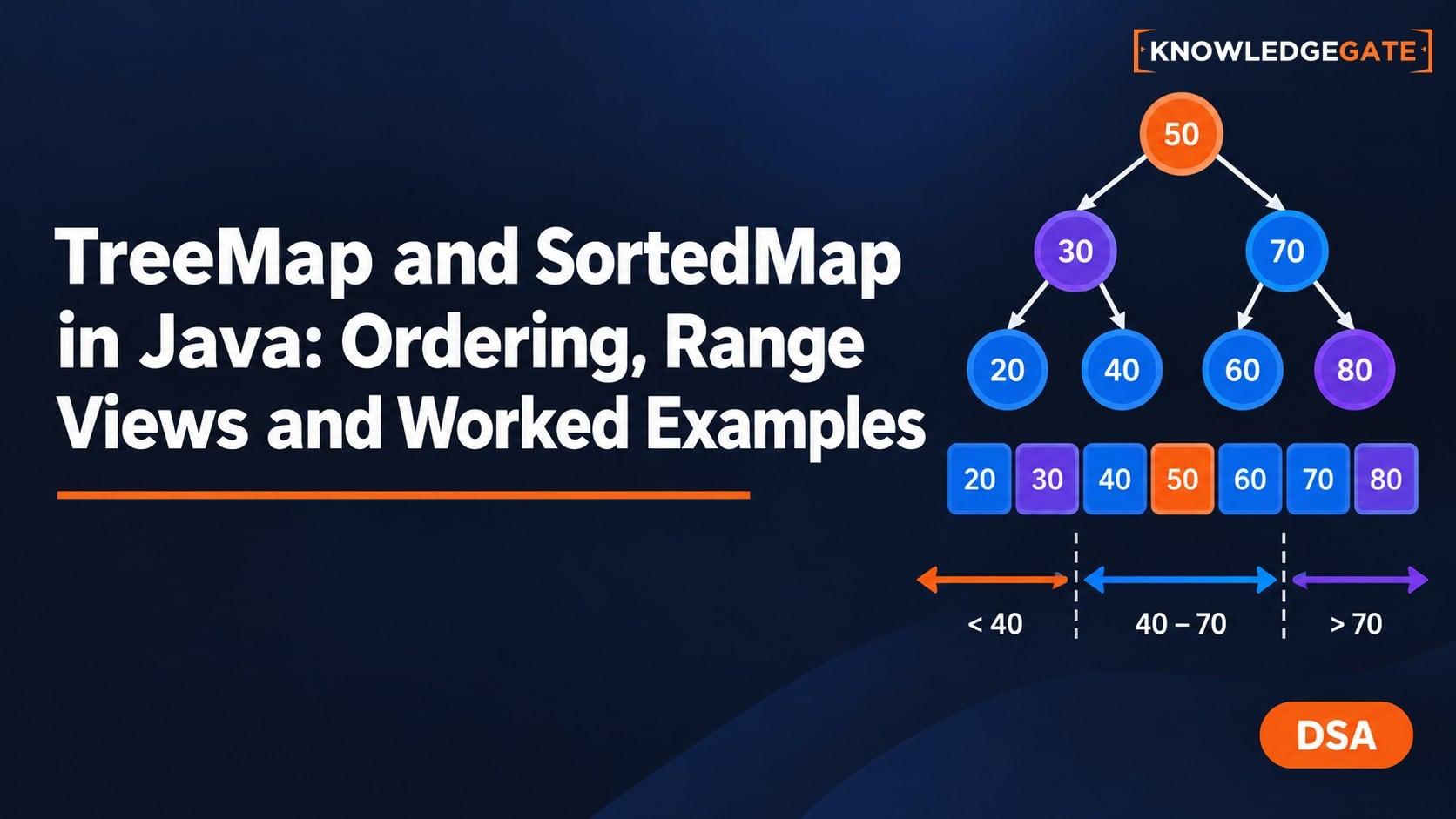
A TreeMap looks like an ordinary key-value map until sorted iteration, nearest-key queries and range views give results that differ from insertion order. Comparator choice also determines key identity, and map selection depends on the required ordering. For the wider route, see Coding and Skill Development Courses; the article on String Handling in Java is useful adjacent reading on immutable keys and value semantics.
Build the Map, SortedMap, NavigableMap and TreeMap mental model
TreeMap<K,V> is a concrete NavigableMap. NavigableMap extends SortedMap, and all of them follow the Map key-value contract. SortedMap adds key order and range views. NavigableMap adds nearest-match methods such as lowerKey, floorKey, ceilingKey and higherKey. The order always applies to keys, not values.
The map can use the keys' natural order, as with Integer and String, or a supplied Comparator. The crucial invariant is that comparison defines key identity inside the tree. If comparison returns 0, the map treats two keys as one map position, even if equals() says they differ. A later put then replaces the earlier value.
Oracle's TreeMap API documentation guarantees logarithmic time for containsKey, get, put and remove. That does not reveal one exact internal tree shape, and the cost of an individual comparison depends on the comparator and key type.
Worked example: insert a schedule and query nearest keys
This runnable program inserts keys in the order 42, 18, 30, 25, 50, but prints them in ascending key order. It also labels every navigation and range result.
import java.util.Map;
import java.util.NavigableMap;
import java.util.TreeMap;

public class TreeMapScheduleDemo {
    static TreeMap<Integer, String> originalSchedule() {
        TreeMap<Integer, String> schedule = new TreeMap<>();
        schedule.put(42, "Graphs");
        schedule.put(18, "Java basics");
        schedule.put(30, "Trees");
        schedule.put(25, "Arrays");
        schedule.put(50, "Review");
        return schedule;
    }

    public static void main(String[] args) {
        TreeMap<Integer, String> schedule = originalSchedule();
        System.out.println("schedule = " + schedule);
        System.out.println("first entry = " + schedule.firstEntry());
        System.out.println("last entry = " + schedule.lastEntry());
        System.out.println("floor 31 = " + schedule.floorKey(31));
        System.out.println("ceiling 31 = " + schedule.ceilingKey(31));
        System.out.println("lower 30 = " + schedule.lowerKey(30));
        System.out.println("higher 30 = " + schedule.higherKey(30));
        System.out.println("floor 17 is null = " + (schedule.floorKey(17) == null));
        System.out.println("ceiling 51 is null = " + (schedule.ceilingKey(51) == null));

        System.out.println("head below 30 = " + schedule.headMap(30, false));
        System.out.println("tail from 30 = " + schedule.tailMap(30, true));

        NavigableMap<Integer, String> block = schedule.subMap(25, true, 42, false);
        System.out.println("block initially = " + block);
        block.put(35, "Heaps");
        System.out.println("block after put 35 = " + block);
        System.out.println("schedule after put 35 = " + schedule);

        schedule = originalSchedule();
        block = schedule.subMap(25, true, 42, false);
        block.remove(30);
        System.out.println("block after remove 30 = " + block);
        System.out.println("schedule after remove 30 = " + schedule);

        schedule = originalSchedule();
        block = schedule.subMap(25, true, 42, false);
        try {
            block.put(45, "DP");
        } catch (IllegalArgumentException exception) {
            System.out.println("put 45 = IllegalArgumentException");
        }

        schedule = originalSchedule();
        schedule.put(35, "Heaps");
        System.out.println("open-closed block = "
                + schedule.subMap(25, false, 42, true));
    }
}
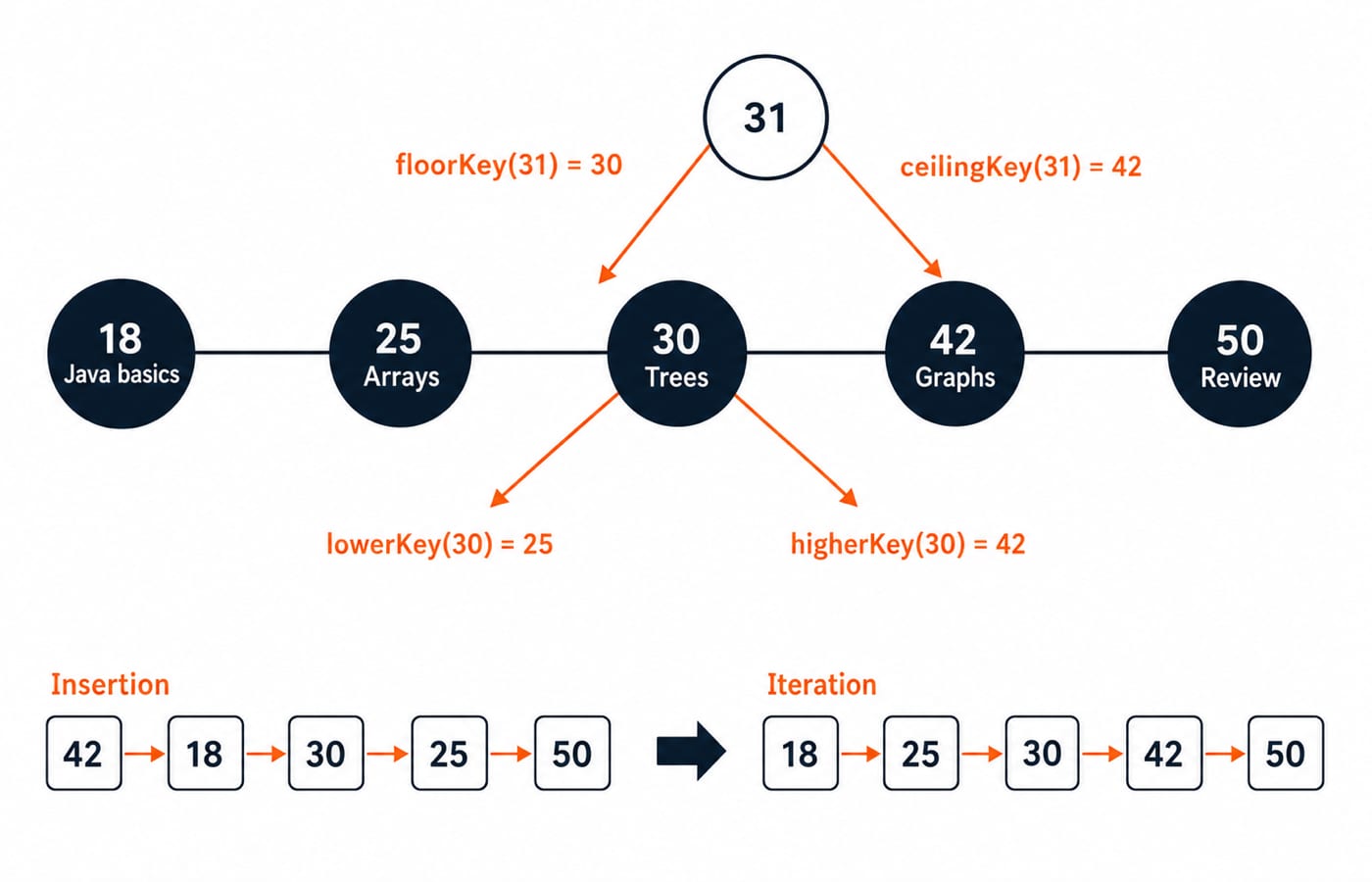
The first map is {18=Java basics, 25=Arrays, 30=Trees, 42=Graphs, 50=Review}. firstEntry() is 18=Java basics, while lastEntry() is 50=Review. For query 31, the floor is 30 and the ceiling is 42. Around exact key 30, the lower key is 25 and the higher key is 42. Floor and ceiling may equal the query; lower and higher are strict. Below the minimum, floorKey(17) is null; above the maximum, ceilingKey(51) is null. An ordinary get(31) would also be null, because it does not search for a neighbour.
Range operations return backed views, not copies
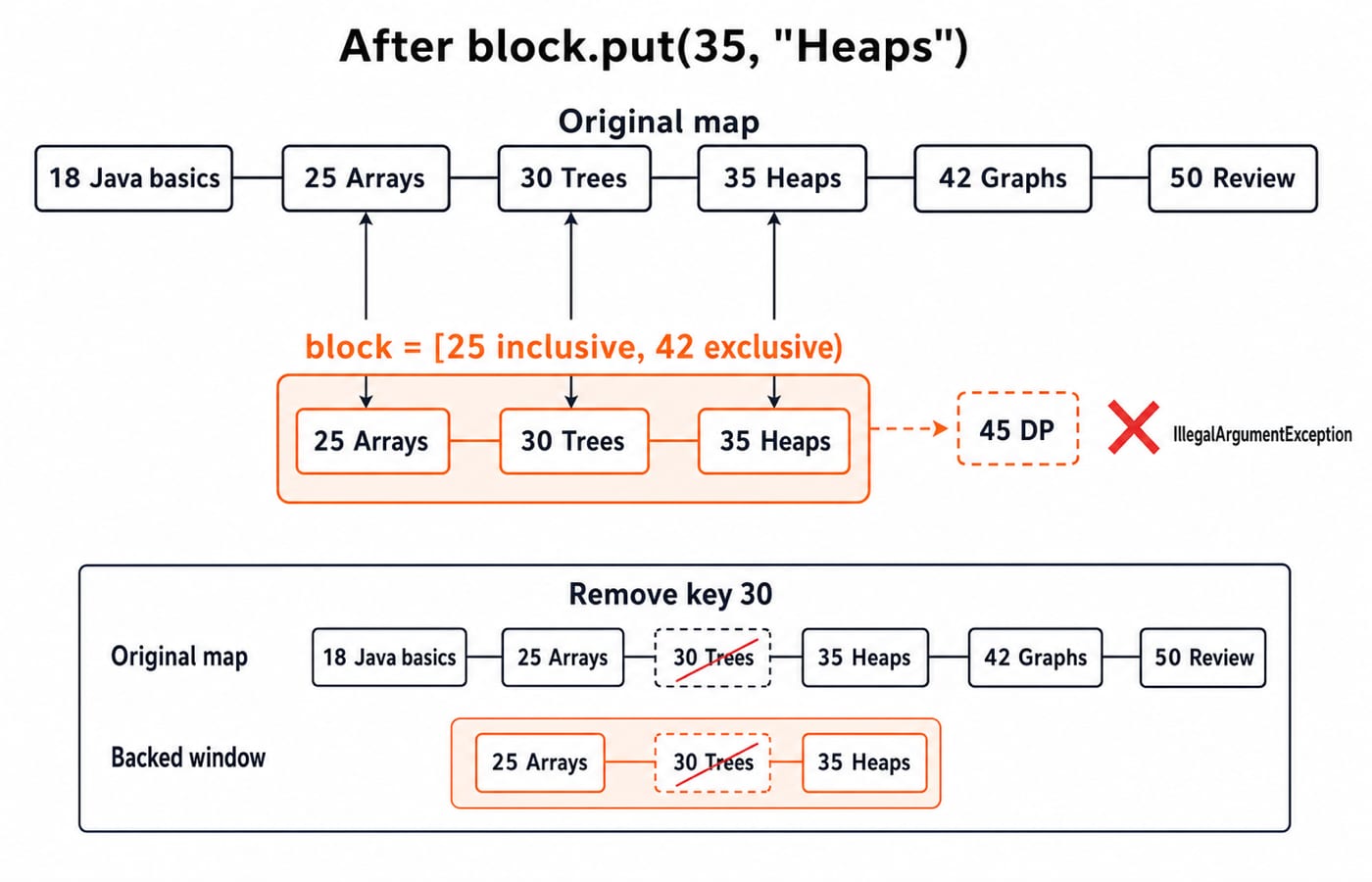
The call schedule.subMap(25, true, 42, false) means [25, 42): include 25, exclude 42. Its initial content is {25=Arrays, 30=Trees}. By comparison, headMap(30, false) gives {18=Java basics, 25=Arrays}, while tailMap(30, true) gives {30=Trees, 42=Graphs, 50=Review}.
The view is backed by the original map. Adding 35=Heaps through block makes the view {25=Arrays, 30=Trees, 35=Heaps} and the original {18=Java basics, 25=Arrays, 30=Trees, 35=Heaps, 42=Graphs, 50=Review}. Removing 30 through a freshly created view removes it from the original too. Putting 45=DP through that view throws IllegalArgumentException because 45 is outside [25, 42).
Boundary flags are part of the answer. With keys 18, 25, 30, 35, 42, 50, subMap(25, false, 42, true) means (25, 42] and contains {30=Trees, 35=Heaps, 42=Graphs}.
Custom comparators control order and key identity
Consider record Student(String name, int score) {}. A comparator built as Comparator.comparingInt(Student::score).thenComparing(Student::name) orders Ravi 65, Asha 72, Meera 72 and Vikram 80 in exactly that sequence. The name tie-breaker keeps both students scoring 72 as separate keys.
Now use only Comparator.comparingInt(Student::score). After inserting Ravi,65 -> B, Asha,72 -> A, Meera,72 -> C and Vikram,80 -> D, the map size is 3. Asha and Meera compare as 0, so Meera's value C replaces A. The retained key object at that position still prints as Student[name=Asha, score=72].
Include every field needed to distinguish business keys. Prefer a comparator consistent with equals() when ordinary Map intuition matters. Random tie-breakers and identity hash codes hide the modelling mistake instead of repairing it.
Common TreeMap failures and their repairs
Expecting insertion order is the first trap. Use LinkedHashMap when insertion order is the real requirement. A TreeMap also cannot sort directly by values; sort its entries with an explicit value comparator and define how ties are broken.
A natural-order TreeMap rejects a null key with NullPointerException, but null values are allowed. Therefore, get(key) == null does not distinguish an absent key from a present key mapped to null. Use containsKey. Behaviour for null keys with a custom comparator follows that comparator and the current API contract, so do not assume one universal shortcut.
Ordering fields must remain stable. If a mutable key is inserted with priority 20 and then changed to 5, its position was established using the old value. Lookup and range behaviour can become inconsistent, with no single output worth memorising. Use immutable keys, or remove, change and reinsert the key. Also remember that TreeMap is not synchronised.
Choose TreeMap only when ordering carries value
For insertion 42, 18, 30, 25, 50, TreeMap iterates 18, 25, 30, 42, 50; LinkedHashMap iterates 42, 18, 30, 25, 50; and no exact HashMap order should be predicted. The Hashing and Collision Resolution tutorial explains the different lookup model. Reason about TreeMap from its ordering and logarithmic-cost contract rather than from a drawn internal tree, because Java does not promise one visible shape here.
Choose TreeMap for minimum and maximum keys, predecessor and successor queries, sorted iteration, and bounded key ranges. Choose HashMap when order is irrelevant and average O(1) lookup is the priority under normal hashing assumptions. Choose LinkedHashMap for deterministic insertion order or configured access order. TreeMap lookup and update take O(log n) comparisons. Iterating all n entries is O(n) for all three.
How interviews and exams test the model
Check the model with four exact questions:
Insert
42, 18, 30, 25, 50. The printed key order is18, 25, 30, 42, 50.Evaluate
lowerKey(30),floorKey(31),ceilingKey(31),higherKey(30). The answers are25, 30, 42, 42.On keys
18, 25, 30, 35, 42, 50, evaluatesubMap(25, false, 42, true). The keys are30, 35, 42.Use the score-only student comparator. The size is
3, and Meera's value replaces Asha's value at their comparator-equal position.
Short version, retrieval exercises and next action
TreeMap sorts by keys.
Comparison returning
0means one map key position.Floor and ceiling allow equality; lower and higher do not.
Range methods use explicit inclusive or exclusive boundaries.
Range maps are backed views.
Exercise A: add 27=Queues to the original schedule. The order becomes 18, 25, 27, 30, 42, 50. The results of lowerKey(27), floorKey(27) and higherKey(27) are 25, 27 and 30. The view subMap(25, true, 30, false) is {25=Arrays, 27=Queues}.
Exercise B: rebuild the original map with Comparator.reverseOrder(). Iteration is 50, 42, 30, 25, 18; firstKey() is 50; lastKey() is 18. First and last follow the comparator, not numeric intuition.
For a wider language and collections foundation, continue with the Java Programming course. If your Java fluency is already sound and you want ordered-search problem practice, take the next step with DSA Using Java. Choose the route that matches the gap you need to close first.
Keep learning
HashSet and TreeSet in Java: Runnable Examples and Key Differences
Learn how Java sets handle duplicates, ordering, navigation and custom objects through deterministic examples you can run and modify.
Updated 8 Nov 20265 min readJava
Java Garbage Collection Tutorial: Reachability, Leaks and Runnable Examples
Trace three connected objects, find exactly when each becomes eligible for collection, and repair a cache that keeps byte arrays reachable.
Updated 7 Nov 20266 min readJava

Java Memory Model Tutorial: Happens-Before, volatile and Safe Publication
Learn the Java Memory Model through exact start/join, volatile, synchronized, final-field and AtomicInteger examples, with clear happens-before guarantees.
Updated 6 Nov 20266 min readJava
Java Exception Handling Tutorial with Runnable Examples
Learn how Java moves control through try, catch, and finally, then build checked custom exceptions and safer file handling with runnable code.
Updated 5 Nov 20266 min readJava