C# vs C++: Managed .NET, Native Control, and the Trade-offs That Matter
Compare one component in C# and C++, then use its lifetime, generic, build, and interop behaviour to choose the right model for your software.
KnowledgeGate Team
Exam prep & CS education
Updated 23 Sep 20266 min read
C# and C++ support similar classes, generics, and performance-sensitive components, but their execution and ownership defaults differ. Choose by memory, runtime, interop, and deployment constraints. The Coding & Skill Development Courses page places both languages in a broader learning path.
1. C# vs C++ starts with the execution model
C# normally compiles to Common Intermediate Language (CIL) plus metadata, then runs with .NET runtime services. C++ normally compiles and links for a target platform, exposing lifetime and layout controls. These are dominant models, not laws: .NET supports ahead-of-time compilation, while C++ can use managed runtimes or garbage-collected libraries.
Concern | C# | C++ |
|---|---|---|
Execution path | CIL plus CLR | Target-native object code |
Memory default | Reference types on the garbage-collected heap; value types stored in place | Deterministic scope and ownership: automatic, static, or free store |
Generic mechanism | Reified generics with constraints | Compile-time templates and concepts |
Portability unit | Runtime plus application | Binary built for a target ABI |
Both support object-oriented programming, but neither is limited to it. Encapsulation, inheritance, and polymorphism remain shared ideas, explained further in Object Oriented Technology Explained: Four Pillars, Worked Java Examples, GATE and Interview Patterns.
2. C# vs C++ worked example: the same ReadingWindow
Both versions own readings and provide Add, Mean, and Above operations.
using System;
using System.Collections.Generic;
using System.Linq;

sealed class ReadingWindow
{
    private readonly List<double> values = new();

    public void Add(double value) => values.Add(value);
    public double Mean() => values.Sum() / values.Count;
    public int Above(double cutoff) => values.Count(x => x > cutoff);
}

class Program
{
    static void Main()
    {
        var window = new ReadingWindow();
        window.Add(18.0);
        window.Add(24.0);
        window.Add(30.0);
        Console.WriteLine($"mean = {window.Mean():F1}, above 23.0 = {window.Above(23.0)}");
    }
}#include <algorithm>
#include <iomanip>
#include <iostream>
#include <numeric>
#include <vector>
class ReadingWindow {
std::vector<double> values_;
public:
void Add(double value) { values_.push_back(value); }
double Mean() const {
return std::accumulate(values_.begin(), values_.end(), 0.0) / values_.size();
}
std::size_t Above(double cutoff) const {
return std::count_if(values_.begin(), values_.end(),
[cutoff](double x) { return x > cutoff; });
}
};
int main()
{
ReadingWindow window;
window.Add(18.0);
window.Add(24.0);
window.Add(30.0);
std::cout << std::fixed << std::setprecision(1)
<< "mean = " << window.Mean()
<< ", above 23.0 = " << window.Above(23.0) << '\n';
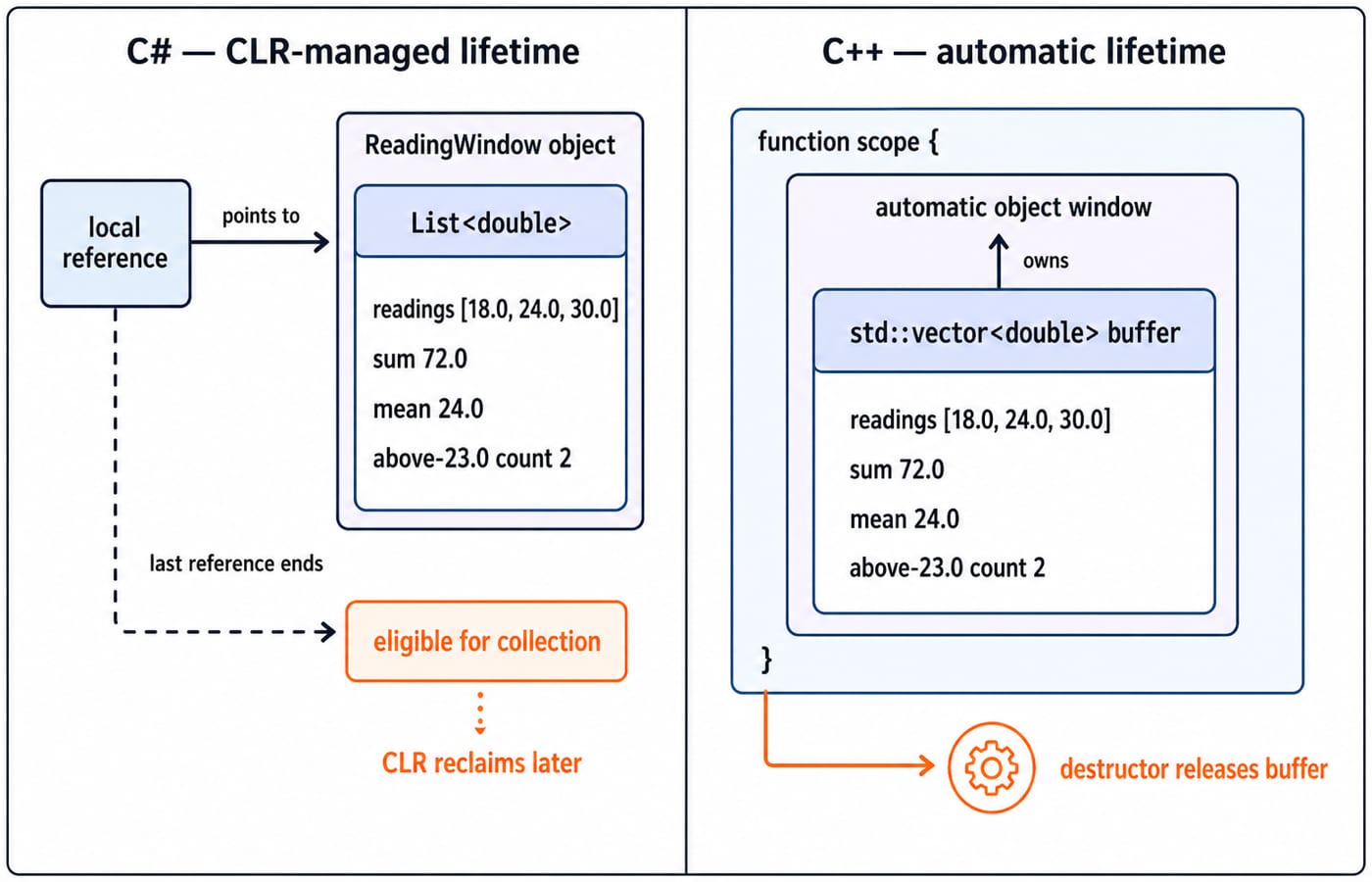
}The arithmetic is identical: 18.0 + 24.0 + 30.0 = 72.0, then 72.0 / 3 = 24.0. With cutoff 23.0, only 24.0 and 30.0 match, so the count is 2. Both print mean = 24.0, above 23.0 = 2.
The output hides different lifetimes. The C# variable refers to a managed class instance tracked for reachability by the CLR. The C++ variable has automatic storage duration; its vector owns a dynamic buffer and releases it when the object leaves scope. Syntax alone cannot predict speed.
3. C# and C++ memory management: collection is not cleanup
Managed memory reclamation is separate from resource cleanup. In C#, the garbage collector reclaims unreachable managed memory at an unspecified later time. A file, socket, or native handle still needs IDisposable and using. For example, using var writer = new StreamWriter("readings.csv"); followed by three writer.WriteLine calls for 18.0, 24.0, and 30.0 closes the writer through Dispose at scope exit, even though object memory remains a GC concern.
C++ applies RAII. An std::ofstream writer{"readings.csv"}; can write the same three lines, and its destructor closes the stream at scope exit. Prefer values, containers, and smart pointers before raw owning new and delete. Deterministic destruction still cannot prevent dangling pointers, use-after-free, or undefined behaviour when ownership is wrong.
4. C# generics vs C++ templates: same call, different contract
The calls look similar and both produce 11:
using System;

static T Max<T>(T a, T b) where T : IComparable<T>
    => a.CompareTo(b) >= 0 ? a : b;

Console.WriteLine(Max(7, 11)); // 11#include <concepts>
#include <iostream>
template<std::totally_ordered T>
T max_value(T a, T b) { return a >= b ? a : b; }
int main() {
std::cout << max_value(7, 11); // 11
}C# retains generic type information at runtime, and constraints define permitted operations. The .NET implementation may share generated code for some reference-type instantiations and specialise value-type instantiations. C++ templates are instantiated during compilation for used types. Concepts improve constraints and diagnostics, while separate instantiations can increase compilation time or binary size. Neither mechanism is automatically faster.
5. C# vs C++ runtime behaviour and deployment
Language | Typical build path | Deployment choices |
|---|---|---|
C# | Source to CIL and metadata to CLR execution, commonly with JIT | Framework-dependent, self-contained, or ahead-of-time publishing |
C++ | Source to object files to a linker-produced target-native executable | Static or shared native dependencies |
For illustration, a C# project might use dotnet build -c Release, while one C++ file might use g++ -std=c++20 -O2 reading_window.cpp -o reading_window. These are examples, not the only tools.
The artefacts differ with operating system, architecture, runtime, and library choices. Measure startup, throughput, latency, binary size, and debugging on the real workload. A learner who needs the fuller compiler, standard-library, and build sequence can follow the C++ Tutorial: The Complete Learning Path from First Program to STL.
6. C# calling C++: make the interop boundary boring
A native library exports a C-compatible wrapper. extern "C" suppresses C++ name mangling so the symbol keeps the name you wrote, and the export marker makes it visible outside the library:
// reading_native.cpp, built as a shared library
#include <cstddef>

#if defined(_WIN32)
#  define READING_API __declspec(dllexport)
#else
#  define READING_API __attribute__((visibility("default")))
#endif

extern "C" READING_API double reading_mean(const double* values, std::size_t count)
{
    if (values == nullptr || count == 0) {
        return 0.0;
    }
    double sum = 0.0;
    for (std::size_t i = 0; i < count; ++i) {
        sum += values[i];
    }
    return sum / static_cast<double>(count);
}
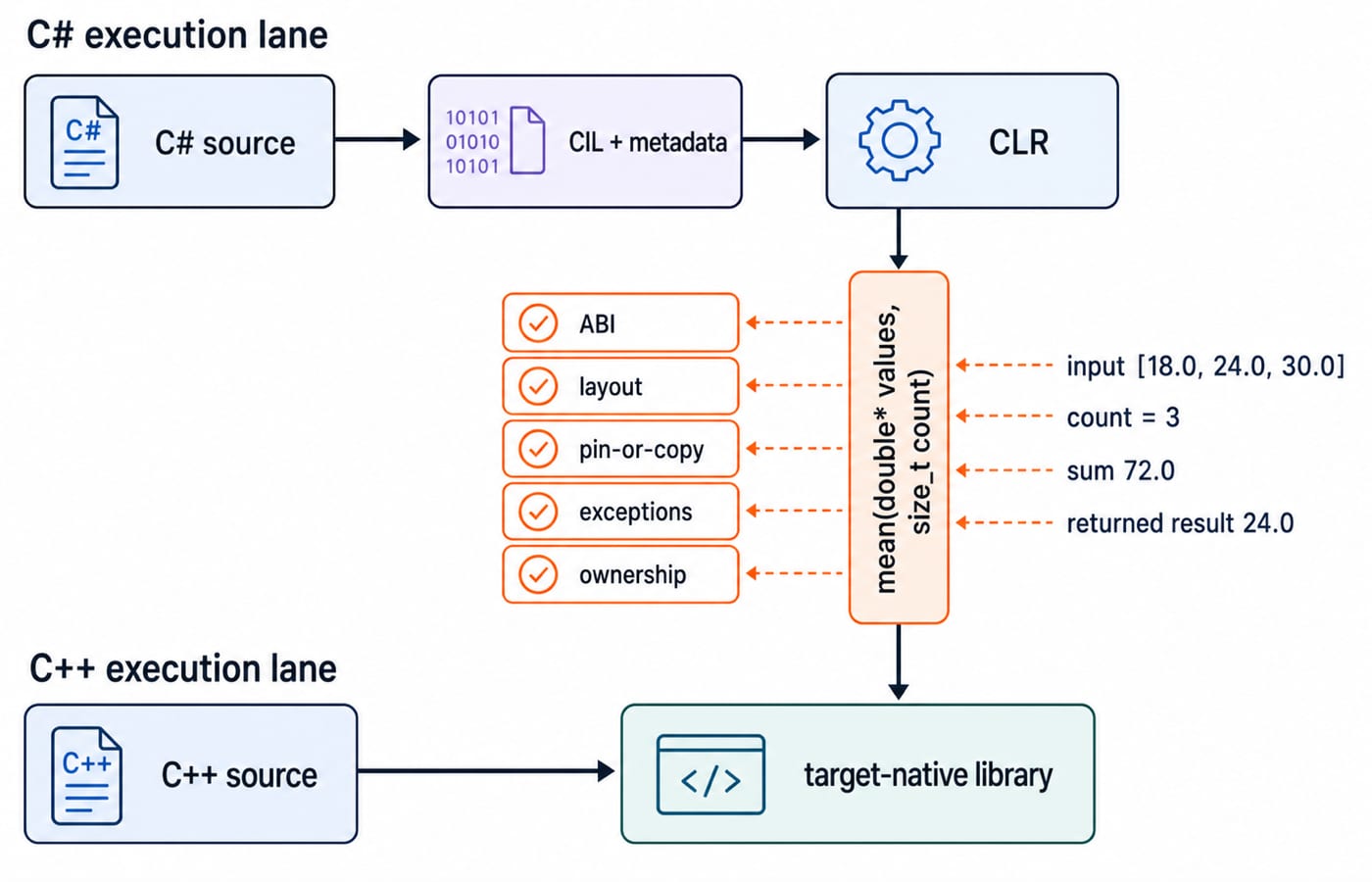
Build the wrapper as a shared library, for example g++ -std=c++20 -O2 -fPIC -shared reading_native.cpp -o libreading_native.so on Linux. Put the library beside the managed assembly or on the platform search path; otherwise the first call throws DllNotFoundException.
The managed declaration names the same symbol, the same calling convention, and a pointer-sized count:
using System;
using System.Runtime.InteropServices;

internal static class NativeReadings
{
    // reading_native resolves to reading_native.dll, libreading_native.so,
    // or libreading_native.dylib, depending on the platform.
    [DllImport("reading_native", EntryPoint = "reading_mean",
               CallingConvention = CallingConvention.Cdecl)]
    internal static extern double Mean([In] double[] values, nuint count);
}

internal static class Program
{
    private static void Main()
    {
        double[] values = { 18.0, 24.0, 30.0 };
        double mean = NativeReadings.Mean(values, (nuint)values.Length);
        Console.WriteLine($"native mean = {mean:F1}"); // native mean = 24.0
    }
}
The managed side passes [18.0, 24.0, 30.0] with count = 3; the native loop returns 24.0, so the program prints native mean = 24.0. Because double is blittable, the runtime can pin this array for the call, so native code must not retain its pointer. CallingConvention.Cdecl matches the wrapper on 32-bit x86. Real failures come from mismatched layouts, calling conventions, string encodings, or ownership. Use interop only when a managed application needs a native engine, with that boundary documented and tested.
7. C# vs C++ traps and how interviews test them
Claim | Why it fails | Correction |
|---|---|---|
C# cannot leak memory | Event subscriptions and static caches can keep objects reachable; native resources may remain undisposed | GC reclaims unreachable managed memory only |
C++ is always faster | Algorithms, allocations, settings, runtime services, and workload dominate | Benchmark the actual program |
| In C#, | In C#, read the declared type: |
Assessments can use output tracing, lifetime and destructor order, using or Dispose, virtual dispatch, generic constraints versus template requirements, and safe interop signatures. Coding For Placements is the relevant practice path after these concepts are clear.
8. C# or C++: the short decision rule
Prefer | When the centre of gravity is |
|---|---|
C# | A .NET application, managed productivity, broad runtime services, and simpler application deployment |
C++ | Explicit lifetime, native ABI integration, tight layout control, embedded constraints, or an existing native codebase |
C# plus C++ | A managed shell that genuinely benefits from a native core |
Use C++ Programming to deepen the native side. If still exploring, rebuild ReadingWindow in both languages and compare correctness, profiling results, and deployment friction on your actual target.
Keep learning
TypeScript vs C# Typing: Structural Compatibility, Nominal Identity, Generics and Runtime Checks
Follow one User/Admin example through TypeScript and C# to predict assignments, generic conversions, branded IDs, and JSON behaviour at runtime.
Updated 3 Oct 20266 min readProgramming Languages Survey
TypeScript Learning Roadmap: 20 Weeks from Everyday Types to a Full-Stack App
Follow a dependency-led TypeScript plan through BudgetLens, IssueBoard and TaskBoard, with exact weekly gates, strict checks and tested API boundaries.
Updated 28 Sep 20265 min readProgramming Languages Survey
Static vs Dynamic Typing: Errors, Feedback Loops and Refactoring Flexibility
Follow one OrderLine model from an integer price to an INR Money value. See what Java catches during checking, what Python reveals during execution, and what both still need tests to prove.
Updated 25 Sep 20265 min readProgramming Languages Survey
Kotlin vs C#: Compare Null Safety, Async Models, Ecosystems and Platform Fit
Compare Kotlin and C# by building the same packing model in both. See how their managed runtimes, null checks, async behaviour and ecosystems differ.
Updated 24 Sep 20266 min readProgramming Languages Survey