C# Tutorial for Beginners: Types, Classes, LINQ and a First Console App
Build a complete C# console app around five candidate records. Learn how types, nullable references, classes, generic lists and LINQ work together, with every output and average checked by hand.
KnowledgeGate Team
Exam prep & CS education
Updated 21 Sep 20266 min read
C# examples often teach isolated syntax, leaving a beginner unsure how types, objects, collections and LINQ fit together in one runnable program. One console application stores five candidate applications, handles two missing email addresses safely, builds a shortlist, and computes track summaries. The final shortlist is Meera at 91, Nila at 88 and Asha at 82. The types and output lines make the LINQ filter predictable rather than magical.
1. C# and .NET: create and run the first console application
C# is the language. The .NET SDK provides the compiler, runtime and dotnet command. Program.cs is the source file for the console application.
Assuming the .NET SDK is installed, create and enter the project:
dotnet new console -n CandidateTracker
cd CandidateTracker
Replace Program.cs with this toolchain check:
Console.WriteLine("Candidate tracker ready");Run dotnet run. The exact output is:
Candidate tracker readyStatements end with semicolons, braces group a block, and C# is case-sensitive. Console.WriteLine calls the static WriteLine method on Console. For a broader beginner-programming hub, use Free Courses & Guidance by Prashant Sir.
2. C# types, var and nullable references with one exact candidate
Start the final Program.cs with these directives and declarations:
#nullable enable
using System;
using System.Collections.Generic;
using System.Linq;

int id = 101;
string name = "Asha";
int score = 82;
string track = "Backend";
string? email = "asha@example.com";
bool hasContact = email is not null;

Console.WriteLine($"{id}: {name}, {score}, {track}, {email ?? "email pending"}, contact={hasContact}");
var threshold = 80;
The first output line is exactly:
101: Asha, 82, Backend, asha@example.com, contact=Trueint and bool are value types. string, the class below, and List<T> are reference types. string expresses an intended non-null value, while string? permits null. The ?? operator supplies fallback text. Nullable-reference checking helps the compiler warn about unsafe dereferences, but it does not create a new runtime string type.
The compiler infers threshold as int. var is still statically typed, not dynamic. If classes, objects, encapsulation and inheritance are still unfamiliar, branch to Object Oriented Technology Explained.
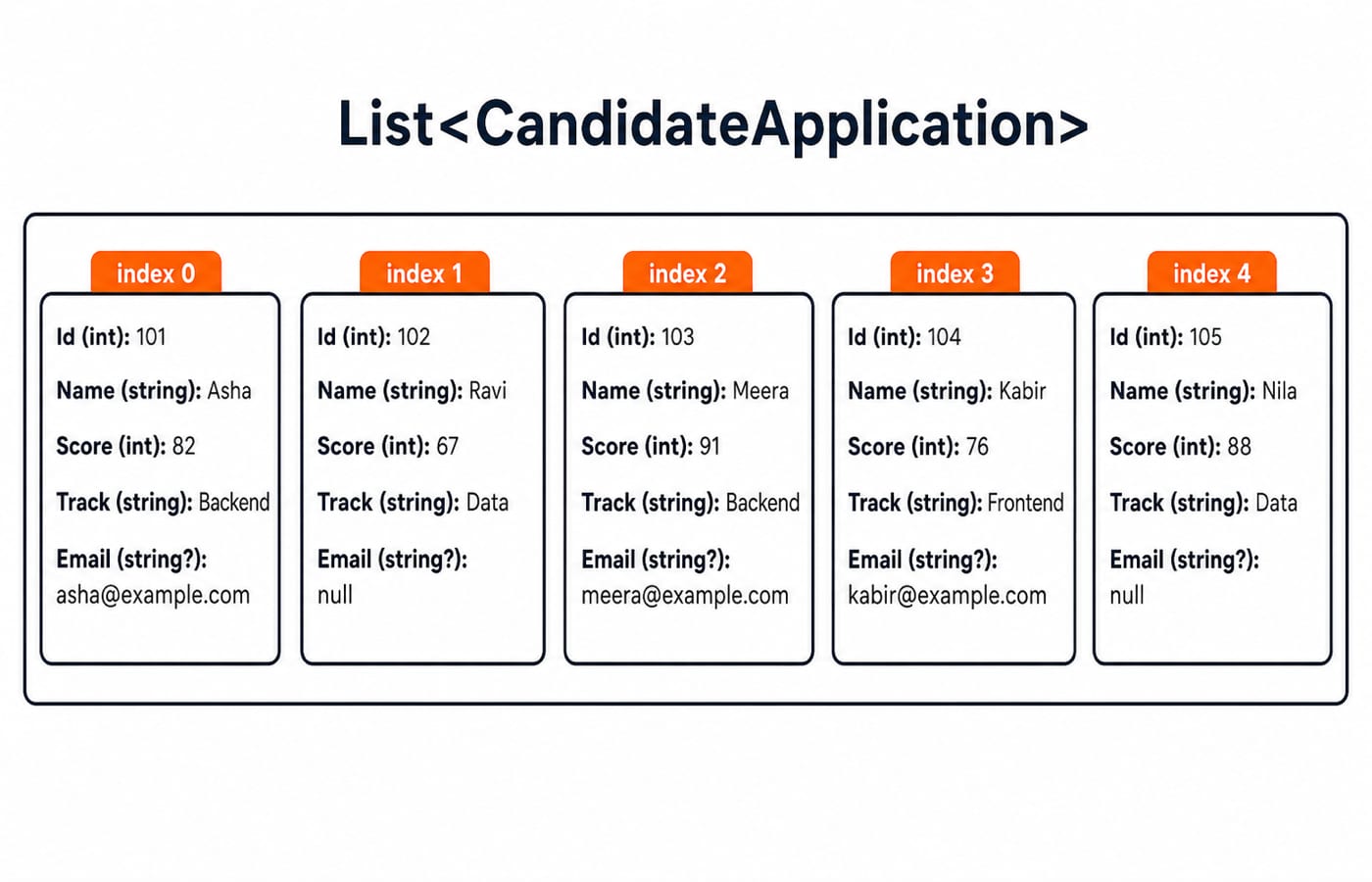
3. C# classes and generic collections: model the five records
Continue the top-level statements with the list below. Its item type is CandidateApplication. The class declaration appears after the remaining top-level statements in section 5, because C# requires type declarations to follow all top-level statements in this file.
var applications = new List<CandidateApplication>
{
    new CandidateApplication(101, "Asha", 82, "Backend", "asha@example.com"),
    new CandidateApplication(102, "Ravi", 67, "Data", null),
    new CandidateApplication(103, "Meera", 91, "Backend", "meera@example.com"),
    new CandidateApplication(104, "Kabir", 76, "Frontend", "kabir@example.com"),
    new CandidateApplication(105, "Nila", 88, "Data", null)
};
Id | Name | Score | Track | |
|---|---|---|---|---|
101 | Asha | 82 | Backend | asha@example.com |
102 | Ravi | 67 | Data |
|
103 | Meera | 91 | Backend | meera@example.com |
104 | Kabir | 76 | Frontend | kabir@example.com |
105 | Nila | 88 | Data |
|
4. LINQ Where, OrderByDescending and Select: work the shortlist by hand
Add this query and loop before the class:
var shortlist = applications
    .Where(candidate => candidate.Score >= threshold)
    .OrderByDescending(candidate => candidate.Score)
    .Select(candidate => new
    {
        candidate.Name,
        candidate.Score,
        Contact = candidate.Email ?? "email pending"
    })
    .ToList();

foreach (var candidate in shortlist)
{
    Console.WriteLine($"{candidate.Name} | {candidate.Score} | {candidate.Contact}");
}
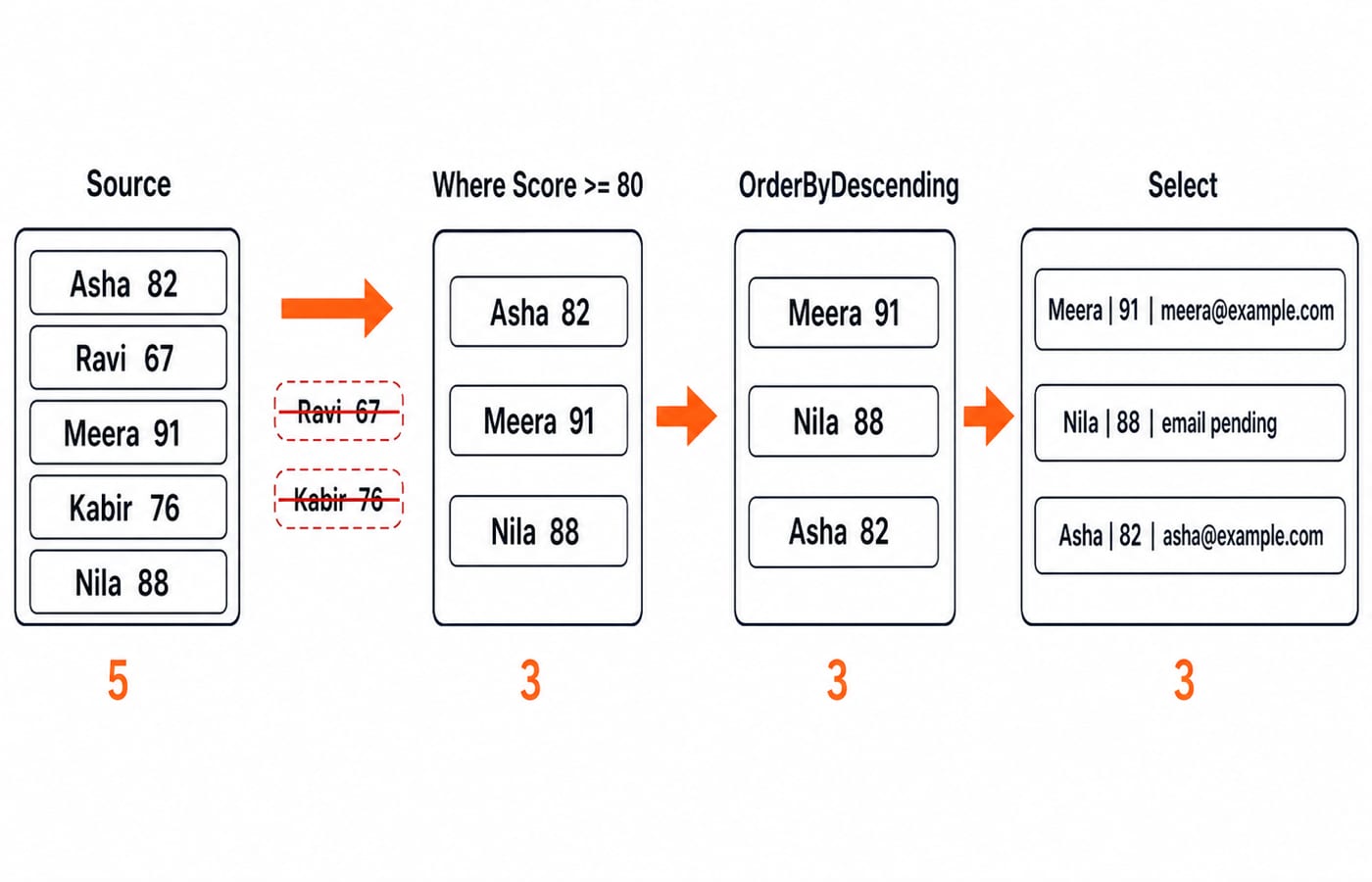
A lambda such as candidate => candidate.Score >= threshold is a small function applied to each element. Trace the pipeline rather than memorising its punctuation:
The source scores are
82, 67, 91, 76, 88.Wherekeeps Asha 82, Meera 91 and Nila 88.OrderByDescendingproduces Meera 91, Nila 88, Asha 82.Selectkeeps Name and Score, then makes Contactmeera@example.com,email pending, andasha@example.com.ToListexecutes the pipeline now and stores the three projected results.
The loop prints:
Meera | 91 | meera@example.com
Nila | 88 | email pending
Asha | 82 | asha@example.com
The original five-item applications list remains unchanged.
5. LINQ aggregates and GroupBy: compute every result
Check the shortlist mean first: 91 + 88 + 82 = 261, then 261 / 3 = 87.0.
var shortlistAverage = shortlist.Average(candidate => candidate.Score);
Console.WriteLine($"Shortlist count: {shortlist.Count}, average: {shortlistAverage:F1}");
This prints Shortlist count: 3, average: 87.0. Now transform individual applications into three track summaries:
var trackSummaries = applications
    .GroupBy(candidate => candidate.Track)
    .Select(group => new
    {
        Track = group.Key,
        Count = group.Count(),
        AverageScore = group.Average(candidate => candidate.Score)
    })
    .OrderByDescending(summary => summary.AverageScore)
    .ToList();

foreach (var summary in trackSummaries)
{
    var noun = summary.Count == 1 ? "candidate" : "candidates";
    Console.WriteLine($"{summary.Track}: {summary.Count} {noun}, average {summary.AverageScore:F1}");
}
Backend gives (82 + 91) / 2 = 86.5. Data gives (67 + 88) / 2 = 77.5. Frontend gives 76 / 1 = 76.0. Descending average order therefore prints:
Backend: 2 candidates, average 86.5
Data: 2 candidates, average 77.5
Frontend: 1 candidate, average 76.0
All top-level statements are now complete. Finish Program.cs with the class declaration:
public sealed class CandidateApplication
{
    public int Id { get; }
    public string Name { get; }
    public int Score { get; }
    public string Track { get; }
    public string? Email { get; }

    public CandidateApplication(int id, string name, int score, string track, string? email)
    {
        Id = id;
        Name = name;
        Score = score;
        Track = track;
        Email = email;
    }
}
CandidateApplication is a type. Each new CandidateApplication(...) expression creates one object. The constructor receives five arguments and assigns five properties. sealed prevents other classes from inheriting CandidateApplication. List<CandidateApplication> ensures every list item has this shape.
6. C# beginner traps: nulls, integer division and LINQ execution
Trap | What goes wrong | Correct move |
|---|---|---|
| Throws when Email is null | Use |
| Will not compile: an int assignment is not a Boolean condition | Use |
Expecting | The source list stays unchanged | Store or enumerate the filtered result |
| Throws an exception | Use |
Modifying | Invalidates enumeration | Collect changes, then apply them after the loop |
All scores total 82 + 67 + 91 + 76 + 88 = 404. int wrongAverage = 404 / 5; gives 80 because integer division discards the fractional part. double correctAverage = applications.Average(candidate => candidate.Score); gives 80.8 because LINQ's Average overload for integers returns a floating-point mean.
Execution timing matters too. A query stored without ToList() can observe later list changes when it is eventually enumerated. ToList() makes the three-item shortlist a snapshot. LINQ does not automatically mean a database query or parallel execution.
7. C# practice and interview-style checks
Change one rule, predict the output, then run it:
Change the threshold from
80to85. Meera 91 and Nila 88 remain, so count is 2 and(91 + 88) / 2 = 89.5.Filter with
candidate.Track == "Data". Source order gives Ravi 67, then Nila 88.Apply
OrderByDescending(...).First(). The highest scorer is Meera 91.
Transfer the pattern to an expense tracker containing Travel 1200, Books 850 and Food 450. Filtering amounts at least 800 keeps Travel and Books, and 1200 + 850 = 2050.
Beginner exercises and interview-style traces may ask you to predict output, repair a null access, distinguish var from dynamic, or evaluate a LINQ chain. Classic Programs in C, Java and Python offers more first-program practice across languages.
8. C# tutorial short version and the next coding step
Keep this five-step chain: declare exact types, model one entity as a class, store objects in List<T>, transform them with Where, ordering and Select, then verify aggregates by hand. The checked results are Meera 91, Nila 88 and Asha 82; shortlist average 87.0; best track average Backend 86.5.
Recreate the five objects without copying. Predict the >= 85 shortlist and its 89.5 average, then run the program and compare. Add a sixth candidate only after you can predict how every output will change.
If you want to compare C# classes, static typing and collections with another object-oriented language, continue with the Complete Java Course. For broader placement-oriented CS study, use CS Fundamentals for Placements by Sanchit Sir. The Java path compares the same object-oriented ideas in another language, while the CS path extends into placement-focused fundamentals.
Keep learning
TypeScript vs C# Typing: Structural Compatibility, Nominal Identity, Generics and Runtime Checks
Follow one User/Admin example through TypeScript and C# to predict assignments, generic conversions, branded IDs, and JSON behaviour at runtime.
Updated 3 Oct 20266 min readProgramming Languages Survey
TypeScript Learning Roadmap: 20 Weeks from Everyday Types to a Full-Stack App
Follow a dependency-led TypeScript plan through BudgetLens, IssueBoard and TaskBoard, with exact weekly gates, strict checks and tested API boundaries.
Updated 28 Sep 20265 min readProgramming Languages Survey
Static vs Dynamic Typing: Errors, Feedback Loops and Refactoring Flexibility
Follow one OrderLine model from an integer price to an INR Money value. See what Java catches during checking, what Python reveals during execution, and what both still need tests to prove.
Updated 25 Sep 20265 min readProgramming Languages Survey
Kotlin vs C#: Compare Null Safety, Async Models, Ecosystems and Platform Fit
Compare Kotlin and C# by building the same packing model in both. See how their managed runtimes, null checks, async behaviour and ecosystems differ.
Updated 24 Sep 20266 min readProgramming Languages Survey