Command Line Arguments in C: argc and argv Tutorial with Runnable Examples
Learn how argc and argv carry command line input into a C program, then practise argument tracing, numeric conversion, validation, and common fixes.
KnowledgeGate Team
Exam prep & CS education
Updated 30 Jul 20265 min read344 views
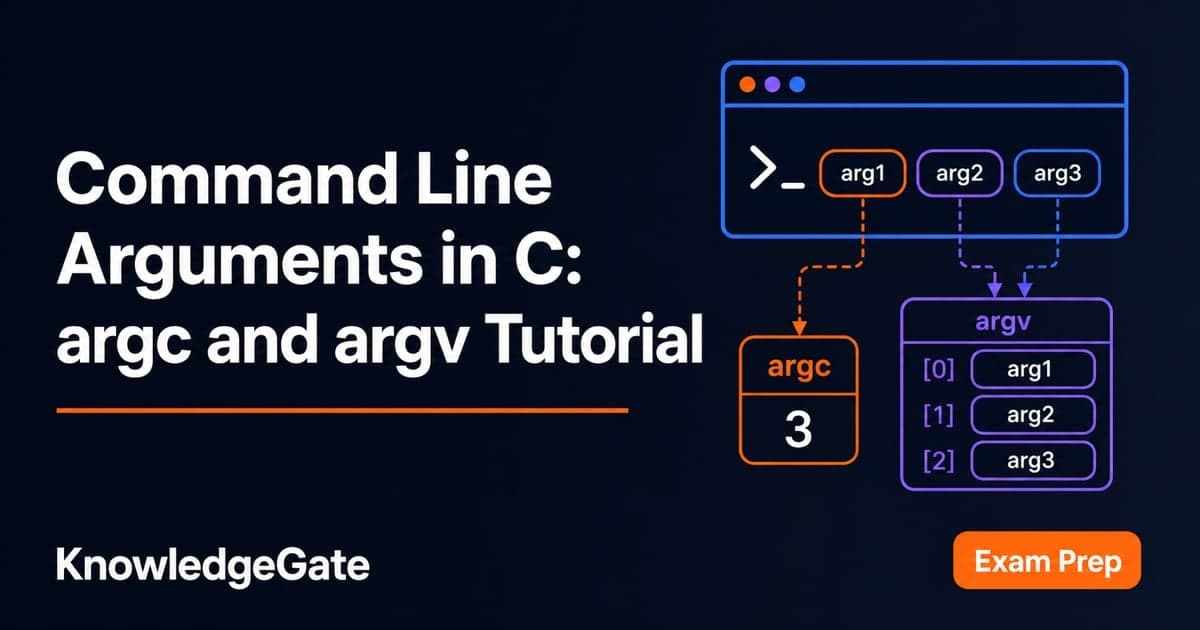
You have written C programs that take input through scanf, but a lab exercise, mini project, or online judge now expects values after the program name. After seeing int main(void) for many lessons, int main(int argc, char *argv[]) can look unexplained and intimidating. It carries only two things: a count of the words typed on the command line, and an array holding those words as strings. Almost every beginner crash here comes from reading the array before checking the count.
What command line arguments are
When you run this command, the shell splits the line into pieces and passes them to the program:
./sum 10 25 7C provides a fuller signature for main so the program can receive those pieces:
int main(int argc, char *argv[])argc is the number of argument strings, including the program name. argv is an array of pointers to those strings. In this parameter position, char *argv[] and char **argv mean the same thing.
For the command above, the layout is:
Expression | Value |
|---|---|
|
|
|
|
|
|
|
|
|
|
|
|
Every supplied value is a string, even "10". The C standard, ISO/IEC 9899, guarantees that argv[argc] is a null pointer.
First runnable program: print every argument
Save this as args.c:
#include <stdio.h>

int main(int argc, char *argv[]) {
    for (int i = 0; i < argc; i++) {
        printf("argv[%d] = %s\n", i, argv[i]);
    }
    return 0;
}
Compile and run it:
gcc args.c -o args
./args hello world
The exact output is:
argv[0] = ./args
argv[1] = hello
argv[2] = world
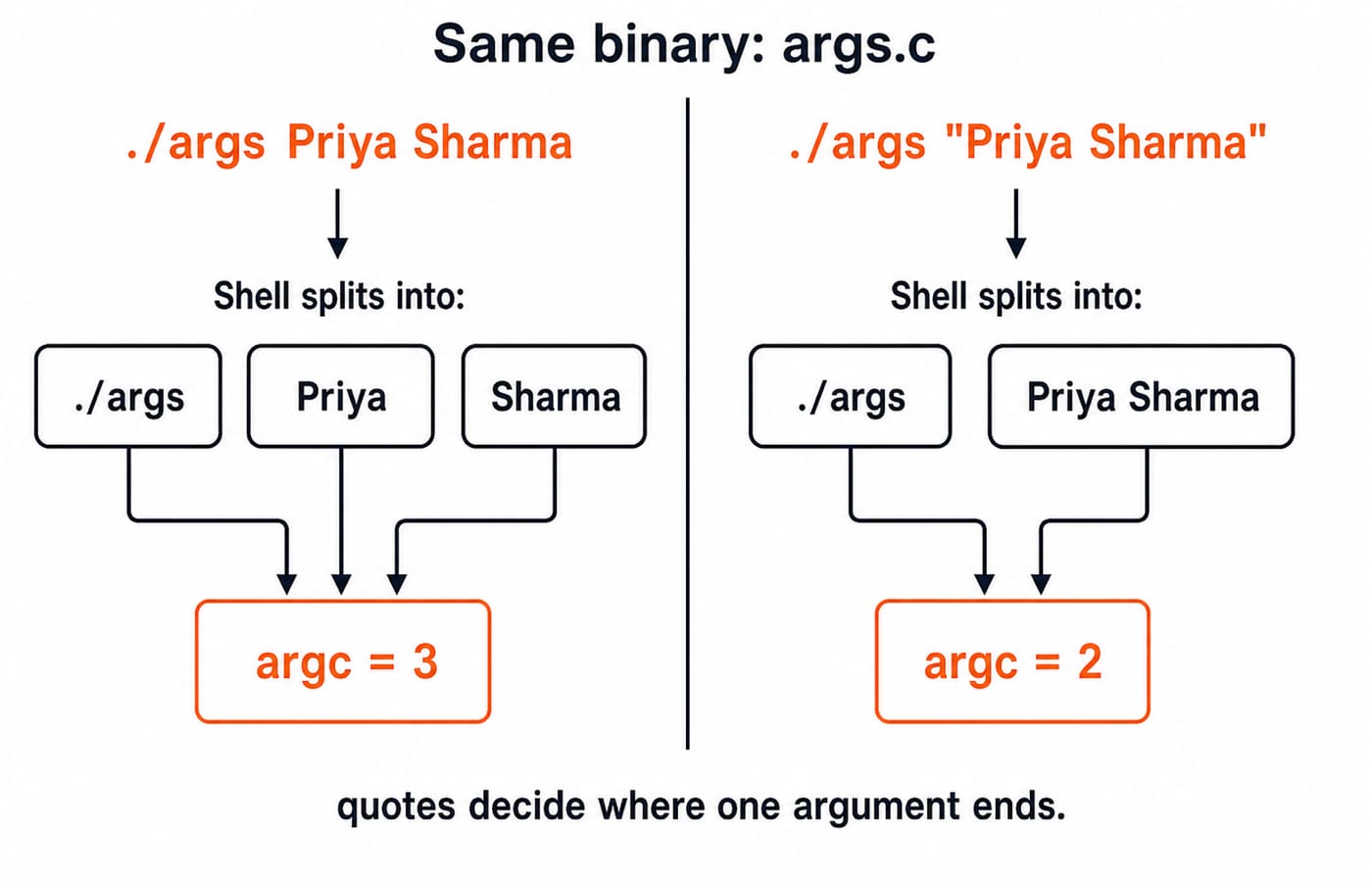
Here, argc is 3. Now try ./args Priya Sharma. The two words become separate arguments, so argc is 3. Run ./args "Priya Sharma" and argc becomes 2 because the quotes keep the space inside one argument. This small experiment explains many command line bugs.
Worked example: sum command line numbers
This complete sum.c program adds all the numbers supplied after its name:
#include <stdio.h>
#include <stdlib.h>

int main(int argc, char *argv[]) {
    if (argc < 2) {
        printf("Usage: %s num1 num2 ...\n", argv[0]);
        return 1;
    }

    int total = 0;
    for (int i = 1; i < argc; i++) {
        total += atoi(argv[i]);
    }

    printf("Sum of %d numbers = %d\n", argc - 1, total);
    return 0;
}
Trace ./sum 10 25 7 one iteration at a time:
| String converted | Calculation | New |
|---|---|---|---|
1 |
|
| 10 |
2 |
|
| 35 |
3 |
|
| 42 |
The output is exactly Sum of 3 numbers = 42. There are four strings in total, so argc is 4 and the number of user arguments is argc - 1, which is 3.
Two habits matter here. The loop begins at index 1 to skip the program name. The guard checks argc before reading argv[1], so running plain ./sum prints a usage message instead of touching a null pointer.
![Memory layout of argv for ./sum 10 25 7: argv[0] to argv[3] hold the strings, argv[4] is NULL, argc is 4, and the traced total is 42.](https://cdn.knowledgegate.ai/blog-assets/blog_asset_1784131539485_sic0x7.jpg)
Converting arguments safely: atoi versus strtol
atoi is convenient but cannot report invalid input. With the same program, ./sum 10 abc prints Sum of 2 numbers = 10 because atoi("abc") silently returns 0. In a larger program, that can look like a valid result.
Use strtol when correctness matters:
char *end;
long value = strtol(argv[1], &end, 10);

if (*end != '\0') {
    printf("Invalid number: %s\n", argv[1]);
    return 1;
}
For "10abc", value becomes 10 and end points at "abc", so the check detects the unwanted characters. A robust program also checks whether no digits were read and whether the result fits its target type.
The third argument to strtol is the base. For example, strtol("ff", NULL, 16) returns 255. This is where ideas from number systems and base conversions become useful in real programs.
Five common argc and argv errors
Reading
argv[1]without checkingargc. With plain./sum, that position is theNULLterminator. Passing it toatoior%scan crash or misbehave. Put the argument-count guard first.Doing arithmetic on
argv[i]. An expression such astotal += argv[i]uses a pointer, not its numeric text, and should produce a compiler diagnostic. Convert the string withstrtolbefore arithmetic.Comparing strings with
==. The testargv[1] == "reset"compares addresses, not characters. Include<string.h>and usestrcmp(argv[1], "reset") == 0.Starting a data loop at 0. In
sum.c, that sends"./sum"toatoi, where it becomes 0 and hides the mistake. User arguments occupy indexes 1 throughargc - 1.Forgetting shell splitting. A name such as
report 2024.txtarrives as two arguments unless quoted. Pass"report 2024.txt", and use the printing program above whenever the split is unclear.
How exams and interviews test this topic
Most objective questions ask you to trace values. For ./a.out one two three, argc is 4, argv[0] contains the program name, and argv[argc] is NULL.
Viva and interview follow-ups ask why char **argv and char *argv[] are interchangeable here, why every argument is a string, and how missing arguments should be handled. A usage message followed by a nonzero return value, as in sum.c, is the clean answer.
Placement tasks may hide the same ideas inside a small command line calculator or file utility. The C Language Course pairs each concept with MCQs and coding practice, and the Coding & DSA Courses catalogue covers the same skills in other languages.
Practice exercises with expected outputs
Write each program yourself, then compare only the output:
mult.c:./mult 2 3 4should printProduct = 24.max.c:./max 17 3 42 9should printMax = 42.rev.c:./rev one two threeshould printthree two one.calc.c:./calc 12 + 30should print42. Compare the operator usingstrcmp.sortargs.c:./sortargs 42 7 19 3should print3 7 19 42.
The last task hides a trap. Sorting the argv strings directly gives 19 3 42 7, because strcmp compares characters and "19" sorts before "3". Convert all four arguments to int first, then sort those.
The short version and your next step
argccounts every argument, including the program name.argvholds strings, never ready-made numbers.argv[argc]is alwaysNULL.Check
argcbefore touchingargv[1].Prefer
strtolwhen invalid input must be detected.
Once a program can accept a filename as an argument, File Handling in C: fopen Modes, fscanf vs fgets is the natural next tutorial, and the C Programming Course teaches the language in sequence with practice. Your best next step is to replace atoi in sum.c with validated strtol, then solve the five exercises without copying a solution.
Keep learning

ctype.h Functions in C: Classify Characters and Convert Case Safely
Learn which character test to choose, trace a complete C classifier, and avoid signed-char and EOF mistakes. Worked examples separate classification from case conversion.
Updated 5 Oct 20266 min readC
Key Features of the C Programming Language: Code Examples
What do C's features actually do in a program? Follow an even-number sum and a pointer update, then test your understanding with small code changes.
Updated 30 Sep 20266 min readC
Preprocessor and Macros in C: Expansion Rules and Worked Examples
Learn what happens before C compilation, expand object-like and function-like macros by hand, and avoid precedence and repeated-evaluation bugs.
Updated 18 Sep 20266 min readC
Variables and Data Types in C: Declarations, Conversions and Runnable Examples
Learn how C types control stored values, expressions and I/O. Compile a complete marks program, trace its conversions and repair common type mistakes.
Updated 17 Sep 20266 min readC