

CASE Expressions in SQL: Syntax, Worked Examples, and Common Traps
Learn how SQL CASE returns one value per row, then trace six employees through classification, aggregation, sorting, NULL handling, and interview exercises.
KnowledgeGate Team
Exam prep & CS education
Updated 30 Oct 20266 min read
CASE looks like an if/else, which makes it easy to treat it as procedural control flow. In SQL, however, it is an expression that returns one value for each row. Branch order, NULL, and a missing ELSE can all change that value. Both CASE forms operate on the six-row employee table, which also supplies the data for conditional aggregation and custom sorting. The SQL is deliberately portable and uses no vendor-only functions, apart from the standard COALESCE function.
CASE expressions in SQL: the mental model and two forms
A CASE expression produces a scalar value. It can appear wherever an expression is valid, especially in SELECT, ORDER BY, or inside an aggregate function. For each row, SQL returns the first matching branch and stops.
Form | Syntax |
|---|---|
Searched |
|
Simple |
|
Searched CASE handles ranges and compound predicates. Simple CASE performs equality matching against one input expression. The employee table illustrates both searched and simple CASE. For related database concepts, use CS Fundamentals for Exams & Placements.
emp_id | name | dept | salary | performance_score | bonus |
|---|---|---|---|---|---|
101 | Asha | Sales | 45000 | 92 | 5000 |
102 | Bharat | Sales | 62000 | 78 | NULL |
103 | Charu | Engineering | 85000 | 88 | 8000 |
104 | Deepak | Engineering | 110000 | 95 | 12000 |
105 | Esha | Support | 38000 | 64 | 2000 |
106 | Farhan | Support | 52000 | NULL | NULL |
Searched CASE: classify all six employees step by step
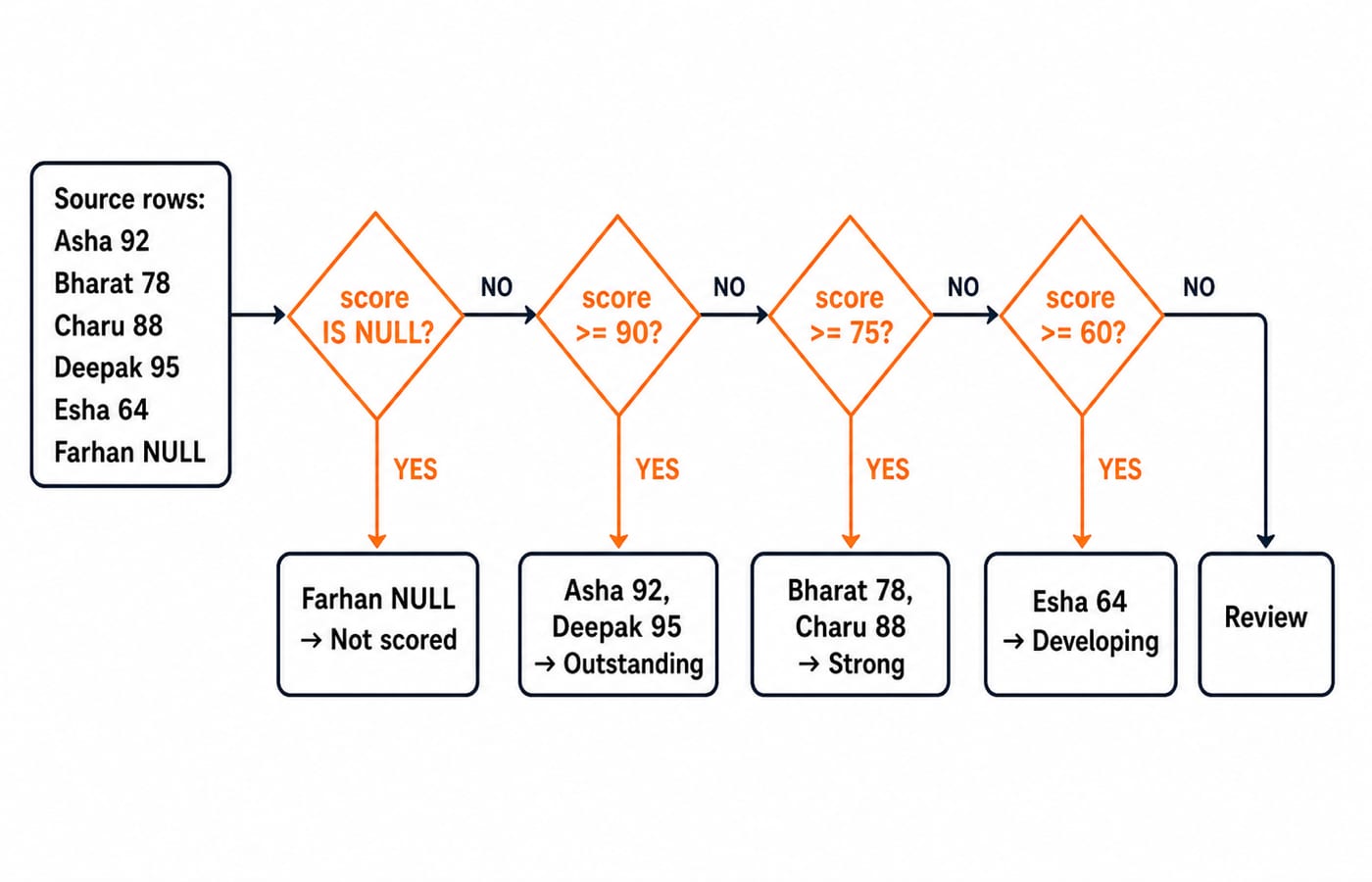
This searched CASE deliberately checks NULL first and keeps the numeric thresholds in descending order.
SELECT emp_id, name, performance_score,
       CASE
           WHEN performance_score IS NULL THEN 'Not scored'
           WHEN performance_score >= 90 THEN 'Outstanding'
           WHEN performance_score >= 75 THEN 'Strong'
           WHEN performance_score >= 60 THEN 'Developing'
           ELSE 'Review'
       END AS performance_band
FROM employees
ORDER BY emp_id;
Now trace the predicates row by row. Asha's 92 fails IS NULL and matches >= 90, so her band is Outstanding. Bharat's 78 fails >= 90 but matches >= 75, giving Strong. Charu's 88 follows the same path to Strong. Deepak's 95 matches >= 90, so he is Outstanding. Esha's 64 fails the higher thresholds and matches >= 60, giving Developing. Farhan's score is NULL, so the explicit first branch returns Not scored before SQL attempts any numeric comparison.
emp_id | name | performance_score | performance_band |
|---|---|---|---|
101 | Asha | 92 | Outstanding |
102 | Bharat | 78 | Strong |
103 | Charu | 88 | Strong |
104 | Deepak | 95 | Outstanding |
105 | Esha | 64 | Developing |
106 | Farhan | NULL | Not scored |
Notice that no later branch can replace an earlier match. This first-match rule is the key to reading and debugging every CASE expression.
Simple CASE: map exact department values
For one column compared with fixed values, simple CASE is easier to scan than repeated equality predicates.
SELECT name, dept,
       CASE dept
           WHEN 'Sales' THEN 'Revenue'
           WHEN 'Engineering' THEN 'Product'
           ELSE 'Operations'
       END AS team_type
FROM employees
ORDER BY emp_id;
Asha and Bharat have Sales, so both become Revenue. Charu and Deepak have Engineering, so both become Product. Esha and Farhan fall into ELSE and become Operations. The boundary is important: simple CASE cannot put salary >= 60000 in a WHEN value. Use searched CASE for ranges, compound AND or OR conditions, and IS NULL checks.
CASE with GROUP BY: conditional counts and sums
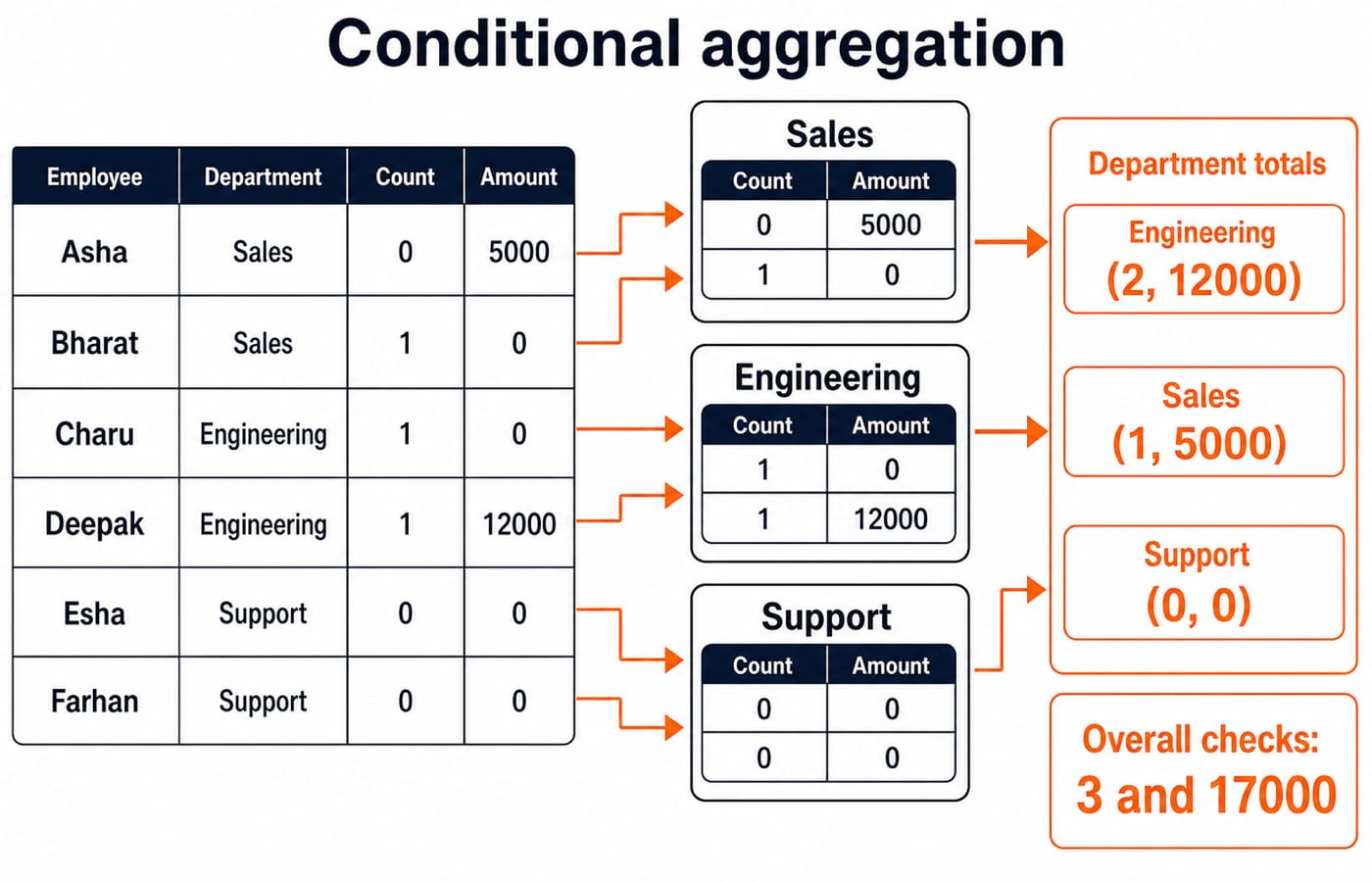
Conditional aggregation converts each source row into a contribution, then lets SUM combine those contributions within each group.
SELECT dept,
       SUM(CASE WHEN salary >= 60000 THEN 1 ELSE 0 END) AS salary_60k_plus,
       SUM(CASE
               WHEN performance_score >= 90 THEN COALESCE(bonus, 0)
               ELSE 0
           END) AS outstanding_bonus
FROM employees
GROUP BY dept
ORDER BY dept;
Read each row's contribution as (salary count, outstanding bonus): Asha (0, 5000), Bharat (1, 0), Charu (1, 0), Deepak (1, 12000), Esha (0, 0), and Farhan (0, 0). Grouping and adding those pairs produces:
dept | salary_60k_plus | outstanding_bonus |
|---|---|---|
Engineering | 2 | 12000 |
Sales | 1 | 5000 |
Support | 0 | 0 |
The overall cross-check is 2 + 1 + 0 = 3 employees earning at least 60000. Outstanding bonuses total 12000 + 5000 + 0 = 17000.
ELSE 0 matters because a group with no matching rows could otherwise feed only NULL values into SUM and return NULL, rather than the intended zero. For the first column, COUNT(CASE WHEN salary >= 60000 THEN 1 END) is also valid because COUNT(expression) ignores NULL.
CASE in ORDER BY: build a custom business priority
CASE can create a sort key without adding that key to the selected output.
SELECT emp_id, name, dept, salary
FROM employees
ORDER BY CASE dept
             WHEN 'Engineering' THEN 1
             WHEN 'Sales' THEN 2
             ELSE 3
         END,
         salary DESC;
The exact order is Deepak, Charu, Bharat, Asha, Farhan, Esha. Engineering receives priority 1, Sales priority 2, and Support priority 3. Within each priority, salary DESC places the higher salary first. Once this single-table logic is clear, SQL Queries and Joins in DBMS: A Clear Guide is the natural next relational step.
CASE expression mistakes: first match, NULL, ELSE, and result types
The first-match trap appears when overlapping thresholds are ordered badly. If WHEN salary >= 50000 THEN '50k+' comes before WHEN salary >= 100000 THEN '100k+', Deepak's 110000 salary becomes 50k+. Correct it by placing >= 100000 first. Order overlapping thresholds from the most specific or highest to the broadest or lowest.
NULL creates a different trap. CASE performance_score WHEN NULL THEN 'Not scored' does not match Farhan, because equality with NULL is unknown. Use searched CASE with WHEN performance_score IS NULL. If the performance query omitted ELSE, any row that matched no branch would return SQL NULL. An explicit fallback is safer when every row needs a complete label.
Finally, keep the result arms compatible. Mixing THEN 'High' with ELSE 0 asks the database to reconcile text and numbers. An engine may reject the expression or convert a value unexpectedly. Return all labels or all numbers instead.
CASE expression questions in exams and SQL interviews
Common questions ask you to trace a query and choose its output, repair incorrectly ordered branches or NULL handling, or write conditional aggregation for a report. SQL Queries for Placement Interviews, Step by Step shows how this reasoning fits into wider interview preparation.
Try two checks on the same six rows:
Classify salary as
Highfor>= 80000,Midfor>= 50000, andLowotherwise. The expected counts are High 2 (Charu and Deepak), Mid 2 (Bharat and Farhan), and Low 2 (Asha and Esha).Count missing bonuses by department with
SUM(CASE WHEN bonus IS NULL THEN 1 ELSE 0 END). The expected results are Engineering 0, Sales 1, and Support 1.
These exercises test stable SQL reasoning. They do not depend on a changing exam pattern.
CASE expressions in SQL: the short version and next step
Choose simple CASE for equality and searched CASE for conditions. Put specific branches first, test NULL with IS NULL, supply an intentional ELSE, and keep result types compatible. Placement-focused readers can continue with CS Fundamentals for Placements by Sanchit Sir. For a wider structured CS foundation, use the Zero to Hero Complete CS Course. Run all four queries, then change one threshold and predict the new rows before execution.
Keep learning
String Functions in SQL: Clean, Extract and Combine Text with Examples
Build reliable SQL text expressions from small, checkable examples, then combine them into a complete contact-cleaning query with explicit NULL handling.
Updated 9 Nov 20265 min readDBMS
Stored Procedures in SQL: PostgreSQL Tutorial with Parameters, Transactions and Examples
Build and test a PostgreSQL procedure that validates a transfer, locks accounts, updates balances and writes an audit row. Then trace rollback and INOUT behaviour.
Updated 8 Nov 20266 min readDBMS
Set Operations in SQL: UNION, INTERSECT and EXCEPT with Worked Examples
Learn how SQL combines compatible query results, why duplicates and column order matter, and how to calculate UNION, INTERSECT and EXCEPT outputs by hand.
Updated 7 Nov 20266 min readDBMS

INSERT, UPDATE and DELETE in SQL: Runnable DML Tutorial with Safe Worked Examples
Follow one table from its first insert through targeted updates and a rolled-back deletion. The runnable lab makes affected rows, defaults and NULL behaviour visible.
Updated 5 Nov 20266 min readDBMS