Go Tutorial for Beginners: Build a CLI with Packages, Types, Slices, Maps and Errors
Start with a module and finish with a working student-report command. Trace Asha's scores through slices, a map and a struct, then test three useful failures.
KnowledgeGate Team
Exam prep & CS education
Updated 27 Aug 20266 min read
If you can read basic code in another language, Go's first file can still feel crowded: package main, a module path, :=, slices, maps and (value, error) appear before you have a project in your head. A tiny hello-world example hides how the pieces connect, while a feature catalogue gives you too much at once. The student-report command crosses a real package boundary, converts command-line text, preserves ordered scores in a slice, provides keyed lookup in a map, and returns validation errors to main.
Go Program Anatomy: Module, Package, Import and main
Start in a terminal:
mkdir student-report
cd student-report
go mod init example.com/student-report
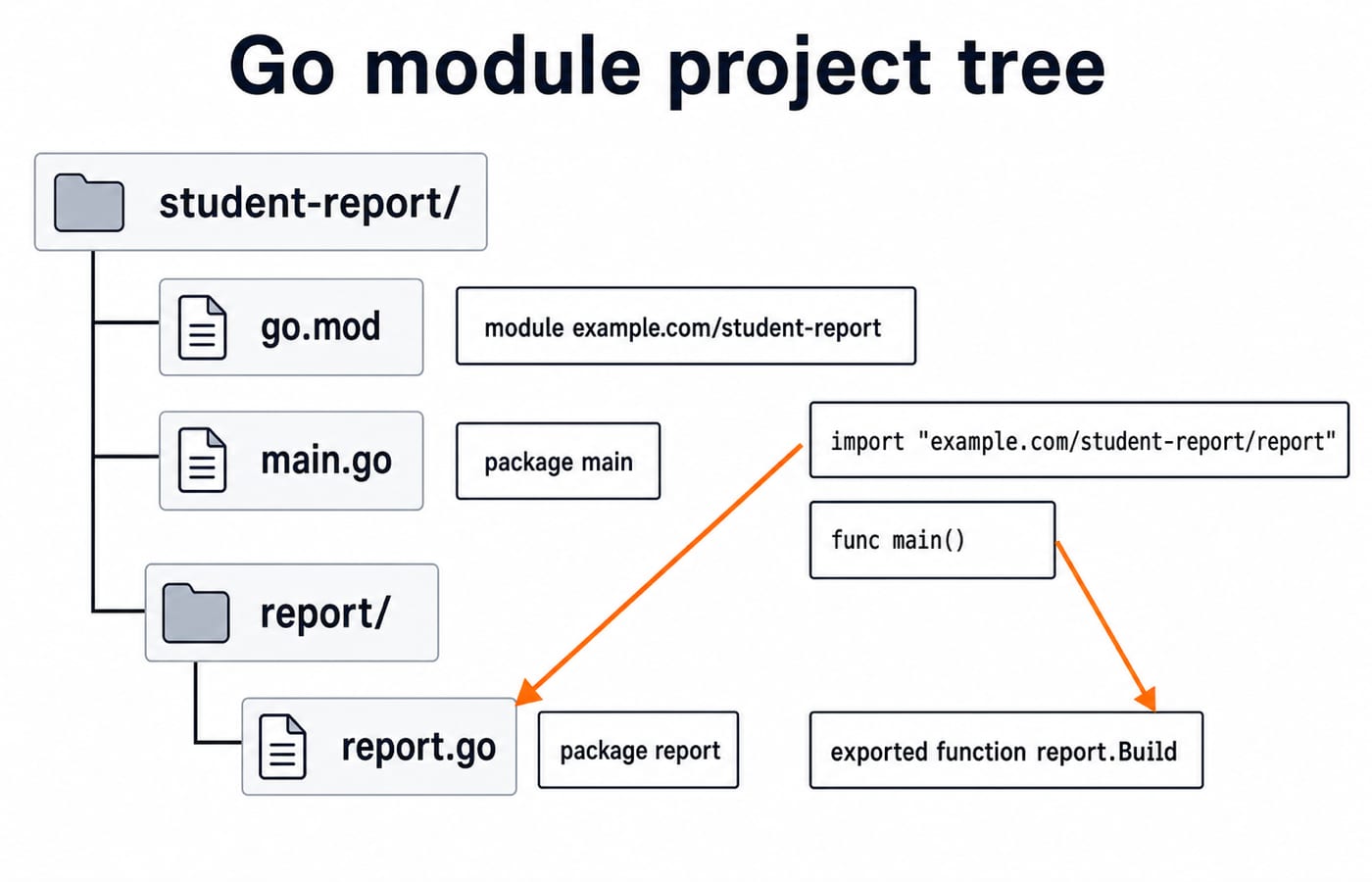
Then create this structure:
student-report/
├── go.mod
├── main.go
└── report/
    └── report.go
The module path set by go mod init is the prefix in the local import example.com/student-report/report. The official Go module tutorial explains this module and package setup, while the Go specification defines the language rules used below.
package main and func main() define the executable entry point. package report groups reusable logic. fmt, os and strconv are standard-library imports. Capitalised identifiers Report and Build are exported for use by main.
Go Types, Slices, Maps and Structs Through the Report Data
Name is a string; scores and total are int; Average is float64; raw and parsed scores are []string and []int; and map[string]int supports subject lookup. A struct names a group of fields:
type Report struct {
	Name      string
	Scores    []int
	BySubject map[string]int
	Average   float64
}
var total int has zero value 0; score, err := strconv.Atoi(text) declares two variables. make([]int, 0, len(raw)) makes an empty slice with planned capacity. make(map[string]int, len(raw)) makes a writable map. Slices preserve order; BySubject["cs"] performs keyed lookup. Map iteration order is not stable.
For Asha, 82 + 91 + 76 = 249, len(scores) = 3, and float64(249) / float64(3) = 83.0. The conversions make floating-point division explicit. For optional sequence-tracing practice in another language, try Python Output-Based Questions; it does not define Go behaviour.
Build the Reusable report Package
Put this complete listing in report/report.go:
package report

import (
	"fmt"
	"strconv"
)

type Report struct {
	Name      string
	Scores    []int
	BySubject map[string]int
	Average   float64
}

func Build(name string, raw []string) (Report, error) {
	subjects := []string{"math", "cs", "english"}
	if len(raw) != len(subjects) {
		return Report{}, fmt.Errorf("need %d scores, got %d", len(subjects), len(raw))
	}

	scores := make([]int, 0, len(raw))
	bySubject := make(map[string]int, len(raw))
	var total int

	for i, text := range raw {
		score, err := strconv.Atoi(text)
		if err != nil {
			return Report{}, fmt.Errorf("%s score %q is not an integer", subjects[i], text)
		}
		if score < 0 || score > 100 {
			return Report{}, fmt.Errorf("%s score %d is outside 0..100", subjects[i], score)
		}

		scores = append(scores, score)
		bySubject[subjects[i]] = score
		total += score
	}

	return Report{
		Name:      name,
		Scores:    scores,
		BySubject: bySubject,
		Average:   float64(total) / float64(len(scores)),
	}, nil
}
Build returns a complete Report with nil, or Report{} with an error. It neither prints nor terminates, so its caller controls the CLI response. Multiple-return, assignability and conversion rules come from the Go specification.
Wire the Command-Line Program in main.go
Now create the complete main.go:
package main

import (
	"fmt"
	"os"

	"example.com/student-report/report"
)

func main() {
	if len(os.Args) < 2 {
		fmt.Fprintln(os.Stderr, "usage: student-report NAME MATH CS ENGLISH")
		os.Exit(1)
	}

	r, err := report.Build(os.Args[1], os.Args[2:])
	if err != nil {
		fmt.Fprintln(os.Stderr, "error:", err)
		os.Exit(1)
	}

	fmt.Printf("%s: scores=%v average=%.2f cs=%d\n", r.Name, r.Scores, r.Average, r.BySubject["cs"])
}
os.Args[2:] passes all score arguments, excluding the executable name and student name. %v prints the score slice, %.2f prints two decimal places, and %d prints the integer lookup. Run:
go run . Asha 82 91 76The program prints:
Asha: scores=[82 91 76] average=83.00 cs=91Trace the Worked Values Through Slices, a Map and a Struct
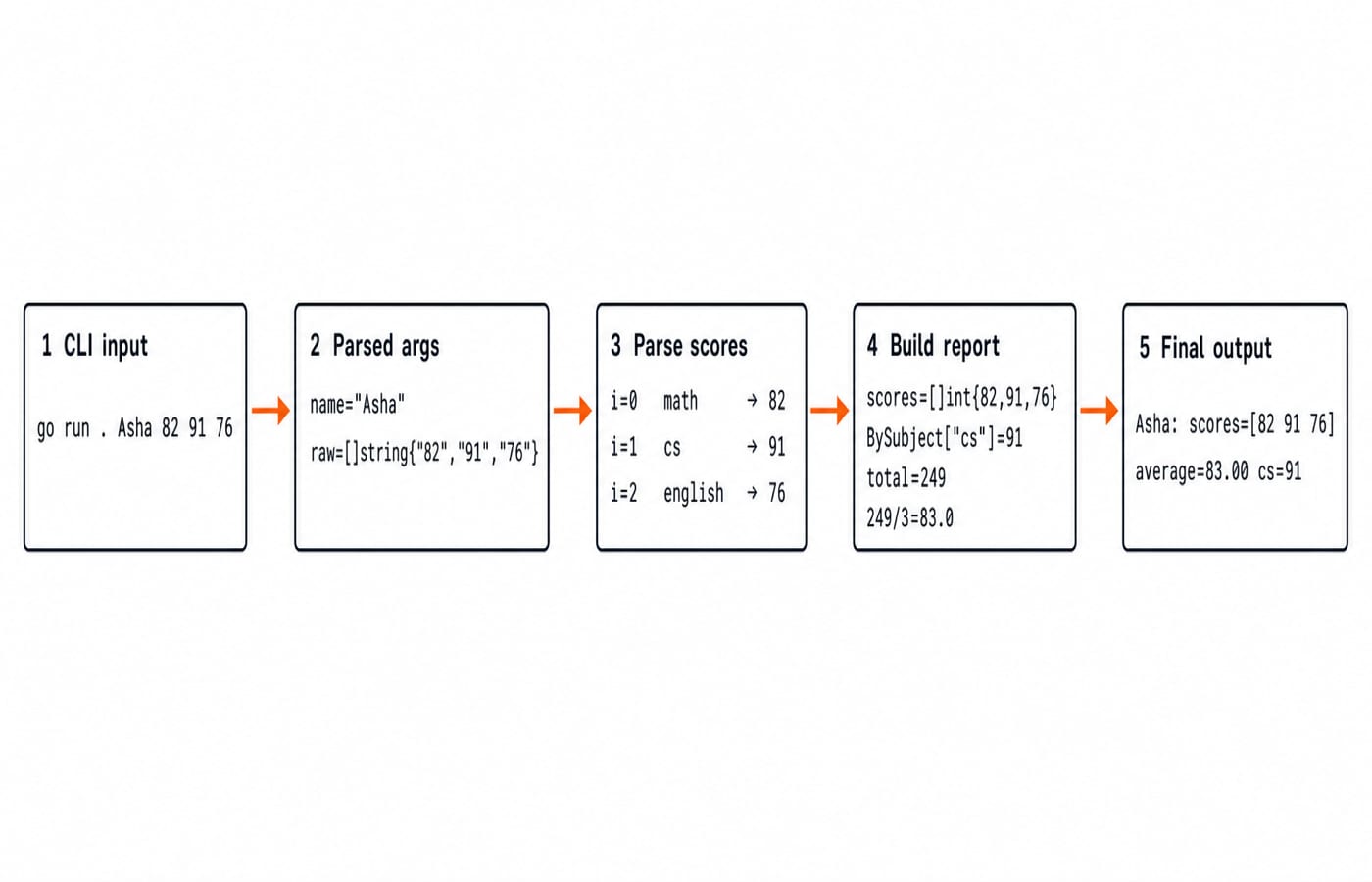
The call starts with os.Args[1] as "Asha" and os.Args[2:] as []string{"82", "91", "76"}. Iteration i=0 appends 82 and stores math:82; i=1 stores cs:91; i=2 stores english:76.
The ordered slice is []int{82, 91, 76}. Total 249 divided by 3 becomes 83.0, formatted as 83.00; BySubject["cs"] gives 91. The result is conceptually Report{Name: "Asha", Scores: []int{82, 91, 76}, BySubject: map[string]int{"math": 82, "cs": 91, "english": 76}, Average: 83.0}. Do not use the whole map as order-sensitive expected output.
Error Returns and Beginner Traps
Each failure returns before report formatting. The program's own stderr is:
go run . Asha 82 91printserror: need 3 scores, got 2.go run . Asha 82 ninety 76printserror: cs score "ninety" is not an integer.go run . Asha 82 101 76printserror: cs score 101 is outside 0..100.
Each time, main prints the non-nil error once and exits with status 1. go run may separately show an exit-status line.
Trap | Why it fails | Direct fix |
|---|---|---|
Unused import or local variable | Go rejects it | Remove it or use it |
Rename | Lowercase keeps it inside | Keep exported |
Write to a nil map | The map has no writable storage | Allocate it with |
Mix | The numeric types differ | Convert before division |
Ignore | Bad text can look like a usable zero | Check |
Expect sorted map | Map iteration order is not stable | Iterate |
Slices can share storage. After short := r.Scores[:2], short is [82 91]; setting short[0] = 70 can also change r.Scores[0] to 70. For independent storage, use clone := append([]int(nil), short...).
Beginner Exercises and Interview-Style Checks
Add
"physics"as the fourth subject, then rungo run . Asha 82 91 76 88. The total is337, the average is84.25, the slice is[82 91 76 88], andBySubject["physics"]is88. Update the output format if you want physics printed.Predict
go run . Asha 82 91 105: it printserror: english score 105 is outside 0..100, with no report line.Explain why
buildis unavailable tomain, why the average usesfloat64conversions, and why a map suits lookup while a slice preserves order.Print every subject deterministically by iterating the fixed
subjectsslice and looking up each map key. Do not expect insertion order from maprange.
Practise os.Args slicing, distinguish arrays from slices, trace range, find a zero-value or nil-map fault, follow (value, error), and reason about visibility. For a class-based treatment of the same result-analysis domain, compare Java Programming Language: Core Syntax, OOP and a Worked Result Analyser; the Go program centres package boundaries, slices, maps and explicit error values.
Go for Beginners: The Short Version and Next Step
Keep this seven-part model: a module supplies import-path identity; directories hold packages; package main with func main() builds an executable; named types such as Report make data explicit; slices preserve a sequence; maps provide keyed lookup; and an error lets the caller choose its response. With the successful values, three valid scores produce one report: total 249, average 83.00, CS lookup 91.
Type both files instead of pasting them. Predict Asha's trace, run it, trigger all three errors, then add physics and verify 337 / 4 = 84.25. For a wider foundations route, continue with the C Language Course: Concepts, MCQs and Coding. Use Coding for Placements: C, C++, Java and Python for multi-language practice, or browse the Coding & Skills category for the next topic.
Keep learning
Classes and Objects MCQs: 12 Solved OOP Questions with Explanations
Solve 12 classes and objects MCQs, check each explanation, and use a worked Java trace to separate instance state, constructors, overloading and nested classes.
20 Oct 20267 min readProgramming Languages Survey
Programming Language Syntax MCQs: 12 Solved Questions on Grammar, Tokens and Semantics
Solve 12 MCQs on syntax, tokens, pseudocode, C grammar and runtime behaviour. Each explanation identifies the rule and applies it.
Updated 16 Oct 20268 min readProgramming Languages Survey
Imperative Programming Structure and Flow Control MCQs: 12 Solved Questions
Test whether you can trace changing state, choose the right loop, read a flowchart, and follow event-driven or exceptional control paths through 12 solved MCQs.
12 Oct 20267 min readProgramming Languages Survey
Static vs Dynamic Binding MCQs: 11 Solved Questions on Scope, Aliasing and Dispatch
Solve 11 binding questions from GATE and UGC NET papers by tracing lexical scope, runtime call chains, declared types and shared storage cells. Each answer shows why the tempting shortcuts fail.
Updated 8 Oct 20267 min readProgramming Languages Survey