SQL Subqueries Tutorial: Scalar, IN, EXISTS, and Correlated Examples
Learn SQL subqueries from one small employee database. Trace each inner result, compare the main query forms, handle NULL safely, and check your understanding with four exercises.
KnowledgeGate Team
Exam prep & CS education
Updated 23 Sep 20265 min read
A filter such as salary > 60000 uses a fixed value, but useful questions often need a value computed from other rows. You may want employees earning above the company average or departments that have at least one employee. A subquery is a SELECT nested inside another SQL statement. This CS Fundamentals lab uses one dataset to produce exact scalar, IN, EXISTS, correlated, and derived-table results.
SQL subquery result shapes and where they fit
The inner SELECT is the subquery; the surrounding statement is the outer query. Parentheses mark their boundary, and the outer operation must suit the inner result: one value for a scalar comparison, one column of values for IN, or a row-existence test for EXISTS. A subquery in FROM can supply a table.
An uncorrelated subquery can be traced by calculating the inner result first. A correlated subquery refers to the current outer row, though an optimiser may rewrite either form while preserving its result. The earlier SQL Subqueries and Correlated Subqueries guide owns the dependency-first placement-test method; this runnable lab instead executes scalar, IN, EXISTS, correlated, SELECT-list, and derived-table forms against one schema.
Create the departments and employees practice data
Run this complete setup first:
CREATE TABLE departments (
    department_id INT PRIMARY KEY,
    department_name VARCHAR(30) NOT NULL,
    city VARCHAR(20) NOT NULL,
    budget DECIMAL(10, 2) NOT NULL
);

CREATE TABLE employees (
    employee_id INT PRIMARY KEY,
    employee_name VARCHAR(30) NOT NULL,
    department_id INT,
    salary DECIMAL(10, 2) NOT NULL
);

INSERT INTO departments (department_id, department_name, city, budget) VALUES
    (10, 'Engineering', 'Delhi', 900000.00),
    (20, 'Sales', 'Pune', 500000.00),
    (30, 'Support', 'Jaipur', 350000.00),
    (40, 'Research', 'Bengaluru', 700000.00);

INSERT INTO employees (employee_id, employee_name, department_id, salary) VALUES
    (101, 'Asha', 10, 90000.00), (102, 'Bharat', 10, 70000.00),
    (103, 'Charu', 20, 65000.00), (104, 'Deepak', 20, 50000.00),
    (105, 'Esha', 30, 45000.00), (106, 'Farhan', 10, 110000.00),
    (107, 'Gita', 30, 55000.00), (108, 'Hari', NULL, 60000.00);
Research has no employee, and Hari has no department. These edges expose EXISTS and NULL behaviour. Results are ordered whenever order matters.
Scalar SQL subquery: calculate, then compare
SELECT employee_id, employee_name, salary
FROM employees
WHERE salary > (SELECT AVG(salary) FROM employees)
ORDER BY employee_id;
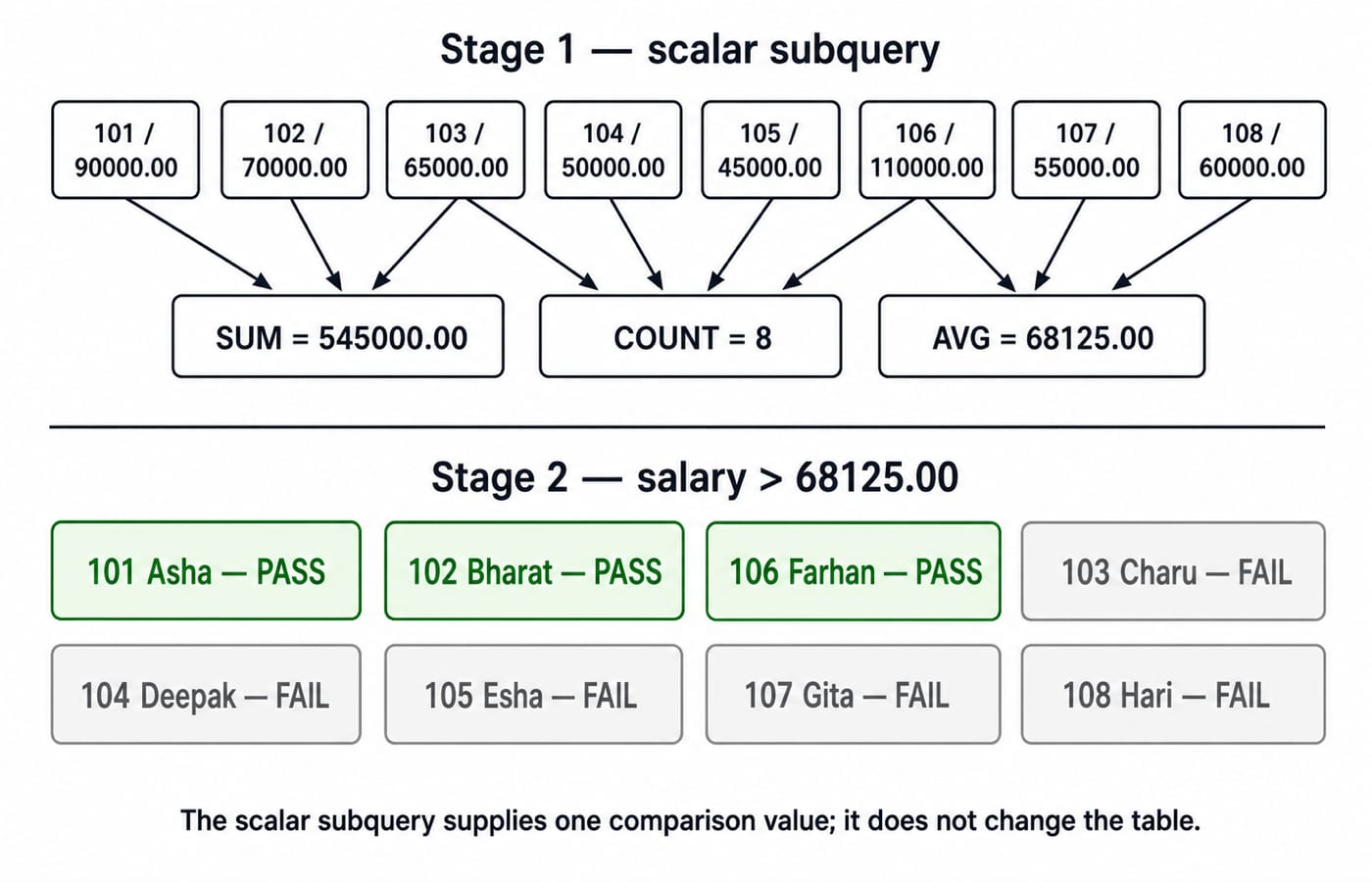
The inner total is 545000.00 across 8 employees, so 545000.00 / 8 = 68125.00. Compare each salary with 68125.00: Asha passes, Bharat passes, Charu fails, Deepak fails, Esha fails, Farhan passes, Gita fails, and Hari fails. The exact output is (101, Asha, 90000.00), (102, Bharat, 70000.00), and (106, Farhan, 110000.00).
SQL IN and EXISTS subqueries
SELECT employee_id, employee_name, department_id
FROM employees
WHERE department_id IN (
    SELECT department_id FROM departments WHERE budget >= 500000.00
)
ORDER BY employee_id;
The inner list is {10, 20, 40}. The result IDs are 101, 102, 103, 104, 106. Research has no employee, and Hari's NULL does not match a list value. IN expects a one-column result, but that result may contain many rows.
SELECT d.department_id, d.department_name
FROM departments AS d
WHERE EXISTS (
    SELECT 1 FROM employees AS e
    WHERE e.department_id = d.department_id
)
ORDER BY d.department_id;
EXISTS returns (10, Engineering), (20, Sales), and (30, Support). It asks only whether a matching row exists; SELECT 1 adds nothing to the outer result. Changing it to NOT EXISTS returns (40, Research).
Correlated SQL subquery by department
SELECT e.employee_id, e.employee_name, e.department_id, e.salary
FROM employees AS e
WHERE e.salary > (
    SELECT AVG(e2.salary)
    FROM employees AS e2
    WHERE e2.department_id = e.department_id
)
ORDER BY e.employee_id;
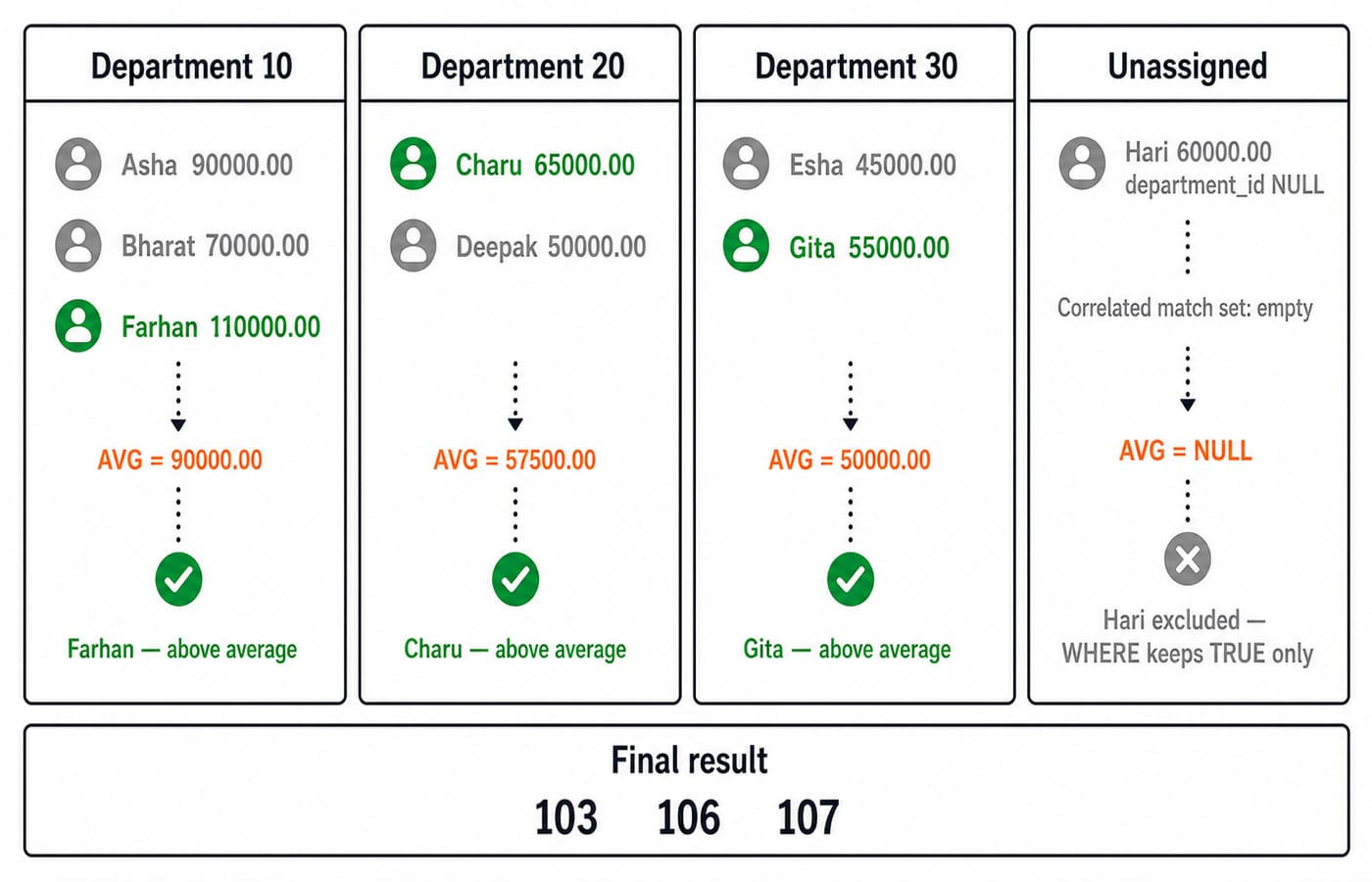
Department 10 has 90000.00, 70000.00, 110000.00, average 90000.00, so Farhan alone passes. Department 20 averages (65000.00 + 50000.00) / 2 = 57500.00, so Charu passes. Department 30 averages (45000.00 + 55000.00) / 2 = 50000.00, so Gita passes. For Hari, equality with NULL finds no rows, AVG is NULL, and 60000.00 > NULL is not TRUE.
The sorted result is (103, Charu, 20, 65000.00), (106, Farhan, 10, 110000.00), (107, Gita, 30, 55000.00). Aliases e and e2 keep the outer and inner instances distinct.
SQL subqueries in SELECT and FROM
SELECT employee_id, employee_name, salary,
       (SELECT MAX(salary) FROM employees) - salary AS gap_to_top
FROM employees
ORDER BY employee_id;
The maximum is 110000.00. Gaps by ID are 101: 20000.00, 102: 40000.00, 103: 45000.00, 104: 60000.00, 105: 65000.00, 106: 0.00, 107: 55000.00, 108: 50000.00. This adds a result column; it does not update salary.
SELECT dept_stats.department_id, dept_stats.employee_count, dept_stats.avg_salary
FROM (
    SELECT department_id, COUNT(*) AS employee_count, AVG(salary) AS avg_salary
    FROM employees
    WHERE department_id IS NOT NULL
    GROUP BY department_id
) AS dept_stats
WHERE dept_stats.avg_salary >= 57500.00
ORDER BY dept_stats.department_id;
The inner table is 10/3/90000.00, 20/2/57500.00, 30/2/50000.00; filtering leaves 10/3/90000.00 and 20/2/57500.00. Aggregate aliases are now derived-table columns that the outer query can filter. Keep the alias for portability.
SQL subquery errors: shape, NULL, and correlation
Scalar shape:
salary = (SELECT salary FROM employees WHERE department_id = 20)receives65000.00and50000.00, so it commonly raises a multiple-row error. UseINif either value is intended, or constrain or aggregate when exactly one value is correct.Column count:
department_id IN (SELECT department_id, budget FROM departments)supplies two columns whereINexpects one. Select onlydepartment_id.NULL with NOT IN:
department_id NOT IN (SELECT department_id FROM employees)returns no department because Hari contributesNULL. For department 40, the chain ends inUNKNOWN, soWHERErejects it. UseNOT EXISTS, or filter the inner list withWHERE department_id IS NOT NULL; either returns40.
A correlated query is a logical per-row trace, not a guarantee of physical per-row execution or worse performance than a join. Optimisers, indexes, and engines differ, so performance work needs that database’s execution plan. In assessments, trace the inner result shape, outer references, IN versus EXISTS, and NULL. Computer Science Fundamentals for Placements by Sanchit Sir provides broader placement-focused DBMS practice.
SQL subquery exercises and the short version
Solve these before reading the answers.
Use
INto find employees earning above60000.00in departments below600000.00budget.Use
NOT EXISTSto find departments without employees.Change the correlated comparison to
<and find employees below their department average.Explain why
salary > (SELECT salary FROM employees WHERE department_id = 10)is invalid.
Answers
Use
salary > 60000.00 AND department_id IN (SELECT department_id FROM departments WHERE budget < 600000.00). The inner IDs are20, 30; only employee103passes.Use the earlier department query with
NOT EXISTS. It returns(40, Research).Changing
>to<returns IDs102, 104, 105.The inner values are
90000.00, 70000.00, 110000.00, not one scalar value.
For another solved set, use SQL Query MCQs: 12 Solved (SELECT, Joins, Subqueries).
Scalar means one value such as 68125.00; IN consumes a one-column list such as {10, 20, 40}; EXISTS tests for a match; correlation reads an outer value; and NOT IN can return no rows when its list contains NULL.
Change Deepak’s salary to 60000.00 and predict before running: department 20’s average becomes 62500.00, so Charu passes and Deepak fails. Continue across core subjects with ZERO TO HERO; for only SQL comparisons, use the earlier subquery guide linked above.
Keep learning
Data Mining and Data Warehouse Explained: Concepts, OLAP and Worked Examples
Follow six orders from operational sources into a warehouse, calculate OLAP totals, and test an association rule on five shopping baskets.
Updated 4 Oct 20266 min readDBMS

Set Operations and Cartesian Product in Relational Algebra: Worked Examples and Exam Traps
Learn when relational set operations are legal, calculate exact union and difference results, enumerate a Cartesian product, and trace how a join filters it.
Updated 29 Sep 20266 min readDBMS
DBMS Interview Questions: Keys, Normalisation and Transactions Through One Worked Schema
Build defensible DBMS interview answers by tracing keys, normal forms, ACID and isolation through one university-enrolment database.
Updated 25 Sep 20265 min readDBMS
Super Key, Candidate Key and Primary Key: A Worked DBMS Example
Use one ENROLMENT relation to derive two candidate keys, enumerate every super key, select a primary key and translate the result into SQL.
Updated 24 Sep 20266 min readDBMS