

SQL Query Optimization Basics: EXPLAIN, Indexes, and Worked Examples
Learn to read row flow, choose composite index order, rewrite date predicates, and compare before and after plans on a deterministic PostgreSQL fixture.
KnowledgeGate Team
Exam prep & CS education
Updated 7 Sep 20265 min read
A SQL query can return exactly the right rows and still do far more work than necessary. The reliable fix is a loop: inspect the plan, find where rows or sorts grow, make one targeted change, and measure again. The example uses PostgreSQL syntax, but scans, filters, sorts, and indexes transfer to other relational databases.
SQL query optimization basics: what the optimizer actually changes
SQL describes the result you want. The optimizer chooses a physical plan to produce it, including a table or index scan, join order, join algorithm, sorting, grouping, and other access paths. Two plans can be logically equivalent yet have very different physical costs. A rewrite helps only when it exposes a cheaper path or makes an existing path usable.
Start with EXPLAIN to see estimates. For a safe SELECT, use EXPLAIN (ANALYZE, BUFFERS) to compare estimated rows with actual rows and inspect reads. ANALYZE executes the statement, so do not use it casually with UPDATE, DELETE, or INSERT.
The key signals are rows scanned, rows kept, sort work, and whether the access path can stop early. If the query syntax itself feels unfamiliar, first revise SQL Queries and Joins in DBMS: A Clear Guide.
Build one controlled SQL optimization example
Create this deterministic PostgreSQL fixture:
CREATE TABLE orders (
  order_id BIGINT PRIMARY KEY,
  customer_id INT NOT NULL,
  order_date DATE NOT NULL,
  status VARCHAR(10) NOT NULL,
  total_amount DECIMAL(10,2) NOT NULL
);

INSERT INTO orders
SELECT
  g,
  ((g - 1) % 10000) + 1,
  DATE '2024-01-01'
    + ((((g - 1) / 10000)::INT * 10) + ((g - 1) % 10)::INT),
  CASE WHEN g % 5 = 0 THEN 'CANCELLED' ELSE 'COMPLETE' END,
  (100 + (g % 9000))::DECIMAL(10,2)
FROM generate_series(1, 1000000) AS s(g);

ANALYZE orders;
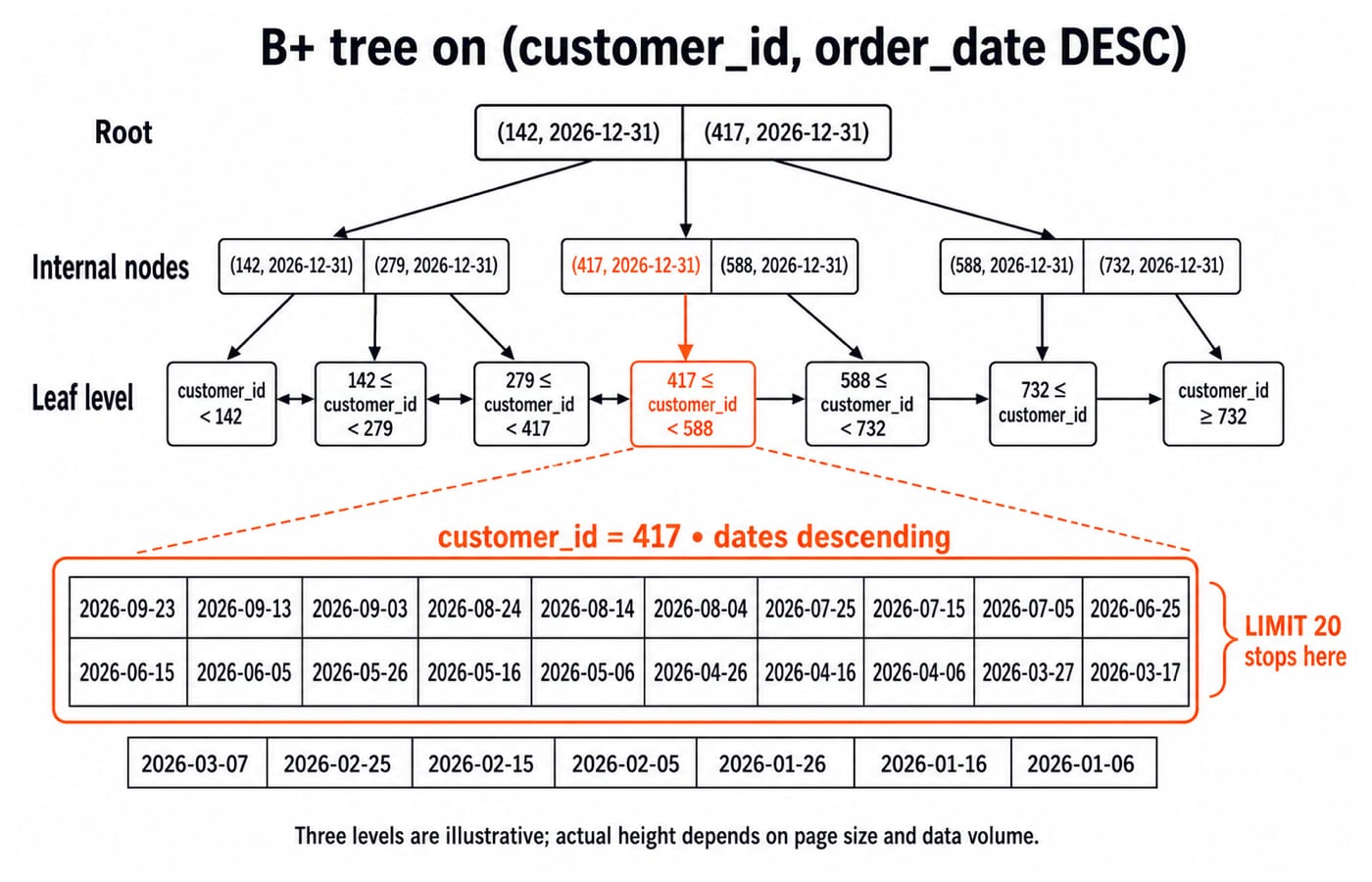
The table has 1,000,000 orders across 10,000 customers, exactly 100 orders per customer, and 1,000 orders on each of 1,000 consecutive dates. Customer 417 has 27 orders in calendar year 2026, every ten days from 2026-01-06 through 2026-09-23.
The query uses customer and date filters with descending date order. It asks for the 20 newest 2026 orders for customer 417 and returns only the required columns:
SELECT order_id, order_date, total_amount
FROM orders
WHERE customer_id = 417
  AND order_date >= DATE '2026-01-01'
  AND order_date < DATE '2027-01-01'
ORDER BY order_date DESC
LIMIT 20;
Read the baseline EXPLAIN plan before adding an index
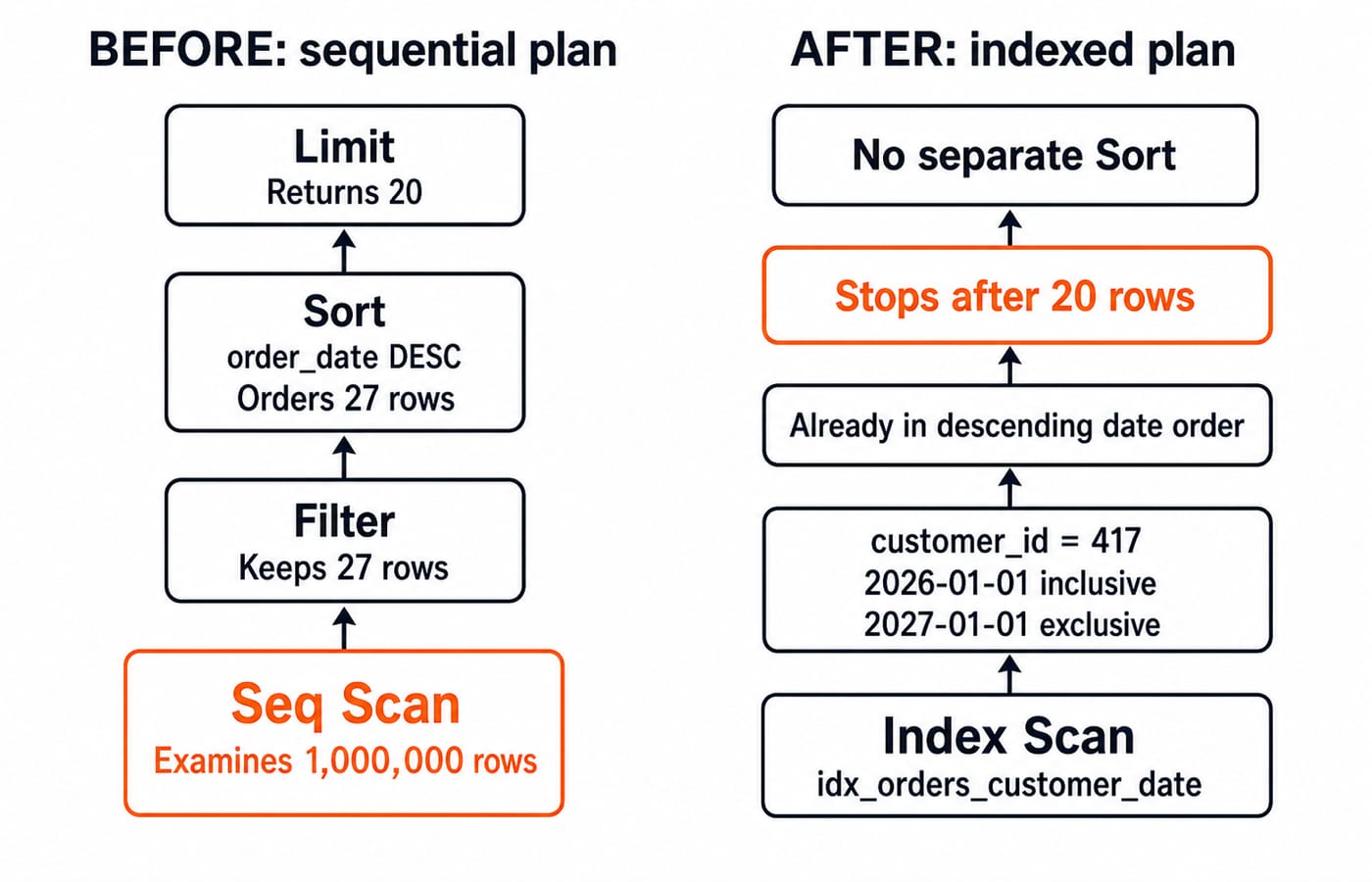
Run EXPLAIN (ANALYZE, BUFFERS) on the target query. In the simplified row flow, a scan considers 1,000,000 rows, the filters retain 27, a sort orders those 27 by descending date, and LIMIT returns 20. Exact node names, parallel workers, buffer counts, and milliseconds vary with PostgreSQL version, hardware, cache state, and configuration.
Read a plan from its most expensive row-producing node upward. The warning is not simply the phrase Seq Scan. It is the mismatch between one million rows examined and twenty returned, followed by a sort needed only because the access path supplies no useful order.
Add a composite index that matches filter, range, and order
Add the index, refresh statistics, and repeat the same plan command:
CREATE INDEX idx_orders_customer_date
  ON orders (customer_id, order_date DESC);

ANALYZE orders;
Column order is the key. Equality on customer_id first selects one contiguous key range. Within customer 417, order_date DESC supports both the 2026 range and newest-first output. The engine starts at 2026-09-23 and stops after the twentieth qualifying entry, 2026-03-17. It neither reads the remaining seven entries nor performs a separate sort.
This is not a covering index. PostgreSQL still visits 20 table rows to obtain the selected values, including order_id and total_amount.
An index on status alone is poor here because the fixture has only two status values and the query does not filter status. Reversing the columns to (order_date, customer_id) can use the date range, but it cannot isolate customer 417 as one leading-key range first. B+ Trees and Database Indexing: A Worked Guide explains why this leading-key order matters.
Make SQL predicates index-friendly before adding more indexes
Now create a separate date index:
CREATE INDEX idx_orders_order_date ON orders (order_date);The predicate below is non-sargable for that ordinary index:
EXTRACT(YEAR FROM order_date) = 2026
AND EXTRACT(MONTH FROM order_date) = 2
Without a suitable expression index, the database must evaluate those functions against stored dates and can examine all 1,000,000 rows. Express the same condition as a half-open range:
WHERE order_date >= DATE '2026-02-01'
  AND order_date < DATE '2026-03-01'
The fixture contains exactly 28 February dates in 2026 and 1,000 rows per date, so the ordinary date index identifies 28 × 1,000 = 28,000 rows. Half-open boundaries also remain correct when a real column is a timestamp, while BETWEEN can accidentally exclude values later on the final day. Select named columns instead of SELECT *, but remember that shorter projection alone cannot repair a bad access path.
Common SQL query optimization mistakes and their fixes
Avoid these common traps:
Adding indexes before reading the plan: you may increase write and storage cost without helping the query. Capture evidence first.
Indexing every column: indexes are not free. Keep those that improve representative reads enough to justify maintenance.
Trusting one warm-cache timing: milliseconds fluctuate. Compare row flow and reads as well as repeated timings.
Treating every sequential scan as wrong: low-selectivity filters or queries returning much of a table may make it the sensible choice.
Stale statistics can make estimated rows diverge sharply from actual rows. Correlated columns can also defeat a simple selectivity estimate. Refresh statistics and compare estimates with actuals before forcing an index.
For a fair measurement, preserve the query and parameters, capture the before plan, make one change, then capture the after plan. Compare rows and reads across representative values, not just one convenient customer.
How SQL query optimization is tested in exams and interviews
Typical tasks ask you to choose an index for a WHERE plus ORDER BY, spot a non-sargable predicate, interpret a small plan, explain composite key order, or compare nested-loop and hash-join situations conceptually. These test reasoning, not a particular exam pattern.
Quick check: which index can filter customer 417's 2026 range and emit newest-first rows, (customer_id, order_date DESC) or (status, total_amount)? The first one. Its equality key isolates the customer, its range key limits the dates, and that same key order supplies the requested descending output.
Use SQL Query MCQs: 12 Solved (SELECT, Joins, Subqueries) for query-reading practice. Plan interpretation still needs hands-on practice with EXPLAIN on real queries.
SQL query optimization basics: the short version and next step
Measure the plan, reduce unnecessary row work, build an index whose leading columns match the real predicate and order, then measure again with representative values. In this fixture, one million examined rows plus a sort becomes an ordered customer-and-date index path that stops after 20 rows.
The CS Fundamentals for Exams & Placements category is the broader DBMS route. If you want DBMS, operating systems, networks, and interview revision in one sequence, use CS Fundamentals for Placements by Sanchit Sir. If you need only this topic, keep practising with the fixture and vary its predicates, indexes, and limits.
Keep learning
Log-Based Recovery Techniques in DBMS: WAL, UNDO/REDO and a Worked Crash Example
Learn how a DBMS classifies winners and losers after a crash, then applies physical REDO and UNDO. One exact WAL log takes you from the crash state to verified final values.
Updated 28 Oct 20266 min readDBMS
Advanced Recovery Algorithms in DBMS: ARIES Worked Step by Step
Work through one ARIES crash from checkpoint analysis to repeating history and logged undo. Every pageLSN, recLSN, loser transaction and CLR is traced.
Updated 27 Oct 20265 min readDBMS
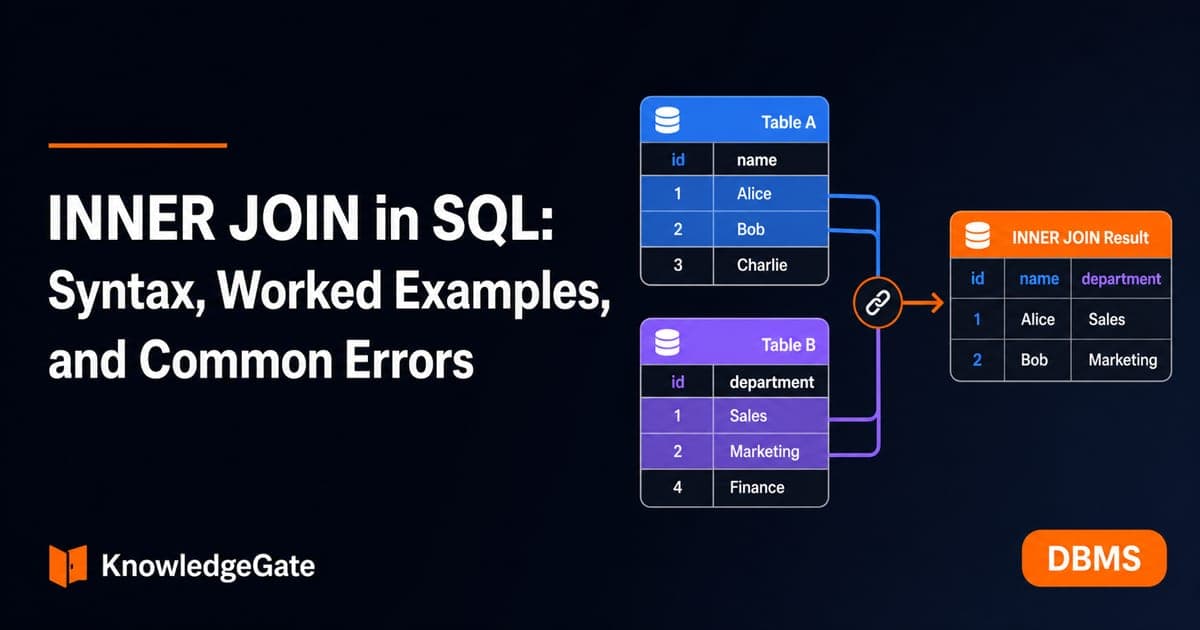
INNER JOIN in SQL: Syntax, Worked Examples, and Common Errors
Build INNER JOIN intuition with a customer-order dataset. Trace exact row matches, handle one-to-many results, extend to payments, and practise common interview patterns.
Updated 25 Oct 20266 min readDBMS
Types of Indexing in DBMS: Primary, Clustering, Secondary and Multilevel Examples
Learn how file order, uniqueness and entry coverage determine an index type. Two worked examples build index levels and count simplified block reads.
Updated 24 Oct 20266 min readDBMS