PSU Through GATE Application Tracker: A Multi-Company System
Build one auditable sheet for multiple PSU applications through GATE. Track exact eligibility wording, deadlines, documents, status and proof without mixing company rules.
KnowledgeGate Team
Exam prep & CS education
Updated 8 Aug 20265 min read
Registering for GATE or receiving a score does not complete a PSU application. You can still miss an opportunity by overlooking a separate company portal, reading a paper code incorrectly, treating similar degree names as equivalent, or losing submission evidence. One reusable tracker turns every notice into a dated, auditable next action.
Treat each PSU notice as a separate application record
Use one row for every company + notice number + post, even when rows use the same GATE score. Each organisation may specify its own paper codes, score years, degree wording, deadline, document formats, payment rule and later stages. Read each condition as, “the current official notice states...” Never carry it between companies.
Follow a strict source hierarchy: official recruitment notice first, official application portal second, saved acknowledgement third. Coaching pages and social posts can alert you, but they cannot settle an eligibility doubt. The PSU Exam Preparation Courses page is a preparation hub, not an authority for recruitment terms.
Build the tracker with 20 columns and controlled status values
Create these exact columns:
CompanyNotice IDOfficial notice URLOfficial application URLPostAccepted GATE paper code(s)Accepted score year(s)Exact degree/discipline wordingEligibility resultPortal opensPortal closes + timezoneFee rule checked?Payment status/referenceDocuments readyBlockerSubmitted atApplication IDAcknowledgement PDFStage statusNext action + due time
Allow only: Watch, Eligibility review, Ready, Submitted, Correction needed, Shortlisted, Closed and Not eligible. A blank means not checked, never probably fine. Keep passwords, identity numbers and payment credentials outside the sheet. Store only evidence paths or masked references.
Freeze row one, enable filters, and format dates as DD MMM YYYY, HH:MM IST. Colour deadlines red at 72 hours or less, amber at 73 to 168 hours, and green only for Submitted rows with an acknowledgement path.
Pass the eligibility gate before preparing the application
Check, in order:
Accepted GATE paper code
Accepted score year
Exact qualifying-degree wording
Completion or result conditions
Category or age conditions
If an equivalent degree is not explicit, keep Eligibility review and ask the official recruitment contact. Similarity is not eligibility.
Take a worked example. The candidate holds B.Tech Information Technology, sat GATE CS 2026 and graduated in July 2025. The three companies below are invented, and their notice wording is chosen to show how the gate decides.
Notice | What the notice states | Tracker result |
|---|---|---|
Alpha Energy, | Accepts |
|
Beta Power, | Accepts |
|
Gamma Metals, | Accepts |
|
In your own rows, quote the current official notice word for word and record the page number you read it on.
Work a three-company deadline board with opening dates, buffers and evidence
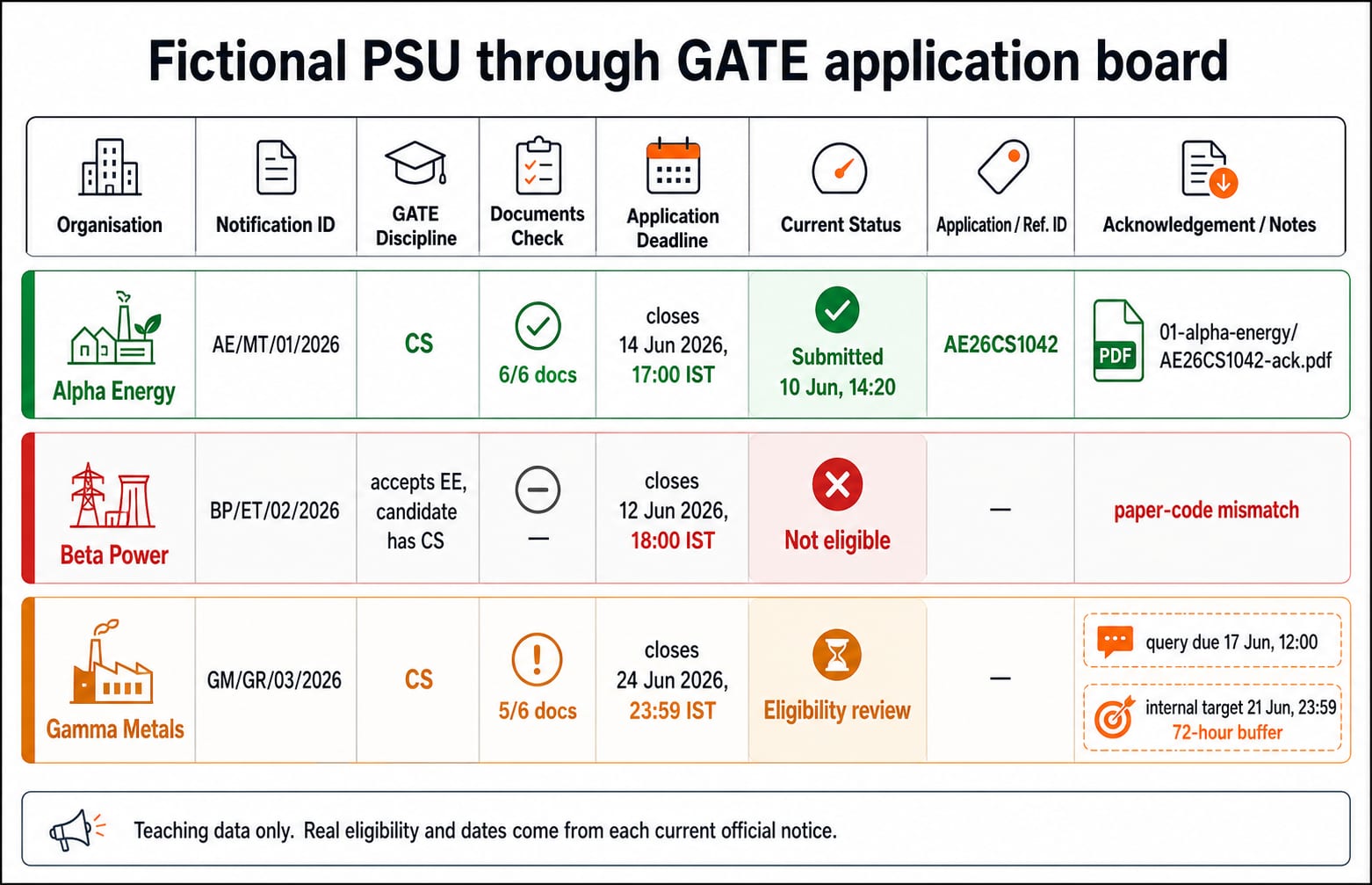
The same three companies now sit on one deadline board. Alpha opens 03 Jun 2026, 10:00 IST and closes 14 Jun 2026, 17:00 IST. All 6/6 notice-listed documents are ready. It is submitted at 10 Jun 2026, 14:20 IST with application ID AE26CS1042, and the acknowledgement is saved at 01-alpha-energy/AE26CS1042-ack.pdf. Its status is Submitted.
Beta closes 12 Jun 2026, 18:00 IST, but its EE-only rule makes the row Not eligible. Keep the row and reason for audit instead of deleting it.
Gamma closes 24 Jun 2026, 23:59 IST, has 5/6 documents ready and unresolved IT-degree wording. Its status stays Eligibility review. The next action is send exact-degree query to official recruitment contact by 17 Jun 2026, 12:00 IST. Set the internal target to 21 Jun 2026, 23:59 IST, exactly 72 hours before closing. This buffer is a personal control, not an official extension or guarantee. Record fee handling only as rule checked, pending, successful or failed.
Build one document vault, then make company-specific copies
Use this folder tree:
PSU-GATE/2026/
├── 00-master/
├── 01-alpha-energy/
├── 02-beta-power/
└── 03-gamma-metals/
Keep only current reusable files in 00-master/, with names such as gate-scorecard-2026.pdf, btech-degree.pdf, marksheets-sem-01-to-08.pdf and photo-2026-06.jpg. These four files are not universally required. The current official notice controls the checklist.
Alpha lists 6 documents and all 6 are ready, so its row shows 6/6. Gamma lists 6, but only 5 are ready, so it stays 5/6 and cannot move to Ready. Company folders hold notice PDFs, submitted-form previews, masked payment evidence and acknowledgements. Use company + application ID + document type in filenames. Never overwrite a submitted copy, and keep login credentials outside the vault.
Run a 90-minute weekly review, with an active-window rule
Setup takes 150 minutes: sheet 40, master vault 50, official-source bookmarks 30, and dry run 30.
40 + 50 + 30 + 30 = 150 minutes
Each week: Monday source scan 20 minutes, Wednesday notice parsing 25, and Saturday document, acknowledgement and action updates 45.
20 + 25 + 45 = 90 minutes
In an active window, add three 25-minute checks: 3 × 25 = 75 minutes. Total: 90 + 75 = 165 minutes, or 2 hours 45 minutes. If Monday is missed, move only its 20-minute scan to Tuesday. Keep the other sessions. An eligible row entering the final 72 hours comes first. Never plan its first upload for the final 24 hours.
Keep administration separate from study. Use the GATE CS Preparation posts for the study calendar and the GATE CS subject-weightage guide to allocate academic hours. Neither sets PSU rules.
Make every submission auditable and recover carefully from failures
Before submitting, verify: name against its supporting document, the post, GATE paper code, score year against the scorecard, every upload in preview, the recorded official fee rule, and the saved final form preview.
Record the timestamp, application ID, any masked payment reference, acknowledgement path and next stage.
Alpha's payment screen stops responding at 10 Jun 2026, 14:05 IST. The candidate does not pay again immediately. They first inspect the official portal's application or payment history. At 14:20 IST, it shows successful and issues AE26CS1042, so the row moves to Submitted. If history stayed unclear, they would contact the official helpdesk with the timestamp and masked evidence, never assume a duplicate attempt is safe.
Use the main state path Watch -> Eligibility review -> Ready -> Submitted -> Shortlisted or Closed, with side exits to Not eligible and Correction needed. A helpdesk query, correction request or late submission is never guaranteed to be accepted.
Short version: protect the application while preparing for GATE
Create one row per notice, paste exact eligibility wording, set a target 72 hours early, store proof under the application ID, and review weekly. Every live row needs a status and dated next action.
If you need structured preparation, use GATE Guidance by Sanchit Sir. For test readiness, use the GATE Test Series. Keep application control separate from preparation: every current official PSU notice and portal governs the real application.
Keep learning

DRDO Scientist B CS Exam Pattern and Marking Scheme: GATE and Interview Explained
Separate GATE paper marks from recruitment merit and interview qualification. Worked examples explain penalties, weighted arithmetic and a practical CS preparation split.
30 Sep 20264 min readPSU Through GATE

PSU Through GATE Choices: Compare Roles, Locations and Career Paths
Compare PSU opportunities through GATE using official evidence, a weighted decision matrix and a practical view of role fit, location and portable skills.
Updated 15 Aug 20265 min read69 viewsPSU Through GATE

PSU Through GATE Interview Preparation: Projects, Core Subjects and Role Fit
Prepare for a possible PSU interview with a notice-first framework, a defensible project story, worked CS drills and an honest role-fit audit.
Updated 13 Aug 20265 min readPSU Through GATE
PSU Through GATE Documents and Medical Checks: An Early-Readiness Checklist
Prepare a clean evidence trail before a PSU call letter arrives. Audit a 17-item file, resolve a name mismatch through the official route, and read medical instructions without guessing.
Updated 11 Aug 20265 min readPSU Through GATE