

How to Build a Portfolio When You Have No Work Experience
A practical guide for students to build a focused tech portfolio without internships: choose a project, document your process, test it, and present it honestly.
KnowledgeGate Team
Exam prep & CS education
21 Nov 20266 min read
No internship yet? That does not mean you have nothing to show. A focused portfolio can demonstrate how you identify a problem, build a solution, test it, and explain your decisions—even when the project began as coursework or self-study.
The goal is not to make a student project look like paid work. It is to give a recruiter or interviewer clear evidence of what you can do and how you think.
Start with the role you want
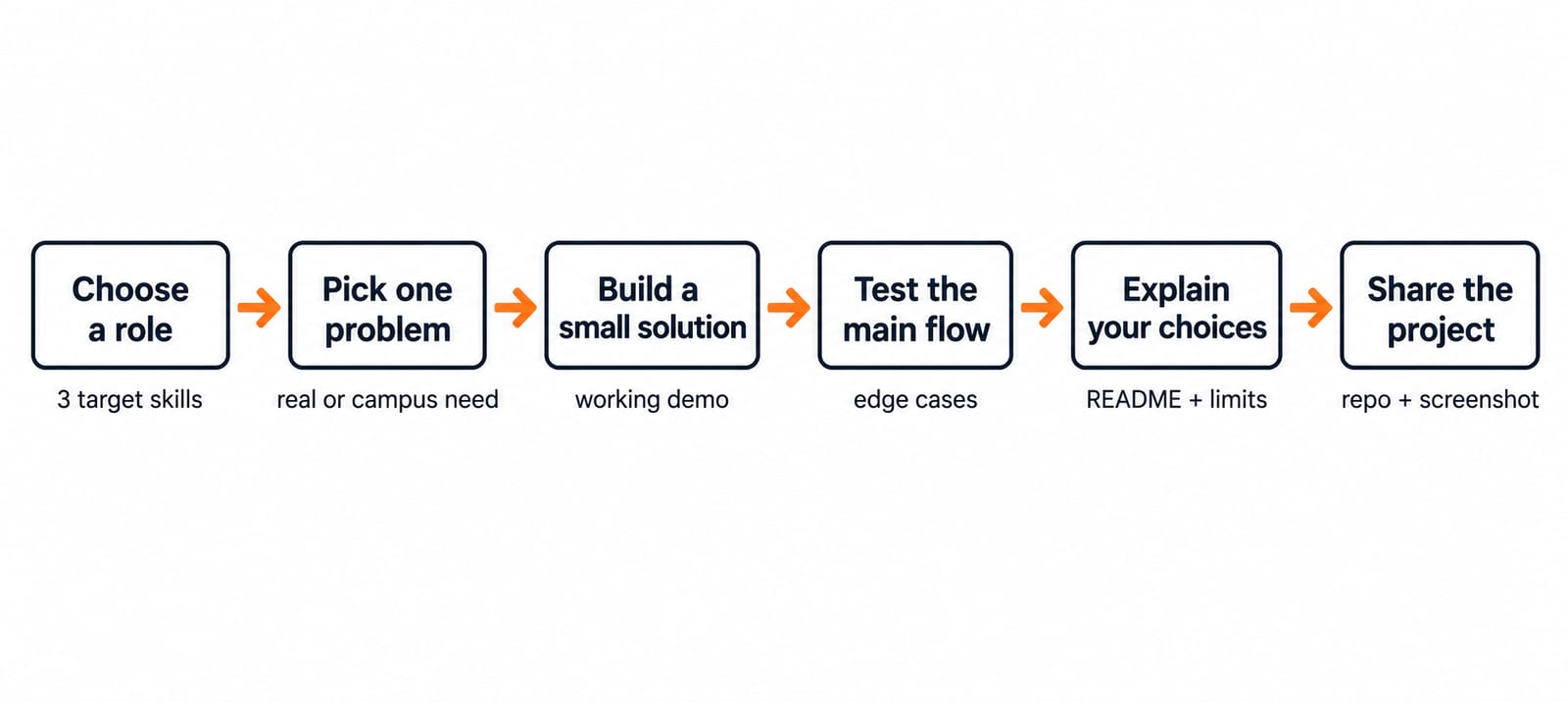
A portfolio works best when it has a direction. Before choosing a project, look at a few entry-level job descriptions for the role you want: software developer, data analyst, AI/ML intern, or another target. Note the recurring skills and tools, then choose a project that lets you demonstrate a small number of them.
You do not need to copy every requirement. Pick a realistic scope that fits your current level. For example:
Software development: build a small web app with one complete user flow, validation, and tests.
Data analysis: answer a specific question with a clean dataset, analysis notebook, and readable charts.
AI or machine learning: compare a simple baseline with one improved model, explain the data and evaluation, and document limitations.
Automation: write a script that removes a repetitive task, handles errors, and explains how to run it.
A project connected to a real student or campus problem can be easier to explain. You might track club events, organize lab resources, analyse a public dataset, or automate a repetitive file task. Keep the data safe: use public, synthetic, or properly anonymized data, never private student records.
Build one complete project before starting five more
A finished small project usually gives a stronger signal than several repositories that stop after setup. Define the smallest useful version first.
For a campus event finder, that might mean:
Users can add an event with a title, date, and location.
The app rejects missing or invalid details.
Visitors can filter the event list.
A short test or test checklist covers the main flow.
The README explains how to run it and what is still missing.
Then improve it in small steps. Add a search feature only after the basic flow works. If you are learning Python for a data or automation project, the KnowledgeGate Python Programming course can support the fundamentals. For an interview-oriented coding project, review Coding for Placement. If your project uses a simple AI feature, connect it to a clear use case and explore the AI for Placement course.
Make the repository easy to understand
A recruiter should not need to guess what your project does. Give each public repository a clean name and a README that answers the first questions:
What problem does it solve, and for whom?
What does it do today?
What tools and languages does it use?
How can someone install and run it?
What input should they try, and what output should they expect?
What did you learn, and what would you improve next?
GitHub explains that a README tells visitors why a project is useful and how to get started; it is often the first thing they see on a repository. Follow its README guidance and keep setup steps specific enough that another student can reproduce them.
Add screenshots or a short demo when the interface matters. For a data project, show the chart and the question it answers. For a command-line tool, include a small example command and output. Never include API keys, passwords, private data, or credentials in a public repository.
Show your reasoning, not just the final screen
A portfolio project becomes more convincing when it reveals the choices behind it. Include a short “Design and decisions” section in the README or project page:
Why did you choose this approach?
What alternative did you consider?
What broke during development?
How did you test the important cases?
What are the known limits?
Be honest about the level of help you used. If you used a tutorial, starter template, or AI assistant, say what you adapted and what you can explain yourself. Do not claim a team project as entirely your own. State your contribution clearly: “I implemented the search and filtering flow; my teammate built the login screen.”
This also prepares you for interviews. The post on showing your skills in AI-era campus hiring discusses ways to make your abilities visible beyond a list of tools. For a related next step, see how to prepare for each stage of a Wipro interview.
Add proof that the project works
Testing does not have to be elaborate, but it should match the project. For a small app, test the main user journey and a few error cases. For a data analysis, check missing values, duplicate rows, and whether the chart matches the underlying numbers. For a model, compare it with a simple baseline and keep the evaluation method consistent.
If the project can be deployed safely, provide a live demo. If deployment is not practical, add a short screen recording or clear screenshots. A reviewer should be able to see the result without setting up a complex environment.
Keep the project maintainable too. Use meaningful file names, remove unused files, and add comments where a choice is not obvious. A polished project does not need advanced architecture; it needs to be understandable and reliable for its intended scope.
Organize the portfolio around evidence
You can use a GitHub profile, a simple personal website, or a single document that links to your repositories. Keep the presentation short and make the best work easy to find.
For each featured project, show:
Project name and one-line purpose
Your contribution
Tools used
A demo, screenshot, or sample output
Repository link
One challenge and how you addressed it
Two or three complete projects are enough to begin. Choose projects that demonstrate different strengths without scattering your story. For example, one can show programming fundamentals, another data handling, and a third collaboration or communication.
Turn coursework into a portfolio project
Class assignments can be a starting point, but publish only work you are allowed to share. Add your own extension: improve the interface, test edge cases, compare another approach, or write a clearer explanation. Follow your institution’s academic integrity rules and do not post restricted exam solutions, classmates’ work, or private course material.
A project does not need to be novel to be useful. A familiar idea can still show good execution if you explain the audience, scope, decisions, tests, and limitations. Avoid exaggerating its impact: describe what you built and what you verified.
A practical one-week starting plan
If you are unsure where to begin, try this sequence:
Day 1: Choose a target role and write down three skills you can demonstrate.
Day 2: Pick one small problem and define the minimum working version.
Days 3–5: Build the core flow and test it as you go.
Day 6: Write the README, add screenshots or sample output, and remove secrets or unrelated files.
Day 7: Ask a classmate to follow your setup instructions. Fix the unclear parts, then practise explaining the project aloud.
The schedule is only a starting point; take more time if the project needs it. The useful outcome is a finished, explainable piece of work—not a rushed repository created to meet a date.
Your next step
Choose one project you can finish at your current level. Write its purpose in one sentence, list the smallest features that prove it works, and create the repository only when you are ready to document the result. A clear, honest project gives you something concrete to discuss while you build the experience that comes later.
Keep learning

What to Do When You Have No Internship Experience
No internship yet? Turn coursework, projects, volunteering, and other real experience into credible evidence for entry-level roles.
31 Oct 20266 min readPlacement Preparation

Is GATE Worth It If You Already Have a Tech Job Offer?
A tech offer and GATE preparation serve different goals. Use a practical framework to decide whether to accept, defer, or prepare alongside work.
Updated 30 Oct 20265 min read84 viewsGATE CS Preparation
TPSC Computer Science PYQs: A No-Guesswork Trend Analysis Method
Turn a small set of Computer Science papers into a careful personal study plan. This method separates observed patterns from guesses and converts errors into scheduled drills.
Updated 1 Aug 20266 min readTPSC Computer Science
EMRS vs State PSC Teaching Jobs: Choose by Work Setting, Mobility and Fit
Compare an EMRS post with a named State PSC route using official clauses, personal mobility limits, syllabus overlap and a worked 100-point fit score.
Updated 29 Oct 20266 min readEMRS