

Cybersecurity Basics Every Student Should Know
Simple cybersecurity habits for students: protect accounts, spot suspicious messages, secure devices, back up work, and know what to do after a compromise.
KnowledgeGate Team
Exam prep & CS education
21 Nov 20265 min read

Your college email, learning portal, cloud drive, phone, and social accounts can hold personal information and work you cannot easily replace. A few steady habits make common account and device risks easier to prevent—and help you respond calmly if something goes wrong.
Cybersecurity is not only a subject for specialists. It is the everyday practice of protecting accounts, devices, data, and other people’s information.
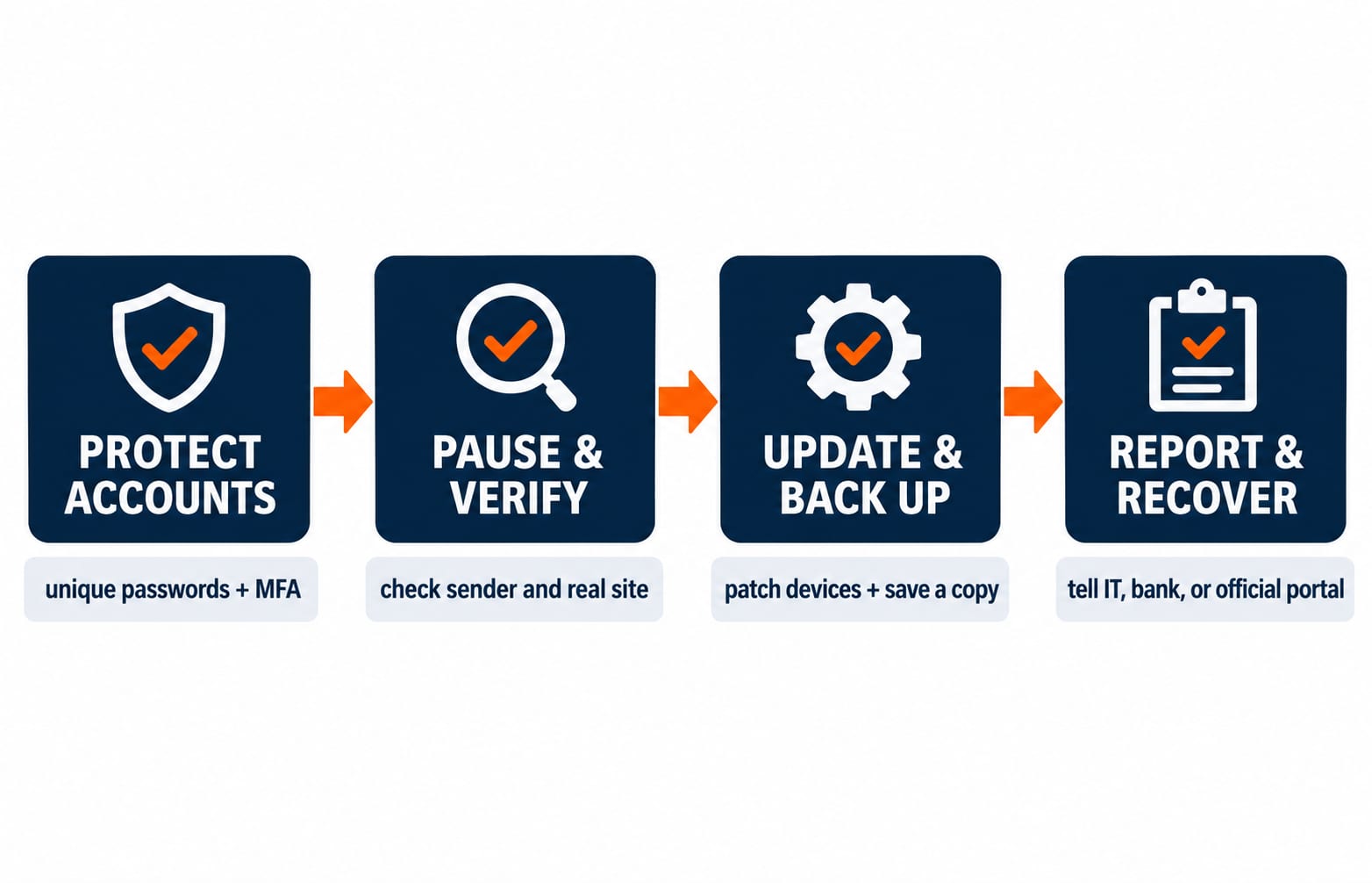
1. Protect your most important accounts first
Start with your primary email account. It can often be used to reset access to other services, so losing control of it can create a wider problem.
Use a different, long password for every important account. A password manager can generate and store unique passwords so you do not have to reuse one.
Turn on multi-factor authentication (MFA) wherever it is offered, especially for email, cloud storage, banking, and social accounts. Use a passkey or authenticator option when available; never approve a sign-in prompt you did not initiate.
Save recovery codes in a safe place that is separate from the account they protect. Check that your recovery email and phone number are still yours.
Do not share one-time passwords, recovery codes, or sign-in links with anyone—even someone claiming to be a teacher, recruiter, support agent, or friend.
CISA’s Secure Our World guidance highlights strong passwords, MFA, recognizing phishing, and software updates as practical everyday steps. Make these habits part of your normal account setup, not a task you postpone until after a warning.
2. Pause before opening links, files, and QR codes
A convincing message can arrive through email, text, social media, a class group, or a shared document. It may imitate a college office, a familiar company, a scholarship programme, or a friend whose account was taken over.
Watch for pressure to act immediately, unexpected attachments, requests for passwords or OTPs, and links that do not match the real organization. Poor spelling can be a clue, but a polished message is not proof that it is genuine. QR codes can hide the destination just like shortened links.
When a message asks you to sign in, pay, or share information:
Do not use the message link. Open the official app or type the known website address yourself.
Check the sender and the full destination carefully. A familiar logo or display name can be copied.
Confirm unusual requests through a separate channel you already trust, such as a known phone number or official campus contact.
If it came from a classmate, contact them directly before opening a file or sending money.
If you clicked a suspicious link, close the page. Do not enter credentials or approve a sign-in prompt. If you already entered a password, change it through the official site from a trusted device, then review active sessions and recovery details.
3. Keep your devices and apps current
Updates fix known weaknesses as well as adding features. Turn on automatic updates for your operating system, browser, and frequently used apps when practical. Restart your device when an update requires it.
Install apps from official stores or the developer’s known website. Be cautious of “free premium” software, cracked apps, unknown browser extensions, and files sent as urgent class material. These can request access or install unwanted software.
Use a screen lock and set your device to lock when unattended. Do not leave a logged-in laptop open in a lab, library, or shared room. On a borrowed or public computer, avoid sensitive accounts where possible; if you must sign in, sign out fully and do not save the password.
For a practical foundation in how devices communicate, explore KnowledgeGate’s Computer Networks course. Students who want broader computer science context can also review Computer Science Fundamentals for Placements.
4. Share less personal information
Think before posting your phone number, home address, live location, student ID, travel plans, or photos of documents. Check privacy settings on social platforms and remove access for apps you no longer use.
Before uploading a project, assignment, or dataset, check that it does not contain passwords, API keys, private messages, personal records, or another person’s identifiable information. A public code repository is visible to more people than your classmates. If you accidentally expose a secret, deleting the visible line may not be enough; revoke or rotate the credential and check the service’s official guidance.
When using AI tools, do not paste private student records, unpublished exam material, credentials, or confidential college or employer information into a service unless you are authorized and understand its data settings. Treat generated links and files with the same care as any other content.
If you are learning automation or scripting, the KnowledgeGate Python course can help you build the programming foundation. Keep practice projects separate from real accounts and private data.
5. Back up work you cannot afford to lose
Keep another copy of important notes, assignments, project files, and documents. Cloud sync is useful, but it is not always a complete backup: deletions or unwanted changes may sync too. For particularly important work, keep a second copy in another trusted location and periodically check that you can open it.
Back up before major device changes. Do not connect an unknown USB drive to your laptop. If a file appears encrypted, renamed, or inaccessible unexpectedly, disconnect the affected device from networks and ask your institution’s IT support or a trusted professional for help rather than trying random “cleanup” tools.
6. Know what to do if an account or device is compromised
If you suspect someone has accessed an account:
Use a trusted device to change its password and any reused passwords on other services.
Sign out of other sessions, review recovery details, and enable MFA if it is not already on.
Tell your college IT team if the account is connected to college systems; warn contacts if someone may be impersonating you.
If payment details or money are involved, contact your bank or payment provider promptly through its official channel.
Keep messages, transaction details, and screenshots that may help an investigation.
In India, the National Cyber Crime Reporting Portal accepts cybercrime complaints. The portal directs people to call 1930 for online financial fraud; report promptly and follow the official instructions. Do not pay someone who promises to recover money or “remove” an account problem through an unofficial channel.
For a technical next step, see KnowledgeGate’s guides to physical security and cryptography basics and computer networks interview questions.
A short monthly security check
Set aside a few minutes once a month to update devices, review account recovery options, check MFA, remove unfamiliar app access, and confirm that important files have another copy. If a message or request feels unusual, pause and verify it through a separate trusted channel.
Good cybersecurity is a set of repeatable habits. Start with your email account today, enable MFA, replace any reused password, and make sure you know how to report a problem through your college and official services.
Keep learning

Python Classes and Objects Tutorial: Build a Student Model Step by Step
Build one Student class, create independent objects, and trace every value. The examples show how constructors, methods, and attribute lookup work in Python.
Updated 15 Sep 20265 min readPython

TypeScript vs JavaScript: What Changes Before Runtime and What Stays the Same
Follow one cart module from JavaScript coercion to TypeScript checks and erased output. Learn what types catch, what they miss, and when migration pays off.
Updated 30 Oct 20266 min readProgramming Languages Survey

DSA interview questions for placements: the patterns freshers must know
Most DSA interview questions are not new. They are variations on a small set of recurring patterns, and once you can recognise the pattern behind a question, the solution follows almost mechanically. Freshers who memorise fifty specific problems stall on the fifty-first. Freshers who learn the seven or eight underlying patterns can attack a problem they have never seen.
Updated 30 Oct 20266 min read133 viewsDSA & Algorithms
UPTET eligibility and exam structure: what to know before you apply
A UPTET eligibility and structure explainer: the two-paper design, who each paper is for, the section backbone, and which details to confirm before applying.
Updated 29 Oct 20265 min read51 viewsCTET & UPTET