

Which Tech Role Fits You: Developer, Tester, Analyst, or Support Engineer?
Compare developer, tester, analyst, and support engineer work, try small role-based tasks, and choose a tech path to explore as a fresher.
KnowledgeGate Team
Exam prep & CS education
Updated 12 Nov 20265 min read

A computer science degree does not lock you into one kind of tech job. You might enjoy building features, testing how software behaves, translating business needs, or helping users solve technical problems. The best starting role depends on the work you want to do and the skills you are ready to build—not on which title sounds most impressive.
Job titles vary across employers, and roles often overlap. Read the actual responsibilities in each job description. The U.S. Bureau of Labor Statistics offers one reference for software development, QA and testing, systems analysis, and computer support; local job titles and duties can differ by company and market.
What does each role do?
Developer: build and improve software
Developers turn requirements into working applications, features, or systems. A typical task might involve understanding what a user needs, implementing a change, debugging a problem, and maintaining existing code. Some roles also include design discussions, tests, documentation, and collaboration with product or QA teams.
You may enjoy development if you like breaking a problem into steps, writing and revising code, and figuring out why a solution behaves unexpectedly. You do not need to know every framework before applying for an entry-level job, but you should be ready to explain a small project and the decisions you made.
Try this: build a simple feature in a small project, such as a search or form validation. Write down the user need, your approach, and one edge case you tested.
Tester or QA engineer: find problems before users do
Quality assurance and testing work checks whether software behaves as expected. A tester might turn requirements into test cases, explore unusual inputs, reproduce a reported bug, document steps to see it again, or use automation to check repeated behaviour. Testing involves careful reasoning and communication; some roles include substantial coding, while others emphasize manual or exploratory testing.
You may enjoy QA if you naturally ask “What could go wrong?”, notice details, and like describing a problem clearly enough for someone else to reproduce it. Learn basic testing concepts and practise writing useful bug reports. For automation roles, check which programming language and tools the job description actually asks for.
Try this: test a public website or your own project. Record the steps, expected result, actual result, and evidence for one issue. Do not test systems you do not have permission to examine.
Analyst: connect people, processes, data, and technology
“Analyst” is a broad label. A business analyst may clarify requirements, map a process, compare options, and help a team agree on what a system should do. A data analyst may work with data to answer a question. A systems analyst may examine how technology supports an organisation and identify improvements. The balance of meetings, documentation, data work, and coding varies widely.
You may enjoy analyst work if you like asking questions, organising information, spotting patterns, and explaining a technical issue in plain language. Look closely at the role: “business analyst,” “data analyst,” and “systems analyst” can describe different responsibilities even when the titles sound similar.
Try this: choose a familiar process, such as registering for a class. Write down the steps, where users may get confused, and what information a better system would need. If the job asks for data skills, practise answering a simple question using a spreadsheet or SQL.
Support engineer: diagnose and resolve technical issues
Support engineer roles help customers or internal teams when a product or system does not work as expected. Depending on the team, the work may include reproducing an issue, checking logs, using SQL or APIs, explaining a workaround, escalating a defect, or documenting a solution. Some support jobs focus on end users; others handle complex product or infrastructure issues.
You may enjoy support if you like troubleshooting, communicating with people, and staying patient while narrowing down a problem. Ask what kinds of issues the team handles, how technical escalations work, and whether the role includes shifts or on-call duties. These details vary across employers.
Try this: take a common technical problem and write a short troubleshooting guide. Include the questions you would ask first, safe checks to try, and when to escalate rather than guess.
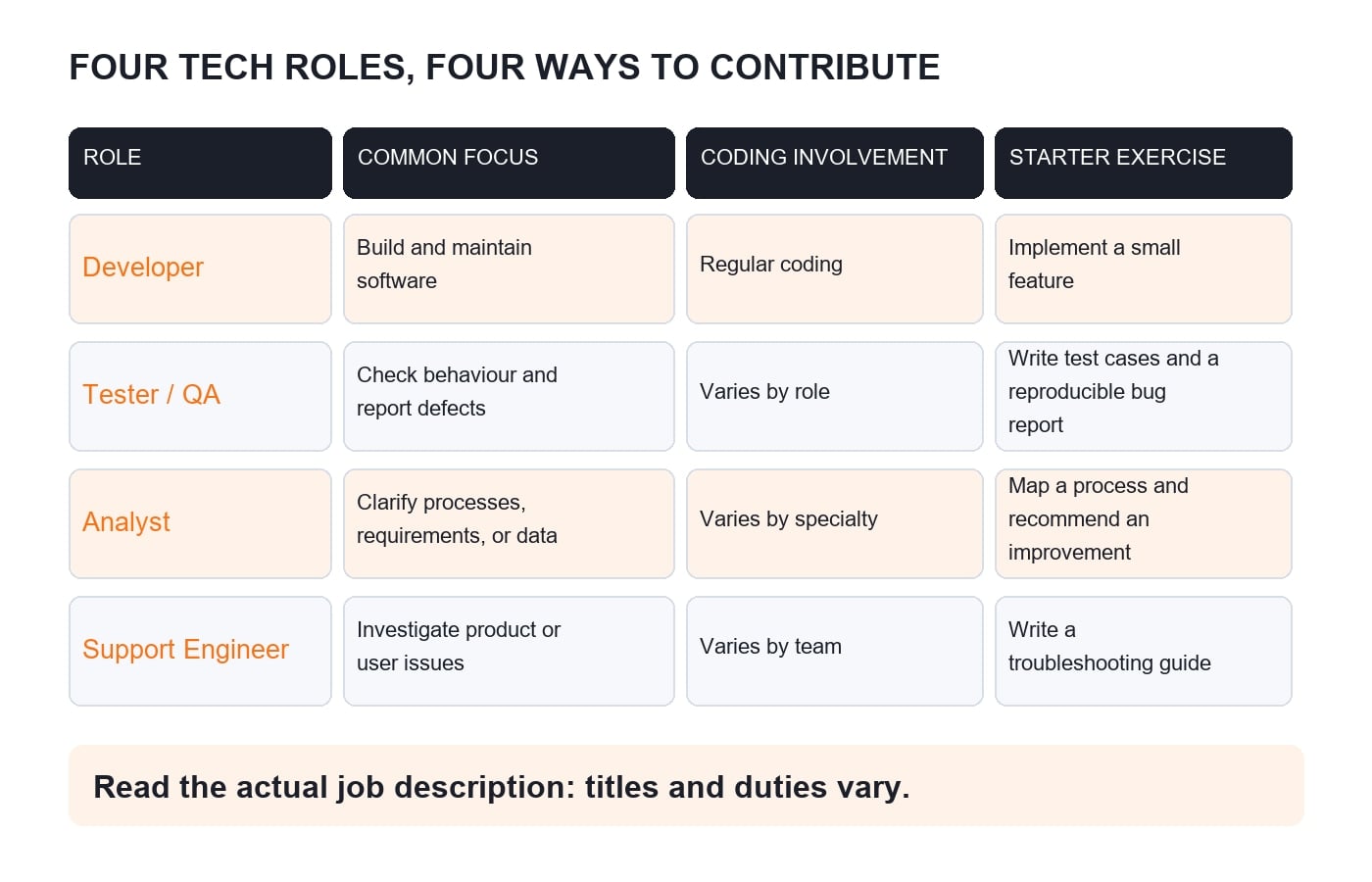
Compare the work, not just the titles
Use the same questions when reviewing job descriptions:
Role | Common focus | Useful evidence to prepare |
|---|---|---|
Developer | Build, change, and maintain software | A working project, code samples, and decisions you can explain |
Tester / QA | Check behaviour, find defects, and report them clearly | Test cases, a reproducible bug report, or a small test script |
Analyst | Clarify needs, processes, or data and communicate findings | A process map, requirements outline, analysis, or concise recommendation |
Support engineer | Investigate issues and help users or teams resolve them | A troubleshooting write-up, clear documentation, or a technical investigation |
Coding is not an all-or-nothing divide. Developers usually write code regularly, but testers, analysts, and support engineers may also use scripts, SQL, APIs, or automation. Check the specific posting and ask about the day-to-day work during an interview.
A quick way to test your fit
Before choosing a path, try one small task from each area. Build a feature, test it, map a process, and write a troubleshooting guide. After each task, note:
Which part held your attention?
What felt difficult but satisfying to work through?
Did you prefer making something, checking it, clarifying the need, or helping someone resolve an issue?
Which skills would you need to practise before applying?
Treat your reactions as clues, not a permanent label. A short exercise cannot tell you exactly what a full-time job is like, but it can help you choose what to explore next.
Prepare for the role you want to try
Pick a few real job descriptions for the same role and mark the skills that appear repeatedly. Separate “must have” requirements from tools that are specific to one employer. Then choose one small project or practice activity that lets you demonstrate a relevant skill. Keep the evidence honest: explain what you personally did, what you learned, and what you would improve.
KnowledgeGate’s CS Fundamentals for Placements by Sanchit Sir and Coding for Placements are options to review if strengthening your CS or programming foundation is part of your plan. For more on matching your job-search approach to your own strengths, read How to Use AI in Your Job Search Without Losing Your Own Voice.
You do not need to settle your entire career path before your first job. Start by identifying the kind of work you want to try, build a small piece of evidence, and compare it with what employers actually ask people in that role to do.
Keep learning
KVS vs NVS vs EMRS: Choose the Right School System for Your Teaching Career
Compare KVS, NVS and EMRS through current post rules, lifestyle limits and a weighted personal-fit matrix. See why changing priorities can change the answer.
Updated 30 Oct 20267 min read102 viewsKVS & NVS

MPPSC vs HPSC Teaching: A Decision Rule for CS Graduates
Compare MPPSC and HPSC teaching routes with a qualification gate, a syllabus portability map and a weighted fit score before committing your study hours.
Updated 29 Oct 20266 min readMPPSC Teaching
EMRS vs State PSC Teaching Jobs: Choose by Work Setting, Mobility and Fit
Compare an EMRS post with a named State PSC route using official clauses, personal mobility limits, syllabus overlap and a worked 100-point fit score.
Updated 29 Oct 20266 min readEMRS
TPSC vs BPSC Teaching Exams: Which State CS Route Fits You?
Compare TPSC and BPSC as conditional Computer Science teaching routes through a five-gate audit that separates official eligibility from personal readiness.
Updated 30 Oct 20266 min readTPSC Computer Science