Floating Point Representation in COA: IEEE 754 Explained with Worked Examples
Learn the IEEE 754 single-precision layout through two complete conversions, then understand hidden bits, biased exponents, special values, and rounding errors.
KnowledgeGate Team
Exam prep & CS education
Updated 7 Aug 20266 min read55 views

You may be comfortable converting integers to binary and still freeze when 85.125 must fit into a 32-bit IEEE 754 word, or when 0xC1C80000 must come back out as a decimal. The difficulty is not binary arithmetic alone. It is knowing where the sign, exponent, hidden bit, and fraction belong. If binary fractions need a refresh, revise Number Systems and Base Conversions first.
Two conversions carry the whole mechanism. The decimal 85.125 encodes to the 32-bit word 0x42AA4000, and the word 0xC1C80000 decodes back to -25.0. The same three fields, the same bias of 127, and the same hidden bit are what make 0.1 impossible to store exactly.
Why floating point uses binary scientific notation
A fixed binary point forces a trade-off. Put many bits before the point and you gain range but lose fractional detail. Put many after it and you gain precision but cannot represent very large values. One 32-bit fixed-point format cannot conveniently cover magnitudes near both 10^38 and 10^-38.
Floating point solves this by moving the point. A value is represented as:
sign x significand x 2^exponent
For example, 85.125 in binary is 1010101.001. Its normalized form is:
1.010101001 x 2^6
Normalization leaves exactly one nonzero binary digit before the point, so a normal binary value always has the form 1.f x 2^E. That leading 1 is guaranteed and is therefore not stored. This implicit, or hidden, 1 gives 24 significant bits from a 23-bit stored fraction. Forgetting it is one of the most common errors in floating-point questions.
IEEE 754 single-precision layout
A 32-bit single-precision word has three fields, from the most significant bit:
Field | Bits | Meaning |
|---|---|---|
Sign | 1 |
|
Exponent | 8 | Stored with a bias of 127 |
Mantissa or fraction | 23 | Bits after the hidden leading |
The exponent is biased, not stored in two's complement. The rule is:
stored exponent = actual exponent + 127
Thus 10000101 is 133, which represents the actual exponent 133 - 127 = 6. The bias makes exponent fields increase in the same direction as actual exponents, which helps ordering for nonnegative floating-point values.
For a normalized single-precision number, memorize this formula:
value = (-1)^sign x (1.fraction)_2 x 2^(stored exponent - 127)
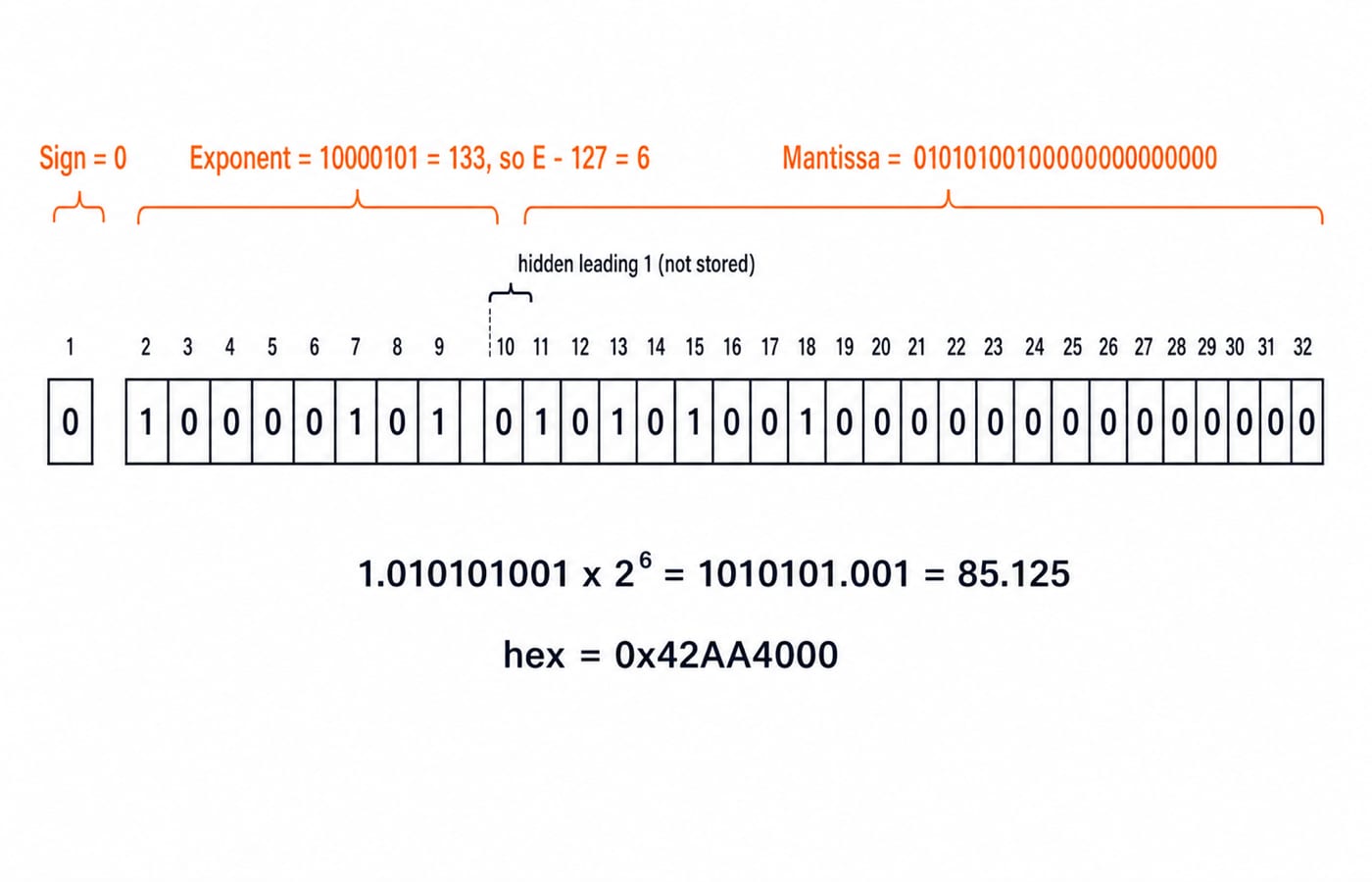
Worked example A: encode 85.125 in single precision
Work from the decimal value towards the three fields.
Convert the integer part:
85 = 64 + 16 + 4 + 1 = 1010101_2.Convert the fraction:
0.125 = 1/8 = 0.001_2.Combine them:
85.125 = 1010101.001_2.Normalize by moving the point left six places:
1010101.001 = 1.010101001 x 2^6. The actual exponent is 6.The number is positive, so the sign bit is
0.Bias the exponent:
6 + 127 = 133 = 10000101_2.Remove the hidden leading
1. The remaining bits are010101001. Pad them on the right to 23 bits:01010100100000000000000.Assemble the fields:
0 | 10000101 | 01010100100000000000000.Group the word into four-bit nibbles:
0100 0010 1010 1010 0100 0000 0000 0000.
Therefore, 85.125 is 0x42AA4000 in IEEE 754 single precision.
The reverse check restores 1.010101001 x 2^6. Moving the point right by six positions gives 1010101.001, which is 85 + 1/8 = 85.125.
Worked example B: decode 0xC1C80000
Decoding applies the same rules in reverse.
Expand the hexadecimal word:
0xC1C80000 = 1100 0001 1100 1000 0000 0000 0000 0000.Split the fields: sign
1, exponent10000011, mantissa10010000000000000000000.Sign
1makes the final value negative.10000011_2 = 131, so the actual exponent is131 - 127 = 4.Restore the hidden
1: the significand is1.1001_2.Evaluate it:
1.1001_2 = 1 + 1/2 + 1/16 = 1 + 0.5 + 0.0625 = 1.5625.Apply the exponent:
1.5625 x 2^4 = 1.5625 x 16 = 25.Apply the sign: the value is -25.0.
If you forget the bias, you may treat 131 as the real exponent. If you forget the hidden 1, you evaluate 0.1001_2 and lose the correct magnitude. Both mistakes break the answer before the final arithmetic begins.
Special values, range, and precision
Exponent fields of all zeros or all ones are reserved in single precision:
Exponent | Mantissa | Meaning |
|---|---|---|
| All zeros | Signed zero, |
| Nonzero | Subnormal, |
| All zeros |
|
| Nonzero | NaN, or Not a Number |
Normal numbers therefore use stored exponents 1 through 254, giving actual exponents from -126 to +127. The largest finite single is about 3.4 x 10^38, while the smallest positive normal single is about 1.18 x 10^-38.
Single precision stores 23 fraction bits and gains one hidden bit, giving 24 significant bits. Its machine epsilon is 2^-23, roughly 1.19 x 10^-7, or about seven decimal digits of precision.
Format | Layout | Bias | Machine epsilon | Approximate precision |
|---|---|---|---|---|
Single | 1 sign + 8 exponent + 23 fraction | 127 |
| About 7 decimal digits |
Double | 1 sign + 11 exponent + 52 fraction | 1023 |
| About 15 to 16 decimal digits |
Double precision has a largest finite magnitude of about 1.8 x 10^308. Use it when roughly seven decimal digits are not enough. These format definitions come from the IEEE Standard for Floating-Point Arithmetic.
Why 0.1 is not stored exactly
The decimal fraction 0.1 repeats in binary:
0.1_10 = 0.00011001100110011..._2 = 1.10011001100110011... x 2^-4
For single precision, the sign is 0 and the biased exponent is -4 + 127 = 123 = 01111011_2. The first 23 fraction bits are 10011001100110011001100. The next bit is 1, with further nonzero bits after it, so round-to-nearest increases the last stored bit. The stored mantissa becomes 10011001100110011001101.
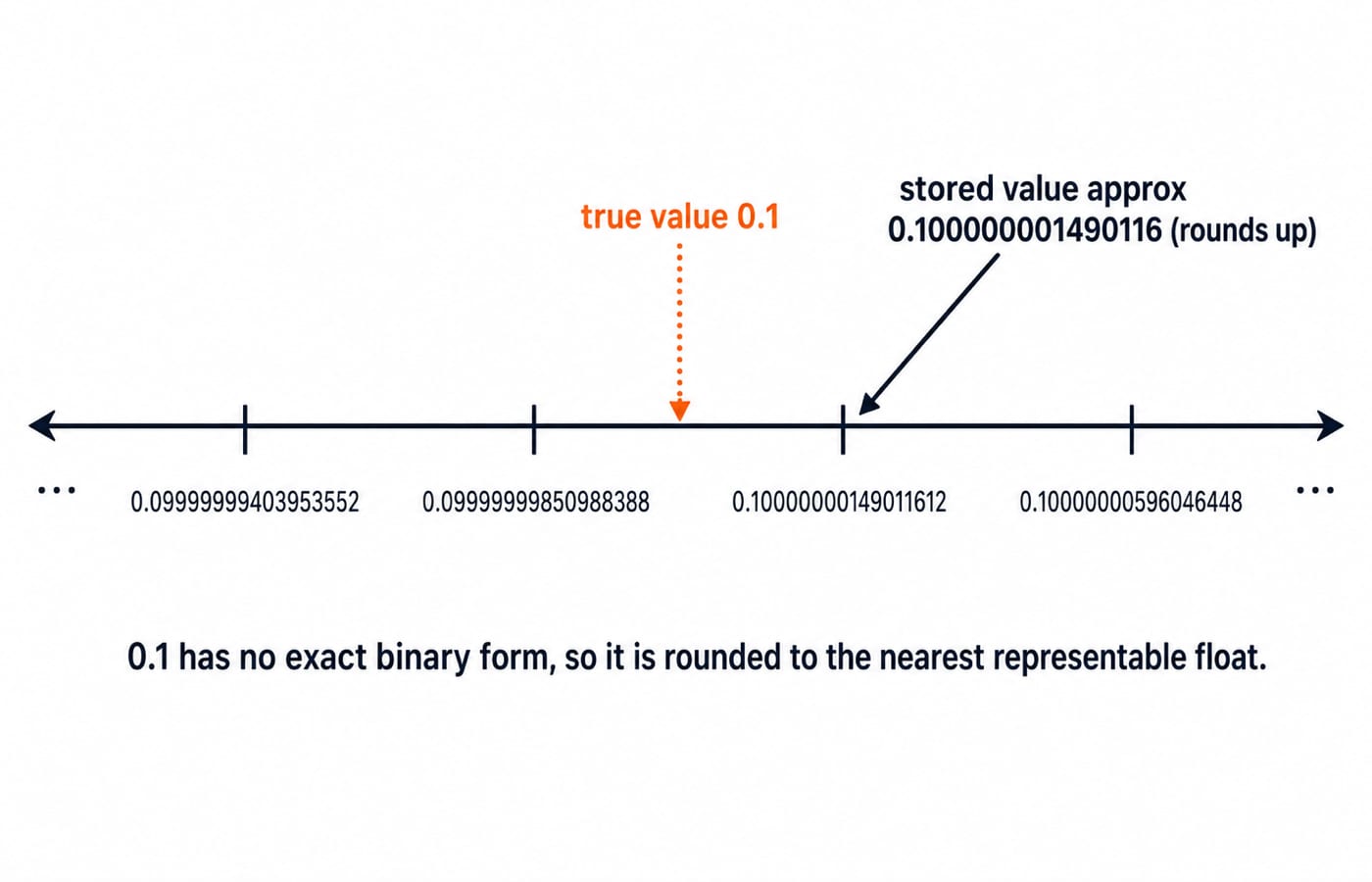
The resulting value is approximately 0.100000001490116, slightly larger than 0.1. That is why an expression such as 0.1 + 0.2 == 0.3 is false with common binary floating-point arithmetic. For computed values, compare the difference against a suitable tolerance instead of expecting exact decimal equality.
The two neighbouring representable values show why it rounds upward. In single precision, 0.1 is bracketed by 0.0999999940395355 and 0.1000000014901161, which are one unit in the last place apart. At this exponent that unit is 2^-27, about 7.45 x 10^-9. The true 0.1 sits 5.96 x 10^-9 above the lower neighbour and only 1.49 x 10^-9 below the upper one, so round-to-nearest picks the upper.
How GATE and interviews test floating point
The official GATE CS syllabus places fixed and floating-point number representation under Computer Organization and Architecture. Typical questions ask you to decode a hexadecimal or bit pattern, encode a decimal value, identify the smallest normal or a subnormal value, count representable values, or calculate a stored value and its rounding error. Number representation is one topic in a wider subject, so revise it alongside the neighbouring material collected in the Computer Organization & Architecture hub.
Interview questions use the same ideas: Why is 0.1 not exact? How many significant bits does a float have? What changes between float and double? What is machine epsilon? Each answer follows from the field layout and formula above.
The short version and your next step
A normalized value is
(-1)^sign x (1.fraction)_2 x 2^(E-127).Single precision stores 1 sign bit, 8 exponent bits, and 23 fraction bits.
The hidden
1provides the twenty-fourth significant bit.Bias the exponent by 127, and round an infinite fraction to the nearest representable value.
The pattern becomes reliable only after timed practice. Use the GATE Test Series to drill COA questions, then work the companion set of Number Representation and Floating Point MCQs. If you want a structured subject sequence before that practice, use GATE Guidance by Sanchit Sir.
Keep learning

Programmed I/O: Polling, CPU Utilisation, Worked Examples and GATE Question Patterns
Follow one programmed-input transfer from control write to data read, then calculate how many polls one word costs and what a longer poll period buys.
Updated 7 Oct 20266 min readComputer Organization & Architecture

Multiprocessor Fundamentals: Architecture, Speedup and Worked Examples
Build a clear model of multiprocessor systems, then use it to calculate speedup and efficiency, trace a coherent write, and diagnose a lost update.
Updated 2 Oct 20265 min readComputer Organization & Architecture

Multiprocessor Classification: Flynn Taxonomy, Memory Models and Exam-Style Worked Examples
Learn how to choose the right multiprocessor classification axis, then solve a four-lane SIMD trace and a NUMA average-access-time problem step by step.
Updated 27 Sep 20266 min readComputer Organization & Architecture

Interrupt-Driven I/O Explained: CPU Handshake, Worked Timing Example and GATE Traps
Trace an interrupt from device request to return-from-interrupt, then compare polling, per-event interrupts, and DMA through worked timing examples.
Updated 25 Sep 20267 min readComputer Organization & Architecture