

e-Governance Portals Explained: Service Models, Workflow and Worked Metrics
Learn how portals fit within e-governance, classify G2C, G2B, G2G and G2E interactions, trace a certificate workflow and calculate service metrics.
KnowledgeGate Team
Exam prep & CS education
Updated 27 Oct 20266 min read
A government website, a login portal and a complete e-governance service are related, but they are not interchangeable. The interface is one layer; identity, records, workflow, officer actions, notifications, audit and grievance handling sit behind it. A hypothetical residence-certificate service and illustrative values show how to calculate completion, turnaround and availability without treating them as observed performance data.
e-Governance, e-government and portals are different layers
E-government narrowly means a public authority's use of digital systems for administration and service delivery. E-governance is commonly broader, including coordination, participation, transparency and accountability. Some questions use the terms interchangeably, so follow the definition supplied.
A portal is an organised entry point to information or services. A public website may only publish forms; a transactional portal can accept and track an application. A back-office management information system may help officers without being visible to citizens. The portal is an interface, not the whole system.
These services depend on the hardware, networks and communication concepts covered in ICT for Teaching Exams: Fundamentals Explained, but ICT is the foundation, not a synonym for e-governance.
G2C, G2B, G2G and G2E interaction models
Classify an interaction by identifying the two active parties first, then the transaction between them.
Model | Actor pair | Purpose | Unambiguous example |
|---|---|---|---|
G2C | Government to citizen | Deliver a public service | A resident requests a residence certificate |
G2B | Government to business | Handle a business-facing process | A firm submits a licence renewal |
G2G | Government to government | Exchange records or coordinate work | A municipal system sends a verified record to a state department |
G2E | Government to employee | Support internal employee services | A public employee files leave through an internal portal |
The device, payment method and portal name do not decide the model. A citizen paying a fee online is still part of a G2C interaction. One department retrieving a record from another is G2G.
One portal can support several models. Its application screen may be G2C, its departmental exchange may be G2G, and its officer dashboard may be G2E. Avoid the one-portal-one-category error.
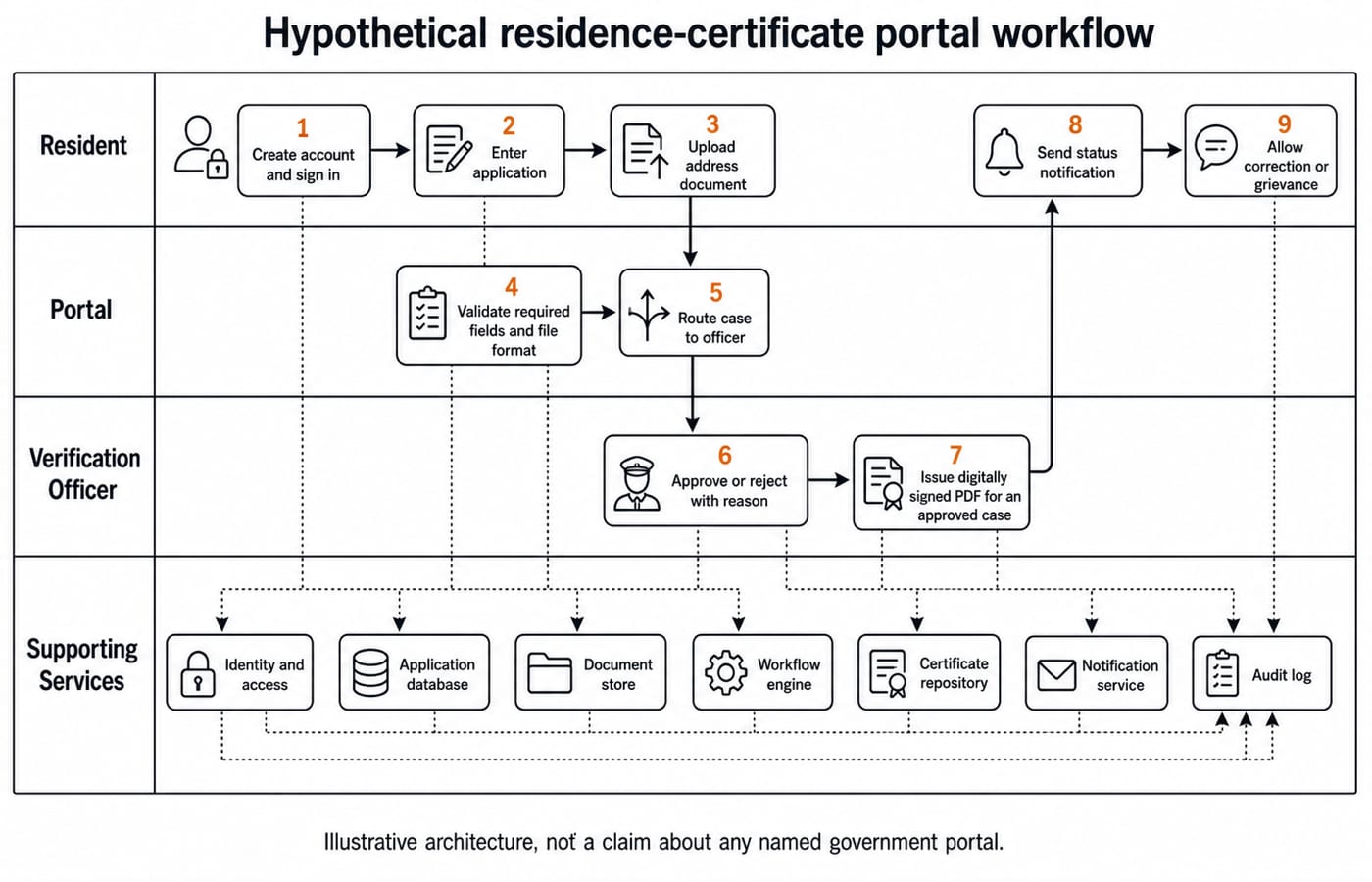
A residence-certificate portal from application to issue
Consider a hypothetical district residence-certificate service. Its flow is:
Create an account and sign in.
Enter the application fields.
Upload an address document.
Validate required fields and file format.
Route the case to a verification officer.
Approve it or reject it with a reason.
Issue a digitally signed certificate for an approved case.
Send a status notification.
Allow a correction or grievance.
The user interface connects to identity and access, an application database, a document store, validation rules, a workflow engine, an officer dashboard, a certificate repository, notifications and an audit log. It can orchestrate them without storing every source record. Real portals may use different identity checks or approval orders.
Authentication asks, "Who are you?" Authorisation asks, "Which records and actions may you access?" Likewise, an image of a handwritten signature is not a cryptographic digital signature, which supports integrity and signer verification.
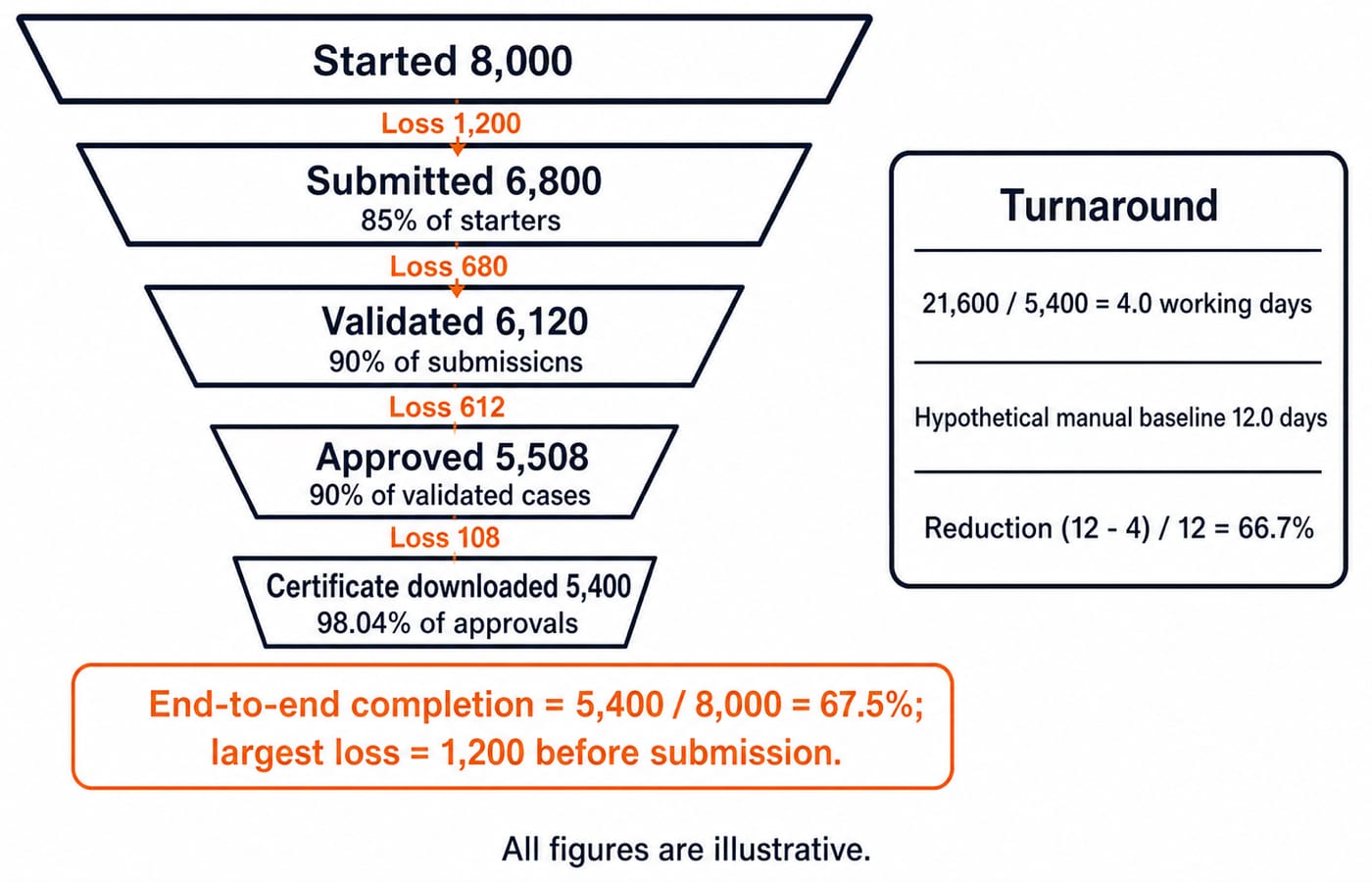
Worked e-governance service funnel
Suppose 8,000 residents start an application in one month. Of these, 6,800 submit, 6,120 pass automated validation, 5,508 are approved after verification and 5,400 download the certificate.
Calculate each stage rate using the previous stage as the denominator:
Submission rate =
6,800 / 8,000 x 100 = 85%.Validation rate =
6,120 / 6,800 x 100 = 90%.Approval rate =
5,508 / 6,120 x 100 = 90%.Download rate =
5,400 / 5,508 x 100 = 98.04%.End-to-end completion =
5,400 / 8,000 x 100 = 67.5%.
The losses are 8,000 - 6,800 = 1,200, 6,800 - 6,120 = 680, 6,120 - 5,508 = 612 and 5,508 - 5,400 = 108. Their total is 1,200 + 680 + 612 + 108 = 2,600, also 8,000 - 5,400. The largest loss is 1,200 before submission. That locates a diagnostic point, but does not prove whether the cause is usability, eligibility, missing documents, connectivity or user choice.
For the same 5,400 completed cases, suppose total elapsed processing time is 21,600 working days. Mean turnaround is 21,600 / 5,400 = 4.0 working days. Against a hypothetical manual baseline of 12.0 working days, the reduction is 12 - 4 = 8 days, or 8 / 12 x 100 = 66.7%. The hypothetical baseline therefore implies a 66.7% reduction; a real programme claim would require observed baseline and portal data.
Service quality needs more than uptime
Measure at least four dimensions separately: technical availability, user completion, processing speed and service outcome. For a 30-day month, scheduled time is 30 x 24 = 720 hours. If planned maintenance takes 4 hours and unexpected downtime takes 2 hours, available time is 720 - 4 - 2 = 714 hours. Availability is 714 / 720 x 100 = 99.17%. A highly available portal can still have a poor completion rate.
Inclusion checks include readable language, keyboard access, sufficient contrast, mobile usability, assisted-service alternatives and a correction path. If 960 of 8,000 starters use an assisted kiosk, 960 / 8,000 x 100 = 12%. This alone cannot reveal whether assistance reflects preference, disability, language, device access or connectivity. At household level, Digital Society Explained: Core Concepts, a Worked Inclusion Audit and Exam Patterns traces access, skills and outcomes. At portal-operation level, completion, turnaround, availability, assisted use and controls remain separate measures.
Security and privacy checks include necessary-field collection, encryption in transit and at rest, role-based officer access, sensitive-action logs, retention and correction rules, and rejection reasons. Listing a control does not prove correct implementation or security.
Common definition and scenario traps
Error: Calling every government webpage e-governance. Consequence: The answer ignores administration, interaction and service processes. Correction: Identify what the page enables and which systems support it.
Error: Treating the citizen portal as the whole system. Consequence: Back-office workflow disappears from the model. Correction: Separate interface, processing services and records.
Error: Choosing G2C whenever citizen data appears. Consequence: A department-to-department exchange is misclassified. Correction: Classify the active parties in that interaction.
Error: Assuming sign-in grants access to every record. Consequence: Authentication is confused with authorisation. Correction: Check the user's role and permitted action.
Error: Equating an uploaded signature image with a digital signature. Consequence: A picture is treated as cryptographic proof. Correction: Distinguish visual representation from cryptographic verification.
Scanning a completed paper form is digitisation. Accepting and routing it electronically is workflow digitalisation. Joining it to verification, notification, audit and grievance is wider service transformation. Terminology varies, so use the question's definitions. If browsers, servers, databases, files and network services get mixed together, revise those fundamentals first.
How exams test e-governance portals
Questions commonly use four shapes. A definition item tests e-government, e-governance or portal. A matching item tests G2C, G2B, G2G and G2E. A sequence item asks you to order submit -> validate -> verify -> decide -> issue, although a real workflow may add or reorder stages. A numerical caselet asks for a stage rate, total loss or turnaround.
For this worked case, end-to-end completion is 67.5%, and the largest loss is 1,200 before submission. A state department pulling a verified municipal record is G2G because both active parties are public bodies.
An assertion-reason question may state: Assertion, one portal can contain G2C and G2G interactions. Reason, classification depends on the parties in each interaction rather than on the portal as a whole. Both statements are true, and the reason explains the assertion.
Topic weightage varies by recruitment and cycle; use the official notification and actual paper for the exam you are preparing. The Govt Teaching Jobs category maps current preparation routes.
The short version and next practice step
E-governance is the wider use of digital systems in public governance, while a portal is an entry point. G2C, G2B, G2G and G2E identify the interacting parties. Uptime, completion, turnaround, inclusion and service outcome answer different quality questions.
Redraw the four-model table and nine-step workflow from memory. Then recompute 85%, 90%, 90%, 98.04%, 67.5%, 99.17% and the 66.7% turnaround reduction, checking units and denominators before comparing percentages.
For preparation across computer-science teaching recruitments, the Teaching Recruitment Exams Bundle provides the broader route. If you need the single-exam path, use the HPSC PGT Computer Science 2026 course.
Keep learning
PowerPoint Slides and Views Explained: A Worked Deck and Exam Traps
Learn what each PowerPoint view does, then trace a deck through reordering, duplication and hiding. The worked example separates slide count from show count.
Updated 26 Oct 20265 min readTeaching Recruitment (Computer Science)
Office Mixed Concepts Explained: Access, Clipboard, File Formats and Exam Traps
Learn how Word, Excel, PowerPoint and Access differ, then trace six learner records through a query, an export, a linked chart and a static picture.
Updated 25 Oct 20265 min readTeaching Recruitment (Computer Science)
MS Word Basics: Editing, Formatting, a Worked Document and Exam Traps
Learn how Word applies commands to characters, paragraphs, pages and files. Build an ICT revision plan, audit every state change and avoid common exam traps.
Updated 23 Oct 20266 min readTeaching Recruitment (Computer Science)
Excel Functions and Charts Explained: Formulas, a Worked Sheet and Exam Traps
Learn how Excel formulas, references and charts work by building one mock-test worksheet from scratch. Every output is calculated and every common trap has a fix.
Updated 19 Oct 20265 min readTeaching Recruitment (Computer Science)