React Controlled Components: Interview Questions and Coding Problems
Trace a five-field React form, build one safe change handler, and debug the controlled-input mistakes that commonly appear in interviews and coding rounds.
KnowledgeGate Team
Exam prep & CS education
Updated 25 Oct 20265 min read
Saying that a controlled input gets its value from state is easy. Interviews get harder when you must trace an event, update one field without deleting four others, handle a checkbox, or explain a switch between controlled and uncontrolled modes. Use one five-field form to trace event flow, preserve sibling fields, handle mixed input types, and repair ownership bugs. For hooks, JSX, reconciliation, and broader state choices, use React Interview Questions for Freshers. Use React Forms: Controlled vs Uncontrolled Components, Validation and the Interview Questions for the React-state-versus-DOM ownership decision and both validation styles. Then practise mixed-field object updates, exact event traces, and handler failures under interview constraints.
What makes a React form component controlled?
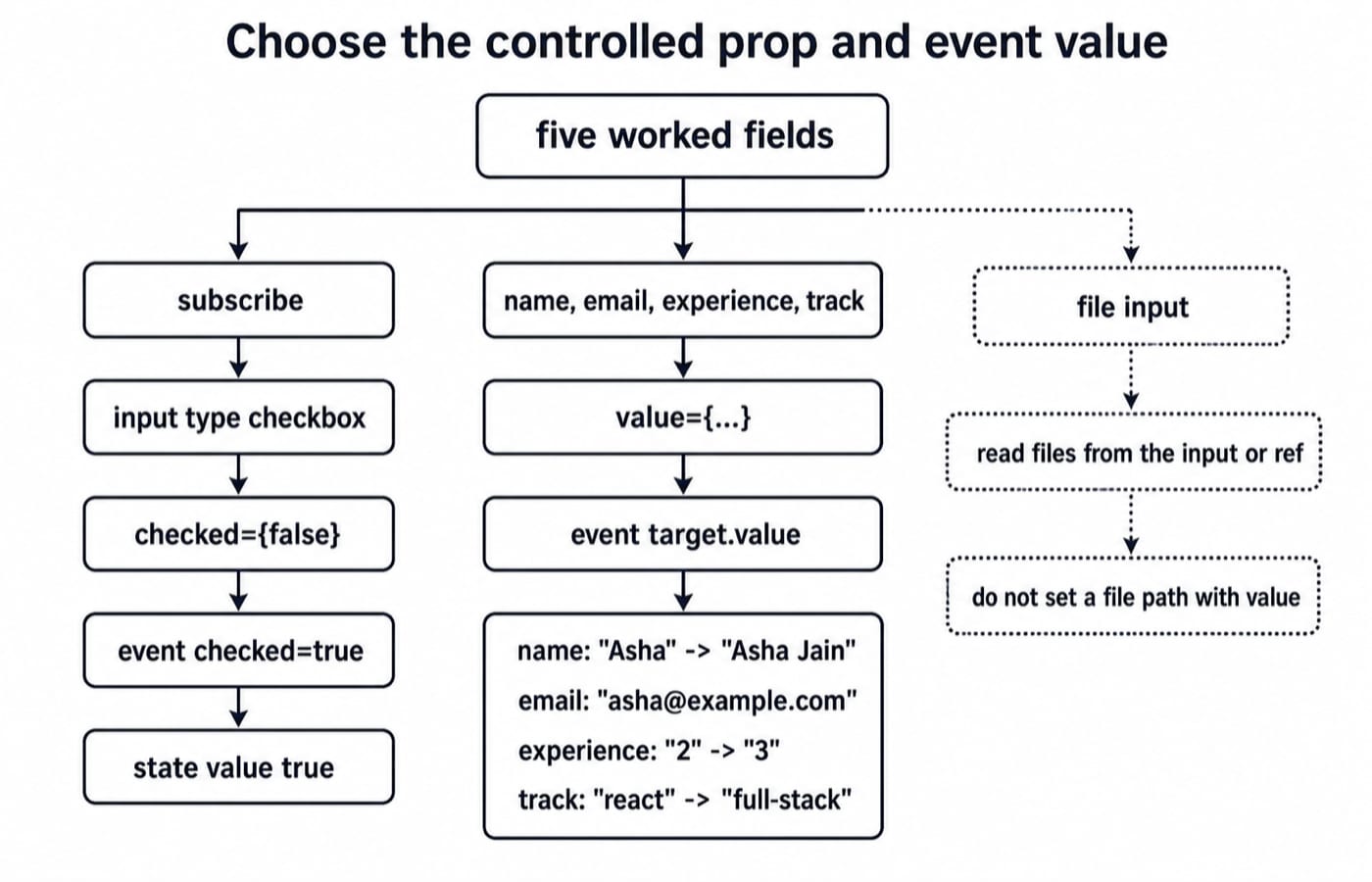
A controlled field has a three-part contract. State stores its value, the element receives it through value or checked, and onChange requests the next state.
const [name, setName] = useState("Asha");

<input value={name} onChange={e => setName(e.target.value)} />
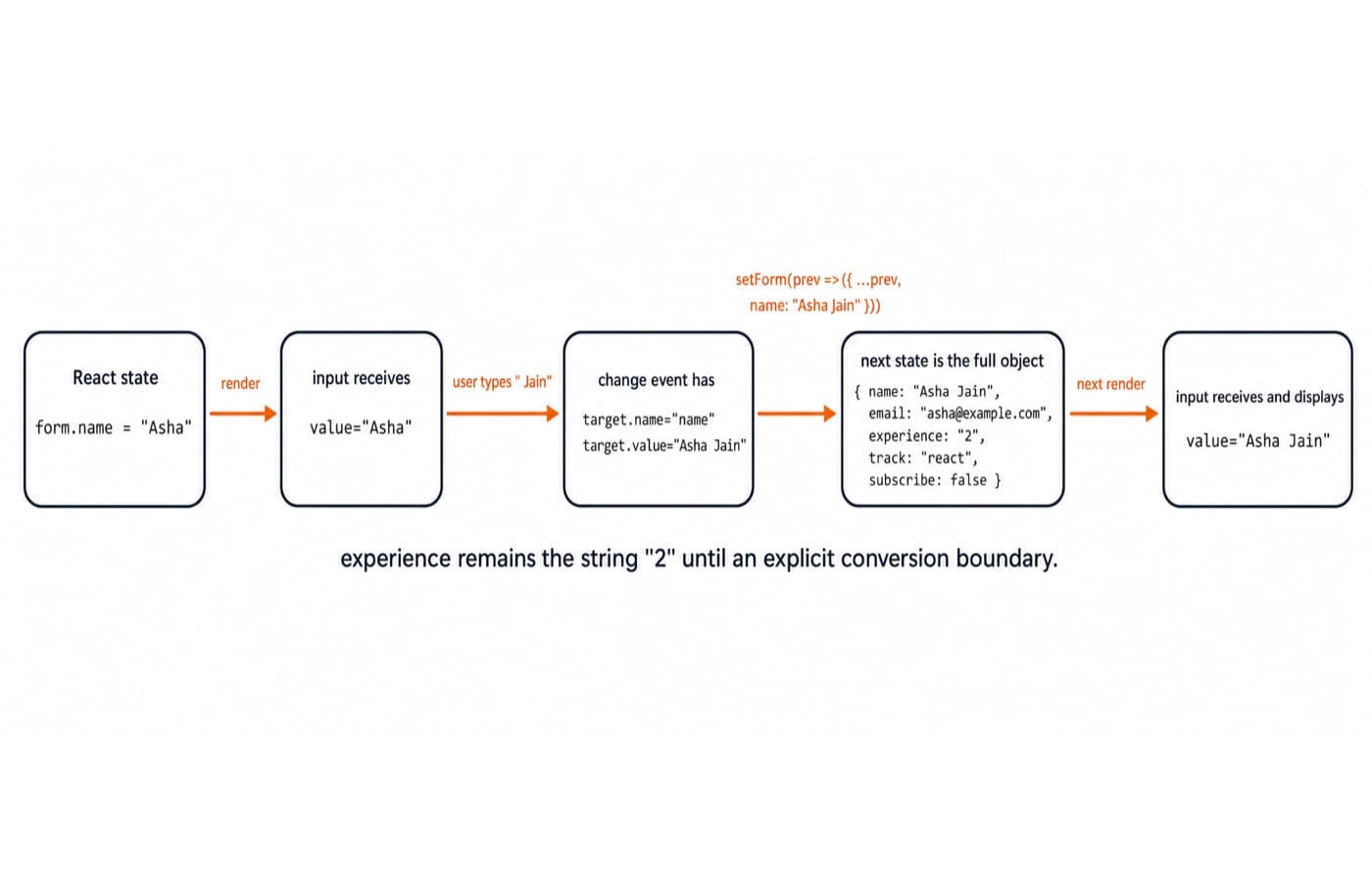
The direction is state to input, event to handler, handler to next state, then render to input. If the user enters Asha Jain, the event carries e.target.value === "Asha Jain". The next state and rendered value are that string.
An uncontrolled input keeps its value in the DOM and is usually read through a ref or submission. Controlled does not mean uneditable. React owns the displayed value.
Trace one controlled form update from keystroke to submit
Start with this exact state:
const [form, setForm] = useState({
  name: "Asha",
  email: "asha@example.com",
  experience: "2",
  track: "react",
  subscribe: false
});
Trace four actions without hiding the unchanged fields:
Name change:
{ name: "Asha Jain", email: "asha@example.com", experience: "2", track: "react", subscribe: false }Experience change:
{ name: "Asha Jain", email: "asha@example.com", experience: "3", track: "react", subscribe: false }Track change:
{ name: "Asha Jain", email: "asha@example.com", experience: "3", track: "full-stack", subscribe: false }Checkbox change:
{ name: "Asha Jain", email: "asha@example.com", experience: "3", track: "full-stack", subscribe: true }
The fourth object is submitted. If the API needs a number, convert at its boundary: Number(form.experience) produces 3.
Use setForm(prev => ({ ...prev, [name]: nextValue })). The spread preserves four fields, the computed key changes one, and the functional form reads the latest queued state. Do not promise a fixed render count because batching and development Strict Mode affect observations.
React controlled-component interview questions with traced answers
What is the source of truth?
form; the DOM displays what React passes. Follow-up: after the name action, the next value is"Asha Jain".Why initialise text and select fields? Use
"", a real string, or a valid option such as"react"to control the first render. Follow-up: untouched track is"react".Why is experience still a string? Input values arrive as strings. Follow-up: after setting
"4", state holds"4", whileNumber(form.experience)is4.How is a checkbox different? Read
event.target.checked, notvalue. Follow-up: checking subscribe changesfalsetotrue.Why use a functional update? It composes with queued updates. Follow-up: updating track preserves
emailas"asha@example.com".Controlled or uncontrolled for a file input? Read files from the input or a ref, not a controlled path
value. Follow-up: selection changes the file list, not a path string.
Coding problem 1: implement one handler for five controlled fields
Build inputs named name, email, experience, track, and subscribe, with react and full-stack select options. Submit requires a trimmed name of at least 2 characters, an email containing @, and non-empty experience that converts to a finite number from 0 through 20.
function handleChange(event) {
  const { name, type, value, checked } = event.target;
  const nextValue = type === "checkbox" ? checked : value;
  setForm(prev => ({ ...prev, [name]: nextValue }));
}

const experienceNumber = Number(form.experience);
const canSubmit =
  form.name.trim().length >= 2 &&
  form.email.includes("@") &&
  form.experience !== "" &&
  Number.isFinite(experienceNumber) &&
  experienceNumber >= 0 && experienceNumber <= 20;
Render the checkbox with checked={form.subscribe} and other fields with value. Empty name fails length, asha.example.com lacks @, "21" exceeds the range, and "" fails before becoming zero. Final values "Asha Jain", "asha@example.com", and "3" make canSubmit true. Keep validation outside the handler.
Coding problem 2: debug lost fields and a control-mode switch
Predict the two failures here:
const [form, setForm] = useState({
  name: undefined,
  email: "asha@example.com"
});

const handleChange = event =>
  setForm({ [event.target.name]: event.target.value });

<input name="name" value={form.name} onChange={handleChange} />
Initially, name has no controlled string. Typing A changes it to "A", switching mode. The replacement { name: "A" } removes email, making form.email undefined.
Initialise { name: "", email: "asha@example.com" }, then update with setForm(prev => ({ ...prev, [event.target.name]: event.target.value })). After A, state is { name: "A", email: "asha@example.com" }. Use value={form.name ?? ""} only as a fallback for missing upstream data, not instead of deliberate state.
Mistakes candidates make and better moves
Mistake | Why it happens | What goes wrong | Better move |
|---|---|---|---|
Use | Inputs look alike | Boolean is wrong | Use |
Replace the object | One field seems enough | Fields disappear | Spread |
Start name as | Data is absent | Mode switches | Start with |
Convert every key | API needs a number | Empty input is awkward | Convert at a boundary |
Store | It feels convenient | Values can drift | Derive during render |
Run | Mutation looks direct | No safe update | Use the setter immutably |
Forget | Browser behaviour is missed | Page reloads | Prevent default on submit |
The validated values "Asha Jain", "asha@example.com", and "3" still derive canSubmit as true. A ref-based file input can be deliberately uncontrolled. A text input moving accidentally from undefined to "A" is a bug.
How interviewers turn the concept into coding-round checks
A useful ladder is to define both modes, trace an event, add a select and checkbox, preserve fields, validate empty and numeric states, explain a rerender without fixing its count, and debug a mode switch. It is not an official universal interview format.
For a 15-minute rehearsal, spend 3 minutes drawing the loop, 6 implementing the handler, 3 tracing "", "3", and "21", and 3 explaining the undefined example. State each result without running code. Keep HTML attributes separate from React state ownership: name selects the state key, while value or checked controls what React renders.
The short version and the next practice step
Keep this five-line mental model:
Initialise a stable state shape.
Bind
valueorchecked.Read the correct event property.
Update immutably from
prev.Convert and validate at an explicit boundary.
The final React state contains experience: "3"; an API-facing payload can contain numeric experience: 3. Rebuild the form without copying, then explain why subscribe is boolean true while those two experience values differ.
For focused continuation, follow the React and Redux Course. The MERN Stack Course is the broader path where the same state crosses an API boundary. Compare those options in Coding & Skill Development Courses. The React Basics, React Intermediate, and React and Redux topics together offer 50+ practice questions, so practise the wider topic without assuming every item is about forms.
Keep learning
Asymptotic Notations Interview Questions and Answers: Big-O, Omega and Theta with Worked Examples
Prepare for Big-O, Omega and Theta questions with proof-ready answers, exact loop and recurrence traces, and a method for avoiding common interview traps.
Updated 24 Oct 20266 min readInterview Corner
Advanced DP Interview Questions and Answers: Four Worked Patterns
Work through four advanced dynamic programming patterns with exact states, transitions, reconstructions, proof hooks, and interview-ready explanations.
Updated 21 Oct 20266 min readInterview Corner
Algorithm Interview Questions and Answers: Cross-Concept DSA Problems
Practise cross-concept DSA questions with defensible answers, complete dry runs and the follow-ups that change which algorithm you should choose.
Updated 17 Oct 20266 min readInterview Corner
Backtracking Technique Interview Questions and Answers: Trace, Prune and Explain
Learn to explain backtracking through exact traces, safe pruning, clean state restoration, N-Queens constraints, complexity derivation and interview follow-ups.
Updated 12 Oct 20266 min readInterview Corner