

React Component Lifecycle Interview Questions and Coding Problems: Trace Every Phase
Learn one render, commit, setup, and cleanup model. Then use it to solve exact class lifecycle traces and two common React coding-round problems.
KnowledgeGate Team
Exam prep & CS education
Updated 26 Oct 20265 min read
Candidates often memorise componentDidMount, componentDidUpdate, and componentWillUnmount, then lose marks when an interviewer asks for the exact log order or a repair for stale asynchronous work. An interviewer usually tests reasoning, not recall. Exact lifecycle answers start with mount, update, and unmount traces, then apply the same setup-cleanup reasoning to stale asynchronous work and timers. Class lifecycle methods still matter in interviews and existing code, while the official React Component reference recommends function components for new code.
Build the lifecycle mental model before memorising APIs
Mount means the component is added. Update means committed props or state have changed. Unmount means the component is about to be removed.
Rendering calculates the next UI. React then commits the necessary DOM changes. Class methods and Effects that run after commit synchronise the component with an external system.
There is no exact class-to-function conversion, but componentDidMount, a guarded componentDidUpdate, and componentWillUnmount often describe one useEffect setup and cleanup process. useLayoutEffect is the rarer choice for work that must finish before browser paint.
Predict order from the actual state, props, dependencies, and cleanup. The slogan "mount, update, unmount" is not enough.
Worked interview trace: mount, one update, then unmount
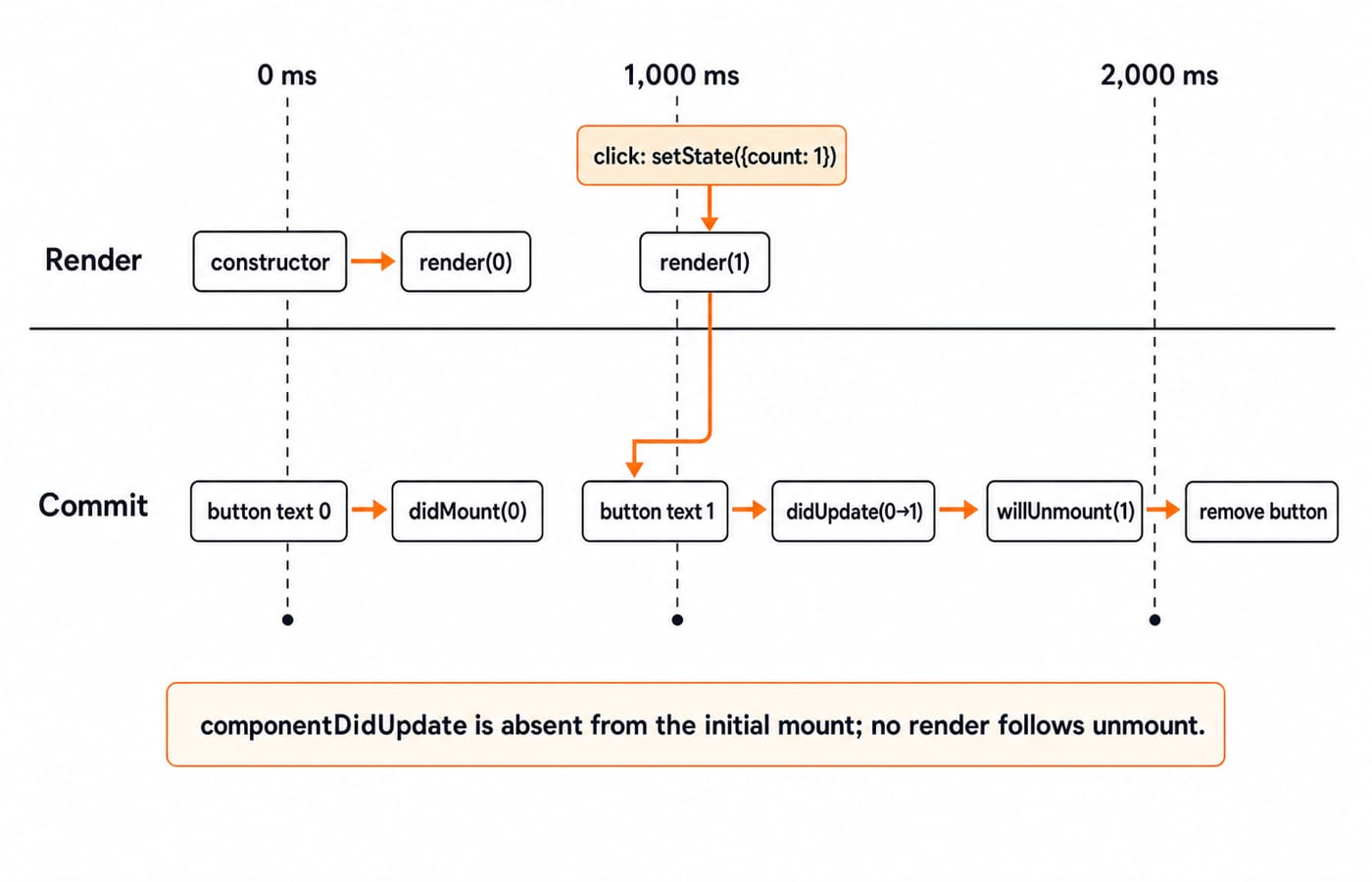
Consider this class in production, outside Strict Mode. It starts at count = 0, the user clicks once at 1,000 ms, and the parent removes it at 2,000 ms.
class CounterTrace extends React.Component {
  constructor(props) {
    super(props);
    this.state = { count: 0 };
    console.log('constructor');
  }

  componentDidMount() {
    console.log('didMount', this.state.count);
  }

  componentDidUpdate(prevProps, prevState) {
    console.log('didUpdate', `${prevState.count}->${this.state.count}`);
  }

  componentWillUnmount() {
    console.log('willUnmount', this.state.count);
  }

  render() {
    console.log('render', this.state.count);
    return (
      <button onClick={() => this.setState({ count: 1 })}>
        {this.state.count}
      </button>
    );
  }
}
The order is:
constructorrender 0didMount 0After the click,
render 1didUpdate 0->1Before removal,
willUnmount 1
The initial render is a mount, so componentDidUpdate does not run. Unmount calls componentWillUnmount without another render. The official Component reference documents this timing. React's development Strict Mode may add diagnostic calls, which is why a good answer states the environment before counting logs.
Effect lifecycle: think in setup and cleanup pairs
React's Effect documentation treats an Effect as its own setup and cleanup lifecycle. For useEffect(setup, [userId]), setup runs after commit. When userId changes, React runs the old cleanup before the new setup. Unmount runs the final cleanup.
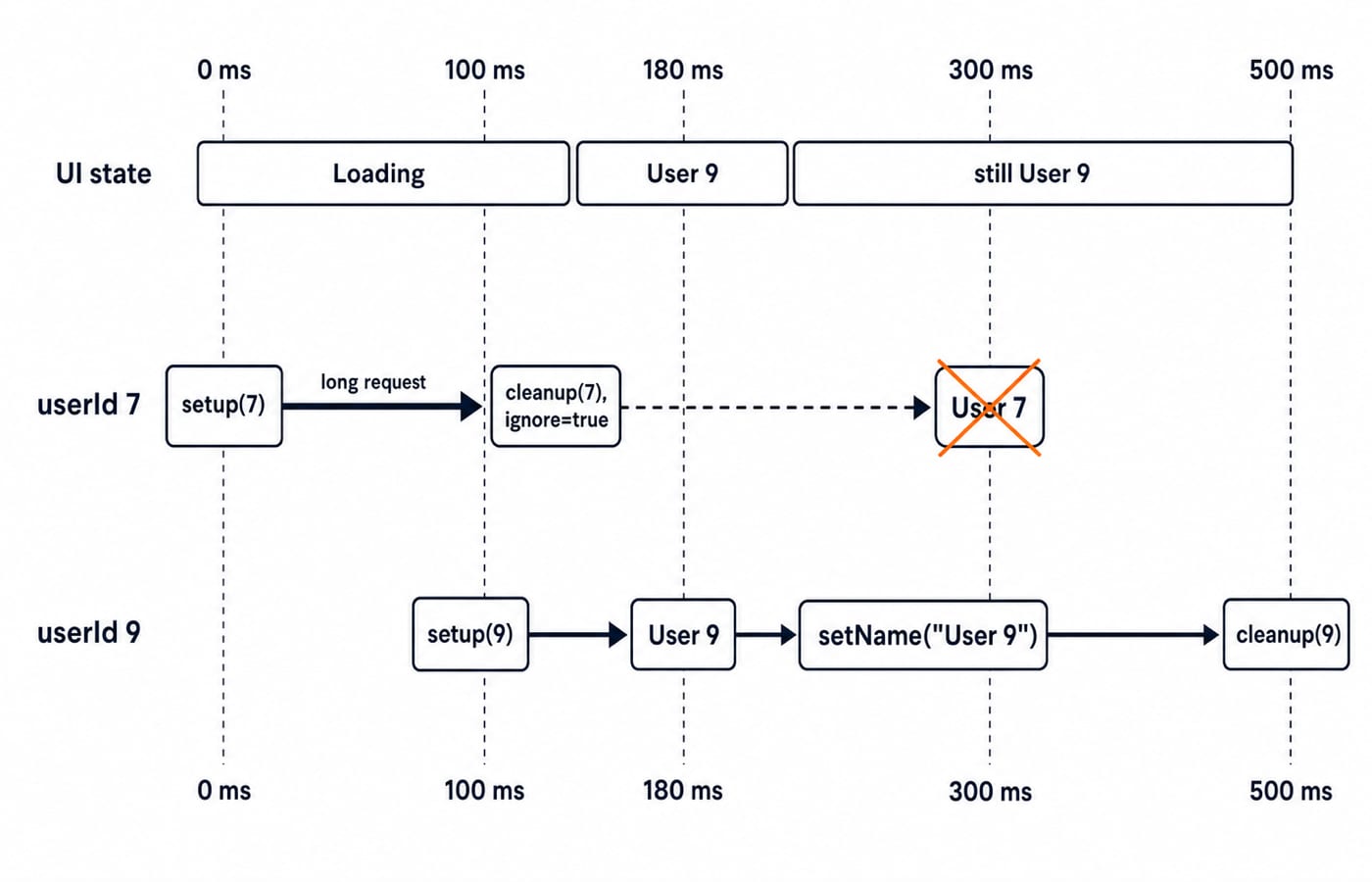
For a production component mounted with userId = 7, changed to 9 at 100 ms, and removed at 500 ms, the trace is setup 7, cleanup 7, setup 9, cleanup 9.
In development Strict Mode, the trace is setup 7, cleanup 7, setup 7, then at 100 ms cleanup 7, setup 9, and at 500 ms cleanup 9. The first setup-cleanup pair checks that cleanup is symmetric. It is not a production promise and not a reason to remove Strict Mode.
Coding problem one: stop a stale profile response
loadProfile(7) starts at 0 ms and takes 300 ms. At 100 ms, loadProfile(9) starts and takes 80 ms, so it finishes at 100 + 80 = 180 ms. Without cleanup, the UI shows User 9 at 180 ms, then the older result wrongly replaces it with User 7 at 300 ms.
Keep loadProfile at module scope:
function Profile({ userId }) {
  const [name, setName] = useState('');

  useEffect(() => {
    let ignore = false;
    console.log('setup', userId);

    loadProfile(userId).then((nextName) => {
      if (!ignore) setName(nextName);
    });

    return () => {
      ignore = true;
      console.log('cleanup', userId);
    };
  }, [userId]);

  return <p>{name || 'Loading'}</p>;
}
At 100 ms, cleanup for 7 sets that closure's ignore to true. User 9 is committed at 180 ms. The late User 7 value arrives at 300 ms but is ignored. Unmount at 500 ms cleans up 9. A real request API may support cancellation, but this solution exposes the lifecycle ownership clearly.
Coding problem two: write a countdown with exact cleanup
Build a countdown that starts at 3, shows 2 at 1,000 ms, 1 at 2,000 ms, and 0 at 3,000 ms. It must schedule nothing after reaching zero.
function Countdown() {
  const [value, setValue] = useState(3);

  useEffect(() => {
    if (value === 0) return;
    const timeoutId = window.setTimeout(() => {
      setValue(value - 1);
    }, 1000);
    return () => window.clearTimeout(timeoutId);
  }, [value]);

  return <span>{value}</span>;
}
Each committed value cleans up its old one-shot timeout before the next setup. At value === 0, the Effect returns no cleanup because it creates no resource. If the parent unmounts at 1,500 ms, cleanup cancels the timeout due at 2,000 ms.
With fake timers, assert that the text is 3 at 999 ms and 2 at 1,000 ms. Then unmount at 1,500 ms, advance another 2,000 ms, and assert that no state update is attempted.
Rapid lifecycle interview questions with concise answers
Does render mean the DOM changed? No. Render calculates; commit applies DOM changes.
Does
componentDidUpdaterun on initial mount? No.Is
useEffect(..., [])exactlycomponentDidMount? No. It can own cleanup and receives a development Strict Mode probe.When does cleanup run? Before setup reruns for changed dependencies and after unmount.
Are class components removed? No. React supports them but recommends functions for new code.
When is
useLayoutEffectrelevant? For work that must run before browser paint, which is the rarer case.
For broader coverage of hooks, reconciliation, and state choices, use React Interview Questions for Freshers. Lifecycle timing needs a separate drill: render and commit, setup and cleanup, stale responses, and timers.
An interviewer may ask: what if unrelated parent state changes while userId stays 7? The child may render again, but the [userId] Effect does not clean up or restart because its dependency is unchanged.
Mistakes candidates make and the direct correction
Mistake | Failure | Direct correction |
|---|---|---|
Missing | The Effect reads a stale closure | Include every reactive value |
No cleanup | A timer or subscription leaks | Return the inverse operation |
Unconditional | Updates can loop | Compare previous and current values |
| The Effect returns a Promise, not cleanup | Call the async function inside a synchronous setup |
Two tracing errors are equally common. A function call is not automatically a committed DOM update. A Strict Mode development probe is not evidence of a duplicate production request. Label Render, Commit, setup, and cleanup separately, then state the environment.
Before submitting a coding answer, spend 45 seconds checking six things: name the external resource, list exact dependencies, show cleanup, trace one prop change, trace unmount, and explain the development-only probe. The coding-round strategy for placements gives a wider method for practising such answers.
Short version and the next practical step
Render calculates. Commit applies. Setup synchronises. Cleanup reverses. A strong lifecycle answer traces concrete values instead of reciting method names.
For focused component practice, use the React and Redux course. Apply the same ideas inside full-stack projects through the MERN Stack course, then explore the broader Coding & Skills category.
Recreate the 7 -> 9 Effect trace on paper. Change one dependency, predict which cleanup runs, and only then run the code.
Keep learning

Floyd-Warshall and Subset Sum Interview Questions: 10 Worked Answers
Prepare two classic dynamic programming problems through ten interview-style questions, complete traces, follow-up answers and quick checks for common mistakes.
Updated 28 Oct 20265 min readInterview Corner
React Controlled Components: Interview Questions and Coding Problems
Trace a five-field React form, build one safe change handler, and debug the controlled-input mistakes that commonly appear in interviews and coding rounds.
Updated 25 Oct 20265 min readInterview Corner

Asymptotic Notations Interview Questions and Answers: Big-O, Omega and Theta with Worked Examples
Prepare for Big-O, Omega and Theta questions with proof-ready answers, exact loop and recurrence traces, and a method for avoiding common interview traps.
Updated 24 Oct 20266 min readInterview Corner
Advanced DP Interview Questions and Answers: Four Worked Patterns
Work through four advanced dynamic programming patterns with exact states, transitions, reconstructions, proof hooks, and interview-ready explanations.
Updated 21 Oct 20266 min readInterview Corner