LDAP Explained: DNs, Bind, Search Filters, and a Developer Login Flow
Build one LDAP mental model from directory tree to login. Trace a service bind, escaped user search, password-verifying user bind, and group-based role check.
KnowledgeGate Team
Exam prep & CS education
Updated 13 Aug 20265 min read
LDAP examples often start with uid=ananya,ou=people,dc=acme,dc=example, then use bind and search without connecting the pieces. One fictional directory, acme.example, holds five people, one service account and one group; a single filter over it returns exactly two engineers, and Ananya's login costs two separate binds. LDAP is an application-layer protocol for accessing a directory. It can support authentication and authorisation, but a search alone does not prove a password, and a directory is not a relational table. Directory access sits alongside the networking and OS material recruiters test in CS Fundamentals for Placements.
LDAP explained: protocol, directory entry, attribute and schema
LDAP is a client-server application protocol for reading and changing entries in a directory information tree. The server hosts the directory, an entry is an object, and attributes such as uid, cn and mail hold values. DNS and HTTP work in requests and responses, as Application Layer Protocols: DNS and HTTP sets out. LDAP instead exposes a fixed operation set over a tree.
dn: uid=ananya,ou=people,dc=acme,dc=example
objectClass: inetOrgPerson
uid: ananya
cn: Ananya Rao
sn: Rao
mail: ananya.rao@acme.example
departmentNumber: ENG
employeeType: active
Here, inetOrgPerson selects schema-defined permitted and required attributes. In this directory, uid is a login-style identifier, cn is the common name, sn is the surname, and the remaining values are searchable. Other organisations can choose differently.
Directory idea | Relational comparison |
|---|---|
Tree path | Table key |
Multi-valued attributes | Scalar cells |
Schema and object classes | Table definition |
Subtree search | Joins |
Directories are designed for identity and read-heavy lookup. LDAP does not universally replace SQL.
LDAP DN and RDN: read the tree from leaf to root
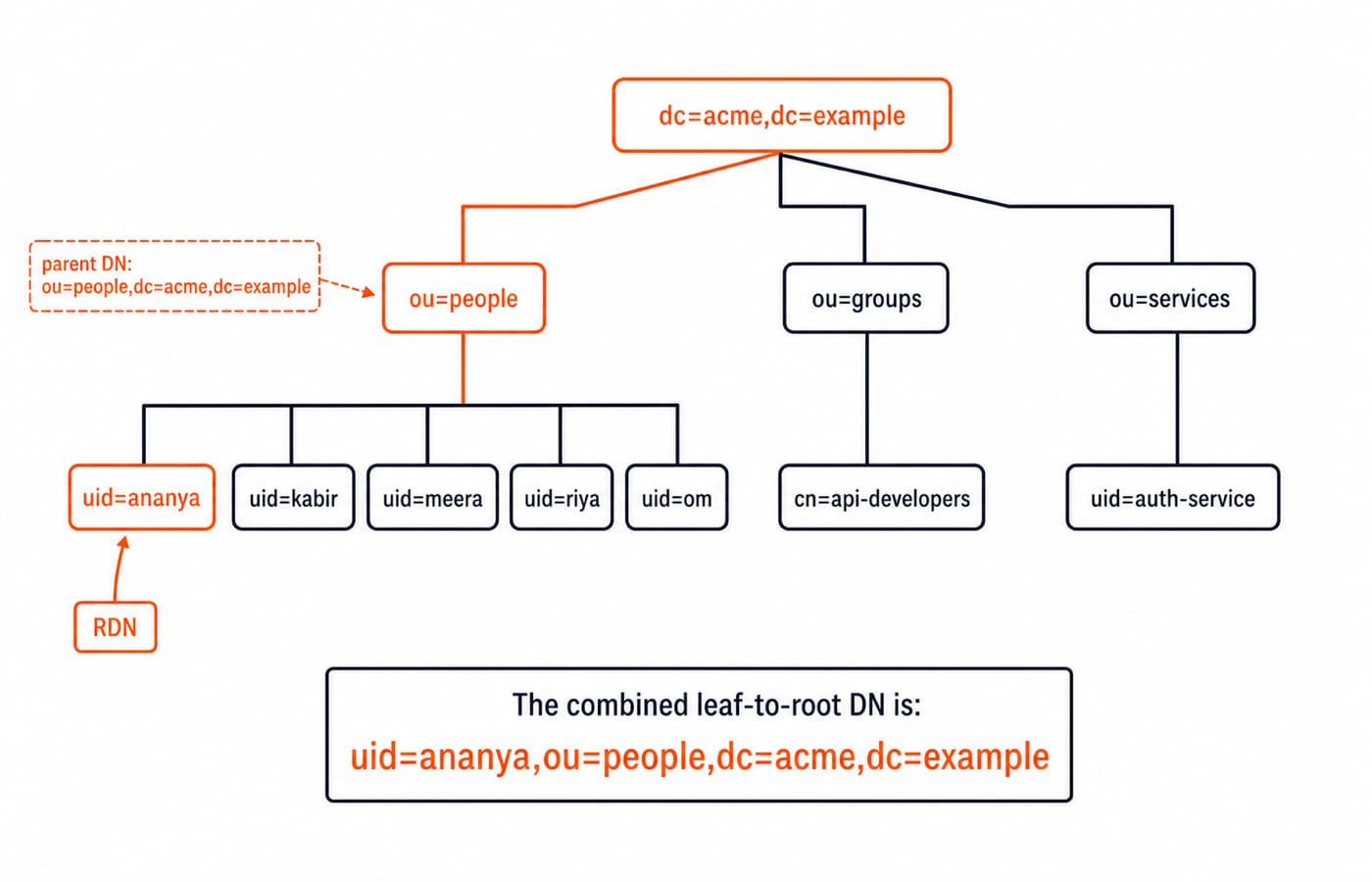
dc=acme,dc=example
├── ou=people
│   ├── uid=ananya
│   ├── uid=kabir
│   ├── uid=meera
│   ├── uid=riya
│   └── uid=om
├── ou=groups
│   └── cn=api-developers
└── ou=services
    └── uid=auth-service
In uid=ananya,ou=people,dc=acme,dc=example, the RDN is uid=ananya, its parent is ou=people,dc=acme,dc=example, and the full DN uniquely locates the entry. DN text runs leaf-to-root although diagrams run root-down.
uid=ananya,ou=people,... and uid=ananya,ou=services,... share an RDN but are different DNs. Moving Ananya to another branch changes her DN even if uid remains ananya. DN and filter escaping differ. A literal comma appears as cn=Rao\, Ananya,ou=people,dc=acme,dc=example.
LDAP bind, search and update operations have different jobs
Bind authenticates a connection identity. Search returns entries, compare tests an attribute value, add, modify and delete change entries, and unbind closes the session. Bind neither opens the transport nor locates a user.
An anonymous connection has no authenticated directory identity. Restricted uid=auth-service,ou=services,dc=acme,dc=example may find users; uid=ananya,ou=people,dc=acme,dc=example verifies Ananya's password. Access controls govern each identity.
Ananya's login connects to ldaps://directory.acme.example:636. Never send simple-bind credentials over plaintext. StartTLS upgrades LDAP on conventional port 389; LDAP over TLS starts protected on conventional port 636. Validate the server name and trust chain. The session runs over TCP, the reliable transport drilled in TCP and UDP MCQs: 12 Solved Transport Layer Questions.
LDAP login flow: service bind, one-entry search, then user bind
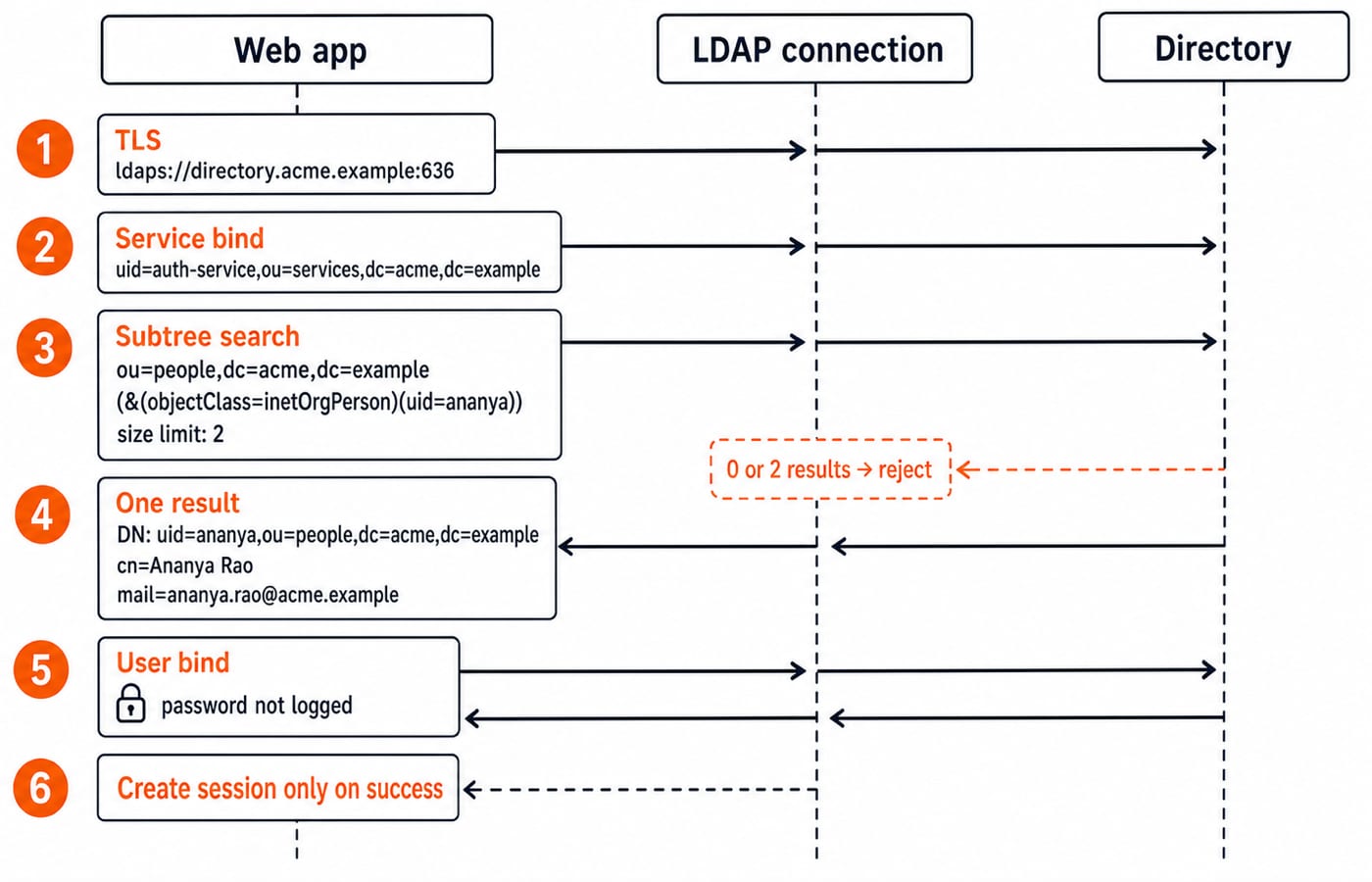
The app receives ananya and a password it never logs. It opens the TLS endpoint and binds as uid=auth-service,ou=services,dc=acme,dc=example, using a secret outside source code.
base DN:    ou=people,dc=acme,dc=example
scope:      subtree
filter:     (&(objectClass=inetOrgPerson)(uid=ananya))
attributes: dn, cn, mail
size limit: 2
Search returns exactly one DN, uid=ananya,ou=people,dc=acme,dc=example, with cn=Ananya Rao and mail=ananya.rao@acme.example. Zero means no eligible account; two means ambiguity. Reject both without choosing a DN.
safeUid = escapeFilterValue(username)
rows = serviceConnection.search(peopleBase, "(&(objectClass=inetOrgPerson)(uid=" + safeUid + "))", sizeLimit=2)
if rows.length != 1: rejectGenericLogin()
userConnection.bind(rows[0].dn, submittedPassword)
if bindSucceeded: createApplicationSession()
else: rejectGenericLogin()
The second bind proves the directory accepted that DN and password. Failure creates no session and returns a generic message that hides account existence. Success changes the connection identity. Rebind before protected service searches, or use another connection. Never pool a user-bound connection.
LDAP search filters and scopes: five entries narrowed to two
Base scope at Ananya's DN considers only her. One-level at ou=people,dc=acme,dc=example considers five immediate users. Subtree also includes deeper descendants.
|
|
|
|---|---|---|
|
|
|
|
|
|
|
|
|
|
|
|
|
|
|
Evaluate (&(objectClass=inetOrgPerson)(departmentNumber=ENG)(employeeType=active)). First, all five satisfy inetOrgPerson. Next, ENG leaves four: Ananya, Kabir, Meera and Om. Finally, active leaves Ananya and Kabir, exactly two.
(|(uid=ananya)(uid=kabir)) is OR and returns the same two. (!(employeeType=disabled)) excludes Om but is not an access rule. Substring (uid=an*) finds Ananya. Parentheses are grammar.
Concatenating literal input ananya* creates substring filter (uid=ananya*). Filter escaping yields ananya\2a, which seeks a literal asterisk. Use the LDAP library's filter escaping, never SQL escaping, URL encoding or manual replacement. DN escaping is different.
LDAP groups turn authentication into authorisation
Authentication is a successful user bind. Authorisation is a later permission decision. A valid password cannot grant every role.
dn: cn=api-developers,ou=groups,dc=acme,dc=example
objectClass: groupOfNames
cn: api-developers
member: uid=ananya,ou=people,dc=acme,dc=example
member: uid=kabir,ou=people,dc=acme,dc=example
On a service-bound connection, search below ou=groups,dc=acme,dc=example with (&(objectClass=groupOfNames)(cn=api-developers)(member=uid=ananya,ou=people,dc=acme,dc=example)). One group returns, so the app may map Ananya to API_DEVELOPER. Riya's DN returns zero, so she may authenticate without that role.
Some directories compute user memberOf; others require group searches by member. Nested groups vary too. Follow the server's schema, not Active Directory assumptions.
LDAP developer and interview traps
Trap | Failure | Rule |
|---|---|---|
Search means login | Password is unverified | Bind as the returned DN |
Broad service access | Data is overexposed | Restrict the account |
Bind without TLS | Credentials cross plaintext | Protect and validate transport |
Raw filter input | Metacharacters alter the query | Use library escaping |
First result wins | Ambiguity selects an identity | Require one entry |
Pool a user-bound connection | Service work runs as user | Rebind or separate pools |
Log credentials or full entries | Sensitive data leaks | Log safe context only |
Result | Check first |
|---|---|
| Bind DN and password |
| Base DN or target DN |
Zero results | Base, scope, filter, schema, escaping |
Size limit | An over-broad filter |
TLS hostname or trust failure | Name and trust chain, never bypasses |
Log request ID, operation, safe DN context, result class and duration, never passwords.
Four closed checks:
Ananya's RDN:
uid=ananya.Bind's job: authenticate the connection identity, not locate entries.
Engineer-filter result: Ananya and Kabir, exactly two.
Search then bind: resolve a username to one controlled DN, then verify its password.
A 60-second interview answer: LDAP reads and writes entries in a directory tree, so uid=ananya,ou=people,dc=acme,dc=example is a DN whose RDN is uid=ananya. Search locates that DN; only a bind against it proves the password. The app therefore binds as auth-service, insists on exactly one match, then binds as Ananya's DN. TLS on port 636 protects the credentials, and membership of cn=api-developers, not the successful bind, decides her role.
LDAP explained: the short version and next step
Connect to ldaps://directory.acme.example:636; bind as restricted auth-service; search below ou=people,dc=acme,dc=example; resolve ananya to one DN; bind as that DN to verify the password; check cn=api-developers separately for the role. DN, filter, bind identity and membership answer different questions.
Place this flow beside Node.js, Express.js, MongoDB and authentication work with MERN Stack (Full Stack Development). If you can explain the two-bind trace and want structured preparation, use the Interview & Resume Preparation Course.
Keep learning

Resume Checklist: What Must Be Included and What Must Be Left Out
3 Oct 20264 min readPlacement Preparation

Group Discussion Rounds for Placements: How GD Is Scored and How to Prepare Topics
Speaking more is not the same as scoring more in a GD. Learn what panels observe, how to prepare topic notes, and how to practise useful contributions.
11 Aug 20266 min readPlacement Preparation

Off-Campus Placement Strategy for 2026 Graduates: Drives, Portals and Referrals That Work
Turn off-campus hiring into a weekly operating system that keeps drives, portals, referrals, follow-ups, and skill preparation moving together.
9 Aug 20267 min readPlacement Preparation
Pseudocode Questions for Placements: Solved Traces for Arrays, Strings and Loops
Learn a paper-based trace method for placement pseudocode, then apply it to bubble sort, string reversal, digit reversal and 22 more recurring question shapes.
Updated 7 Aug 20265 min readPlacement Preparation