

JavaScript Objects and Arrays Explained: Nested Data, Mutation and Output Traps
Learn how JavaScript arrays and objects store nested data, then trace reads, updates, copies, filters and reductions without losing the current value.
KnowledgeGate Team
Exam prep & CS education
Updated 17 Nov 20265 min read

A single number or string is easy to trace. With nested arrays and objects, you must track the current value, the access path and whether an update changes the original data. Output traps in programming tests and interviews often depend on those details. If you need a broader learning path first, explore the Free Courses category.
What makes an object or array a composite data structure?
A primitive holds one value: const score = 81. An array such as const scores = [81, 76, 84] groups values by numeric position. An object such as const student = { id: 101, name: "Asha", score: 81 } groups values by named keys.
JavaScript array positions start at index 0, so scores[0] === 81. Object properties use names, so student.name === "Asha". Both structures can hold primitives, arrays, objects or further nesting. Also, typeof scores === "object", but Array.isArray(scores) === true identifies it as an array.
JavaScript Basics: Types, Functions, Arrays and Async covers the wider language sequence. Nested data needs a narrower discipline: resolve one access segment at a time, record references, and check whether each update reaches shared state. JavaScript arrays also should not be analysed with C's typed, contiguous-memory rules; Arrays in C uses that separate model.
Read, add, update and delete without losing the access path
With the values above, student.score gives 81, while student["name"] gives "Asha". Then student.city = "Pune" adds a property, and student.score = 85 replaces 81. Calling scores.push(90) changes the array to [81, 76, 84, 90], so scores.length is 4.
Brackets are necessary when the key comes from a variable. Given const key = "score", student[key] gives 85; student.key instead looks for a property literally named key. Brackets also handle unusual names, as in student["full name"].
Deletion differs by structure. delete student.city removes the named property. However, delete scores[1] leaves an empty slot and keeps the length at 4. To remove and compact an array, start again with [81, 76, 84, 90] and run scores.splice(1, 1). The result is [81, 84, 90], with length 3.
Build and trace a nested student data set
A stable data set makes nested accesses easier to trace:
const students = [
  {
    id: 101,
    name: "Asha",
    marks: { dsa: 72, js: 81 },
    skills: ["C", "JavaScript"]
  },
  {
    id: 102,
    name: "Ravi",
    marks: { dsa: 68, js: 76 },
    skills: ["Python", "JavaScript"]
  },
  {
    id: 103,
    name: "Meera",
    marks: { dsa: 88, js: 84 },
    skills: ["JavaScript", "SQL"]
  }
];
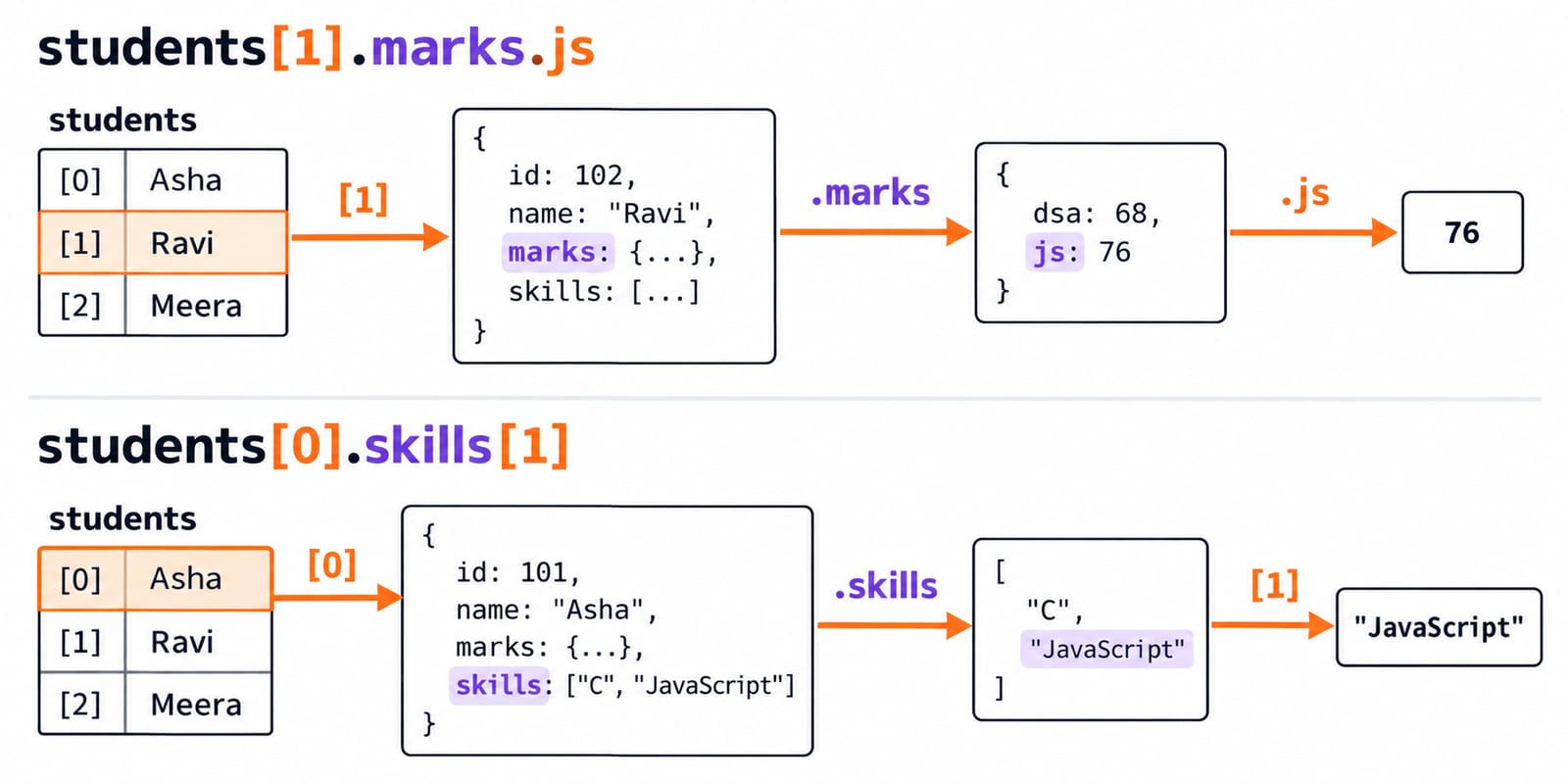
Read from outside to inside. students is an array of length 3. students[1] is Ravi's object, students[1].marks is his marks object, and students[1].marks.js is 76. Similarly, students[0].skills[1] is "JavaScript". Resolve one pair of brackets or one dot at a time, writing down each intermediate value.
Now set students[2].marks.js = 90, changing Meera's JavaScript mark from 84 to 90. Next, students[0].skills.push("HTML") changes Asha's skills to ["C", "JavaScript", "HTML"]. These are nested updates; the outer array still contains three student objects.
Compute useful results from the nested values
After Meera's update, mapping the JavaScript marks gives [81, 76, 90]. Filtering with s.marks.js >= 80 keeps Asha and Meera, and mapping those records to names gives ["Asha", "Meera"].
For the average, begin the reduction at 0. Add 81 to get 81, add 76 to get 157, then add 90 to get 247. There are three students, so 247 / 3 = 82.333.... (247 / 3).toFixed(2) displays two decimal places, but returns the string "82.33", not a number.
const jsScores = students.map(s => s.marks.js);
const eligible = students
  .filter(s => s.marks.js >= 80)
  .map(s => s.name);
const total = jsScores.reduce((sum, mark) => sum + mark, 0);
const average = (total / students.length).toFixed(2);

console.log(jsScores); // [81, 76, 90]
console.log(eligible); // ["Asha", "Meera"]
console.log(total);    // 247
console.log(average);  // "82.33"
Mutation, aliases and the shallow-copy trap
Consider a separate trace:
const profile = { name: "Asha", marks: { js: 81 } };
const alias = profile;
alias.marks.js = 85;
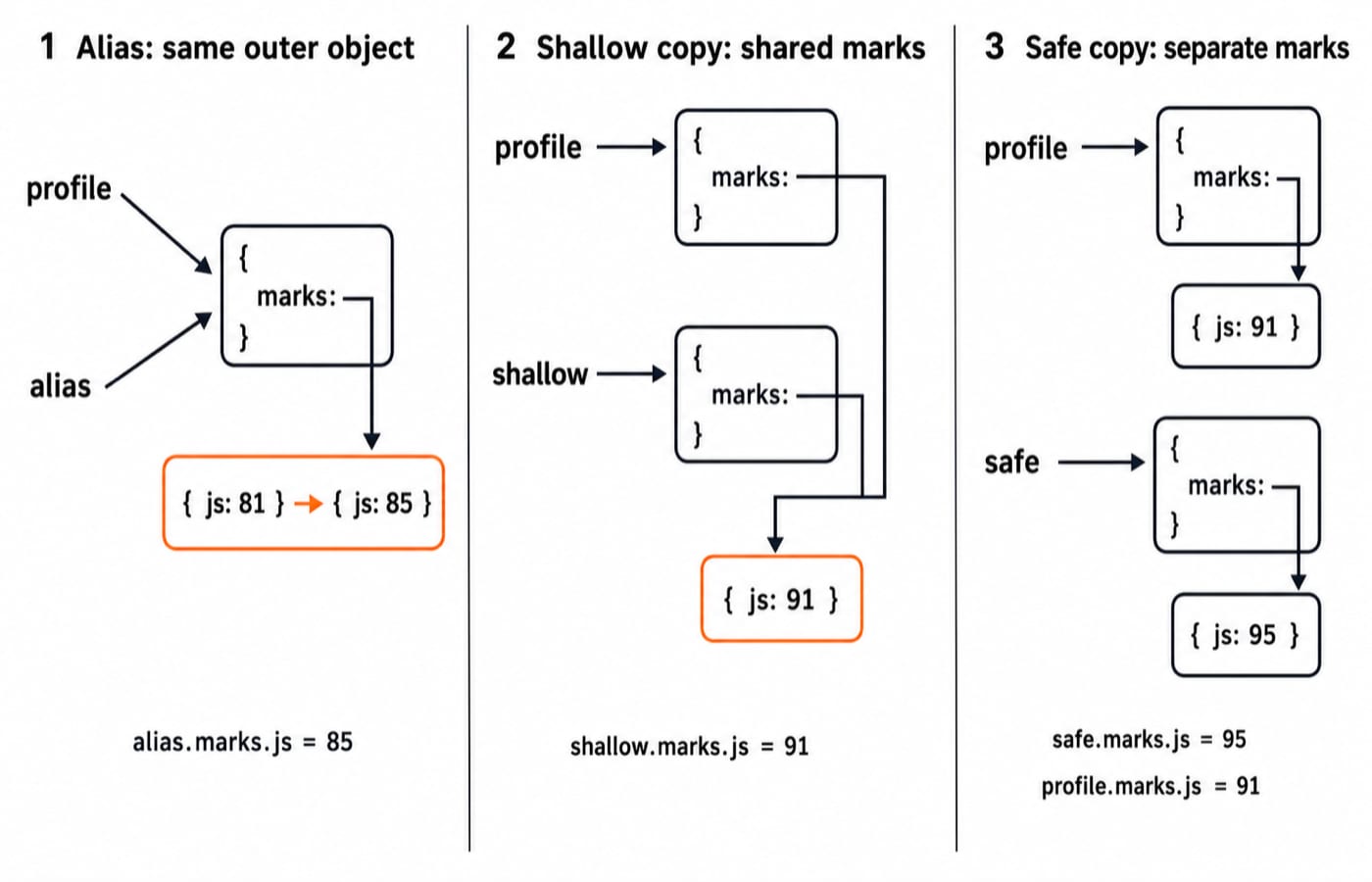
Now profile.marks.js is 85 because alias and profile refer to the same object. They are not two equal copies.
Next, const shallow = { ...profile }; shallow.marks.js = 91; creates a new outer object but shares the nested marks object. Therefore profile.marks.js also becomes 91. A nested copy changes the result: const safe = { ...profile, marks: { ...profile.marks } }; safe.marks.js = 95;. Now safe.marks.js is 95, while profile.marks.js remains 91.
This kind of reasoning is language-specific, so do not transfer copying rules from another language without checking them. Careful object and array updates matter especially in front-end state, where an unintended mutation can make behaviour difficult to predict. The React and Redux course develops that application further.
Common output traps and the correct reasoning
Reference equality: { x: 1 } === { x: 1 } is false because the expressions create distinct objects. With const a = { x: 1 }; const b = a, the expression a === b is true because both names refer to one object. Compare identity before assuming equal-looking contents are equal objects.
Missing paths and falsy values: Given const obj = { active: false, attempts: 0 }, neither !obj.active nor !obj.attempts proves that a property is absent. Use Object.hasOwn(obj, "attempts") to test ownership. For a nested read, student.address?.city evaluates to undefined when address is absent instead of throwing an error.
Coercion and sparse arrays: [1, 2] + [3, 4] produces the string "1,23,4", not a combined array. Use [...[1, 2], ...[3, 4]] to get [1, 2, 3, 4]. With const values = [10, 20, 30]; delete values[1];, the length remains 3. Use splice when you need compaction.
How tests and interviews turn these ideas into questions
Typical tasks ask you to trace students[1].marks.js, predict an alias mutation, distinguish student[key] from student.key, identify typeof [] versus Array.isArray([]), or spot a shallow copy of nested data.
Try one with the worked values. After Meera's mark becomes 90, what does students.filter(s => s.marks.js >= 80).map(s => s.id) return? Trace it: 81 >= 80 is true, 76 < 80, and 90 >= 80 is true. The answer is [101, 103].
Short version and the next step
Arrays use ordered numeric positions. Objects use named properties. Nesting combines both, so trace one level at a time. Aliases can expose the same object through different names, while shallow copies still share nested objects.
Retype the three-student example, then add { id: 104, name: "Kabir", marks: { dsa: 75, js: 88 }, skills: ["JavaScript", "CSS"] }. The new JavaScript total is 247 + 88 = 335, and the average is 335 / 4 = 83.75. For a broader sequence of lessons and practice, continue with Complete JavaScript.
Keep learning

Objects in JavaScript: Beginner Tutorial with Runnable Examples
Learn JavaScript objects through runnable examples that cover property access, updates, methods, nested data, iteration, and reference behaviour.
Updated 14 Sep 20265 min readWeb Development

ISRO CS C Output Questions: Trace Pointers, Arrays and Recursion Step by Step
Learn a repeatable trace-first method for C output problems. Three worked programs show copied pointers, array parameters and recursive output in exact execution order.
Updated 30 Oct 20266 min readC Programming & Data Structures

C Programming Mixed-Concept Questions Explained: Arrays, Pointers, Functions and Output Tracing
Learn a four-pass method for tracing C programs that combine arrays, pointer aliases, function calls, static storage and side effects, with a complete worked output trace.
Updated 15 Sep 20266 min readC Programming & Data Structures

JavaScript Basics: Types, Functions, Arrays and Async Code with Worked Examples
Build a reliable JavaScript mental model by tracing values, closures, arrays, object copies and queued work. A complete three-record example verifies every total.
Updated 5 Aug 20267 min readProgramming Languages Survey