Introduction to Flowcharts: Symbols, a Worked Example and Exam Traps
Learn how flowchart symbols express sequence, decisions and loops. Then trace a complete even-sum example, translate it into C and repair common logic defects.
KnowledgeGate Team
Exam prep & CS education
Updated 18 Oct 20266 min read
You may recognise ovals, rectangles and diamonds yet still struggle to turn a word problem into one unambiguous path. Memorising shapes is not enough: a correct chart shows operation order, labels every decision branch, updates loop variables and terminates for every allowed input. Flowcharts separate logic from language syntax by using symbols for sequence, selection and iteration, and arrows for execution order. For N = 7, the traced loop checks 1 through 7, adds 2, 4 and 6 to reach 12, maps directly to C, and exposes boundary and update defects.
Flowchart fundamentals: algorithm, pseudocode and program
A flowchart is a directed visual representation of an algorithm. Its symbols contain operations or tests, while arrowheads specify which step executes next. The algorithm is the finite, ordered method itself. Pseudocode expresses that method in structured text, and a C program is one executable implementation.
The same method for summing even integers can therefore have one flowchart, equivalent pseudocode and several valid programs. A sound beginner's chart has one clear entry, a reachable exit, deterministic outgoing paths, variables initialized before use and a finite route to termination for every allowed input. A top-to-bottom or left-to-right layout makes the chart easier to read, but position alone does not control execution. Arrow direction does. Two nearby boxes are not consecutive unless a directed flow line connects them.
Flowchart symbols and what each one is allowed to say
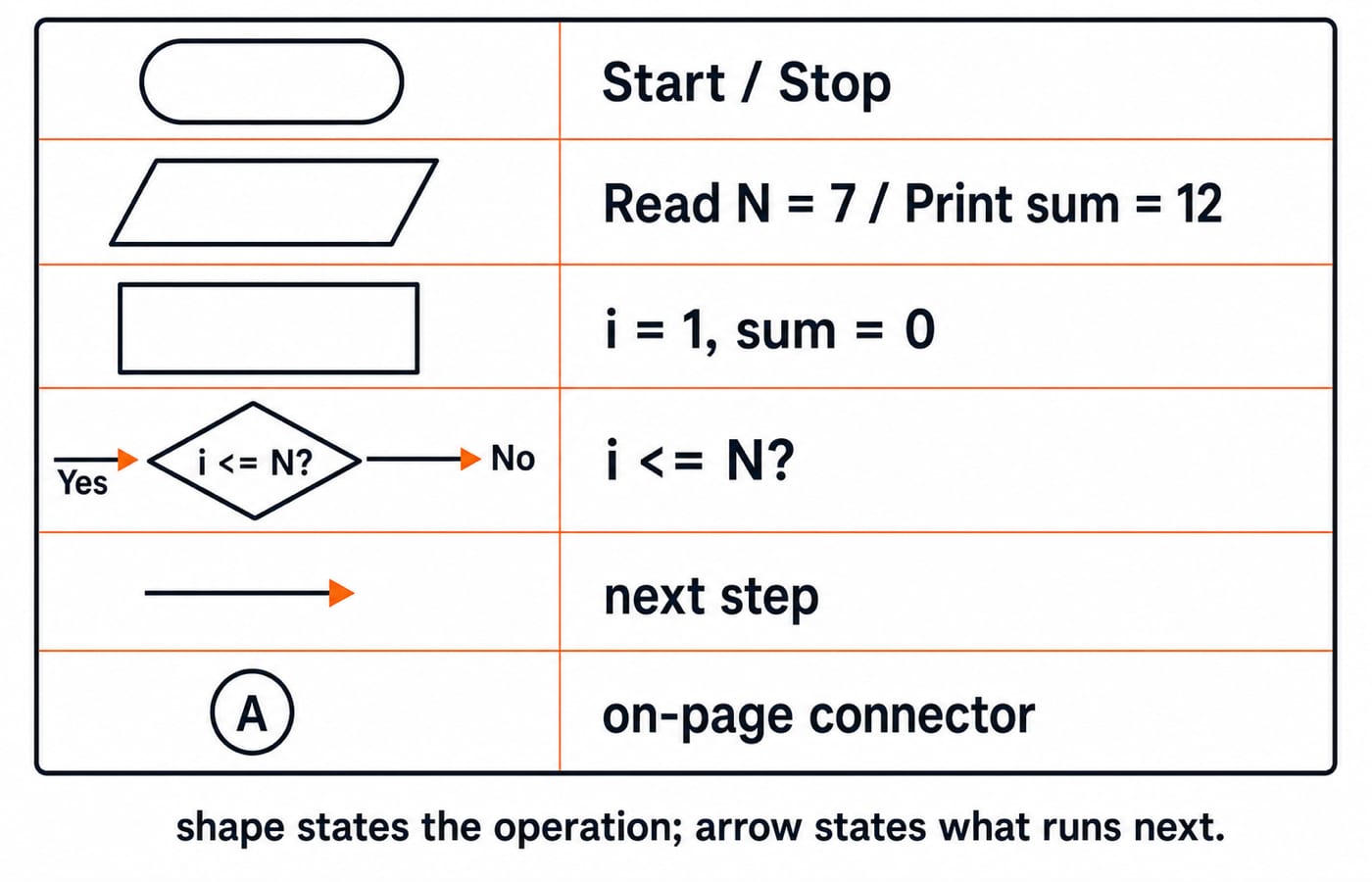
Each shape has one job. Keeping those jobs consistent makes the logic readable without guesswork.
Symbol | Shape | Purpose | Worked-example label |
|---|---|---|---|
Terminator | Oval or rounded capsule | Entry or exit |
|
Input/output | Parallelogram | Receive or display data |
|
Process | Rectangle | Assignment or calculation |
|
Decision | Diamond | Condition with labelled outcomes |
|
Flow line | Directed arrow | Next control step | Increment back to |
On-page connector | Small labelled circle | Continue a line elsewhere on the same page |
|
A diamond asks a condition, so it needs explicitly labelled Yes/No or True/False exits. A rectangle performs work but does not choose a branch. An off-page connector is a secondary symbol for continuing on another page, not decoration for a simple one-page chart. Use one notation throughout instead of changing a shape's meaning.
Flowchart control structures: sequence, selection and iteration
Control structure | What it does | Example in this chart |
|---|---|---|
Sequence | Runs operations once in arrow order |
|
Selection | Chooses one path from a condition | If |
Iteration | Returns to an earlier test | After incrementing |
The two selection paths must rejoin before i = i + 1. The range decision is a pre-test loop: Yes enters the body, while No leaves for output. If the increment existed only on the even path, an odd value would never change. Execution would keep testing i = 1, producing an infinite loop. The update must be unavoidable on every path that repeats.
Flowchart worked example: sum the even integers from 1 through N
The problem is precise: read a whole number N >= 0, add every even integer in the inclusive range 1 through N, and print the sum. For N = 7, the answer is 2 + 4 + 6 = 12. Here, i is the current candidate and sum is the accumulated total.
The full chart is:
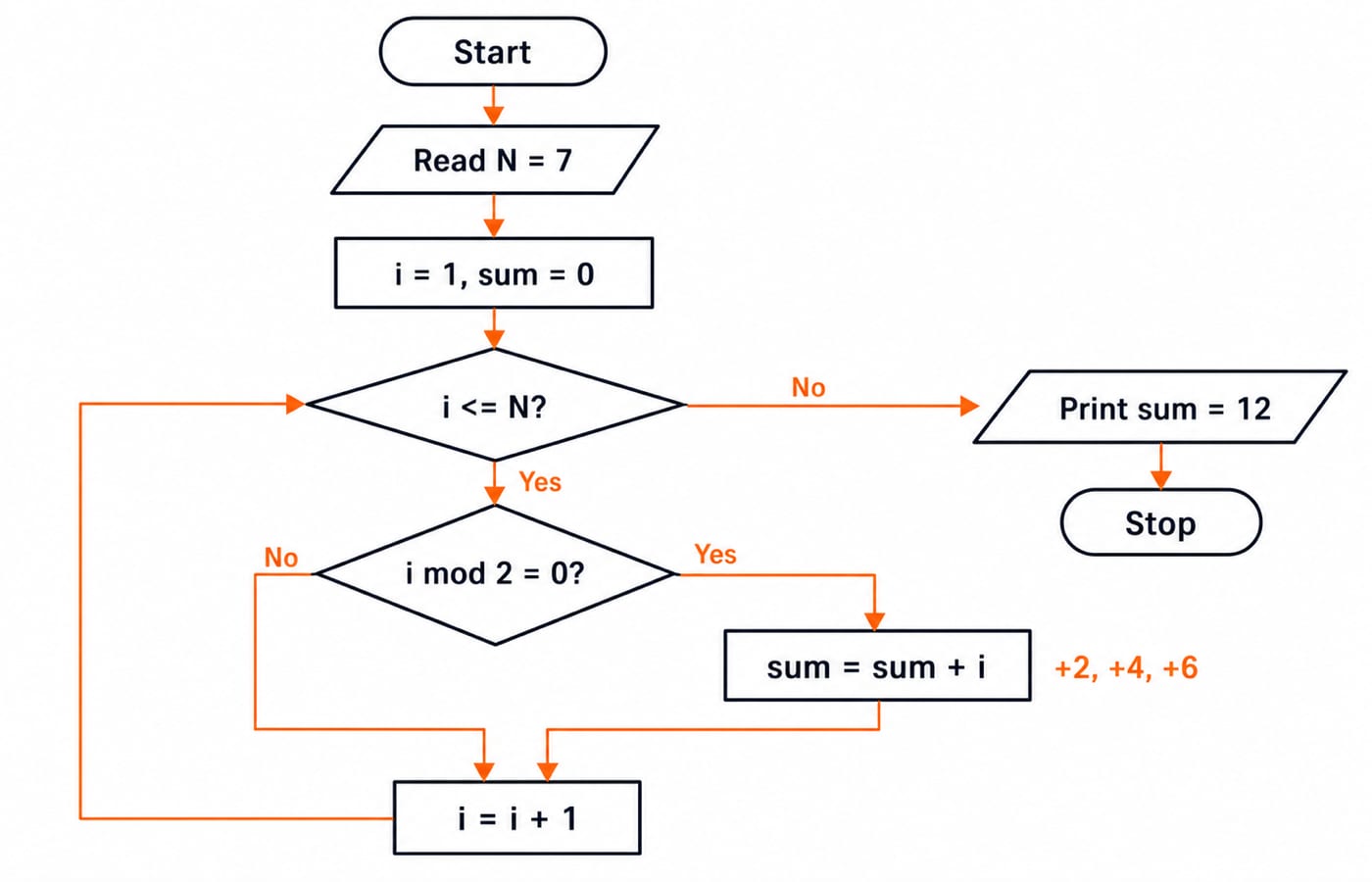
Start -> Read N -> i = 1, sum = 0 -> decision i <= N?
The No branch goes to Print sum -> Stop. The Yes branch goes to the decision i mod 2 = 0?. Its Yes branch performs sum = sum + i, while its No branch skips that process. Both branches rejoin at i = i + 1, then return to i <= N?.
The increment sits after the parity branches because both even and odd candidates must advance. Output sits after the range test becomes false because printing earlier would expose intermediate totals instead of the final result. The boundary input N = 0 reaches the range decision with i = 1, takes the first No branch and correctly prints 0.
Dry-run the flowchart and translate the same logic into C
Trace the arrows before writing code:
|
| Even? |
| Next |
|---|---|---|---|---|
1 | Yes | No | 0 | 2 |
2 | Yes | Yes | 2 | 3 |
3 | Yes | No | 2 | 4 |
4 | Yes | Yes | 6 | 5 |
5 | Yes | No | 6 | 6 |
6 | Yes | Yes | 12 | 7 |
7 | Yes | No | 12 | 8 |
8 | No | Not reached | 12 | Stop |
The range decision is checked eight times, the parity decision seven times and the addition runs three times. The C translation preserves that control flow exactly:
#include <stdio.h>

int main(void) {
    int n;
    int i = 1, sum = 0;

    scanf("%d", &n);
    while (i <= n) {
        if (i % 2 == 0) {
            sum += i;
        }
        i++;
    }
    printf("%d\n", sum);
    return 0;
}
Input 7 produces 12. The branch-to-code correspondence is a useful bridge into C Programming for Teaching CS Exams: Key Concepts. For a broader language-learning route, explore Coding and DSA Courses for Placements.
Flowchart mistakes: diagnose the wrong path, not just the wrong symbol
Defect | What goes wrong | Repair |
|---|---|---|
Missing | The decision path is ambiguous | Label both outgoing arrows |
Increment only after the even branch | The run gets trapped at odd | Rejoin both paths before |
Test uses | At | Use |
Print sits inside the loop |
| Print only after the range test is false |
An uninitialized sum makes every later addition unreliable. Crossed arrows and decorative connectors can also hide the true execution order. Before accepting the chart, dry-run the smallest boundary input (N = 0), an odd input (N = 7) and an even boundary (N = 8). These three cases expose most initialization, update and boundary defects.
Flowchart exam patterns: tracing, repair and reverse translation
Tracing questions ask for branch outcomes and loop state; repair questions target initialization, updates and boundaries. For reverse translation, mark the code's initialization, loop test, branch test, updates and output. Map assignments to rectangles, tests to diamonds and input or output to parallelograms; rejoin both parity paths before routing i++ back to the range test. For N = 7, the verified facts are: output 12, eight range tests, seven parity tests and three additions.
Use these short checks to test the logic:
Self-check 1: What changes for
N = 8?
Answer: The chart also adds 8, so the result is 2 + 4 + 6 + 8 = 20.
Self-check 2: What if the test becomes
i < NforN = 8?
Answer: The loop stops before testing 8, so the result remains 12.
Self-check 3: What if initialization starts at
i = 2forN = 7?
Answer: The result is still 12, but the useless first odd pass disappears.
For positive N, the loop performs N parity checks, so its work grows linearly. Time Complexity and Asymptotic Notation: Big-O develops that observation into formal analysis.
Flowcharts: the short version and the next step
Keep five rules in view:
Assign one meaning to each shape.
Label every decision exit.
Initialize variables before use.
Make every loop update unavoidable.
Test boundary, odd and even inputs.
For N = 7, inspect 1 through 7, add 2, 4 and 6, then print 12 when i becomes 8. Now redraw the chart from the problem statement without looking, translate it into C and compare the trace. If you want the surrounding sequence and more practice, continue with the C Language Course: Concepts, MCQs and Coding Questions.
Keep learning
File Handling in C: Modes, Streams, a Worked File-Position Trace and Exam Traps
Learn how C streams, fopen modes, EOF checks and file positions work, then follow a five-byte trace that makes common output questions predictable.
Updated 24 Oct 20266 min readC Programming & Data Structures
C Operators and Expressions Explained: Precedence, Types and Worked Traces
Learn a repeatable way to parse and evaluate C expressions. Follow typed calculations, bitwise and short-circuit traces, and common exam traps.
Updated 22 Oct 20266 min readC Programming & Data Structures
Undefined Behavior in C: Common Causes, Examples, and Fixes
Learn to find the first undefined operation in common C programs, repair the missing invariant, and verify the corrected result with worked examples.
Updated 14 Oct 20266 min readC Programming & Data Structures
Structures in C: Syntax, Member Access and Worked Examples
Learn how C structures group related values, then trace object and pointer access through complete, implementation-safe examples.
Updated 10 Oct 20266 min readC Programming & Data Structures