TypeScript vs JavaScript: What Changes Before Runtime and What Stays the Same
Follow one cart module from JavaScript coercion to TypeScript checks and erased output. Learn what types catch, what they miss, and when migration pays off.
KnowledgeGate Team
Exam prep & CS education
Updated 25 Oct 20266 min read
TypeScript does not add a browser runtime. It adds static checks to JavaScript source, erases its type-only syntax during compilation, and leaves the browser to execute ordinary JavaScript. One cart module exposes the practical consequences: coercion can hide a bad value, a checker can block an incompatible type before emission, and neither types nor compilation can replace runtime validation or tests.
TypeScript vs JavaScript: compare the four layers
Layer | JavaScript | TypeScript |
|---|---|---|
Authoring syntax |
|
|
Pre-run checking | Syntax tools can parse code, but value types are decided at runtime | A static checker reports many incompatible types before execution |
Emitted code | The source is already JavaScript | Type-specific syntax is removed during compilation |
Runtime | JavaScript values, browser APIs, and JavaScript rules | The same JavaScript values, browser APIs, and runtime rules |
TypeScript is a static type checker built around JavaScript. It is not a replacement browser language or a runtime framework. A syntax error means the code cannot be parsed. A type error means the checker found incompatible assumptions, such as a string where a number is required. A runtime error occurs while the emitted JavaScript executes.
Compile-time knowledge and runtime behaviour answer different questions. Language Design in Programming Languages explains syntax, types, scope, and evaluation across languages; TypeScript applies that broader distinction to a checker whose type-only syntax disappears before JavaScript runs. The checker can reject many inconsistent shapes, but it cannot prove every formula or business decision correct.
JavaScript browser module: a value can be wrong and still work
Start with cart.js:
const line = { sku: "KB-01", unitPrice: 2500, quantity: "2", discount: 300 };

export function payable(x) {
  return x.unitPrice * x.quantity - x.discount;
}

document.querySelector("#payable").textContent = `${payable(line)}`;
JavaScript coerces the string during multiplication. 2500 * "2" becomes 5000, then 5000 - 300 = 4700. The browser displays 4700, although quantity has the wrong type.
Change only quantity from "2" to "two". Multiplication now produces NaN, subtraction remains NaN, and the page displays NaN. The first payload is more dangerous because coercion lets faulty data look correct on the tested path. There is another runtime risk: if #payable is absent, querySelector returns null, and assigning textContent throws only when that line executes.
The same cart module in TypeScript: what the checker adds
Give the shared object a named shape and annotate the boundary:
type CartLine = {
  sku: string;
  unitPrice: number;
  quantity: number;
  discount: number;
};

const line: CartLine = {
  sku: "KB-01",
  unitPrice: 2500,
  quantity: "2",
  discount: 300,
};

export function payable(line: CartLine): number {
  return line.unitPrice * line.quantity - line.discount;
}
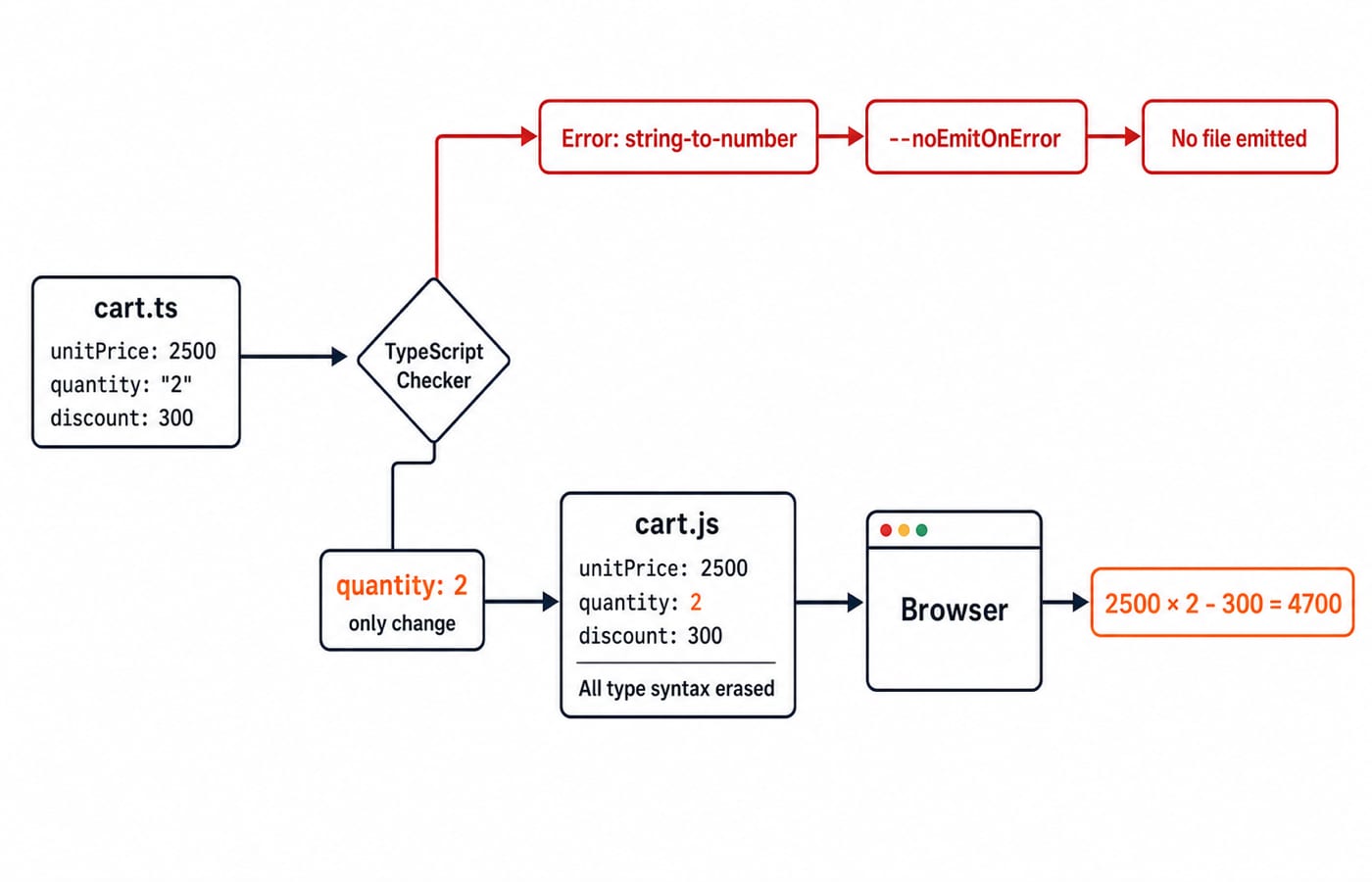
The checker reports that a string is not assignable to the numeric quantity field. Correct it to quantity: 2, and the calculation is 2500 * 2 - 300 = 4700.
Strict null checking also treats the page as uncertain:
const payableEl = document.querySelector<HTMLSpanElement>("#payable");
if (!payableEl) throw new Error("Missing #payable");
payableEl.textContent = `${payable(line)}`;
The query result is HTMLSpanElement | null, so the guard is required. TypeScript does not prove that the real page contains the element. It can infer local numeric results without annotations, while CartLine remains valuable at a module or API boundary because it documents a shape shared by multiple callers.
TypeScript compilation: follow the exact input to browser output
Run:
tsc cart.ts --strict --target ES2020 --module ES2020 --noEmitOnErrorWith quantity: "2", checking fails and --noEmitOnError prevents an output file. After changing the value to 2, the emitted JavaScript contains no CartLine type or parameter and return annotations:
const line = {
  sku: "KB-01",
  unitPrice: 2500,
  quantity: 2,
  discount: 300,
};

export function payable(line) {
  return line.unitPrice * line.quantity - line.discount;
}
The target can change the syntax form emitted for the selected JavaScript version. It does not add a TypeScript runtime, validate server data, change multiplication or subtraction, or alter browser APIs. The current TypeScript Handbook is the official source for static checking, type erasure, and preserved JavaScript runtime behaviour.
TypeScript limits: three traps that types do not solve
A logical error can still be well typed
Change the formula to unitPrice * quantity + discount. Every operand is numeric, so the checker accepts it. The result is 2500 * 2 + 300 = 5300, not the intended 4700. A unit test such as expect(payable(line)).toBe(4700) checks the business rule that the type system cannot infer.
A type assertion is not runtime validation
Consider untrusted input:
const line = JSON.parse(
  '{"sku":"KB-01","unitPrice":2500,"quantity":"two","discount":300}'
) as CartLine;
as CartLine performs no runtime check, so this value can still produce NaN. A runtime guard must confirm that the input is an object with a string sku, numeric unitPrice, integer numeric quantity > 0, and numeric discount. This payload must be rejected before calculation because quantity is a string.
Escape hatches reduce the available evidence
any, unchecked assertions, broad suppression comments, and missing library declarations can silence useful findings. They have practical uses, but each one moves responsibility back to tests, runtime validation, and error handling.
Debugging, libraries, and incremental adoption
JavaScript reveals the "two" problem only when that payload reaches payable. TypeScript reports the annotated "2" mismatch in the editor or build before the browser runs. Genuine runtime failures still need debugging, and source maps can map a JavaScript stack back to cart.ts.
Libraries also have two layers. JavaScript files provide runtime behaviour. Bundled declaration files, or a matching community declaration package, provide editor and checker knowledge. A missing declaration weakens checking and tooling, but does not change what the library's JavaScript does at runtime.
For a 12-file browser project, begin without rewriting everything. Enable allowJs and checkJs, add // @ts-check to cart.js, then convert cart.js and checkout.js. Leave the other 10 files as JavaScript and tighten strict settings as their boundaries become typed. JavaScript Basics teaches coercion, functions, arrays, objects, and asynchronous execution. At the TypeScript boundary, make shared shapes explicit, migrate the two risky modules, and leave JavaScript runtime behaviour unchanged. The Coding & Skills category provides the broader learning route.
TypeScript or JavaScript: decide from project friction, not fashion
JavaScript is reasonable for a learning exercise, a short browser script, or a prototype with local, easily tested data shapes. TypeScript earns its setup cost when cart-like objects cross API, state, component, and library boundaries, when several people refactor shared code, or when wrong property names and nullable values repeatedly escape review. The 12-file example is a migration plan, not a universal threshold.
Look for five signals:
Shared object shapes appear across modules.
Refactors are frequent and risky.
Multiple contributors change the same contracts.
External data crosses trust boundaries.
Modules are reused in several places.
If three or more cause real defects or slow changes, try a small TypeScript pilot at one boundary instead of rewriting the whole project. This is a practical rule of thumb, not a measured industry cutoff.
Interviews and coding tests often ask the same distinctions. Identify which line is rejected before emit, predict 4700, 5300, and NaN for the three variants, explain type erasure, and state why as CartLine is not validation.
TypeScript vs JavaScript: the short version and next step
TypeScript changes | TypeScript does not change |
|---|---|
Authoring syntax and earlier feedback | JavaScript runtime values and coercion rules |
Editor and refactoring information | Browser APIs and third-party runtime code |
Build configuration and declaration metadata | The need for tests and validation of untrusted input |
If you are still building confidence with variables, functions, DOM work, and events, start with the Complete JavaScript Course. If you are ready to apply JavaScript across a larger front-end and back-end project, use the MERN Stack course, then pilot TypeScript at one shared data boundary such as CartLine.
Keep learning

Types of Programming Languages MCQs: 12 Solved Classification Questions
Work through 12 solved programming-language classification questions. Each solution identifies the deciding axis, checks the options and explains the main trap.
Updated 24 Oct 20267 min readProgramming Languages Survey

Classes and Objects MCQs: 12 Solved OOP Questions with Explanations
Solve 12 classes and objects MCQs, check each explanation, and use a worked Java trace to separate instance state, constructors, overloading and nested classes.
20 Oct 20267 min readProgramming Languages Survey
Programming Language Syntax MCQs: 12 Solved Questions on Grammar, Tokens and Semantics
Solve 12 MCQs on syntax, tokens, pseudocode, C grammar and runtime behaviour. Each explanation identifies the rule and applies it.
Updated 16 Oct 20268 min readProgramming Languages Survey

Imperative Programming Structure and Flow Control MCQs: 12 Solved Questions
Test whether you can trace changing state, choose the right loop, read a flowchart, and follow event-driven or exceptional control paths through 12 solved MCQs.
12 Oct 20267 min readProgramming Languages Survey