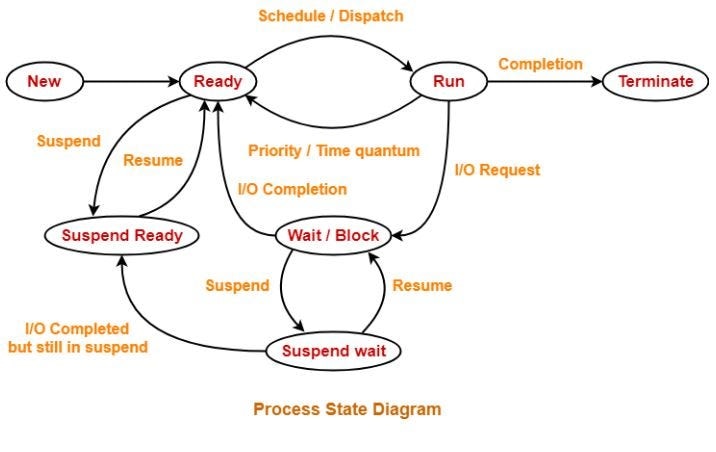
A process changes its state during its lifetime depending on CPU scheduling…
A process changes its state during its lifetime depending on CPU scheduling and I/O operations. In this context, answer the following:
a) Explain the different states of a process in an operating system.
b) Describe the transitions between process states and explain the events that cause a process to move from one state to another.
c) Illustrate the Process State Transition Diagram and explain the role of the scheduler and dispatcher in managing process execution.
Attempted by 4 students.
Show answer & explanation
1. Process States in Operating System
During execution, a process moves through different states depending on its execution progress and resource availability.
New State
The process is being created.
The operating system initializes the required resources.
Ready State
The process is loaded in main memory and waiting for CPU allocation.
Multiple processes may remain in the ready queue.
Running State
The process is currently executing on the CPU.
Only one process per CPU can be in the running state at a time.
Waiting (Blocked) State
The process waits for an I/O operation or event completion.
During this time, the CPU is allocated to another process.
Terminated State
The process has finished execution or has been aborted.
2. Process State Transitions
Processes move between states due to scheduling decisions and system events.
New → Ready: Process is admitted to the ready queue.
Ready → Running: Scheduler dispatches the process to the CPU.
Running → Waiting: Process requests an I/O operation.
Waiting → Ready: I/O operation completes.
Running → Terminated: Process finishes execution.
3. Role of Scheduler and Dispatcher
Scheduler
Selects a process from the ready queue for execution.
Determines the order of process execution based on scheduling algorithms.
Dispatcher
Transfers CPU control to the selected process.
Performs context switching and switches the CPU to user mode.