Study the screen shots given below. The number 500 has been given a two-column…
2017
Study the screen shots given below.
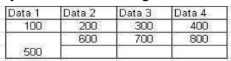
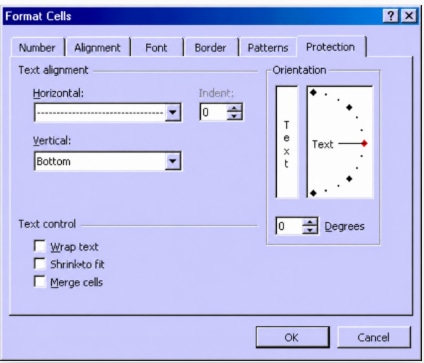
The number 500 has been given a two-column spacing. What option must be selected from the image above to achieve this?
Answer: B. Merge Cells — king at the small table spreadsheet snippet at the top: Row 1 contains four columns: Data 1, Data 2, Data 3, and Data 4. Row 2 contains individual cells with…
- A.
Shrink to fit
- B.
Merge Cells
- C.
Select two cells and press delete
- D.
Wrap Text
Attempted by 35 students.
Show answer & explanation
Correct answer: B
king at the small table spreadsheet snippet at the top:
Row 1 contains four columns:
Data 1,Data 2,Data 3, andData 4.Row 2 contains individual cells with values
100,200,300, and400.Row 3 contains cells with
600,700, and800spanning across under Data 2, 3, and 4.Crucially, the number
500is located in the bottom-left corner. It spans across the width of two columns underData 1andData 2space (or across the grid lines of the first two columns), creating a combined wider spacing for that single value.
To combine multiple adjacent cells into a single larger cell that spans across columns, the "Merge cells" feature under the Text control section of the Alignment tab in the Format Cells dialog box must be used.