Windows OS Architecture: Processes, Memory, NTFS and Worked Examples
Follow one coherent map of Windows OS architecture, then solve thread scheduling, virtual-address translation and NTFS allocation examples step by step.
KnowledgeGate Team
Exam prep & CS education
Updated 19 Sep 20266 min read
Generic OS definitions do not always explain what Windows actually schedules, what a handle represents, how a virtual address reaches RAM, or where NTFS fits below an application. Windows architecture follows an NT-family execution path, with priority scheduling, 4 KiB address translation, and 65 KiB file allocation. The earlier Windows Operating System: Architecture, Processes, Memory and Worked Examples follows API-to-kernel I/O, services, sessions, semaphores and access checks. Priority scheduling, a recoverable page fault and NTFS cluster allocation form a separate calculation path.
Windows OS architecture connects an application to hardware
Microsoft documentation describes an application calling a Windows API in user mode. System libraries prepare the request, then a controlled system call enters kernel mode. Executive managers coordinate objects, processes, threads, memory, I/O, security, and caching. The kernel handles scheduling, traps, and interrupts; drivers and the hardware abstraction layer reach devices. Privilege boundaries, not release-specific component names, form the useful conceptual map.
Layer | Example responsibility | Boundary crossed |
|---|---|---|
User application | Requests a file operation | Calls a user-mode API |
User-mode system library | Prepares a system service request | Makes a controlled system call |
System service/Executive | Coordinates objects, memory, I/O, and security | Dispatches into kernel facilities |
Kernel | Handles scheduling, traps, and interrupts | Invokes device-facing support |
Driver/HAL | Translates work for a device | Reaches hardware |
The distinction is privilege and failure radius. A user-mode process has a protected virtual address space. Kernel-mode code can execute privileged operations and access system resources, so a faulty driver can affect the whole machine. User mode is not simply "software", and kernel mode is not "hardware".
Windows processes contain resources, but threads receive CPU time
A process is a resource and protection container. It owns a virtual address space, access token, handle table, and one or more threads. A thread is a schedulable execution path with its own register state and stack. The central correction is simple: Windows schedules threads, not whole processes.
In the Windows NT architecture, a kernel object represents a managed resource. A process-local handle is a handle-table entry referring to that object with granted access. Suppose Process P has threads T1, T2, and T3, file handle 0x44, and event handle 0x48. Those numbers are illustrative and local to Process P. Another process may use 0x44 for a different object.
Operation | What changes |
|---|---|
Process creation | Creates a new protection and resource context, plus an initial thread |
Thread creation | Adds execution state while sharing the process resources |
Context switch | Changes the running thread and may change address-space context if the next thread belongs to another process |
Windows thread scheduling worked example: priority before round robin
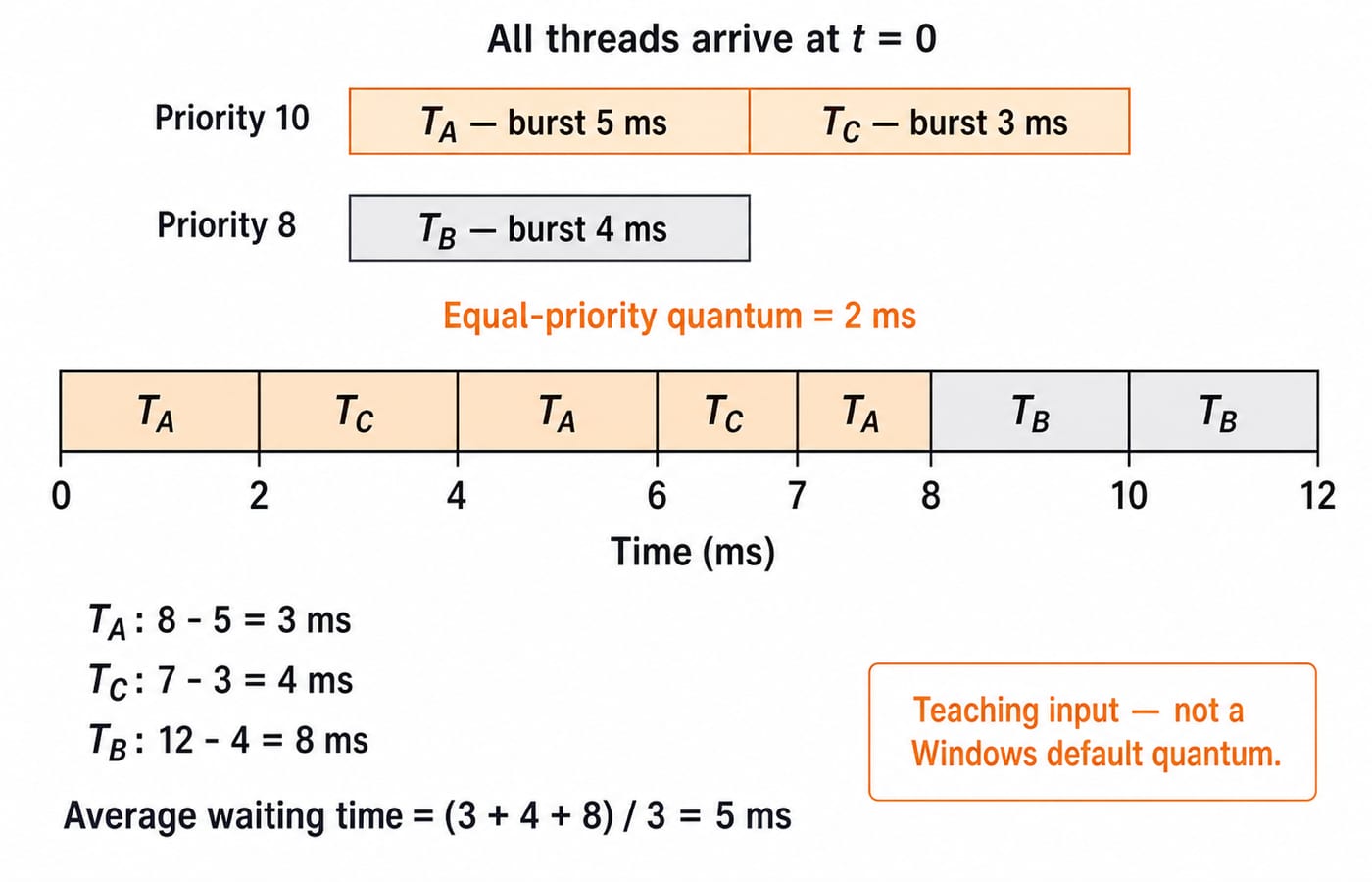
Windows scheduling is preemptive and priority-driven. Equal-priority ready threads can share a processor by time slices. The following is a simplified fixed-priority snapshot with one CPU, no dynamic boosts, affinities, multiprocessor effects, or release-specific default quantum. Its 2 ms quantum is a teaching input, not a Windows default.
Thread | Arrival | Priority | CPU burst |
|---|---|---|---|
T_A | 0 | 10 | 5 ms |
T_C | 0 | 10 | 3 ms |
T_B | 0 | 8 | 4 ms |
At priority 10, the ready-queue order is T_A then T_C. The exact trace is T_A 0-2, T_C 2-4, T_A 4-6, T_C 6-7, T_A 7-8, T_B 8-10, T_B 10-12. T_B is selected again at t=10 because no other priority-8 thread is ready, so its adjacent slices may also appear as one 8-12 block.
With every arrival at 0, completion time equals turnaround time:
T_A completes at 8. Turnaround is
8 ms; waiting is8-5=3 ms.T_C completes at 7. Turnaround is
7 ms; waiting is7-3=4 ms.T_B completes at 12. Turnaround is
12 ms; waiting is12-4=8 ms.Average waiting time is
(3+4+8)/3=5 ms.
The bursts total 5+3+4=12 ms, matching the continuous 0-12 schedule. Compare the portable algorithms in CPU Scheduling: FCFS, SJF, Round Robin and Priority.
Windows virtual memory worked example: page, offset, frame and fault
Every process uses virtual addresses. Page-table entries map resident virtual pages to physical frames; the working set is the resident subset in use. A legal non-resident committed page causes a recoverable page fault. An invalid access that cannot be resolved is different.
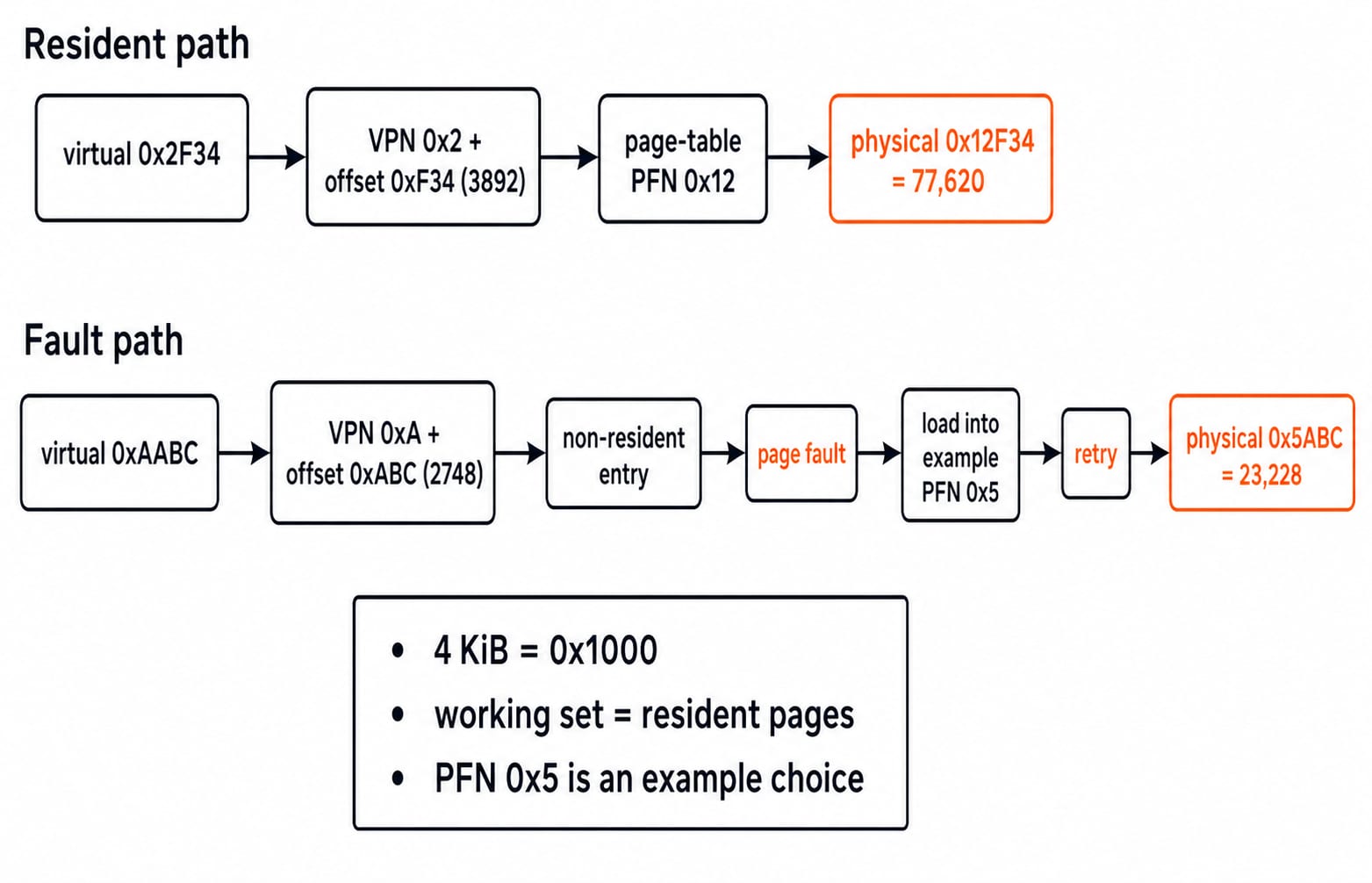
Use a simplified 16-bit address and 4 KiB = 0x1000 pages. For 0x2F34, the virtual page number is floor(0x2F34/0x1000)=0x2; the offset is 0xF34=3892. If VPN 0x2 maps to frame 0x12=18, then:
0x12*0x1000+0xF34=0x12F34
In decimal, 18*4096+3892=73,728+3,892=77,620.
Now access 0xAABC. Its VPN is 0xA, and its offset is 0xABC=2748. The entry begins non-resident, so the access faults. If this teaching model loads it into example frame 0x5, retrying produces 0x5ABC. In decimal, 5*4096+2748=20,480+2,748=23,228. Frame 0x5 is an example choice, not a Windows replacement policy. For TLB timing and replacement traces, use Virtual Memory in Operating Systems: Paging, TLB and Page Replacement with Worked Examples; this Windows trace isolates page-to-frame translation and one recoverable fault.
Windows I/O and NTFS connect handles to stored bytes
An application uses a file handle. The I/O manager routes the request through file-system and storage drivers. The cache manager may satisfy it from cached data or defer physical I/O. NTFS supplies metadata and allocation rules. A handle, file object, cached data, metadata and disk cluster are separate ideas.
On a hypothetical NTFS volume with 4 KiB clusters, an ordinary non-sparse, uncompressed file has logical size 65 KiB = 65*1024 = 66,560 bytes.
Clusters needed:
ceil(65/4)=ceil(16.25)=17.Allocated space:
17*4 KiB=68 KiB=69,632 bytes.Final-cluster slack:
68-65=3 KiB=3,072 bytes.
NTFS is a file system, not a CPU or disk-scheduling algorithm. Logical size can differ from allocated space. Sparse files, compression, and resident data can change real allocation, so the calculation applies only under the stated assumptions.
Windows OS questions test boundaries, traces and precise vocabulary
GATE-style concept questions transfer through portable ideas such as process versus thread, privilege modes, scheduling traces, paging, and file allocation. Windows interviews may additionally ask how those ideas appear as handles, access tokens, services, the Registry, working sets, drivers, and NTFS. The GATE CS Exam Preparation page provides the wider study route.
Claim | Correction |
|---|---|
Windows schedules processes | It schedules threads |
A handle is a memory pointer | It is a process-local reference with granted access |
A page fault is always a crash | A valid non-resident page can be made resident |
The page file is extra RAM | It is backing storage within a larger virtual-memory system |
NTFS decides CPU order | It manages file-system naming, metadata, and allocation |
Kernel mode means hardware | It is a privileged execution mode used by the kernel and drivers |
Two short traces test the same distinctions. If T_A blocks for I/O at t=1, the scheduler selects another ready thread because a process does not own the CPU as a unit. If a process presents handle 0x44, the OS resolves it through that process's handle table and checks granted access. It does not treat 0x44 as a global object address.
On scratch paper: identify the boundary being tested, write the given values, trace state changes in time order, and separate portable OS theory from Windows-specific vocabulary.
Windows OS architecture in the short version
Applications start in user mode.
Controlled calls enter kernel mode.
Processes own resource contexts.
Threads receive CPU time.
Virtual pages map to frames or trigger faults.
Handles name managed objects within a process.
I/O and NTFS carry file operations towards storage.
Check three results: 5 ms average wait, physical addresses 0x12F34 and 0x5ABC, and 68 KiB allocated for the 65 KiB file.
Once you can reproduce those traces without notes, use the GATE Test Series for timed topic-wise practice.
Final self-test: with a 4 KiB page size, split virtual address 0x7D2A.
Answer: VPN 0x7, offset 0xD2A=3370. A physical address cannot be completed until a page-table frame is supplied.
Keep learning
Paging and TLB Explained: Address Translation, EMAT and Exam Traps
Follow one virtual address from its VPN through the TLB to a physical frame, then calculate page-table size, TLB reach and effective memory access time.
Updated 4 Oct 20266 min readOperating Systems
Operating System Scenarios: Solve Scheduling, Concurrency, and Page Replacement
Learn one state-trace method for three common OS problem families, then apply it to complete Round Robin, concurrency, FIFO, and LRU examples.
Updated 29 Sep 20265 min readOperating Systems

Tower Research Hiring Process: Stage-by-Stage Prep for Quant and Dev Roles
Prepare for a Tower Research application without treating one online account as a universal process. Use this role-led map, worked drills, and seven-day plan.
Updated 25 Sep 20265 min readOperating Systems

Capital One Recruitment Process: Stage-by-Stage Guide for India Applicants
Prepare for a Capital One India application with a cautious five-stage map, worked technical and case drills, and a practical 14-hour schedule.
Updated 24 Sep 20265 min readOperating Systems