StringBuilder and StringBuffer in Java: Differences, Methods and Runnable Examples
Learn how Java's mutable text classes change character sequences, where their indexes matter, and when method-level synchronisation changes the right choice.
KnowledgeGate Team
Exam prep & CS education
Updated 29 Aug 20265 min read
String, StringBuilder, and StringBuffer can all hold text, but they do not change text in the same way. Repeated String concatenation produces new values, while the two builder classes mutate an existing character sequence. Choose the type based on whether text is fixed, built locally, or shared across threads. For a broader learning path, use the Java Programming course alongside these examples.
Why repeated String concatenation is the problem
Start with String word = "Java";. Calling word.concat(" 21"); and ignoring the returned value leaves word as "Java". Assigning word = word.concat(" 21"); makes the variable refer to the new value "Java 21". A String is immutable, so its existing character sequence cannot be edited.
Now compare this:
StringBuilder builder = new StringBuilder("Java");
builder.append(" 21");
System.out.println(builder.toString()); // Java 21
Here, append mutates the same builder. That makes StringBuilder the usual choice when a loop or a series of operations changes text repeatedly.
Use String for a fixed label such as "Submit". Use StringBuilder for a CSV row assembled field by field. Text shared and mutated by multiple threads may require StringBuffer, although avoiding shared mutable state can be a cleaner design.
StringBuilder from zero: constructors, indexes and core methods
Three constructors cover the beginner cases:
new StringBuilder()creates an empty builder.new StringBuilder("gate")starts with existing text.new StringBuilder(10)creates an empty builder with capacity 10.
In the last case, length is 0 and capacity is 10. After appending "Java", length is 4 and capacity remains 10.
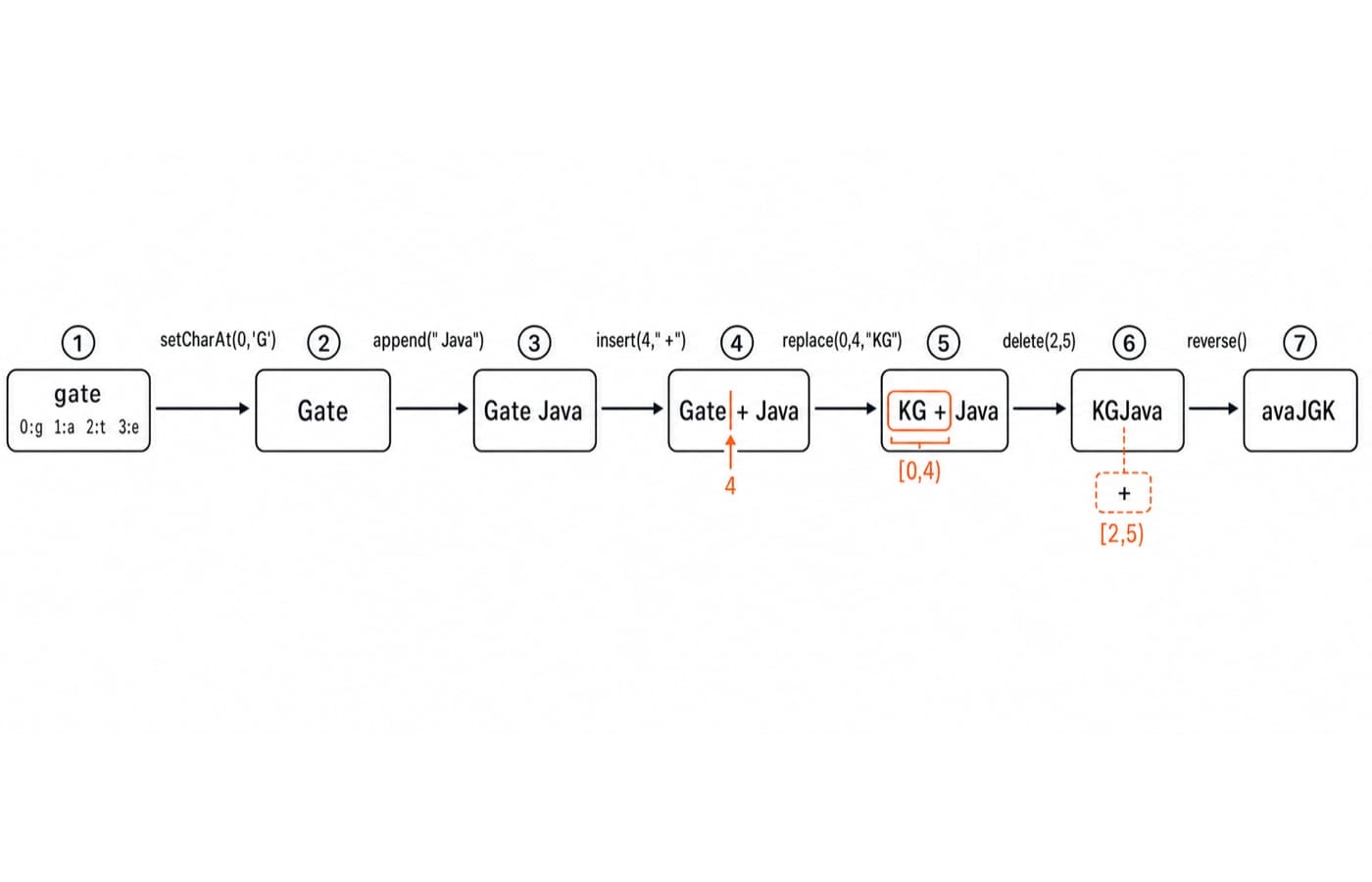
Run this exact mutation trace:
public class BuilderTrace {
    public static void main(String[] args) {
        StringBuilder sb = new StringBuilder("gate");
        System.out.println(sb);

        sb.setCharAt(0, 'G');
        System.out.println(sb);

        sb.append(" Java");
        System.out.println(sb);

        sb.insert(4, " +");
        System.out.println(sb);

        sb.replace(0, 4, "KG");
        System.out.println(sb);

        sb.delete(2, 5);
        System.out.println(sb);

        sb.reverse();
        System.out.println(sb);
    }
}
The output is:
gate
Gate
Gate Java
Gate + Java
KG + Java
KGJava
avaJGK
setCharAt changes one character, append adds at the end, and insert adds before an index. replace and delete use an inclusive start and exclusive end. Therefore, delete(2, 5) removes the three characters " + ". reverse then reverses the entire remaining sequence.
Length, capacity, conversion and content comparison
For StringBuilder b = new StringBuilder(10); b.append("Java");, b.length() is 4, b.capacity() is 10, and valid character indexes are 0 through 3. Capacity is reserved storage, not part of the text. Its exact future growth should not be treated as application logic.
Conversion creates a snapshot:
StringBuilder b = new StringBuilder("Java");
String snapshot = b.toString();
b.append("!");
snapshot remains "Java", while b.toString() becomes "Java!". APIs expecting a String need that toString() conversion.
There is also an equality trap. Given two separate builders, a = new StringBuilder("Java") and b = new StringBuilder("Java"), a.equals(b) is false. However, a.toString().equals(b.toString()) is true. StringBuilder does not define content equality the way String does.
StringBuffer and what thread-safe means here
StringBuffer is a mutable character sequence whose relevant mutating methods are synchronised. StringBuilder is unsynchronised, so prefer it for ordinary local construction. Use StringBuffer only when the same buffer really is shared across threads and method-level synchronisation matches the operation.
public class BufferThreads {
    public static void main(String[] args) throws InterruptedException {
        StringBuffer shared = new StringBuffer();
        Runnable task = () -> {
            for (int i = 0; i < 1_000; i++) {
                shared.append('x');
            }
        };

        Thread first = new Thread(task);
        Thread second = new Thread(task);
        first.start();
        second.start();
        first.join();
        second.join();

        System.out.println(shared.length());
    }
}
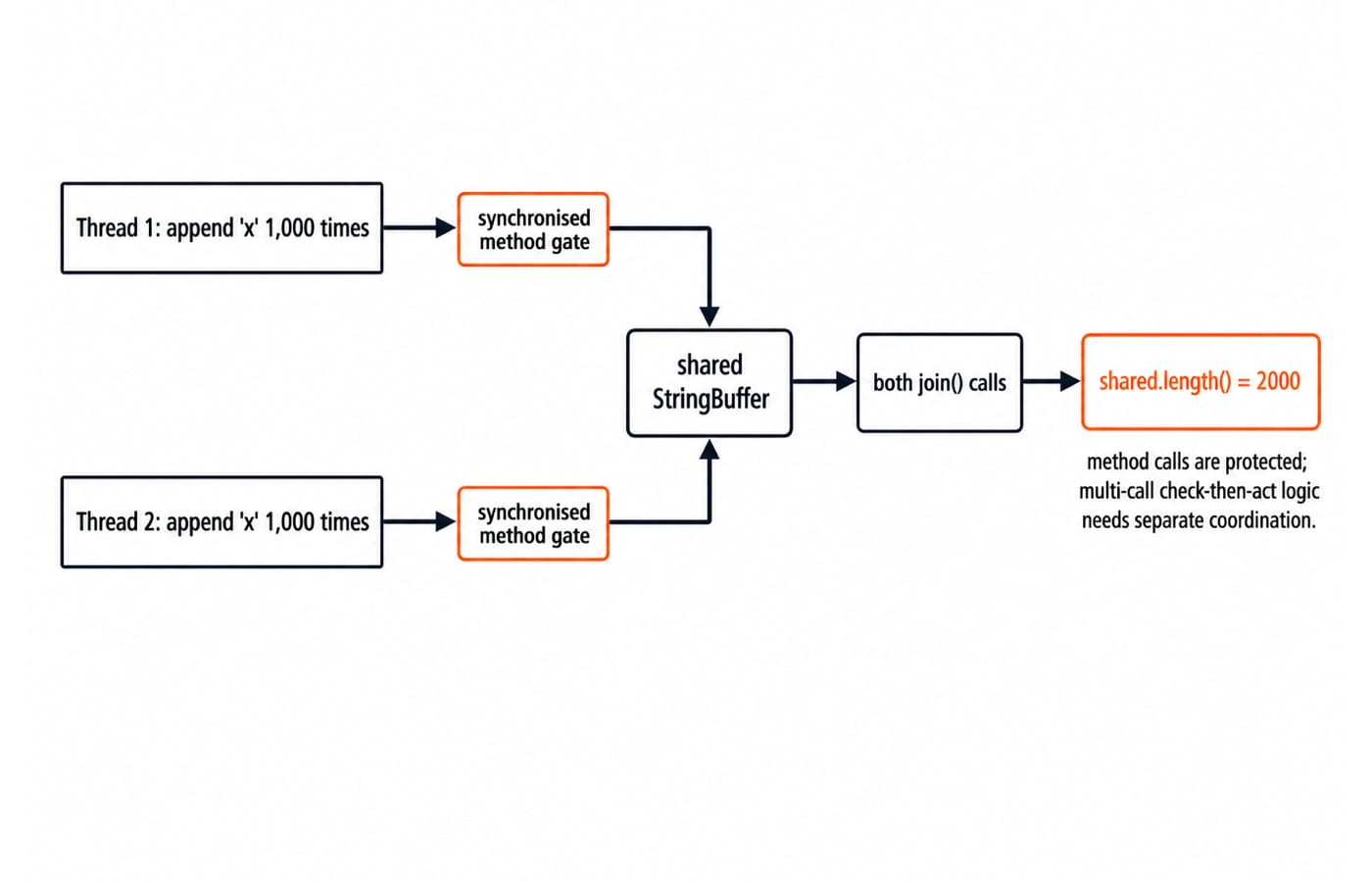
The program prints 2000: two threads each complete 1,000 protected append calls before the length is read. Character interleaving is not a useful ordering guarantee, even though every character is x here.
Synchronised individual methods do not make a compound action such as "check length, then append" atomic. Replacing the buffer with StringBuilder creates a data race, so its observed result is not reliable.
String vs StringBuilder vs StringBuffer: a decision table
Type | Mutable | Built-in method synchronisation | Best fit |
|---|---|---|---|
| No | Not applicable | Fixed or rarely changed text |
| Yes | No | Text built inside one thread or one method |
| Yes | Yes, at method level | A genuinely shared mutable character buffer |
An error code "E104" never changes, so use String. Joining 50 names into one comma-separated line inside a request handler calls for StringBuilder. If two worker threads append diagnostic markers to the same buffer, StringBuffer can protect individual appends, although a queue or separate per-thread builders may be cleaner.
The Coding & Skills category gives a broader route through programming fundamentals. As with choosing an algorithm or data structure, the right text type depends on the operations and sharing context.
Common errors and how to debug them
With new StringBuilder("Java"), charAt(4) throws StringIndexOutOfBoundsException because the last valid index is 3. Check 0 <= index && index < length() before single-character access.
Calling builder.toString() creates a String; it does not change the builder variable's type. Store a clearly named snapshot when needed. Also, builder.equals("Java") is false even if its characters read Java, so compare converted string content.
Range boundaries cause another common error. In "ABCDE", the indexes are 0:A, 1:B, 2:C, 3:D, 4:E. Calling delete(1, 4) removes indexes 1, 2, and 3, producing "AE"; index 4 is not removed.
A local StringBuilder is safe from races even when the application has many threads. The risk starts when the same instance is mutated concurrently. Conversely, StringBuffer does not make a multi-step algorithm atomic.
How assessments and interviews test the concept
Coding assessments and interviews commonly turn this topic into output tracing, index-boundary checks, type-choice reasoning, and the difference between method-level synchronisation and compound operations. Try these before reading the key:
Trace
new StringBuilder("CAT").append('S').insert(1, "R").deleteCharAt(2).For
new StringBuilder(8).append("Java"), give its length and capacity.Choose a type for repeatedly appending
25integers inside one method.
Solution key: Exercise 1 changes CAT to CATS, then CRATS, then CRTS. Exercise 2 has length 4 and capacity 8. Exercise 3 uses StringBuilder because construction stays within one method.
For more state-tracing practice, continue with dynamic programming explained through recurrence and tables and binary trees and binary search trees. They are separate topics, but both reward careful tracking of changing state and operations.
Short version and next step
String is immutable. StringBuilder is the default mutable choice for local, single-threaded text construction. StringBuffer adds synchronised methods for a shared mutable buffer, but it does not solve every concurrency problem.
Type and run BuilderTrace. Then change delete(2, 5) to delete(2, 4) and predict the new intermediate value KG Java and final reversed value avaJ GK before running it.
Continue with the Java Programming course for the beginner path above, then use DSA Using Java as a later problem-solving path.
Keep learning
Polymorphism in Java: Overloading, Overriding and Runnable Examples
Learn how Java chooses overloaded methods at compile time and overridden methods at runtime. Trace two complete programs, common traps and practice targets.
Updated 22 Oct 20266 min readJava

Packages and Access Modifiers in Java: Visibility Rules with Runnable Examples
Learn how Java package boundaries change member visibility. Compile a complete example covering public, protected, package-private and private access.
Updated 18 Oct 20265 min readJava
OOP Basics in Java: Classes, Objects and the Four Pillars with Runnable Examples
Connect Java's OOP syntax to design decisions with a complete Account example. Trace two objects through validation, overriding and runtime dispatch to exact output.
Updated 14 Oct 20265 min readJava
Classes and Objects in Java: Build and Trace Two Objects Step by Step
Build a Java Student class, create two independent objects, and trace fields, methods, aliases, null references, output, and common errors step by step.
Updated 10 Oct 20266 min readJava