

Encapsulation in Java: Build Safer Classes with Runnable Examples
Learn how a Java class can protect valid state through private fields, behaviour methods, validation before mutation, and defensive collection copies.
KnowledgeGate Team
Exam prep & CS education
Updated 30 Oct 20265 min read
Making a Java field private is easy. Keeping every operation valid is the real task. This runnable StudentResult accepts scores 68, 82 and 79, rejects 125, and finishes with best=82 and attempts=3. The object, not its caller, decides which state transitions are allowed. For broader structured coding and language paths, explore the Coding and Skill Development Courses category.
What encapsulation means in Java
Encapsulation puts state behind a class boundary and exposes operations that preserve its rules. Access control restricts who can name a member, data hiding conceals representation, and abstraction gives callers a smaller behavioural contract. The wider OOP context of classes and inheritance supplies the wider context; encapsulation specifically governs invariant-preserving mutation and defensive snapshots.
Our invariant is precise: every stored score is from 0 to 100, attemptCount equals the number of accepted scores, and bestScore is the maximum accepted score. No operation may directly create attemptCount=-2 or bestScore=125.
Modifier | Source-level member access |
|---|---|
| Its enclosing top-level class and nested classes |
package-private | Classes in the same package |
| The same package, plus subclasses subject to inherited-access rules |
| The widest access |
A Java module can further restrict whether a public type is accessible across module boundaries.
Why public fields create invalid objects
Consider a class that gives callers direct write access:
class BadStudentResult {
    public String studentId = "CS-1042";
    public int bestScore = 68;
    public int attemptCount = 1;
}

BadStudentResult result = new BadStudentResult();
result.bestScore = 125;
result.attemptCount = -2;
This compiles, but the object now claims an impossible score and a negative attempt count. Because callers can write each field independently, they can bypass validation and create contradictions.
A safer design keeps identity, score, count and history private. It accepts changes through recordAttempt(int score) and answers queries without exposing writable state. Private fields create the boundary; controlled methods enforce it.
Build a fully encapsulated StudentResult
Save the following Java 8 compatible program as EncapsulationDemo.java:
import java.util.ArrayList;
import java.util.Collections;
import java.util.List;

final class StudentResult {
    private final String studentId;
    private int bestScore;
    private int attemptCount;
    private final List<Integer> attemptScores = new ArrayList<>();

    StudentResult(String studentId, int firstScore) {
        if (studentId == null || studentId.trim().isEmpty()) {
            throw new IllegalArgumentException("studentId must not be blank");
        }
        requireValidScore(firstScore);
        this.studentId = studentId;
        this.bestScore = firstScore;
        this.attemptCount = 1;
        this.attemptScores.add(firstScore);
    }

    public void recordAttempt(int score) {
        requireValidScore(score);
        attemptScores.add(score);
        attemptCount++;
        bestScore = Math.max(bestScore, score);
    }

    public List<Integer> getAttemptScores() {
        return Collections.unmodifiableList(
                new ArrayList<>(attemptScores));
    }

    public String summary() {
        return studentId + " | best=" + bestScore
                + " | attempts=" + attemptCount;
    }

    private static void requireValidScore(int score) {
        if (score < 0 || score > 100) {
            throw new IllegalArgumentException(
                    "score must be between 0 and 100");
        }
    }
}

public class EncapsulationDemo {
    public static void main(String[] args) {
        StudentResult result = new StudentResult("CS-1042", 68);
        result.recordAttempt(82);
        result.recordAttempt(79);

        try {
            result.recordAttempt(125);
        } catch (IllegalArgumentException ex) {
            System.out.println("Rejected: " + ex.getMessage());
        }

        List<Integer> snapshot = result.getAttemptScores();
        try {
            snapshot.set(0, 0);
        } catch (UnsupportedOperationException ex) {
            System.out.println("Snapshot cannot be changed");
        }

        System.out.println(result.summary());
        System.out.println(result.getAttemptScores());
    }
}
The output is exactly:
Rejected: score must be between 0 and 100
Snapshot cannot be changed
CS-1042 | best=82 | attempts=3
[68, 82, 79]
Callers provide an identity and first score, then request later changes through recordAttempt. They cannot set the best score or count independently. requireValidScore centralises the range rule, and recordAttempt validates before changing any field. The final class prevents StudentResult from being subclassed; encapsulation does not otherwise require a final class.
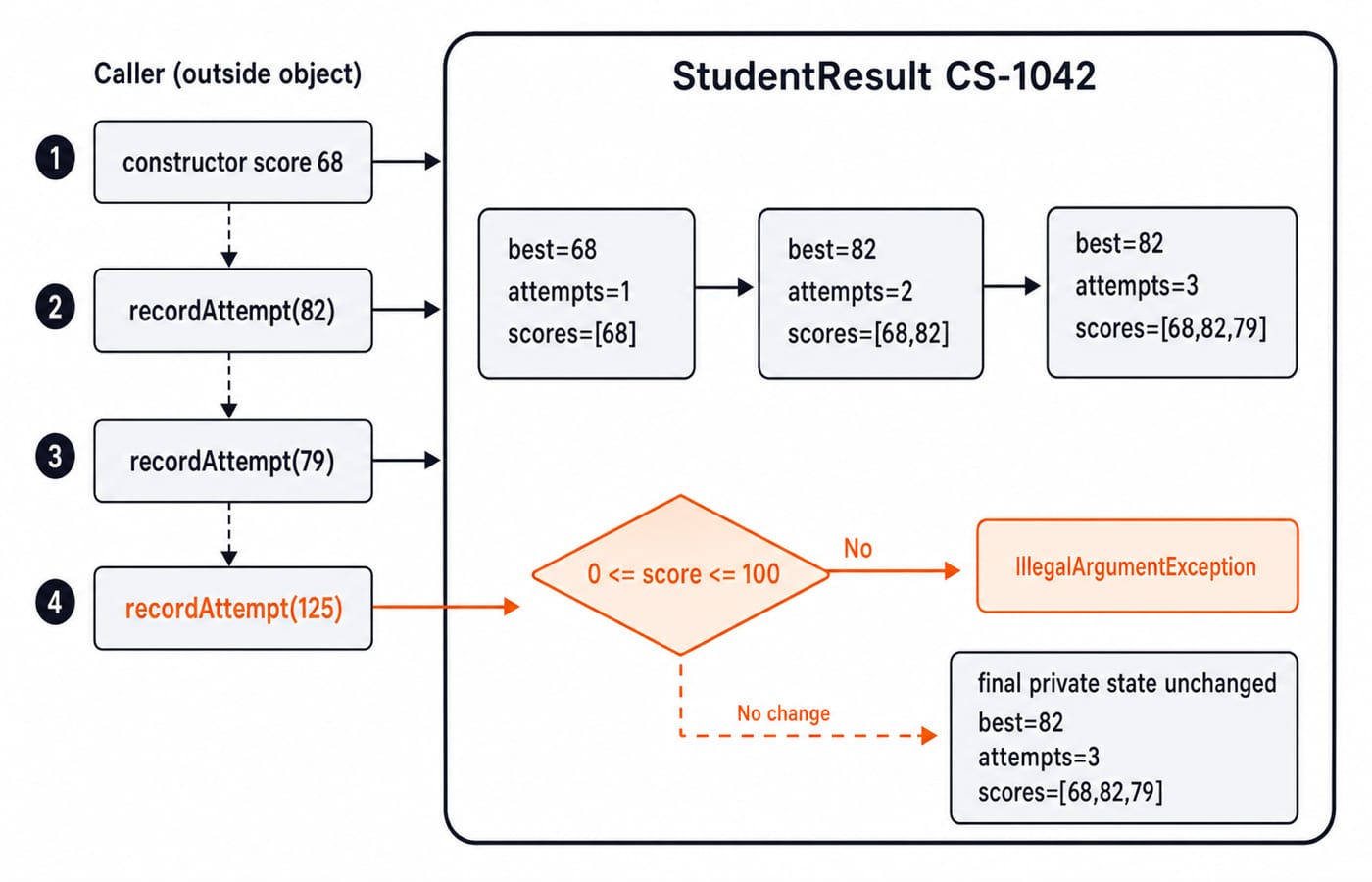
The constructor establishes (bestScore=68, attemptCount=1, scores=[68]). Recording 82 produces (82, 2, [68, 82]) because max(68, 82) = 82. Recording 79 produces (82, 3, [68, 82, 79]) because max(82, 79) = 82.
The score 125 fails validation before the list, count or best score changes. The final state therefore remains best=82, attempts=3, with scores [68, 82, 79]. The snapshot mutation fails separately, confirming that callers cannot rewrite the history returned by getAttemptScores().
Getters and setters are design choices, not a ritual
This class has no setBestScore(int) or setAttemptCount(int). Either could break the relationship among the best score, history and count. recordAttempt validates once and updates them together.
public void setBestScore(int score) { bestScore = score; }That setter recreates public-field access even though the field is private. Also note that final prevents studentId from being reassigned and attemptScores from referring to another list, but it does not freeze the list's contents. Add a setter only when one property can change independently and validly. Otherwise use a named operation with defined effects.
Encapsulate mutable collections with a defensive snapshot
Returning attemptScores directly would let a caller run clear(), leaving an empty history while attemptCount remained 3 and bestScore remained 82.
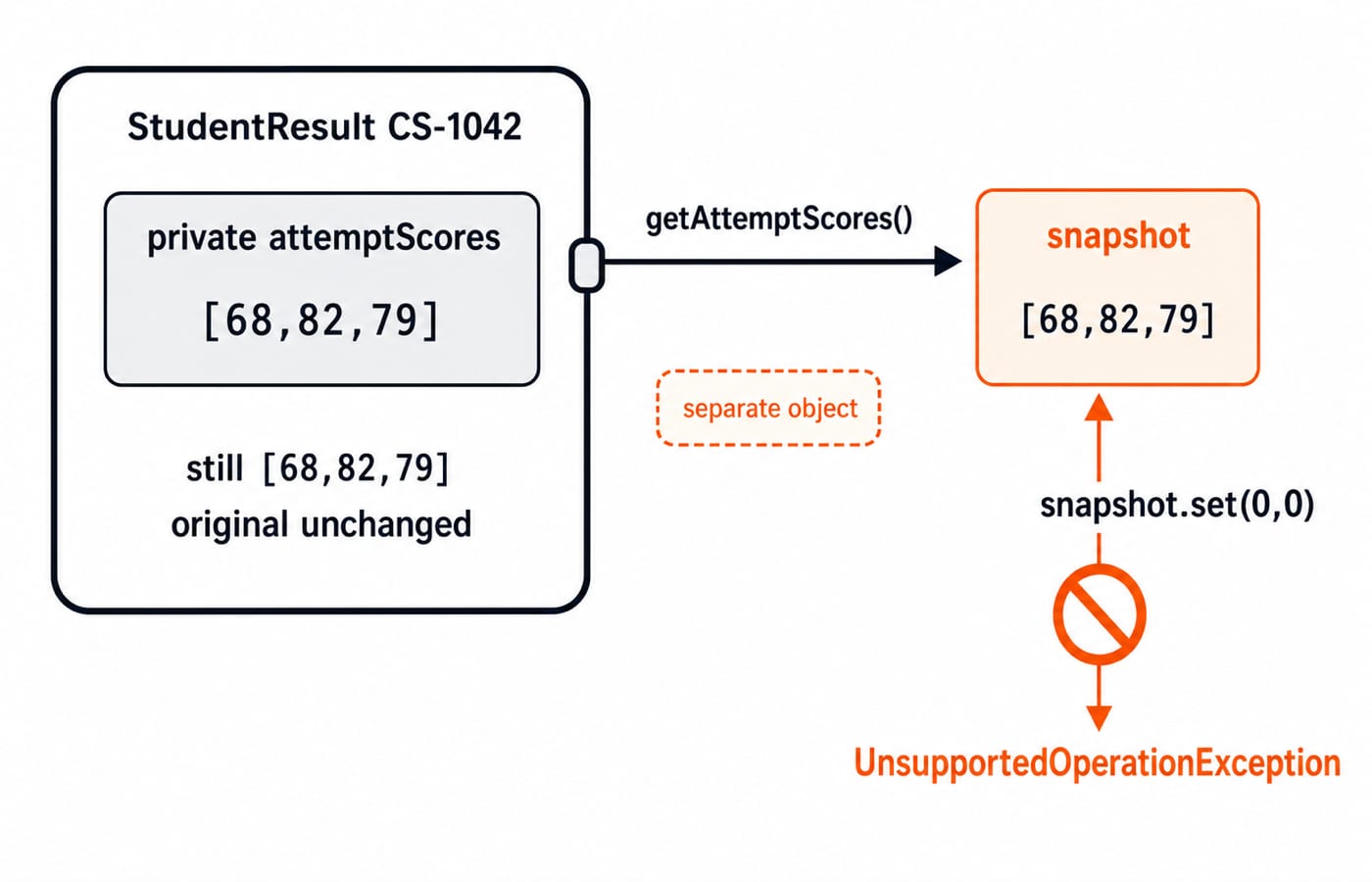
new ArrayList<>(attemptScores) creates a separate [68, 82, 79] list. Collections.unmodifiableList(...) blocks writes through that reference, so snapshot.set(0, 0) throws while the owned list stays unchanged.
Using only Collections.unmodifiableList(attemptScores) would return a read-only live view that reflected later additions. Copying first creates a snapshot. This copy is shallow, so mutable elements would also need protection. Java strings show how immutability is related to, but distinct from, encapsulation.
Common encapsulation mistakes and precise fixes
Mistake | Failure | Fix |
|---|---|---|
Private fields with unrestricted setters | Callers can still create invalid combinations | Expose validated behaviour methods |
Returning a mutable list or array | Callers mutate private state through an alias | Return an immutable value or defensive copy |
Validating after partial mutation | A rejected operation can leave changed state | Validate first, then update related fields |
Using | Subclasses depend on and can corrupt representation | Keep fields private and expose narrow methods |
Keeping rules only in UI or controller code | Another caller can bypass the rules | Enforce invariants inside the class |
Assuming | The list object can still be modified | Control mutation and return snapshots |
If attemptCount++ ran before validating 125, the exception would leave the count at 4 although only three scores were accepted. Validate first, then mutate. Queries such as summary() can also express intent better than many getters that expose representation details.
How exams and interviews test encapsulation
Expect access-modifier MCQs, compilation checks involving private members, output traces through validated methods, and design questions about unsafe setters. For example, result.bestScore = 90; fails to compile in main because bestScore is private.
Public methods do not weaken encapsulation by themselves. They form the controlled contract while representation stays hidden. For more syntax, MCQ and coding practice, continue with the Java Course: Concepts, MCQs and Coding Questions.
Encapsulation in Java: the short version and next step
Use this checklist when designing a class:
State the invariant.
Make fields private.
Establish valid state in the constructor.
Expose behaviour methods that validate before mutation.
Return immutable values or defensive snapshots.
The checksum is CS-1042 | best=82 | attempts=3: valid construction, validated behaviour, and no writable alias to private state.
When you are ready to connect this pattern with core syntax, OOP and later Java topics, use the Complete Java Course as the structured next route.
Keep learning
TreeMap and SortedMap in Java: Ordering, Range Views and Worked Examples
Learn how Java's TreeMap orders keys, answers floor and ceiling queries, exposes live range views, and handles comparator collisions through worked examples.
Updated 9 Nov 20266 min readJava
HashSet and TreeSet in Java: Runnable Examples and Key Differences
Learn how Java sets handle duplicates, ordering, navigation and custom objects through deterministic examples you can run and modify.
Updated 8 Nov 20265 min readJava
Java Garbage Collection Tutorial: Reachability, Leaks and Runnable Examples
Trace three connected objects, find exactly when each becomes eligible for collection, and repair a cache that keeps byte arrays reachable.
Updated 7 Nov 20266 min readJava

Java Memory Model Tutorial: Happens-Before, volatile and Safe Publication
Learn the Java Memory Model through exact start/join, volatile, synchronized, final-field and AtomicInteger examples, with clear happens-before guarantees.
Updated 6 Nov 20266 min readJava