Python Dictionary MCQs: 12 Solved Questions with Explanations
Attempt 12 published Python dictionary questions, then trace each answer through keys, values, mutations, aliases, and copies.
KnowledgeGate Team
Exam prep & CS education
Updated 31 Aug 20268 min read
Python dictionary MCQs often look like syntax recall, but their distractors test keys versus values, assignment versus augmented assignment, aliasing versus copying, and removal versus lookup. Attempt each question before checking the explanation, then trace the dictionary state line by line. Literal syntax and direct iteration establish the basics. Repeated keys, mutations, fromkeys(), aliases and shallow copies require a state trace. Continue with the Coding & Skills learning path when a rule needs more practice.
Related reading: Python comprehensions and Python collections and strings.
Dictionary MCQs 1-3: literals, key-value syntax, and mapping
A dictionary is a mapping of unique keys to values. It is written as key-value pairs inside braces, with a colon joining each key to its value and a comma separating pairs.
Question 1
The given declaration statement in Python Language belongs to which data type?
>>> Student = {'SUBJECT' : 'Compiler', 'Marks' : '50', 'Grade' : 'C'}A. Numbers
B. Sequence
C. Sets
D. DictionaryAnswer: D. Dictionary. The declaration has three colon-separated pairs: 'SUBJECT' : 'Compiler', 'Marks' : '50', and 'Grade' : 'C'. The outer braces and the key-value structure make Student a dictionary. Every displayed value is a string, including '50', but the value types do not change the type of the container.
Open Question 1 in the learning module.
Question 2
In Python dictionary key value pairs are separated by :A. :
B. #
C. !
D. $Answer: A. :. In {'name': 'Asha', 'score': 8}, each colon joins one key to its value. The comma separates one complete pair from the next. The symbols #, !, and $ do not perform this role in a dictionary literal.
Open Question 2 in the learning module.
Question 3
Which of the following is a mapped data type?A. List
B. Sets
C. Dictionary
D. BooleanAnswer: C. Dictionary. A mapping retrieves a value through its associated key, as in student['Marks'], rather than through a positional index. A list is a sequence, a set stores unique elements without key-value pairs, and a Boolean is the scalar value True or False.
Open Question 3 in the learning module.
Dictionary MCQs 4-5: get() and direct iteration
Keep two retrieval rules separate. d.get(key, default) returns the stored value when the key exists and uses the default only when the key is absent. A loop written as for x in d iterates over keys, not values or key-value pairs.
Question 4
Select the output for the given Python code from the following options
 D1={1:2,2:3,3:4}
 D2=D1.get(1,2)
print(D2)A. 2
B. 3
C. [2, 3]
D. {1:2,2:3}Answer: A. 2. Read the call as get(key=1, default=2). Key 1 exists and maps to 2, so the method returns the stored value and ignores the default, with no comparison between those two values required. In contrast, D1.get(9, 6) would return 6 because key 9 is absent. That distinction prevents the common default-value distractor from working.
Open Question 4 in the learning module.
Question 5
Consider the statements given below and then choose the correct output from the given options:
 D = {'S01': 95, 'S02': 96}
 for l in D:
print(l, end="#")A. S01#S02#
B. 95#96#
C. S01,95#S02,96#
D. S01#95#S02#96#Answer: A. S01#S02#. On the first iteration, l is 'S01'; on the second, it is 'S02'. Direct dictionary iteration yields keys in insertion order. Since end="#" adds # after every printed key, the values 95 and 96 never appear.
Open Question 5 in the learning module.
Dictionary MCQs 6-7: repeated keys and update()
Repeated keys and update() require tracing dictionary state after each operation. When Python encounters an existing key again, it simply overwrites that key's value. It cannot append a second entry with the same key.
Question 6
Considering the following dictionary:
 Num = {10: 'Ten', 100: 'Hundred', 10: 'Decimal'}
 print(Num)
What shall be the output of print(Num)?A. {10: 'Ten', 100: 'Hundred', 10: 'Decimal'}
B. {10: 'Ten', 100: 'Hundred'}
C. {10: 'Decimal', 100: 'Hundred'}
D. ErrorAnswer: C. {10: 'Decimal', 100: 'Hundred'}. Evaluate the literal from left to right. The state moves from {10: 'Ten'} to {10: 'Ten', 100: 'Hundred'}, and the later key 10 then changes its value to 'Decimal'. Key 10 stays in its original first position, so the final printed order matches option C. This is a simple overwrite, not duplicate-key storage.
Open Question 6 in the learning module.
Question 7
What will be the output of the following Python code ?
 D1={'A':5, 'B':7, 'C':9}
 D2={'B':5, 'D':10}
 D1.update(D2)
print(D1)A. {'A':5, 'B':5, 'C':9, 'D':10}
B. {'A':5, 'B':5, 'C':9, 'B':5, 'D':10}
C. {'A':5, 'C':9, 'D':10}
D. {'B':7, 'D':10, 'A':5, 'C':9}Answer: A. {'A':5, 'B':5, 'C':9, 'D':10}. Begin with D1 as A:5, B:7, C:9. Applying the first pair from D2 overwrites B:7 with B:5, giving A:5, B:5, C:9. The next pair adds the new key D:10; it does not duplicate B or remove A and C. Because an overwrite does not move a key, B remains before C.
Open Question 7 in the learning module.
Dictionary MCQs 8-10: removal methods, del, and missing-key errors
pop(key) removes a named key and returns its value. del d[key] removes the named entry without returning it, popitem() removes one key-value pair, and get() reads without removing. Augmented assignment must read the old value first, so it fails if the key is missing.
Question 8
Which of the following is an invalid method / function in a Python dictionary?A. popitem()
B. remove()
C. get()
D. pop()Answer: B. remove(). Dictionaries provide popitem(), get(), and pop(), but not remove(). That method belongs to container APIs such as lists and sets. To remove a dictionary key, use pop(key) when you need the returned value or del d[key] when you do not.
Open Question 8 in the learning module.
Question 9
Consider the following Python dictionary:
D = {1: 'Amar', 2: 'Akbar', 3: 'Anthony'}
Which of the following statements will perform an operation on dictionary D that is most similar to D.pop(2)?A. del D(2)
B. del D[2]
C. D.popitem(2)
D. D.remove(2)Answer: B. del D[2]. Calling D.pop(2) removes key 2, returns 'Akbar', and leaves {1: 'Amar', 3: 'Anthony'}. The statement del D[2] makes the same change to the dictionary but returns no value. The other options use invalid syntax or unsupported method calls. None removes key 2 with valid dictionary syntax.
Open Question 9 in the learning module.
Question 10
A dictionary is declared as:
 D = {10: "A", 25: "B", 32: "C", 54: "D"}
Which of the following is incorrect?A. D[20] = "E"
B. D[30] += 20
C. D[32] += '*'
D. D['X'] = 100Answer: B. D[30] += 20. Simple assignment can insert a new key, so options A and D are valid. Key 32 exists with the string value "C", so option C reads that value and writes back "C*". Option B must first evaluate the missing lookup D[30]; Python immediately raises KeyError before it can add 20.
Open Question 10 in the learning module.
Dictionary MCQs 11-12: fromkeys(), aliases, and shallow copies
The results depend on how a dictionary is constructed and which object each name refers to. Use separate object labels when tracing aliases and copies. Track names first, then mutate the referenced object.
Question 11
What will be the output of the following Python code?
P = ["A", "B"]
Q = (0, 1)
R = dict.fromkeys(P, Q)
print(R)A. {'A': (0, 1), 'B': (0, 1)}
B. {'A': 0, 'B': 1}
C. {'A': 1, 'B': 0}
D. ['A': (0, 1), 'B': (0, 1)]Answer: A. {'A': (0, 1), 'B': (0, 1)}. dict.fromkeys(P, Q) takes every element of P as a key and assigns the complete value Q to each one. It does not distribute tuple element 0 to key A and element 1 to key B. Both keys therefore map to (0, 1).
Open Question 11 in the learning module.
Question 12
Analyze the following Python code snippet and identify the correct output:
D1 = {1: 4, 5: 6, 3: 2, 1: 7}
D2 = D1
D3 = D1.copy()
D2.popitem()
D3[3] = 8
print(D1)A. {1: 7, 5: 6, 3: 2}
B. {1: 4, 5: 6, 3: 2, 1: 7}
C. {1: 7, 5: 6}
D. This program will raise an ErrorAnswer: C. {1: 7, 5: 6}. First collapse the repeated key: the literal creates object O1 as {1: 7, 5: 6, 3: 2}. D2 = D1 makes both names point to O1, while D3 = D1.copy() creates a separate top-level object O2 with the same entries. D2.popitem() removes the last inserted pair (3, 2) from O1, leaving {1: 7, 5: 6}. Finally, D3[3] = 8 changes only O2 to {1: 7, 5: 6, 3: 8}, so printing D1 still gives option C.
Question 12 is available from the Python dictionaries practice hub.
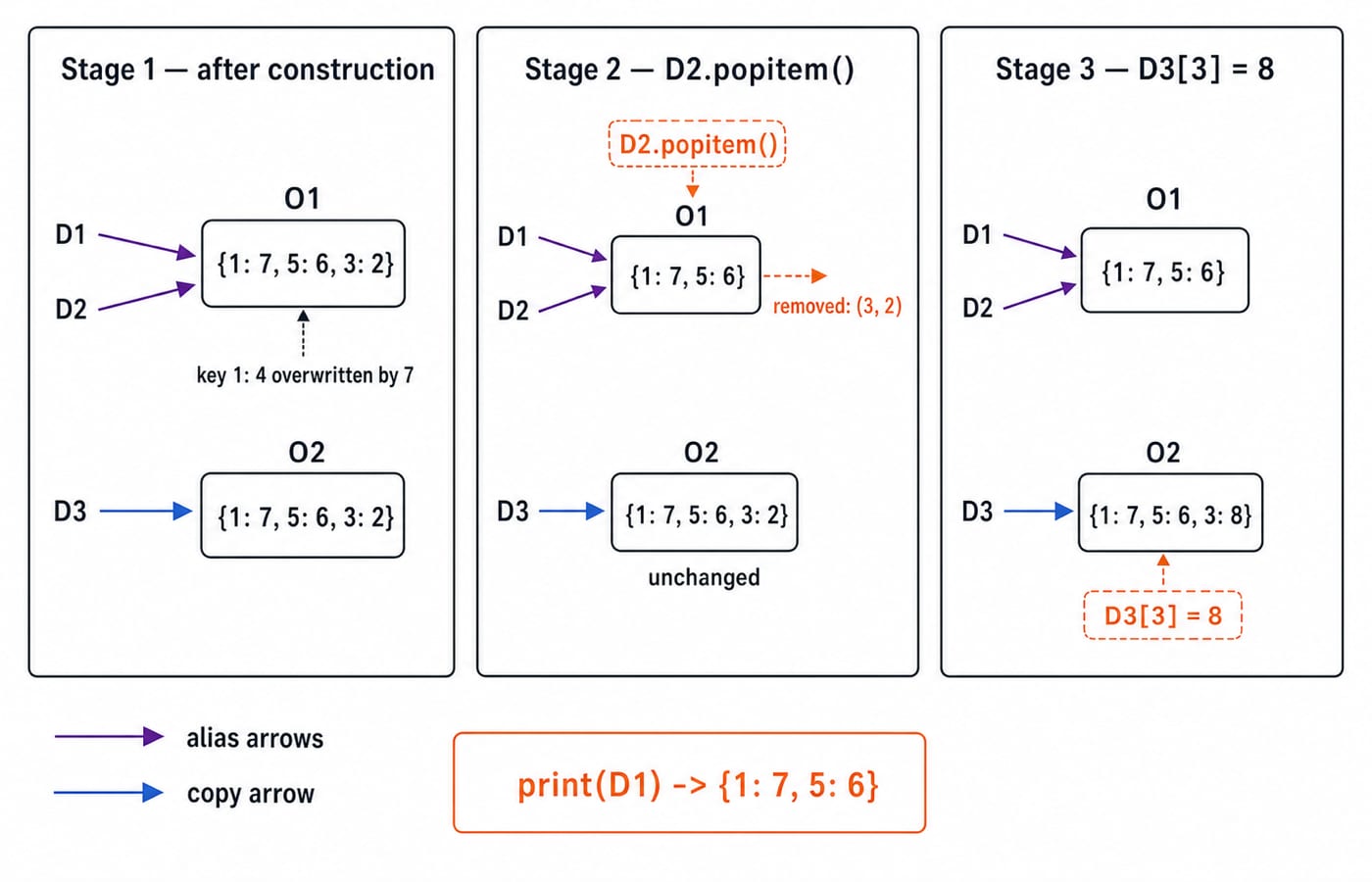
Python dictionary MCQ traps, answer map, and next practice step
The answer map is: 1 Dictionary; 2 colon; 3 Dictionary; 4 2; 5 S01#S02#; 6 {10: 'Decimal', 100: 'Hundred'}; 7 {'A':5, 'B':5, 'C':9, 'D':10}; 8 remove(); 9 del D[2]; 10 D[30] += 20; 11 {'A': (0, 1), 'B': (0, 1)}; 12 {1: 7, 5: 6}.
Use this six-step check on the next set:
Identify the keys and values.
Evaluate repeated keys from left to right.
Trace whether each operation reads, writes, or removes.
Test whether a key exists before augmented assignment.
Distinguish aliases from copies.
Write the dictionary after each mutation before choosing an option.
Repeat this routine until the state transitions feel automatic.
Next, practise Graph MCQs: 10 Solved BFS, DFS, Connectivity Questions and Binary Tree MCQs: 11 Solved BST, AVL, Heaps Questions. For a language-first route, use Python Course: Concepts, MCQs & Coding. To progress from Python containers to interview-oriented data structures, continue with DSA Using Python.
Keep learning
Ecosystem Fundamentals MCQs: 10 Solved Questions on Meaning and Ecological Organisation
Solve 10 ecosystem MCQs with clear explanations of ecological organisation, productivity, sustainability, environmental ethics, energy balance and conservation.
8 Sep 20268 min readMCQ Practice

Architectural and Component Design MCQs: 12 Solved Questions
Solve 12 bank MCQs on software architecture, component roles, repositories, MVC, DFDs, structure charts and UML, each with a direct worked explanation.
Updated 6 Sep 20268 min readMCQ Practice
C++ Constructors MCQs: 12 Solved Object-Initialization Questions
Solve 12 published C++ constructor questions by tracing object creation, copy semantics, arrays, access, virtual rules, and dynamic allocation.
Updated 5 Sep 20267 min readMCQ Practice

Clipping Algorithms MCQs: 11 Solved Cohen-Sutherland and Cyrus-Beck Questions
Solve 11 clipping questions with fresh explanations, checked outcodes, line classifications, boundary intersections and a practical revision routine.
Updated 3 Sep 20268 min readMCQ Practice