

Annotations in Java Tutorial: Custom Metadata, Retention and Reflection Examples
Create a custom Java annotation from zero, inspect its values through reflection, and learn how retention, targets and defaults control the result.
KnowledgeGate Team
Exam prep & CS education
Updated 3 Nov 20265 min read
An annotation looks like a comment beginning with @, but Java can give that text a precise structure for compilers, tools and programs to inspect. A missing retention policy can even make a reflection call return null. Java annotations have a precise structure, can be retained for reflection, and require deliberate choices about declarations, targets and defaults.
What annotations mean in Java
An annotation is metadata attached to a program element. // review this method is source text for a person. @Override asks the compiler to check an override, while @Audit("refund") can be read by reflection code.
The annotation itself does not automatically change behaviour. Its consumer supplies the effect: a compiler, build tool, framework, annotation processor or your reflection code.
Keep declaration and use separate:
@interface Audit { ... }declares a metadata type.@Audit("refund")uses that type and attaches values to an allowed element.
Oracle's Java SE 21 JLS section 9.6 defines the declaration syntax and legal member types. Built-in annotations communicate code conditions; meta-annotations such as @Retention and @Target control custom annotations; reflection can read only metadata available at runtime. The Java Course places this model inside the wider language sequence.
Declare a custom @Audit annotation
Create one file named AuditDemo.java:
import java.lang.annotation.ElementType;
import java.lang.annotation.Retention;
import java.lang.annotation.RetentionPolicy;
import java.lang.annotation.Target;
import java.lang.reflect.Method;

@Retention(RetentionPolicy.RUNTIME)
@Target({ElementType.TYPE, ElementType.METHOD})
@interface Audit {
    String value();
    int risk() default 1;
    String[] reviewers() default {};
}

@Audit(value = "settlement", risk = 3,
       reviewers = {"Asha", "Ravi"})
class PaymentService {
    @Audit("refund")
    public void refund(int orderId) {
        System.out.println("refund order=" + orderId);
    }
}

public class AuditDemo {
    public static void main(String[] args)
            throws NoSuchMethodException {
        Audit classAudit =
            PaymentService.class.getAnnotation(Audit.class);

        Method method = PaymentService.class
            .getDeclaredMethod("refund", int.class);
        Audit methodAudit = method.getAnnotation(Audit.class);

        System.out.println("class action=" + classAudit.value()
            + ", risk=" + classAudit.risk()
            + ", reviewers="
            + String.join("|", classAudit.reviewers()));
        System.out.println("method action=" + methodAudit.value()
            + ", risk=" + methodAudit.risk()
            + ", reviewers=" + methodAudit.reviewers().length);

        new PaymentService().refund(1042);
    }
}
value() is required, and its special name permits the shorthand @Audit("refund"). risk() defaults to 1, while reviewers() defaults to an empty array. These members are declarations without method bodies, not mutable object fields. A member without a default must be supplied at every use.
The class supplies all three values. The method supplies only value, so it receives both defaults. @Target({TYPE, METHOD}) permits these two placements.
Read annotations with reflection
Compile and run without a framework or external dependency:
javac AuditDemo.java
java AuditDemo
The exact output is:
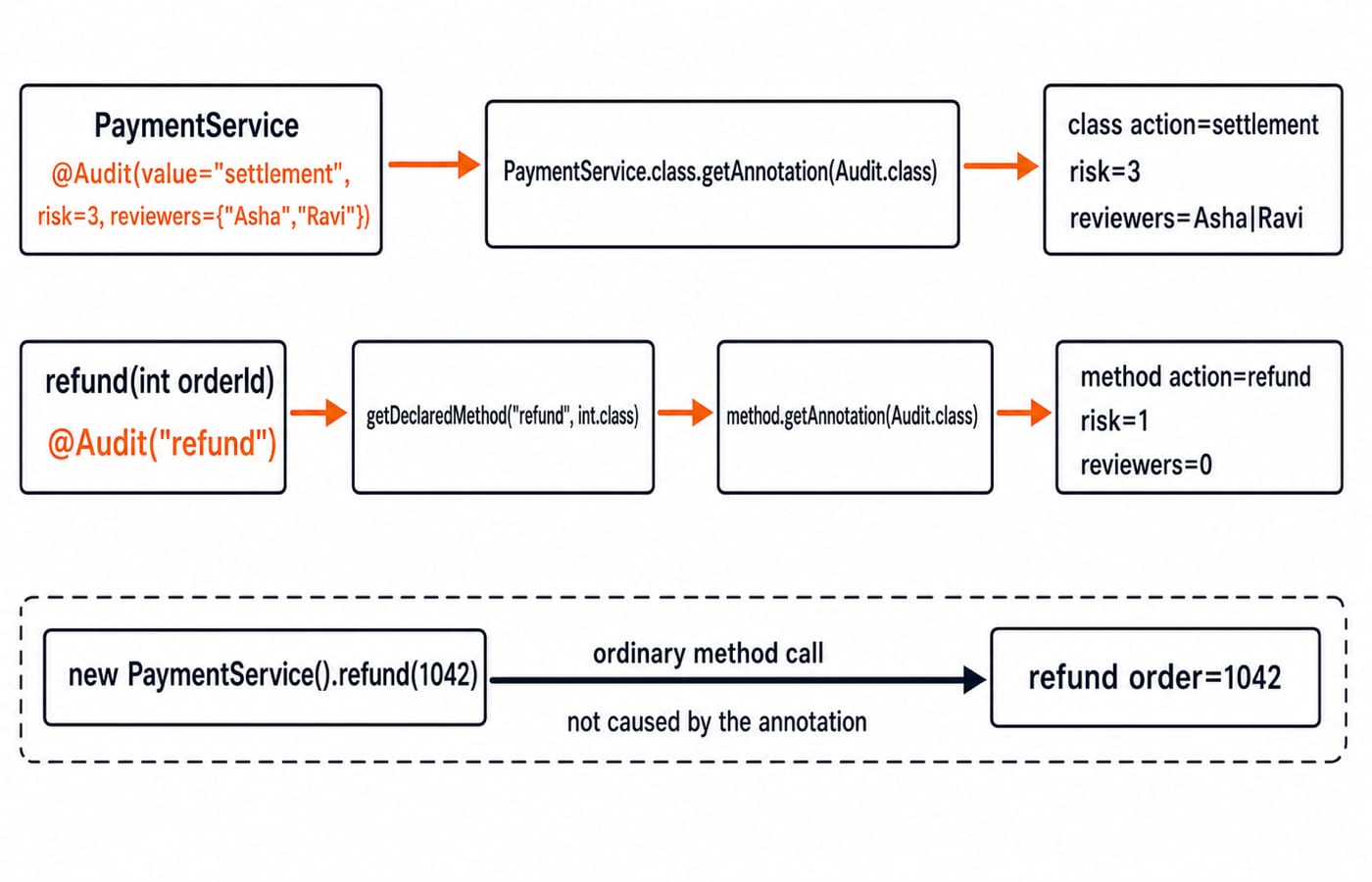
class action=settlement, risk=3, reviewers=Asha|Ravi
method action=refund, risk=1, reviewers=0
refund order=1042
The class use explicitly supplies settlement, 3, Asha and Ravi. The method use explicitly supplies refund; 1 and the zero-length array come from defaults. The Java SE 21 AnnotatedElement documentation defines when getAnnotation can expose an annotation.
Notice the final call. new PaymentService().refund(1042) invokes the method normally. Reading @Audit did not invoke it.
Retention policies: SOURCE, CLASS and RUNTIME
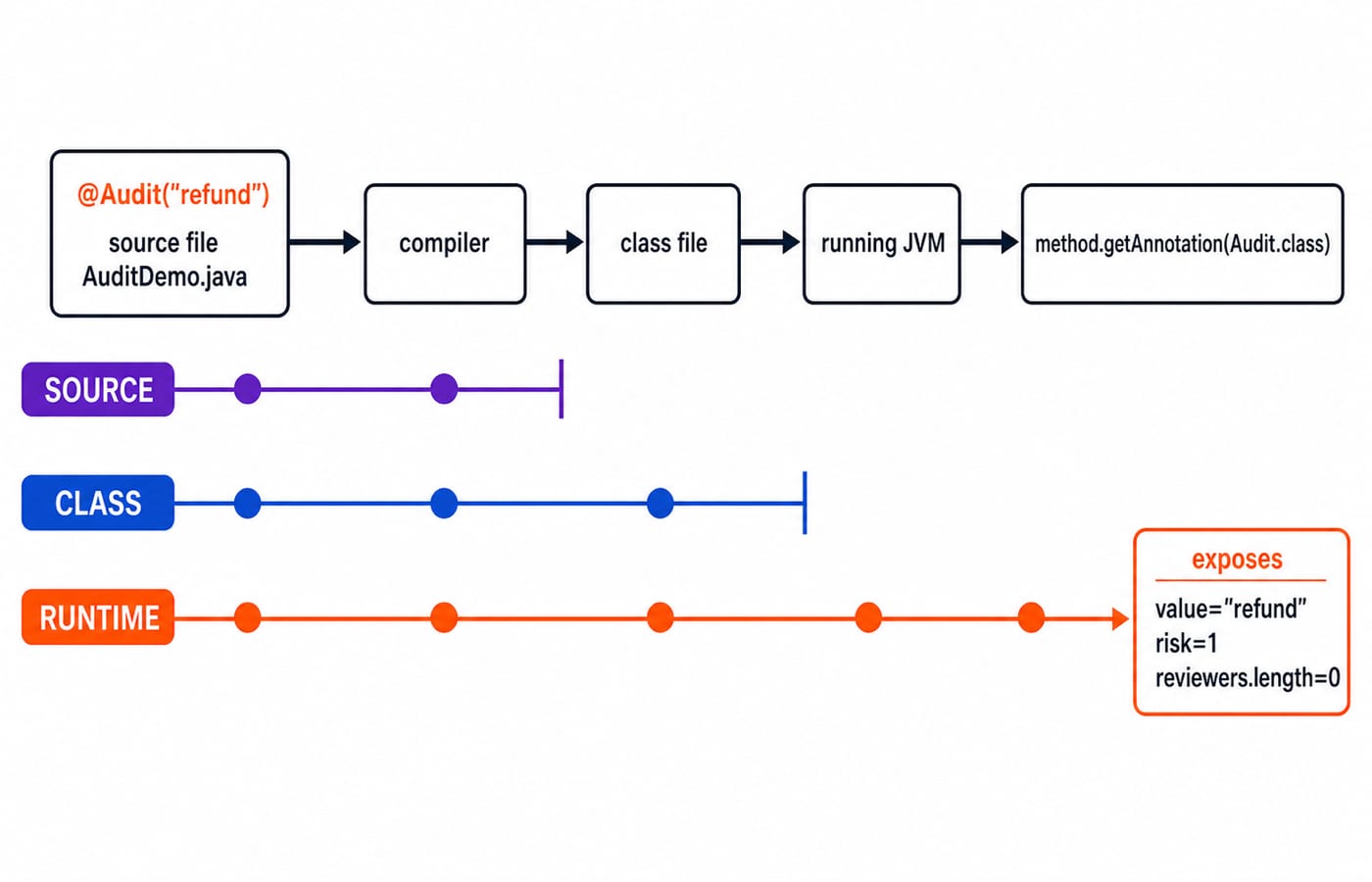
The Java SE 21 annotation package documents these retention meanings:
Policy | After compilation | Visible through reflection | Typical consumer |
|---|---|---|---|
| Discarded by the compiler | No | Source or compiler tool |
| Recorded in the class file, but not required to be retained by the VM at runtime | No | Bytecode tool |
| Recorded in the class file and retained by the VM | Yes | Runtime framework or reflection |
With RUNTIME, both calls return Audit objects. Change only the declaration to RetentionPolicy.CLASS, and PaymentService.class.getAnnotation(Audit.class) returns null. Calling classAudit.value() then throws NullPointerException.
Use RUNTIME when runtime inspection is intended, and null-check when absence is valid. If an annotation declaration has no @Retention, the default is CLASS, not RUNTIME.
@Target and built-in annotations that prevent mistakes
ElementType.TYPE allows @Audit on PaymentService; ElementType.METHOD allows it on refund. This placement fails to compile because PARAMETER is absent:
public void refund(@Audit("id") int orderId) { }Keep the annotation off parameters, or deliberately add ElementType.PARAMETER when the design needs parameter metadata.
@Override catches a different mistake. In a class extending Object, @Override public String toSting() fails because no superclass method has that signature. Correcting it to toString() makes the override valid. OOP for Teaching CS Exams: Classes and Inheritance develops that inheritance context.
@Deprecated marks an API from which callers should move away. @SuppressWarnings("unchecked") suppresses that named compiler warning within its scope. Prefer the narrowest justified suppression and fix the type-safety problem where possible. Neither annotation rewrites business logic.
Common annotation errors and their repairs
Reflection returns
null: chooseRUNTIMEfor this program, and check fornullwhere metadata is optional.Target mismatch: align
@Targetwith actual placements.Missing required member: bare
@Auditfails. Write@Audit("refund")or declare a deliberate default.
Annotation values also have restrictions. This fails because level is not a constant variable:
class RefundService {
    static int level = 3;

    @Audit(value = "refund", risk = level)
    void refund() { }
}
This form is valid:
class RefundService {
    static final int LEVEL = 3;

    @Audit(value = "refund", risk = LEVEL)
    void refund() { }
}
Valid member types are primitives, String, Class, enum types, annotation types and one-dimensional arrays of those types. null is illegal. Most importantly, metadata is not execution: @Audit("refund") neither logs a refund nor blocks a risk level. Some consumer must read it and act.
How interviews and tests assess Java annotations
Interview and objective-test questions commonly probe declaration versus use, retention, legal targets, defaults, reflection output and null diagnosis. Practise by changing one element of the runnable program at a time and predicting both compilation and output.
Change the method use to
@Audit(value="refund", risk=4). Output becomesmethod action=refund, risk=4, reviewers=0.Remove the class
reviewersargument. The joined string is empty, so the class line ends withreviewers=.Try
@Audit("id") int orderId. The missing target isElementType.PARAMETER.Change retention to
CLASSand print"class annotation visible=" + (classAudit != null). Output isclass annotation visible=false.
For the behaviour check, change only the method metadata from @Audit("refund") to @Audit("cancel"). The metadata line becomes method action=cancel, risk=1, reviewers=0, but the unchanged method call still prints refund order=1042.
Annotations in Java, the short version and next step
Declare metadata with @interface. Use value shorthand only when it reads clearly, choose @Target deliberately, select RUNTIME only for runtime inspection, read optional annotations safely, and remember that a consumer supplies behaviour.
Type AuditDemo.java, verify all three original lines, complete the four exercises, then explain why CLASS changes reflection but does not stop refund(1042) from running. Continue with DSA using Java once core syntax and objects are comfortable, use Coding & Skills to explore the broader catalogue, and revise String Handling in Java: Pool, Immutability and Interview Questions next.
Keep learning
TreeMap and SortedMap in Java: Ordering, Range Views and Worked Examples
Learn how Java's TreeMap orders keys, answers floor and ceiling queries, exposes live range views, and handles comparator collisions through worked examples.
Updated 9 Nov 20266 min readJava

HashSet and TreeSet in Java: Runnable Examples and Key Differences
Learn how Java sets handle duplicates, ordering, navigation and custom objects through deterministic examples you can run and modify.
Updated 8 Nov 20265 min readJava
Java Garbage Collection Tutorial: Reachability, Leaks and Runnable Examples
Trace three connected objects, find exactly when each becomes eligible for collection, and repair a cache that keeps byte arrays reachable.
Updated 7 Nov 20266 min readJava

Java Memory Model Tutorial: Happens-Before, volatile and Safe Publication
Learn the Java Memory Model through exact start/join, volatile, synchronized, final-field and AtomicInteger examples, with clear happens-before guarantees.
Updated 6 Nov 20266 min readJava