Which of the following is the correct code to create a framed webpage as shown…
2023
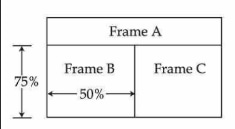
Which of the following is the correct code to create a framed webpage as shown in the figure below?
- A.
<FRAMESET ROWS="25%, 75%">
<FRAME SRC="A.html">
<FRAMESET COLS="50%, 50%">
<FRAME SRC="B.html">
<FRAME SRC="C.html">
</FRAMESET>
</FRAMESET>
- B.
<FRAMESET COLS="25%, 75%">
<FRAME SRC="A.html">
<FRAMESET ROWS="50%, 50%">
<FRAME SRC="B.html">
<FRAME SRC="C.html">
</FRAMESET>
</FRAMESET>
- C.
<FRAME ROWS="25%, 75%">
<FRAMESET SRC="A.html">
<FRAME COLS="50%, *">
<FRAMESET SRC="B.html">
<FRAMESET SRC="C.html">
</FRAME>
</FRAME>
- D.
<FRAME COLS="25%, 75%">
<FRAMESET SRC="A.html">
<FRAME ROWS="50%, *">
<FRAMESET SRC="B.html">
<FRAMESET SRC="C.html">
</FRAME>
</FRAME>
Attempted by 132 students.
Show answer & explanation
Correct answer: A
The layout requires: A top frame (Frame A) occupying 25% height. The remaining 75% area divided into two vertical frames (Frame B and Frame C) of 50% width each. This structure is correctly achieved using an outer ROWS="25%,75%" frameset and a nested COLS="50%,50%" frameset, which is exactly done in option (a).
A video solution is available for this question — log in and enroll to watch it.