Following are the two tables in a MySQL database. (Table Data Provided) Select…
2023
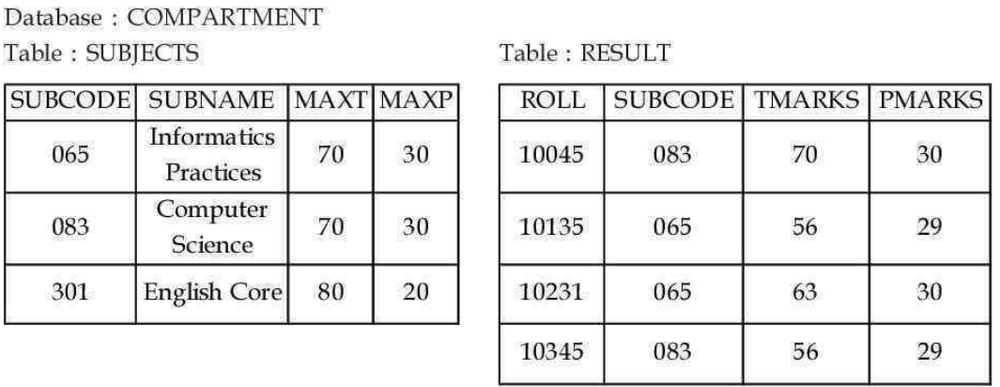
Following are the two tables in a MySQL database. (Table Data Provided) Select the command from the following options to display subjects (SUBNAME) and number of students registered in that subject in table RESULT. MySQL
Answer: D. SELECT SUBNAME, COUNT (*) FROM SUBJECTS NATURAL JOIN RESULT GROUP BY SUBNAME; — Correct SQL query: SELECT SUBNAME, COUNT(*) FROM SUBJECTS NATURAL JOIN RESULT GROUP BY SUBNAME;✅ Correct Option: D Explanation: NATURAL JOIN joins tables…
- A.
SELECT SUBNAME, COUNT() FROM SUBJECTS, RESULT GROUP BY SUBNAME;
- B.
SELECT SUBNAME, COUNT () FROM SUBJECTS, RESULT ORDER BY SUBNAME;
- C.
SELECT SUBNAME, COUNT () FROM SUBJECTS NATURAL JOIN RESULT ORDER BY SUBNAME;
- D.
SELECT SUBNAME, COUNT (*) FROM SUBJECTS NATURAL JOIN RESULT GROUP BY SUBNAME;
Attempted by 1288 students.
Show answer & explanation
Correct answer: D
Correct SQL query:
SELECT SUBNAME, COUNT(*)
FROM SUBJECTS NATURAL JOIN RESULT
GROUP BY SUBNAME;
✅ Correct Option: D
Explanation:
NATURAL JOINjoins tables using the common columnSUBCODE.COUNT(*)counts the number of students registered in each subject.GROUP BY SUBNAMEgroups the records subject-wise.
From the given data:
Informatics Practices → 2 students
Computer Science → 2 students
Note:
COUNT()without any argument is invalid in SQL.
A video solution is available for this question — log in and enroll to watch it.